
GoDaddy Elevates Security: Introducing App-Based Two-Factor Authentication with Google Authenticator
In an increasingly digital world, robust online security is no longer a luxury but a fundamental necessity. Every day, individuals and businesses face myriad threats, from sophisticated phishing scams to relentless brute-force attacks, all aiming to compromise valuable online accounts. Recognizing this critical need, GoDaddy, one of the world’s largest domain registrars and web hosting providers, has significantly bolstered its account security features. They’ve introduced advanced two-factor authentication (2FA) options, making it easier and more secure for users worldwide to protect their digital assets.
Effective immediately, GoDaddy customers can now leverage the power of app-based authenticators, such as Google Authenticator, to secure their accounts. This enhancement marks a crucial pivot from relying solely on SMS text messages for secondary verification, offering a more robust, reliable, and globally accessible security layer. This update not only strengthens user protection but also provides greater flexibility in how and when this essential security measure is applied, giving users more control over their account safety.
Understanding Two-Factor Authentication (2FA): Your Digital Shield
At its core, Two-Factor Authentication (2FA) adds an extra layer of security beyond just your password. It requires two distinct forms of identification before granting access to an account. Think of it like needing two keys to open a safe, rather than just one. These two factors typically fall into different categories:
- Something you know: This is usually your password or a PIN.
- Something you have: This is a physical item like your smartphone, a hardware token, or a specific app on your device that generates codes.
- Something you are: This refers to biometrics, such as a fingerprint, facial scan, or retina scan.
By requiring something from two of these categories, 2FA dramatically reduces the risk of unauthorized access. Even if a cybercriminal manages to steal your password (the “something you know”), they would still need the second factor (the “something you have”) to breach your account, making their efforts significantly harder and often futile.
Why 2FA is Non-Negotiable in Today’s Digital Landscape
The importance of 2FA cannot be overstated. Passwords, even strong ones, can be compromised through various methods:
- Phishing Attacks: Deceptive emails or websites trick you into revealing your login credentials.
- Data Breaches: Millions of passwords are leaked from various services annually, often appearing on the dark web.
- Credential Stuffing: Attackers use leaked username/password combinations from one site to try and log into others.
- Brute-Force Attacks: Automated systems attempt countless password combinations until one works.
2FA acts as a powerful barrier against these threats. For a GoDaddy account, which often holds control over critical assets like domain names, website hosting, and email services, compromising it could lead to catastrophic consequences – from website defacement and data loss to domain hijacking and identity theft. Implementing 2FA is a proactive and essential step in safeguarding your online presence and business continuity.
The Evolution of 2FA: From SMS to Advanced App-Based Security
For many years, SMS-based 2FA was the most common form of two-factor authentication. While it offered a significant improvement over password-only security, it came with notable limitations. GoDaddy’s latest update addresses these shortcomings by introducing superior app-based authentication.
The Challenges of SMS-Based 2FA
SMS text messages deliver a one-time passcode (OTP) to your registered mobile number. This method, while convenient, has several inherent vulnerabilities and practical drawbacks:
- SIM-Swapping Attacks: Malicious actors can trick mobile carriers into porting your phone number to a SIM card they control, allowing them to intercept your SMS 2FA codes.
- International Roaming Issues: Users traveling abroad often experience delays, unreliable delivery, or incur high roaming charges for receiving SMS codes.
- Network Reliability: SMS delivery can be subject to network congestion, signal strength issues, or carrier outages, leading to frustrating login experiences.
- Privacy Concerns: Your phone number is linked to your identity, and SMS messages are not always end-to-end encrypted, potentially exposing codes to interception.
These issues highlighted the need for a more secure and universally reliable 2FA solution, especially for a global platform like GoDaddy that serves millions of customers across diverse geographical regions.
Embracing App-Based Authenticator Solutions
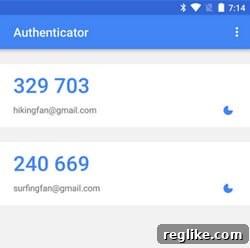
The new app-based 2FA option addresses the vulnerabilities of SMS-based verification head-on. Applications like Google Authenticator, Authy, or Microsoft Authenticator generate time-based one-time passwords (TOTP) directly on your smartphone. Here’s how they work and why they’re superior:
- Time-Based Codes: These apps generate new, unique codes every 30-60 seconds. Each code is valid for a very short period, making it difficult for attackers to intercept and reuse.
- Offline Functionality: Authenticator apps do not require an internet connection or cellular service to generate codes once they are set up. This is a massive advantage for international travelers or users in areas with poor network coverage.
- Immunity to SIM-Swapping: Since the codes are generated directly on your device and not sent over the mobile network, they are unaffected by SIM-swapping attacks.
- Enhanced Security: The cryptographic algorithms used by these apps provide a higher level of security compared to SMS, which can be vulnerable at various points in the delivery chain.
By integrating support for these robust authenticator apps, GoDaddy offers its users a significantly stronger defense against sophisticated cyber threats, ensuring greater peace of mind for their digital assets.
GoDaddy’s Commitment to Enhanced Security: A Game-Changer for Users
GoDaddy’s decision to enhance its two-factor authentication capabilities is a testament to its commitment to user security and an understanding of the evolving threat landscape. The new options not only introduce app-based authentication but also provide greater flexibility in how users choose to implement 2FA, tailoring security to their specific needs and risk profiles.
Key Benefits of GoDaddy’s New 2FA Options:
- Global Accessibility and Reliability: For GoDaddy’s vast international customer base, the transition from SMS-centric 2FA to app-based alternatives is a monumental improvement. It eliminates the frustrations of delayed, lost, or costly SMS codes, ensuring a smooth and consistent login experience regardless of geographical location or network conditions.
- Superior Protection Against Modern Threats: By offering app-based authenticators, GoDaddy equips its users with a powerful defense against prevalent attacks like SIM-swapping. This critical upgrade safeguards against account takeovers, which can have devastating consequences for website owners and businesses.
- Unprecedented User Choice and Flexibility: GoDaddy now empowers users to decide when their second factor of authentication is required. Customers can choose from two distinct settings:
- Require 2FA Every Login: This option provides the highest level of security, demanding a secondary code each time you log into your GoDaddy account. It’s ideal for users with highly sensitive information or those who prioritize maximum security above all else.
- Require 2FA for High-Risk Transactions Only: For users who prefer a balance between security and convenience, this option requires 2FA only when performing critical actions. These “high-risk transactions” typically include password changes, domain transfers, updates to billing information, or other actions that could significantly impact your account or assets. This intelligent approach ensures that crucial operations are protected without adding friction to routine logins.
- Streamlined Experience: Once set up, using an authenticator app is often quicker and more seamless than waiting for an SMS message to arrive. The codes are instantly available, allowing for faster and more efficient logins.
This strategic enhancement positions GoDaddy at the forefront of online security, providing its users with the tools necessary to defend against an ever-evolving array of cyber threats while maintaining an optimal user experience.
Setting Up Your Enhanced GoDaddy 2FA: A Step-by-Step Guide
Enabling two-factor authentication on your GoDaddy account is a straightforward process that takes only a few minutes but provides a lifetime of enhanced security. While the exact steps might vary slightly with UI updates, the general procedure remains consistent:
- Log In to Your GoDaddy Account: Access your account using your standard username and password.
- Navigate to Account Settings: Look for a section like “Account Settings,” “Security Settings,” or “Login & PIN.” This is usually found by clicking on your profile name or icon in the top right corner.
- Find Two-Step Verification/2FA: Within the security settings, locate the option for “Two-Step Verification” or “Two-Factor Authentication.”
- Choose “Authenticator App”: You will likely see options for SMS and Authenticator App. Select the “Authenticator App” option.
- Download and Configure Your App: If you haven’t already, download an authenticator app like Google Authenticator (available on iOS and Android) to your smartphone.
- Scan the QR Code: GoDaddy will display a QR code on your screen. Open your authenticator app and choose to add a new account, then use your phone’s camera to scan the QR code. This links your GoDaddy account to the app.
- Enter the Verification Code: The authenticator app will immediately generate a 6-digit code. Enter this code into the GoDaddy prompt to confirm the setup.
- Select Your 2FA Preference: Choose whether you want 2FA required for “Every Login” or “High-Risk Transactions Only,” based on your security preferences.
- Save Backup Codes (Crucial!): GoDaddy will likely provide a set of one-time backup codes. It is imperative that you save these codes in a secure, offline location. These codes are your lifeline if you lose your phone or cannot access your authenticator app. Without them, recovering your account can be a lengthy and difficult process.
For the most precise and up-to-date instructions, always refer to GoDaddy’s official help documentation. I cannot emphasize enough the importance of enabling this feature; it is the single most effective step you can take to protect your GoDaddy account.
Detailed instructions for adding 2FA can be found directly on the GoDaddy website: Enable Two-Step Verification on GoDaddy. Take action today to fortify your digital defenses.
Beyond 2FA: Holistic Security Practices for Your GoDaddy Account
While two-factor authentication is a powerful security enhancement, it’s part of a broader security strategy. To ensure the utmost protection for your GoDaddy account and the valuable digital assets it controls, consider implementing these additional best practices:
- Strong, Unique Passwords: Create complex passwords that are long, random, and combine uppercase and lowercase letters, numbers, and symbols. Critically, never reuse passwords across different services. A password manager can help you generate and securely store unique passwords for all your accounts.
- Regular Password Updates: Although 2FA mitigates the risk of compromised passwords, periodically changing your GoDaddy password adds an extra layer of caution.
- Beware of Phishing: Always be skeptical of emails or messages asking for your GoDaddy login credentials. GoDaddy will never ask for your password via email. Always verify the sender and the URL before clicking any links or entering your information. Type the GoDaddy URL directly into your browser.
- Keep Contact Information Updated: Ensure your email address and phone number associated with your GoDaddy account are current. This is crucial for account recovery and receiving important security notifications.
- Monitor Account Activity: Regularly review your GoDaddy account for any unfamiliar activity, such as unauthorized domain transfers, changes to billing information, or unusual login attempts.
- Secure Your Devices: Ensure the devices you use to access your GoDaddy account (computer, smartphone) are protected with strong passwords/PINs, up-to-date antivirus software, and the latest operating system updates.
- Use Secure Wi-Fi: Avoid accessing your GoDaddy account over public or unsecured Wi-Fi networks, which can be vulnerable to eavesdropping. Always use a Virtual Private Network (VPN) when on untrusted networks.
By adopting a multi-faceted approach to security, including the robust 2FA options now provided by GoDaddy, you create a formidable defense against the majority of cyber threats.
The Broader Impact: Why GoDaddy’s Move Matters for Digital Trust
GoDaddy’s enhancement of its 2FA offerings sends a strong signal to its millions of users: their security is a top priority. In an era where data breaches and cyberattacks are commonplace, the responsibility of online platforms to provide robust security tools is paramount. By embracing app-based authentication and offering flexible implementation options, GoDaddy demonstrates leadership in fostering a more secure online ecosystem.
This move not only protects individual users but also reinforces trust in the GoDaddy platform. When users feel confident that their domains, websites, and data are well-protected, they are more likely to continue investing in and relying on GoDaddy’s services. It sets a positive example for other online service providers to follow, pushing the entire industry towards higher security standards for the benefit of all internet users.
Conclusion: Take Control of Your GoDaddy Security Today
The digital landscape is constantly evolving, and so too must our approach to online security. GoDaddy’s significant upgrade to its two-factor authentication system, integrating app-based solutions like Google Authenticator and offering flexible usage options, represents a critical step forward in protecting your valuable digital assets. This enhancement directly addresses the limitations of older 2FA methods, providing a more secure, reliable, and convenient way to safeguard your accounts.
Protecting your GoDaddy account, which often serves as the central hub for your online identity and business, is paramount. Enabling these new 2FA features is one of the most impactful actions you can take to prevent unauthorized access, mitigate risks from phishing and credential theft, and maintain the integrity of your websites and domains. Don’t wait for a security incident to realize the importance of robust protection. Take advantage of these powerful new tools now and fortify your GoDaddy account against the threats of tomorrow. Your digital peace of mind starts with stronger security, and GoDaddy has just made it easier than ever to achieve.