
Supercharge Your Email List Growth with Facebook Lead Ads: A Comprehensive Guide
In the dynamic world of digital marketing, building a robust email list remains a cornerstone for sustained business growth. Email marketing offers a direct, personal channel to engage with your audience, nurture leads, and drive conversions. However, the challenge often lies in efficiently and affordably expanding that list. Enter Facebook Lead Ads – a powerful, often underutilized tool that can revolutionize your lead generation strategy.
Facebook, with its unparalleled targeting capabilities, offers advertisers a rich ecosystem to connect with potential customers. Among its diverse ad formats, Lead Ads stand out for their ability to streamline the lead capture process. Unlike traditional ads that redirect users to an external landing page, Facebook Lead Ads allow users to submit their information directly within the Facebook platform or app. This seamless, in-app experience significantly reduces friction, as forms are often pre-populated with user data (such as name and email address) from their Facebook profile.
The result? Dramatically higher conversion rates and a substantial reduction in your cost-per-lead (CPL) compared to methods requiring users to navigate away from Facebook. In many cases, businesses report conversion rates increasing by as much as 10x, making Facebook Lead Ads an exceptionally efficient mechanism for growing your email subscriber base. This comprehensive guide will walk you through the process of leveraging Facebook Lead Ads to expand your email list effectively, from initial setup to advanced optimization techniques.
Why Facebook Lead Ads Are a Game-Changer for Email List Building
Before diving into the how-to, let’s explore the core advantages that make Facebook Lead Ads an indispensable tool for marketers focused on email list growth:
- Seamless User Experience: The primary benefit is that users never leave Facebook. This eliminates external page load times, potential distractions, and the common drop-off associated with navigating to a new site. The entire process, from seeing the ad to submitting information, is contained within the Facebook environment, leading to a smoother, faster experience.
- Pre-filled Forms for Higher Conversions: Facebook automatically populates fields like name and email address based on the user’s profile information. This dramatically reduces the effort required from the user, making it incredibly easy for them to convert. Less typing means less friction, which translates directly into higher conversion rates and more leads for your email list.
- Exceptional Targeting Capabilities: Facebook’s vast dataset allows for incredibly precise audience targeting. You can reach specific demographics, interests, behaviors, custom audiences (like website visitors or existing customer lists), and even Lookalike Audiences. This ensures that your lead ads are shown to people most likely to be interested in your content and subscribe to your email list, improving lead quality and reducing wasted ad spend.
- Cost-Effectiveness: While advertising costs vary, the efficiency gained from higher conversion rates often results in a significantly lower cost-per-lead. By capturing more leads for the same ad spend, Facebook Lead Ads can offer an impressive return on investment for your email list growth initiatives.
- Mobile-First Design: With the majority of Facebook usage occurring on mobile devices, Lead Ads are inherently designed for a mobile-friendly experience. This ensures that your lead capture forms are easily accessible and functional for users on the go.
Your Step-by-Step Guide to Growing Your Email List with Facebook Lead Ads
Ready to start building your email list? Here’s a detailed breakdown of how to set up and run your first successful Facebook Lead Ad campaign.
1. Create Your Ad Campaign with the Right Objective
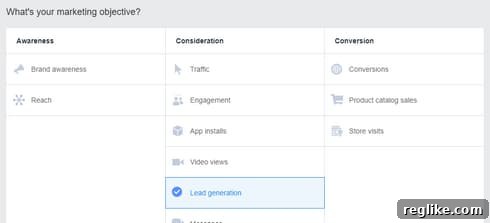
The very first and most crucial step in setting up any Facebook ad campaign is selecting the correct objective. For lead generation, specifically for growing your email list, you must choose the “Lead Generation” objective.
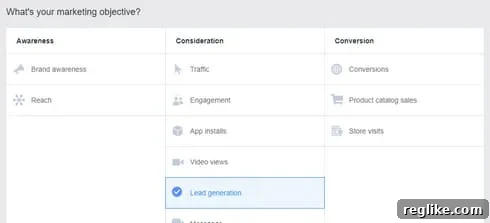
Navigating to Facebook Ads Manager, you’ll click “Create” to start a new campaign. Under the “Choose a Campaign Objective” section, select “Lead Generation.” This choice signals to Facebook’s algorithm that your goal is to acquire leads, and it will optimize your campaign delivery accordingly to find users most likely to fill out your lead form. Other objectives, while valuable for different goals, will not yield the same efficiency for email list growth.
2. Define and Refine Your Target Audience
Effective targeting is the backbone of any successful Facebook ad campaign, especially for lead generation. The more precisely you can define who you want to reach, the higher the quality of your leads and the lower your CPL will be.
Consider these powerful targeting options:
- Facebook Page Fans: If you already have an established Facebook page, a great starting point is to target people who like or follow your page but haven’t yet subscribed to your email list. These individuals already have some familiarity with your brand, making them warmer leads. You can create a custom audience of your page fans and then exclude existing email subscribers (if you have that data) to ensure you’re only reaching new potential subscribers.
- Custom Audiences:
- Website Visitors: Target people who have visited your website but haven’t converted into email subscribers.
- Customer Lists: Upload existing customer lists (e.g., lapsed customers or specific segments) to re-engage them with a new offer for your email list.
- Engagement Audiences: Target people who have engaged with your content (videos, Instagram profile, events) on Facebook or Instagram.
- Lookalike Audiences: Once you have a source audience (e.g., your current email subscribers, high-value customers, or even your Facebook page fans), you can create a Lookalike Audience. Facebook will then find new users who share similar characteristics with your source audience, allowing you to scale your reach to highly relevant potential subscribers.
- Detailed Targeting: Dive into demographics (age, gender, location), interests (hobbies, brands they follow, content they consume), and behaviors (purchase behavior, digital activities). For instance, if your email list focuses on sustainable living, you might target individuals interested in “eco-friendly products,” “zero waste,” or “renewable energy.”
- Geographic Targeting: If your email list is tied to a local business or specific region, ensure you set precise geographic boundaries.
Remember to continually test and refine your audiences. Start broad and narrow down, or vice versa, to find the most responsive segments. Always consider excluding your current email subscribers to avoid wasting ad spend and ensure you’re acquiring new leads.
3. Craft Compelling Ad Creatives and Your Lead Form
This is where your offer meets your audience. A well-designed ad creative and an optimized lead form are critical for converting interested users into subscribers.
Ad Creative (Image/Video & Copy)
- Visuals: Use eye-catching, high-quality images or videos that instantly convey the value of your email list. Whether it’s a vibrant graphic or a short, engaging video, make sure it stops the scroll.
- Ad Copy: Your ad copy should clearly articulate the benefit of subscribing to your email list. What unique value will subscribers receive? Is it exclusive content, discounts, early access, expert tips, or educational resources? Be concise, compelling, and create a sense of urgency or exclusivity.
- Call-to-Action (CTA): Select an appropriate CTA button for your ad, such as “Subscribe,” “Sign Up,” “Download,” or “Get Quote.” “Subscribe” or “Sign Up” are usually best for email list growth.
The Lead Form: The Heart of Your Conversion
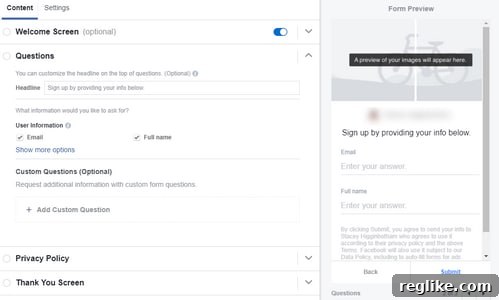
The lead form is what users will interact with to provide their information. Facebook gives you options to customize this, starting with an optional Welcome Screen.
- Welcome Screen (Optional but Recommended): This screen appears before the actual form. It’s an excellent opportunity to reiterate the benefits of joining your email list, set clear expectations about the content they’ll receive, and build trust. For example, you might explain, “Get weekly insights on digital marketing trends delivered straight to your inbox!” If your audience is already very familiar with your brand and the value of your email list, you might choose to skip this screen for a faster user journey. However, for colder audiences, it adds crucial context.
- Information Fields: This is the core of your lead form. Facebook allows you to select which pieces of information you want to collect.

A golden rule for lead forms is: the fewer the fields, the higher the conversion rate. Facebook pre-populates name and email address, making these the easiest to collect. If your primary goal is email list growth, simply asking for “Full Name” and “Email Address” is often sufficient. If you require more qualifying information (e.g., phone number, job title, company name for B2B lists), add them judiciously, understanding that each additional field may slightly decrease your conversion rate. You can also add custom questions to further qualify leads if needed. Remember to include a link to your privacy policy to ensure compliance.
- Thank You Screen: After a user submits the form, they will see a Thank You screen. Use this space to confirm their subscription, thank them, and provide clear next steps. You can include a link to your website, a relevant blog post, or a special offer. This is an important step in continuing the user journey and reinforcing engagement.
Once your ad creative and lead form are finalized, you’re ready to set your campaign live and start attracting new subscribers.
4. Get Your Leads and Automate the Process
Your ad is now running, and potential subscribers are filling out your lead form. Now, the critical step is to retrieve these leads and integrate them into your email marketing system.
It’s important to note that while Facebook pre-fills email addresses, users rarely use their company email addresses on Facebook. Expect most of the email addresses you acquire to be personal ones (e.g., Gmail, Yahoo, Hotmail). This is generally fine for consumer-focused businesses, but B2B marketers should be aware of this distinction.
There are two primary methods for accessing your leads:
- Manual Download: You can manually download your leads as a CSV or Excel file directly from Facebook Ads Manager. This involves going to your Facebook page, selecting “Publishing Tools,” and then navigating to “Lead Ads Forms.” While straightforward, this method is time-consuming, especially with a high volume of leads. More critically, it delays your ability to send a welcome email, which is a crucial first step in nurturing new subscribers. Manual downloads can lead to “cold” leads by the time you upload them to your email marketing service.
- Automated Integration (Highly Recommended): For efficiency and maximum impact, automating the transfer of leads to your email marketing service is the superior approach. This ensures that new subscribers receive a welcome email almost immediately, capitalizing on their initial interest and engagement.
Tools like Zapier are designed precisely for this kind of automation. Zapier connects various web applications, allowing you to create automated workflows called “Zaps.” In this context, a Zap can be set up to:
- Trigger: When a new lead is captured by your Facebook Lead Ad.
- Action: Add that lead’s information (name, email) to your chosen email marketing service (e.g., Mailchimp, Constant Contact, ActiveCampaign, HubSpot, ConvertKit).
Here’s a specific Zapier template for connecting Facebook Lead Ads to Mailchimp.
Zapier offers a 14-day free trial, which is an excellent opportunity to test the effectiveness of Facebook Lead Ads for your business. Within just a few days, you’ll gain valuable insights into your cost-per-lead, conversion rates, and the overall quality of subscribers, allowing you to make informed decisions about scaling your campaigns. After the trial, paid plans start at an affordable monthly rate, which is a small investment for the time saved and the improved lead nurturing capabilities.
Optimizing Your Facebook Lead Ad Campaigns for Maximum Impact
Setting up your campaign is just the beginning. Continuous optimization is key to achieving the best results for your email list growth.
- A/B Test Everything: Experiment with different ad creatives (images, videos, headlines, ad copy), target audiences, and even elements of your lead form (e.g., welcome screen content, number of fields). Small changes can lead to significant improvements in conversion rates and CPL.
- Monitor Key Metrics: Regularly check your cost-per-lead (CPL), conversion rate, and lead quality. If your CPL is too high or lead quality is low, it’s a sign to adjust your targeting or ad creative.
- Budgeting and Bidding: Experiment with different bidding strategies (e.g., lowest cost vs. cost cap) to find what works best for your goals and budget. Start with a smaller budget and scale up as you find winning combinations.
- Ad Frequency: Keep an eye on your ad frequency (how many times a user sees your ad). High frequency can lead to ad fatigue, increasing costs and decreasing engagement. Consider rotating creatives or expanding your audience to avoid this.
- Focus on Lead Quality: While a low CPL is attractive, prioritize the quality of your leads. A smaller list of highly engaged subscribers is more valuable than a large list of disengaged ones. If necessary, add one or two qualifying questions to your lead form to ensure you’re attracting the right audience.
Beyond Email Lists: The Versatility of Facebook Lead Ads
While this guide focuses on email list growth, it’s worth noting that Facebook Lead Ads are incredibly versatile. They can be effectively used for a wide range of lead generation purposes, including:
- Product Demos or Free Trials: Collect sign-ups for software demos or trial periods.
- Consultation Bookings: Generate leads for service-based businesses offering free consultations.
- Event Registrations: Gather attendees for webinars, workshops, or in-person events.
- Content Downloads: Offer gated content like eBooks, whitepapers, or guides in exchange for contact information.
- Quote Requests: For businesses requiring specific information to provide a quote.
No matter your lead generation objective, the fundamental principle of reducing friction and capturing information directly on the platform makes Facebook Lead Ads an exceptionally powerful tool in any digital marketer’s arsenal.
Conclusion
Facebook Lead Ads present an unparalleled opportunity for businesses to efficiently and affordably expand their email lists. By offering a seamless, on-platform experience with pre-filled forms, they dramatically increase conversion rates and reduce the cost of acquiring new subscribers. From precise audience targeting to automated lead management with tools like Zapier, the entire process is designed for maximum effectiveness.
By following this comprehensive guide, you can leverage the power of Facebook Lead Ads to build a robust, engaged email list that serves as a vital asset for your ongoing marketing and business development efforts. Start experimenting today, continually optimize your campaigns, and watch your subscriber base flourish with high-quality leads.