
Maximizing Your Domain Parking Profits: Two Essential Tips for Sedo Success
by Peter Askew
Embarking on the journey of domain investing can feel like navigating a complex maze. For many, myself included, the initial focus is almost exclusively on domain development. There’s a prevailing belief that building out a website is the *only* true path to unlocking a domain’s full potential and generating significant value. However, as my involvement in the captivating world of domaining deepened, a crucial realization began to emerge: domain parking, far from being a mere placeholder, holds significant strategic importance. It’s not just about earning a few extra pennies; it’s a legitimate avenue for contributing a substantial monetary lift to a domain business, both through consistent parked revenue and by enhancing a domain’s resale appeal.
In my exploration, Sedo quickly distinguished itself as the preferred marketplace for managing my parked domains. Yet, like many newcomers, I initially found myself somewhat adrift in its user interface. The process of uploading new domains and attempting to optimize them felt akin to shooting in the dark. I’d test various approaches, often failing to properly target keywords or refine the page design. These tasks, while not inherently difficult, required a level of guidance that, in my early experience, Sedo’s platform didn’t overtly provide. It was this initial frustration that spurred me to delve deeper, seeking out the nuances and hidden functionalities that could transform a stagnant parked page into a revenue-generating asset.
The breakthrough came when I finally identified the precise methods for implementing these crucial changes. The impact was immediate and profound: my click-through rate (CTR) more than tripled. This significant improvement didn’t just boost my earnings; it fundamentally reshaped my perspective, cementing domain parking as a genuinely viable and profitable option, a powerful complement to, and sometimes even a superior alternative to, immediate development. This newfound insight was too valuable to keep to myself. Recognizing the benefit it could offer to fellow domain investors, I’m delighted to share these practical, actionable tips.
Unlock Higher Earnings: Two Simple Steps to Optimize Your Sedo Parking
1. Precision Keyword Targeting: The Engine of Relevance
One of the most common pitfalls in domain parking, especially for those new to the Sedo platform, stems from a misunderstanding of keyword targeting. When new domain names are submitted for parking, Sedo’s system typically attempts to identify relevant advertisements based on the key terms found within the domain name itself. For example, a domain like PetersSultryMassageParlor.com would likely trigger advertisements related to ‘massage parlor’ topics – a straightforward match.
However, this automated approach often falls short for domains that are less explicit. If your domain name is an acronym, a brand name, a portmanteau, contains intentional misspellings, or simply doesn’t clearly articulate the domain’s actual purpose or the nature of the traffic it attracts, Sedo’s default targeting can go awry. Imagine a domain like “XYZWidgets.com” that actually receives traffic from users looking for advanced industrial machinery, or an acronym “LBLVacations.com” meant for a specific geographic travel destination. In such cases, the automated system might target broad, irrelevant ads that have little to no appeal to your specific audience. The consequence, as you might predict, is a significantly lower click-through rate, directly translating into diminished revenue for your domain portfolio.
Fortunately, rectifying this issue is surprisingly straightforward and incredibly impactful. Here’s how to take control of your ad targeting:
First, log in to your Sedo account. Once inside, navigate to the left-hand menu. Under the ‘Domain Parking’ section, you’ll find and click on ‘Optimizer’. This powerful tool is your gateway to fine-tuning your parked pages. Within the Optimizer interface, locate the specific domain name you wish to adjust. On the same row as your domain, you’ll see a column labeled ‘Master Keyword’. This is where you can manually input the most relevant and targeted keyword(s) for your domain. Think about the specific search terms users would employ to find content related to your domain. Use descriptive terms, synonyms, and even long-tail keywords if appropriate. This manual override ensures that the advertisements displayed are precisely aligned with your domain’s content and audience intent, drastically increasing the likelihood of user engagement and, consequently, your earnings.
The beauty of this feature lies in its ability to transform a poorly performing parked page into a highly optimized, revenue-generating asset. By guiding Sedo’s ad-serving algorithm with accurate keywords, you’re not just hoping for the best; you’re actively directing relevant traffic to advertisers, a win-win scenario that pays dividends directly into your pocket. Remember, continuous monitoring and occasional adjustment of these keywords based on performance data can further enhance your results.
2. Crafting an Engaging Page Design: Beyond the Default
My initial forays into domain parking led to another common misconception: the belief that the default Sedo page design was immutable. I assumed that the template presented upon parking was a fixed layout, unchangeable and uncustomizable. This notion, born from a lack of clear initial guidance, was another hurdle that once overcome, yielded substantial improvements in user interaction and CTR.
Just like keyword targeting, customizing your parked page’s design is an equally easy and effective optimization. The same ‘Optimizer’ section you used for keyword targeting also houses the tools for design customization. Locate your domain name within the Optimizer list. On that same row, you’ll find a drop-down box under a column related to design templates. Clicking this box will reveal a selection of various page design templates offered by Sedo. Each template offers a different aesthetic and layout, allowing you to choose one that best complements your domain’s potential theme or simply appeals more visually.
For me, the ‘Retro Green’ template quickly became a personal favorite due to its clean lines and appealing aesthetic. It demonstrates that sometimes, simplicity and a touch of color can make all the difference in user experience. To preview how any chosen template might appear to visitors, simply make your selection from the drop-down menu and then click on the magnifying glass icon typically located nearby. This allows for a real-time visualization of the changes before you commit.
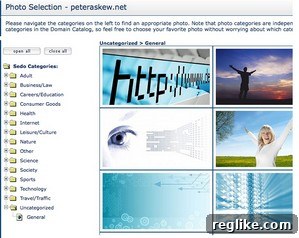
An even greater customization option available within many of these templates is the ability to incorporate a self-selected image directly onto your parked page. Visual elements can significantly enhance a page’s appeal and professionalism, instantly communicating more about your domain than text alone. To utilize this feature, look for a person icon (or similar image icon) under the ‘Photo’ column on the same row as your domain. Clicking this icon will allow you to browse through various category files or even upload your own image. Choosing a relevant, high-quality image can make your parked page stand out, capture visitor attention, and reinforce the domain’s theme, further encouraging engagement.
Selecting an appropriate image is key. Consider one that is visually appealing, relevant to your domain’s topic, and professional. Avoid cluttered or low-resolution images, as they can detract from the user experience. A well-chosen image can subtly influence visitor perception, suggesting that the domain is actively managed and potentially more valuable.
Finalizing Your Optimization: Saving and Seeing Results
Once you have meticulously entered your preferred keywords, selected an engaging design template, and chosen an impactful image for your parked page, the final crucial step is to ensure all your changes are saved. Return to the main Optimizer page, and typically at the bottom or top, you’ll find a ‘Save All Settings’ or ‘Apply Changes’ button. Clicking this will commit your optimizations. Sedo’s system is generally quite efficient; these updates should propagate and become visible on your parked page within a few minutes, though sometimes it can take a bit longer.
The combined effect of these seemingly small adjustments – precise keyword targeting and an optimized page design – can be truly transformative. As I personally experienced, these changes can lead to a substantial increase in your click-through rate. A higher CTR doesn’t just mean more clicks; it directly translates into more consistent and higher earnings from your parked domains. This amplified revenue stream, generated with minimal ongoing effort, is incredibly valuable. It provides the financial leverage to reinvest, pursue new domain acquisitions, and expand your portfolio, fueling the very addiction of domaining that started this journey. These simple, yet powerful, optimization strategies underscore the potential for maximizing returns even from domains that are awaiting development or listed for sale, proving that smart parking is a cornerstone of a successful domain investment strategy.
Peter Askew, a frequent contributor to DNW, is an esteemed Ole Miss alum and a respected figure in the domain name industry. With a particular passion for geo domain names, Peter continuously explores innovative projects, currently dedicating his efforts to Land Between The Lakes.