
Maximize Your Domain Sales: A Comprehensive Guide to Sales-Only Landers on DNS
For many domain investors, the ultimate goal isn’t just to generate a modest recurring income from domain parking but to realize significant capital gains through outright sales. While pay-per-click (PPC) monetization has its place, a dedicated sales strategy often yields far superior results for premium assets. This in-depth guide will walk you through the process of setting up “sales-only” landing pages for your domain names on DomainNameSales.com (DNS), a powerful platform designed to streamline your domain selling efforts. By focusing solely on sales, you can present your domains as valuable, acquisition-ready assets, attracting serious buyers and mitigating potential risks associated with traditional parking.
Why Opt for Sales-Only Domain Landers?
The decision to switch from PPC-driven parking pages to sales-focused landing pages is a strategic one, offering several compelling advantages for domain investors:
1. Enhanced Sales Focus and Lead Generation
A sales-only lander sends an unambiguous message: this domain is for sale. Unlike PPC pages, which often present a confusing array of advertisements alongside a subtle “for sale” link, a dedicated sales page immediately communicates intent. This clarity helps to attract more serious buyers who are ready to make an offer. By removing distractions, potential buyers can focus solely on the domain’s value, making it easier for them to initiate contact or submit a bid through clear calls to action.
2. Professional Presentation as a Premium Asset
Presenting a domain on a sales-only lander elevates its perceived value. It suggests that the domain is a premium asset worthy of direct acquisition, rather than merely a parked website generating ad revenue. A well-designed sales page, often provided by platforms like DNS, lends an air of professionalism and seriousness, which can be crucial in securing a higher sale price. Buyers are more likely to invest in domains that are presented as high-value, ready-to-use digital properties.
3. Mitigating Trademark Infringement Risks
One of the most significant reasons to avoid PPC parking for certain domains is the potential for inadvertent trademark infringement. Generic pay-per-click ads displayed on a parked domain can sometimes, by unfortunate coincidence, feature trademarks of third-party companies. This can lead to allegations of cybersquatting and Uniform Domain-Name Dispute-Resolution Policy (UDRP) complaints. For instance, a four-letter acronym domain might display ads related to a well-known company that uses that same acronym. Even if the domain owner has no intent to target that specific trademark, the mere appearance of such ads can be used as evidence of bad faith. Sales-only landers eliminate this risk entirely by removing all third-party advertising, protecting domain investors from costly and time-consuming legal disputes.
4. Cleaner User Experience
For visitors landing on your domain, a sales-only page offers a much cleaner and more direct experience. There are no distracting ads, intrusive pop-ups, or irrelevant content. This streamlined approach focuses the user’s attention on the domain itself and the opportunity to acquire it, leading to a more positive interaction and increasing the likelihood of a successful inquiry.
Getting Started: Setting Up Sales-Only Landers on DomainNameSales.com (DNS)
DomainNameSales.com (DNS) is a popular platform favored by domainers for its robust features and user-friendly interface. It offers a straightforward method to configure your domains for sales-only presentation. Here’s a detailed, step-by-step guide to help you transition your domains to dedicated sales landers:
Step 1: Create a Dedicated Portfolio for Sales Domains
The first step involves organizing your domains within DNS by creating a specific portfolio for those you intend to point to sales-only landers. This helps in managing your assets effectively and applying the desired settings uniformly.
- Log in to your DomainNameSales.com account.
- Navigate to the “Domains” dropdown menu, typically located at the top of the interface.
- From the options presented, select “Portfolios/Landers.” This will take you to a page where you can manage your existing domain portfolios.
- On this page, you will see an option to “Add New Portfolio.” Click on this link.
- A dialog box will appear, prompting you to name your new portfolio. Choose a clear and memorable name that signifies its purpose, such as “SalesOnly,” “Premium Domains for Sale,” or “Acquisition Assets.” This will make it easy to identify later.
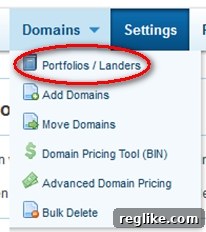
Once you’ve named your portfolio, click “OK” or “Create” to finalize its creation. You will then see your newly created portfolio listed among your others.
Step 2: Configure the New Portfolio for Sales-Only Display
With your new portfolio established, the next crucial step is to instruct DNS that all domains within this portfolio should display a sales-only landing page, rather than a standard parking page with ads.
- Locate the portfolio you just created (e.g., “SalesOnly”) within your list of portfolios.
- Within the portfolio’s options, you will typically find settings to modify its behavior. Look for an “Edit” button or click on the portfolio name itself to open its settings.
- Inside the portfolio’s settings, you should see various display options. Identify and select the “Sales only” option. This setting is specifically designed to disable PPC advertisements and activate the dedicated “For Sale” lander template for all domains assigned to this portfolio.
- After selecting “Sales only,” ensure you click “OK” or “Save Changes” to apply this setting. If you accidentally closed the dialog box after creating the portfolio, simply click the “Edit” link next to its name to reopen the settings and make this crucial change.
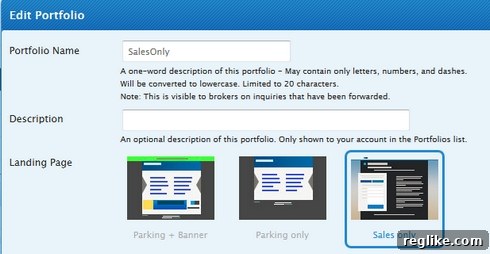
This action globally updates the display preference for all domains that will eventually be placed into this portfolio.
Step 3: Transfer or Add Domains to Your Sales-Only Portfolio
The final step is to populate your newly configured portfolio with the domain names you wish to sell. DNS provides options for both adding new domains to its management and moving existing domains from other portfolios.
A. Adding New Domains to DNS
If the domain names you wish to point to sales landers are not currently managed by DomainNameSales.com, you will need to add them:
- Within the “Portfolios/Landers” section, find your “SalesOnly” portfolio.
- Click the “Add” button associated with this portfolio.
- You will be prompted to enter the domain names. List them one per line or in a comma-separated format, depending on the interface’s requirement.
- Click “Upload” or “Add Domains” to import them.
- Remember, after adding them to DNS, you will also need to update the nameservers at your domain registrar to point to DNS’s nameservers (typically ns1.domainnamesales.com and ns2.domainnamesales.com) for the changes to take effect.
B. Moving Existing Domains Within DNS
If your domains are already at DNS but are currently in a different portfolio (e.g., a PPC-enabled parking portfolio), you can easily move them:
- Go back to the main “Domains” dropdown menu at the top of the page.
- Select the “Move Domains” option, which is usually the third option in the list.
- A new interface will appear, allowing you to select the target portfolio. From the dropdown menu provided, choose the “SalesOnly” portfolio you just set up.
- Below the portfolio selection, there will be a text area where you can input the domain names you wish to move. Enter them accurately, one per line.
- Click “Upload” or “Move Domains” to initiate the transfer.
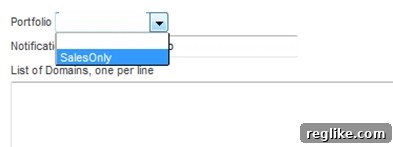
Once these steps are completed, all domains within your “SalesOnly” portfolio will now point to professional “For Sale” landers, completely free of any PPC advertisements.
Benefits of Utilizing DNS Sales Landers
Beyond the core advantages discussed earlier, DNS’s specific implementation of sales landers offers additional benefits:
- Professional Appearance: DNS provides sleek, modern sales lander templates that present your domains in the best possible light.
- Streamlined Inquiry Process: Buyers can easily submit offers or contact you directly through intuitive forms built into the landing pages.
- Brand Authority: Using a reputable platform like DNS for sales reinforces the legitimacy and quality of your domain assets.
Important Considerations and Potential Pitfalls
While sales-only landers offer significant advantages, it’s crucial for domain investors to be aware of certain nuances, particularly regarding the information displayed on these pages.
Revisiting the “Bad Faith” Argument with DNS Landers
DNS’s sales landers are designed to be informative, and they often include additional data about your domain, such as its category (e.g., “Technology,” “Travel,” “Finance”) and even search results related to the domain’s terms. While this information is generally considered harmless and useful for potential buyers, it can, in rare circumstances, be misinterpreted or leveraged in a UDRP dispute by a trademark owner. For instance:
- If you have a generic domain like “AutoParts.com” and it is categorized as “Automotive” on the DNS lander, this is typically fine. However, if the domain were “XYZWidgets.com” (where XYZ is a trademark) and it was categorized in “Technology” with search results displaying brands related to XYZ’s products, a trademark owner might argue that the categorization and search results indicate an intent to target their trademark, suggesting bad faith registration.
- The display of search results for the domain’s terms, even if automatically generated, could show links to competitors or trademarked entities. While the intention isn’t malicious, the presence of such information on a “for sale” page might be used as circumstantial evidence in a UDRP complaint.
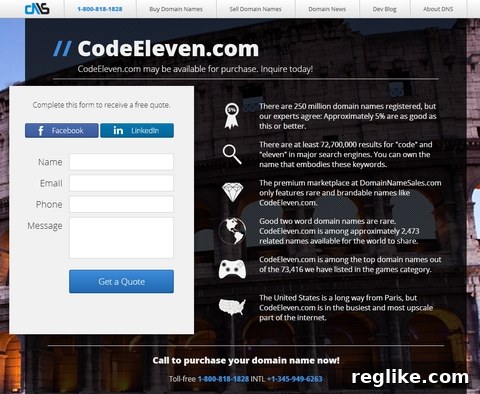
It’s important to understand that winning a UDRP argument requires proving bad faith registration and use. The mere presence of categorization or search results on a sales lander does not automatically constitute bad faith. However, sophisticated trademark owners and their legal teams may attempt to use any available information to build their case. Therefore, always exercise caution, especially with domains that bear any resemblance to existing trademarks or could be perceived as such.
For highly sensitive domains or those with potential trademark conflicts, it’s always advisable to carefully review the exact content displayed on your DNS sales landers. In some extreme cases, domainers might opt for custom-built, minimalist landing pages on their own hosting to have absolute control over every piece of information presented, though this requires more technical expertise.
Pricing Strategy and Traffic Generation
A sales-only lander is an excellent tool for presenting your domain, but it’s only one part of the sales process. You’ll also need to consider:
- Pricing: Decide whether you want to display a fixed price, accept offers, or use a combination. Research market value to set a realistic asking price.
- Traffic: A sales lander won’t sell itself. While direct navigation traffic is valuable, consider additional marketing efforts to drive potential buyers to your domain, such as listing on marketplaces, outreach, or targeted advertising.
Conclusion
Transitioning your domain names to sales-only landing pages on DomainNameSales.com is a powerful strategy for any serious domain investor focused on outright asset sales rather than incremental PPC income. By adopting this approach, you not only enhance the professional presentation of your domains and attract more qualified buyers but also significantly reduce the risk of inadvertent trademark issues. The detailed steps outlined above provide a clear pathway to configure your DNS portfolios for optimal selling potential.
While the benefits are substantial, remember to remain vigilant regarding the information displayed on these landers, particularly for contentious or trademark-sensitive domains. With careful planning and execution, sales-only landers can be a cornerstone of your domain sales strategy, empowering you to unlock the true value of your digital real estate.