
Long, complex URLs can be a significant source of confusion and distrust for the average web user. In an increasingly digital world, the address bar of a web browser serves as the primary identifier for any online destination. Yet, as websites grow in complexity and malicious actors become more sophisticated, the challenge of making these addresses both informative and secure has become paramount. This ongoing dilemma between user simplicity and granular information is at the heart of how web browsers display URLs today.
Understanding URLs: Navigating the Web with Clarity and Security
The way web browsers interact with and present Uniform Resource Locators (URLs) and domain names has undergone a dramatic transformation over the past two decades. These changes have often been driven by a dual purpose: to enhance user experience by simplifying navigation and to bolster security by making it harder for deceptive websites to trick visitors. While some modifications have brought the crucial second-level domain (SLD) into sharper focus, others have, perhaps inadvertently, downplayed the overall importance or visibility of the full domain structure. This dynamic evolution reflects the continuous struggle to balance ease of use with robust security protocols in the digital realm.
The Evolving Landscape of URL Display in Web Browsers
Historically, web browsers displayed the complete URL in the address bar at all times. This provided users with a transparent, albeit sometimes overwhelming, view of their exact location on the internet. As the web matured and the number of internet users exploded, the need for a more streamlined and intuitive experience became clear. Modern browsers began experimenting with various ways to shorten or simplify the displayed URL, often hiding elements like the “https://” protocol, the “www.” subdomain, or even path information. The primary motivations behind these changes included decluttering the user interface, saving precious screen real estate, especially on mobile devices, and attempting to make web addresses less intimidating for non-technical users.
What is a URL, and Why Does Its Display Matter?
A URL is essentially the unique address for every resource on the internet. It comprises several components: the protocol (e.g., `https://`), the subdomain (e.g., `www.`), the second-level domain (e.g., `example`), the top-level domain (e.g., `.com`), and often a path, query parameters, and fragments. Among these, the second-level domain combined with the top-level domain (e.g., `example.com`) is arguably the most critical for user recognition and trust. This combination represents the brand or entity owning the website. When browsers simplify URL display, they often emphasize this core domain, but the method and extent of simplification can have profound implications for user understanding and site security, particularly in identifying legitimate versus malicious sites.
The Shift Towards Simpler URL Presentation
The push for simpler URL presentation gained significant traction as web usage diversified. Early attempts by browsers like Google Chrome aimed to remove what was considered redundant information, such as the `https://` prefix, once secure connections became the norm, or the `www.` subdomain, which often didn’t alter the core destination. The idea was to present only the “identity” of the site, making it quicker for users to grasp where they were. However, this simplification, while beneficial for reducing clutter, also sparked debates about whether it deprived “power users” and even average users of crucial contextual information that could aid in security checks or detailed navigation. The balance between a clean interface and comprehensive information remains a central design challenge.
The Critical Role of Second-Level Domains (SLDs)
In the context of browser URL display, the second-level domain holds immense significance. It is the part of the URL that most directly corresponds to the brand or organization. For instance, in `google.com`, “google” is the second-level domain. This element is the anchor of trust and identity for users. When simplified URL displays highlight the SLD, it helps users quickly ascertain if they are on the intended website, thereby strengthening their sense of security. Conversely, when the SLD is obscured or blended into a long, complex string, it becomes easier for phishing attempts to succeed by tricking users with subtly altered or spoofed domain names.
Combatting Phishing: The Security Imperative
The fight against phishing is a major driving force behind many of the proposed changes to URL display. Phishing attacks frequently rely on confusing or obfuscating the true domain name to trick users into believing they are on a legitimate site, such as a bank or a social media platform. Attackers might use subdomains like `login.paypal.com.evil-site.com` or paths like `paypal.com/login-verify/secure-account`. By prominently displaying or focusing solely on the second-level domain, browsers can make it significantly harder for these deceptive tactics to work. Users can then more easily discern that `evil-site.com` is not `paypal.com`, regardless of what precedes it in the URL string. This direct focus on the core identity is a powerful weapon in the browser’s arsenal against online fraud.
Google Chrome Developers Weigh In: A Vision for User-Friendly URLs
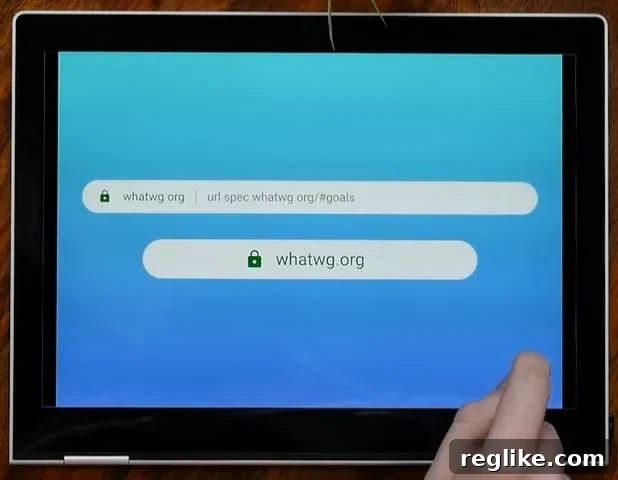
The Google Chrome Developers YouTube channel recently published a thought-provoking video addressing the very core of this discussion: how to make URLs more intuitive and safer for human interaction. A significant portion of the conversation revolved around empowering users to distinguish legitimate sites from fraudulent ones. The video underscored Google’s commitment to enhancing web security by refining how URLs are presented, recognizing that a confusing URL can be a gateway for deception. The discussion was rich with ideas, and one of the co-hosts put forth a personal proposal – not an official Google stance, but a compelling concept – on how browsers could evolve their URL display. This proposal centered heavily on emphasizing what we commonly refer to as the second-level domain, suggesting that it should be the primary visual anchor in the address bar.
The Google Chrome Developers video delved into the intricacies of current URL display challenges and potential future solutions. It highlighted the cognitive load associated with parsing long, intricate web addresses and how this can be exploited by malicious actors. By proposing a system where the crucial second-level domain is given visual priority, the idea is to reduce ambiguity and provide a clear, instant indicator of a website’s identity. This approach seeks to distill the essence of the URL down to its most critical security component, offering a quick and intuitive way for users to verify their location online. While not a definitive roadmap, this discussion sparked considerable interest in the web development community and among security advocates for its forward-thinking approach to user protection and clarity.
Balancing Simplicity for All Users with Granular Access for Power Users
A central challenge in the debate about URL display is how to cater to both the typical web user and the “power user.” The typical user might benefit immensely from a simplified URL that highlights only the most crucial security and identity information, such as the second-level domain. They may find long strings of characters intimidating and confusing. However, power users, including developers, security researchers, and even highly engaged general users, often require access to the full URL string. They use it for debugging, understanding site architecture, analyzing specific resource paths, and identifying intricate query parameters that might indicate particular site functionalities or potential vulnerabilities. Striking this balance is paramount. It’s not about choosing one over the other, but creating a system that gracefully accommodates both needs.
The Path Forward: Empowering Users with Choice and Clarity
The solution, as often suggested by the community and echoed by one of the video’s commenters, lies in providing users with choice and control. A compelling approach would be to implement a browser option that allows users to permanently display the full URL in the address bar, for those who prefer complete transparency. This would cater directly to power users and anyone who values the full context of their web location. Concurrently, for all users, there must be an easily accessible and intuitive mechanism to expand what’s shown in the address bar into the full URL. This could be a simple click, a hover, or a keyboard shortcut. Such a flexible design would empower users to decide their preferred level of detail, transforming the URL bar from a static display into a dynamic tool for secure and informed web navigation. This adaptability would foster greater user trust and confidence across the spectrum of web experience levels.
Best Practices for Website Owners in an Evolving URL Environment
Even as browser interfaces evolve to simplify URL display, the fundamental importance of well-structured and descriptive URLs for website owners remains undiminished. Clean, semantic URLs are crucial for several reasons, impacting both search engine optimization (SEO) and user experience. When the full URL is visible, whether in search results, social media shares, or when users copy and paste links, a clear and concise URL communicates trustworthiness and relevance. Website owners should strive to create URLs that are readable, avoid excessive parameters where possible, and accurately reflect the content of the page. This not only aids in search engine crawling and ranking but also reassures users when they encounter the full address, reinforcing brand identity and content clarity. Preparing for a future where URL display is more dynamic means optimizing URLs to be effective in both simplified and expanded contexts.
Conclusion: Navigating the Future of Web Addresses
The ongoing discourse surrounding URL display in web browsers highlights a fundamental tension between simplicity, security, and comprehensive information. As the web continues to grow in complexity and malicious activities become more prevalent, the mechanisms by which users identify and trust online destinations are more critical than ever. The insights from Google Chrome Developers and the broader web community underscore the need for innovative solutions that can effectively combat phishing while still providing necessary context for all users. The future of web addresses likely lies in intelligent, adaptable displays that prioritize the second-level domain for immediate security cues, yet always offer an easy path for users to access the full, unvarnished URL. By empowering users with these choices, browsers can foster a more secure, transparent, and ultimately more navigable internet for everyone.
(hat tip: @ppcbz)