
The Essential Guide to Google Analytics 4: Mastering Your Data in the Post-Universal Analytics Era
For years, Google Universal Analytics (UA) stood as the undisputed champion of web analytics, a free yet powerful tool relied upon by millions of website owners to understand their digital performance. Most users would set it up once and let it run, periodically checking in on traffic, conversions, and user behavior. However, the landscape of web analytics fundamentally shifted on July 1, 2023. On this pivotal date, Universal Analytics properties ceased processing new data, marking the official transition to its successor: Google Analytics 4 (GA4).
If your Google Analytics property was created before October 14, 2020, you were almost certainly using Universal Analytics. While the sunset date has passed, the implications for your historical data and future analytics strategy are profound. This comprehensive guide will walk you through why this change occurred, what it means for your business, and how to effectively navigate Google Analytics 4 to unlock deeper insights into your audience.
Why the Shift to GA4? Understanding Google’s Evolution in Web Analytics
The move from Universal Analytics to Google Analytics 4 was not merely an update; it was a fundamental re-imagining of how web analytics should function in the modern digital age. Several critical factors drove this significant evolution, primarily centered around data privacy, cross-platform user behavior, and the need for more intelligent, predictive analytics.
A New Era of Data Privacy and Compliance
One of the primary catalysts for GA4’s development was the escalating global emphasis on user privacy. Regulations like the General Data Protection Regulation (GDPR) in Europe and the California Consumer Privacy Act (CCPA) necessitated a more privacy-centric approach to data collection. Universal Analytics, with its reliance on IP addresses and third-party cookies, was increasingly at odds with these evolving privacy standards. Google Analytics 4 was built from the ground up with privacy in mind. A key change is that GA4 does not store IP addresses, offering enhanced user anonymity by default. This shift helps website owners comply with stricter privacy regulations and builds greater trust with their audience.
The Event-Driven Data Model: A Paradigm Shift
Universal Analytics operated on a session-based data model, where interactions were grouped into sessions, and metrics like pageviews, sessions, and bounce rate were central. GA4, in contrast, adopts an “event-driven” data model. Everything, from a page view and a click to a video play or a purchase, is considered an “event.” This unified approach offers a more flexible and granular way to measure user interactions. It allows for a deeper understanding of the entire user journey, rather than fragmented session data, providing richer context for analysis.
Seamless Cross-Platform Measurement
In today’s multi-device world, users rarely stick to a single platform. They might browse products on a mobile app, research on a desktop website, and complete a purchase on a tablet. Universal Analytics struggled to stitch these disparate interactions together into a single user journey. GA4 excels at cross-platform measurement, providing a holistic view of user engagement across websites, Android apps, and iOS apps. By leveraging user IDs and Google signals, GA4 can unify data from different touchpoints, offering a more complete and accurate picture of how users interact with your brand, regardless of the device or platform they use.
Enhanced Machine Learning and Predictive Capabilities
Google Analytics 4 harnesses the power of machine learning to uncover insights and make predictions that were previously unavailable. It can identify trends, predict user behavior (like potential churn or purchase likelihood), and automatically highlight significant data anomalies. These predictive metrics enable businesses to proactively target users, optimize campaigns, and make more informed decisions, moving beyond simple retrospective reporting to forward-looking strategy.
The Universal Analytics Sunset: What Happened and What It Means
The transition from Universal Analytics to Google Analytics 4 wasn’t just an option; it was a mandatory shift. The deadline of July 1, 2023, for standard UA properties, and July 1, 2024, for UA 360 properties, marked the definitive end of data processing for the older platform.
The July 1, 2023, Deadline: A New Chapter Begins
As of July 1, 2023, all standard Universal Analytics properties officially stopped processing new data. This means that any hits, sessions, or events occurring on your website after this date are no longer being recorded by your UA property. If you had not set up a GA4 property and configured it to collect data by this date, your analytics data collection effectively ceased, leaving a gap in your historical performance tracking.
The Impact on Your Historical Data: A Ticking Clock
While UA properties stopped collecting new data, access to your previously processed historical data was initially maintained. Google committed to keeping Universal Analytics data available for at least six months after the sunset date, meaning access was expected to persist until early 2024. However, Google later extended this period for a few months, but the definitive date for complete data deprecation and loss of user interface access to UA data is imminent in mid-2024. This means that if you haven’t already, the window to export your valuable historical UA data is rapidly closing. Relying solely on Google’s interface for this information is no longer a viable long-term strategy.
Why Acting Early (or Now) Was and Is Crucial
The primary advice before the sunset was to set up your GA4 property as soon as possible. This “dual tagging” strategy allowed website owners to collect parallel data in both UA and GA4, building up a historical baseline in the new platform even while UA was still active. For those who missed the early setup, the consequence is a lack of continuous historical data in GA4 prior to their setup date. While you can’t go back in time to collect that data, establishing your GA4 property now is paramount to begin building a new, robust historical record for future analysis. It also allows ample time to fix any implementation errors and become familiar with the platform before it becomes your sole source of web analytics.
Navigating Google Analytics 4: Your Action Plan
Even if you’re late to the party, or just want to refine your GA4 usage, understanding its core functionalities and implementing best practices is essential for harnessing its full potential.
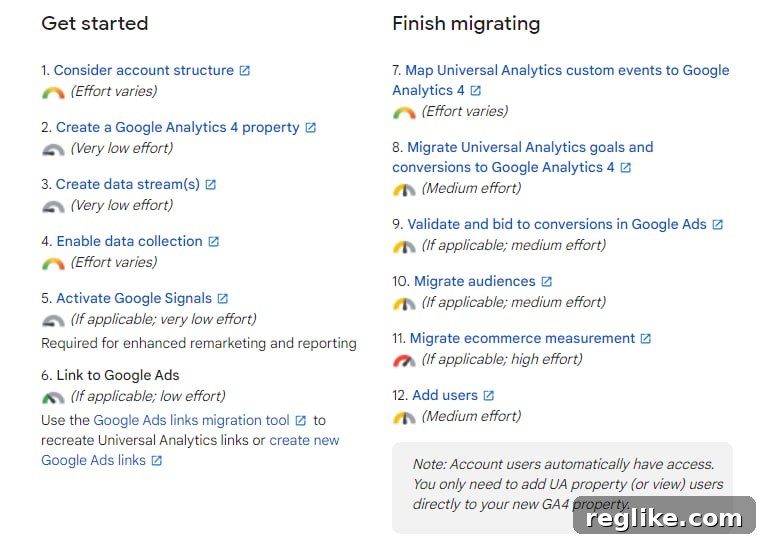
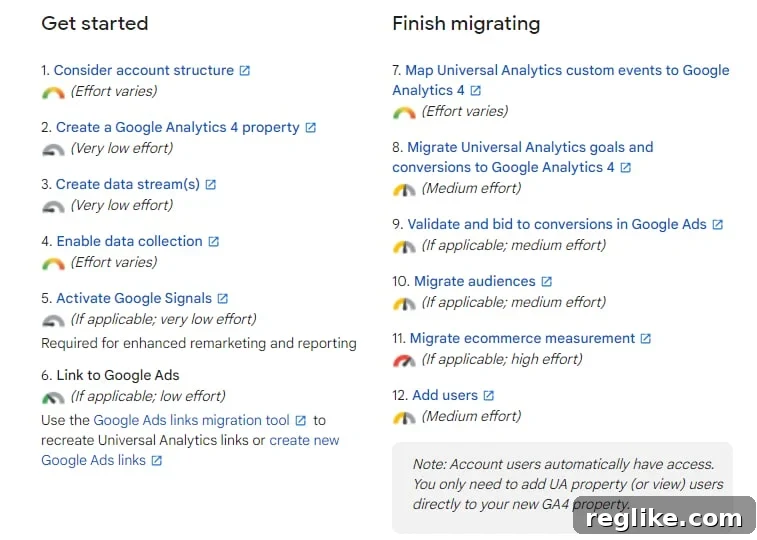
Google previously provided clear migration outlines, detailing steps from setup to data validation. While the immediate pressure of migration is past, the principles of setting up, configuring, and verifying your GA4 property remain vital for anyone still engaging with the platform.
Setting Up Your GA4 Property (If You Haven’t Already)
If you’re among those who haven’t yet transitioned, establishing your GA4 property is your immediate priority. Google provides a “GA4 Setup Assistant” within your old Universal Analytics account that can guide you through the initial steps of creating a new GA4 property and enabling data collection. This assistant can often automatically set up basic data streams and even reuse existing UA tags if you’re using Google Tag Manager. However, a manual review and configuration are always recommended to ensure data is collected precisely as you intend.
Understanding the GA4 Interface and Reports
One of the first things you’ll notice is that the GA4 interface looks significantly different from Universal Analytics. Many familiar reports have changed or been replaced. GA4 focuses on five key report categories: Realtime, Acquisition, Engagement, Monetization, and Demographics & Tech. Beyond these standard reports, GA4 introduces “Explorations,” a powerful suite of tools that allows for custom, ad-hoc analysis using techniques like Funnel Exploration, Path Exploration, and Segment Overlap. Spending time familiarizing yourself with these new reporting capabilities is crucial for extracting meaningful insights.
Mastering Event Tracking in GA4
As discussed, everything in GA4 is an event. This shift means that understanding and properly configuring event tracking is paramount. GA4 automatically collects certain “enhanced measurement” events (like page views, scrolls, outbound clicks, video engagement, and file downloads) with minimal setup. For more specific interactions crucial to your business, you’ll need to implement custom events. This often involves using Google Tag Manager to define what actions trigger an event, what parameters to include (e.g., product name, video title), and how these events are sent to GA4. Accurate event tracking is the backbone of effective GA4 measurement.
E-commerce Measurement in GA4: A Deeper Dive
For e-commerce businesses, the transition to GA4 requires particular attention. While GA4 offers robust e-commerce reporting, the implementation is more complex than in UA. It requires a detailed understanding of the GA4 e-commerce event schema, which includes events like `view_item`, `add_to_cart`, `begin_checkout`, and `purchase`. Each of these events also requires specific parameters (e.g., `item_id`, `item_name`, `price`, `quantity`) to be passed correctly. Many businesses will need developer assistance or specialized Tag Manager configurations to ensure all e-commerce transactions and related user behavior are accurately tracked and reported in GA4.
Integrating with Other Google Products
GA4 integrates seamlessly with a host of other Google products, enhancing its utility for digital marketers. Linking your GA4 property with Google Ads allows for better campaign optimization, audience segmentation, and performance measurement. Integrating with Google Search Console provides valuable insights into organic search performance. Connections to platforms like BigQuery (for raw data export and advanced analysis) and Data Studio (now Looker Studio, for custom dashboards) further extend GA4’s analytical power, enabling a truly connected marketing and analytics ecosystem.
Preserving Your Legacy: Exporting Universal Analytics Data
The historical data housed in your Universal Analytics account represents years of valuable insights into your website’s performance, user trends, and marketing effectiveness. With Google’s eventual deprecation of access to UA data, exporting this information is not just recommended; it’s non-negotiable for anyone who values their past analytics record.
Why Data Export is Non-Negotiable
Once Google removes access to Universal Analytics properties, all your years of data – traffic sources, user behavior patterns, conversion histories, and more – will become inaccessible through the standard interface. This loss can create significant challenges for long-term trend analysis, year-over-year comparisons, and strategic planning based on historical benchmarks. Exporting this data now ensures you retain ownership and control over your past performance metrics, allowing for continued reference and deeper historical context when analyzing your current GA4 data.
Methods for Data Export
There are several ways to export your Universal Analytics data, ranging from manual downloads to automated API extractions:
- Manual Reports: For smaller datasets or specific reports, you can export data directly from the UA interface. Navigate to any report, select your desired date range, and use the “Export” button (usually found above the report table) to download data in CSV, TSV, XLSX, or PDF formats. This method is practical for high-level summaries or specific tables.
- Google Analytics Reporting API: For more extensive data extraction, especially for multiple reports or longer date ranges, the Google Analytics Reporting API is the most powerful method. This requires some technical proficiency or the use of tools that leverage the API. Developers can write scripts to fetch specific metrics and dimensions, allowing for highly customized and automated data exports.
- Google Sheets Add-ons: Tools like the “Google Analytics” add-on for Google Sheets (while potentially deprecated or requiring specific setup) can provide a user-friendly interface to pull data from UA via the API directly into a spreadsheet. This bridges the gap between manual exports and full API development.
- Third-Party Connectors and Tools: Various third-party business intelligence (BI) tools and data connectors offer integrations to pull data from Universal Analytics into data warehouses or analytics platforms. These solutions can be ideal for businesses with complex data needs.
What Data to Prioritize for Export
Given the potential volume of data, it’s wise to prioritize what you export. Focus on:
- Key Performance Indicators (KPIs): Traffic, bounce rate, average session duration, goal completions, conversion rates, revenue (for e-commerce).
- Dimension Combinations: Traffic source/medium, landing pages, device categories, user demographics (if available), and product performance.
- Segmented Data: Export data for your most important user segments (e.g., new vs. returning users, specific marketing channels).
- Annotations: If you used annotations to mark significant events, capture these separately as they provide crucial context for your historical data.
Organize your exported data logically, perhaps by month or year, and store it securely in a format that allows for future analysis and comparisons.
Beyond Migration: Optimizing Your GA4 Experience
The journey with Google Analytics 4 doesn’t end with initial setup and data collection. It’s an evolving platform that requires continuous engagement and optimization to truly leverage its capabilities.
Continuous Learning and Adaptation
GA4 is still relatively new and Google frequently releases updates, new features, and changes to the interface. Staying informed through official Google announcements, blogs, and community forums is crucial. Invest time in learning GA4’s nuances, whether through self-study, online courses, or workshops. The better you understand its event-driven model and reporting interface, the more value you’ll derive.
Leveraging Advanced Features for Deeper Insights
Beyond the basic reports, GA4 offers a suite of advanced features that can transform your understanding of user behavior:
- Custom Dimensions and Metrics: Extend GA4’s data model by defining custom dimensions and metrics that are unique to your business, allowing you to capture and analyze highly specific data points.
- Audiences: Build powerful audience segments based on any combination of events, parameters, and user properties. These audiences can be used for targeted reporting, remarketing in Google Ads, and predictive analysis.
- Predictive Metrics: Utilize GA4’s machine learning to predict user churn, purchase probability, and revenue likelihood. These insights enable proactive marketing and optimization strategies.
- BigQuery Export: For advanced users, exporting raw GA4 data to BigQuery unlocks unparalleled flexibility for custom queries, joining with other datasets, and performing highly sophisticated analyses.
The Power of Data-Driven Decisions
Ultimately, the goal of any web analytics platform is to facilitate data-driven decision-making. GA4, with its enhanced user-centric approach and predictive capabilities, provides an even stronger foundation for this. By consistently analyzing your data, setting up relevant custom events, monitoring your key performance indicators, and experimenting with advanced exploration techniques, you can gain actionable insights that inform everything from website design and content strategy to marketing campaigns and product development. Embrace GA4 not just as a reporting tool, but as a strategic partner in your digital growth.
Conclusion: Embrace the Future of Analytics with GA4
The transition to Google Analytics 4 marks a significant milestone in the world of web analytics. While the sunset of Universal Analytics brought challenges, it also ushered in a more powerful, privacy-focused, and future-proof platform. If you have not yet fully embraced GA4, now is the time to commit. Ensure your new property is correctly configured, begin diligently collecting your new historical data, and crucially, secure your legacy by exporting your Universal Analytics data before it becomes permanently inaccessible.
Google Analytics 4 is more than just an upgrade; it’s a fundamental shift towards understanding the complete customer journey across all touchpoints. By investing in learning and optimizing your GA4 setup, you’ll be well-positioned to unlock deeper insights, adapt to evolving user behaviors, and make more strategic, data-informed decisions that drive your business forward in the years to come.