
Effortlessly Transfer Your Domain Names Away From Moniker
Are you looking to transfer your domain names from Moniker to a different registrar? Many domain owners have experienced frustrations, particularly after platform transitions. This guide provides a detailed, step-by-step explanation of how to efficiently transfer your domains, focusing on the recently implemented bulk authorization code export feature, designed to streamline the migration process.
The Challenges and the Solution
For many Moniker customers, the past few weeks or months may have been challenging. A significant platform switch created disruptions, leading many users to consider moving their domain portfolios to alternative registrars. A primary obstacle was the lack of a simple method to obtain transfer authorization codes in bulk. Initially, users were required to request these codes individually, a time-consuming and potentially overwhelming process, especially for those managing numerous domains.
Fortunately, Moniker has introduced a solution: bulk authorization code exporting. This feature allows you to request and receive authorization codes for multiple domains simultaneously, significantly simplifying the transfer process. This enhancement represents a positive step forward in improving the user experience for those seeking to migrate their domains.
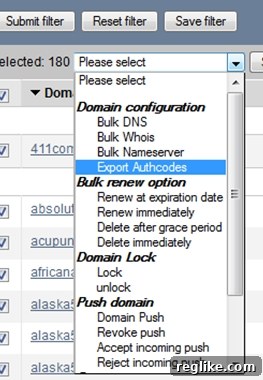
Step-by-Step Guide to Exporting Authorization Codes in Bulk
To effectively transfer your domains away from Moniker, follow these detailed instructions:
1. Unlock Your Domains
Before initiating the transfer process, you must unlock all the domains you intend to move. This is a standard security measure implemented by registrars to prevent unauthorized transfers. Log in to your Moniker account and navigate to your domain management area. Select the domains you wish to unlock and choose the “Unlock” option. It’s essential to confirm that the unlocking process is complete before proceeding to the next step. Recent improvements have made unlocking multiple domains simultaneously more reliable and less prone to errors.
2. Select “Export Authcodes”
Once your domains are unlocked, locate the drop-down menu within your domain management interface. From this menu, select the “Export Authcodes” option. This action will initiate the process of generating and sending authorization codes for the selected domains. Make sure that you have selected all the domains you want to transfer before proceeding. Double-checking your selections can save you time and prevent potential complications later on.
3. Await the Email with Authorization Codes
After selecting “Export Authcodes,” Moniker will send an email containing the authorization codes for the selected domains to the email address associated with your account. The confirmation page typically states that you will receive the email within minutes. However, it’s important to exercise patience, as the delivery time may vary. In some cases, it could take up to 30 minutes or longer for the email to arrive. Avoid repeatedly requesting the codes, as this could potentially delay the process further. Check your spam or junk mail folder if you haven’t received the email within a reasonable timeframe.
Understanding Authorization Codes (Auth Codes)
Authorization codes, often referred to as auth codes or transfer codes, are unique alphanumeric strings assigned to each domain name. These codes act as passwords, ensuring that only the legitimate owner of the domain can authorize its transfer to a different registrar. When initiating a domain transfer, you will be prompted to provide the authorization code to the new registrar. This code verifies your ownership and allows the transfer to proceed. Keep your authorization codes secure and confidential, as anyone with access to these codes could potentially initiate an unauthorized transfer of your domain.
Why Transfer Your Domain Name?
There are numerous reasons why you might consider transferring your domain name to a different registrar. Some common motivations include:
- Better Pricing: Different registrars offer varying pricing structures for domain registration, renewal, and other services. You might find a more competitive price at another registrar.
- Improved Customer Support: The quality of customer support can significantly impact your experience managing your domains. If you are dissatisfied with the support provided by your current registrar, transferring to a registrar with a reputation for excellent customer service may be a worthwhile decision.
- Enhanced Features: Some registrars offer a wider range of features and tools for managing your domains, such as advanced DNS management, domain privacy, or website building tools.
- Consolidated Management: If you have domains registered with multiple registrars, consolidating them under a single registrar can simplify your domain management and streamline your billing.
- Security Concerns: Security is a critical aspect of domain management. If you have concerns about the security measures implemented by your current registrar, transferring to a registrar with robust security protocols may be necessary to protect your domains from potential threats.
Choosing a New Registrar
Selecting the right registrar is crucial for a smooth and successful domain transfer. Consider the following factors when evaluating potential registrars:
- Pricing: Compare the registration, renewal, and transfer fees charged by different registrars.
- Customer Support: Research the registrar’s reputation for customer support. Look for reviews and testimonials from other customers.
- Features: Evaluate the features and tools offered by the registrar, such as DNS management, domain privacy, and website building tools.
- Security: Inquire about the registrar’s security measures and protocols to ensure the safety of your domains.
- ICANN Accreditation: Ensure that the registrar is accredited by the Internet Corporation for Assigned Names and Numbers (ICANN), the organization responsible for managing the domain name system.
Initiating the Transfer with Your New Registrar
Once you have chosen a new registrar, the next step is to initiate the domain transfer process through their website. Typically, you will need to provide the following information:
- The domain name you wish to transfer.
- The authorization code for the domain.
- Your contact information.
The new registrar will then initiate the transfer process, which involves contacting your current registrar (Moniker) to verify the transfer request. Moniker will typically send you an email asking you to confirm or deny the transfer. If you approve the transfer, the process will proceed. If you do not respond within a specified timeframe, the transfer may be automatically approved.
Potential Delays and Troubleshooting
While domain transfers are generally straightforward, there may be occasional delays or issues. Some common causes of delays include:
- Incorrect Authorization Code: Ensure that you have entered the correct authorization code.
- Domain Locked: Verify that the domain is unlocked at your current registrar.
- Contact Information Inaccuracy: Ensure that your contact information is accurate and up-to-date with both your current and new registrar.
- Pending Renewal: A domain cannot be transferred within 60 days of registration or a previous transfer.
If you encounter any issues during the transfer process, contact the customer support teams of both your current and new registrars for assistance.
Conclusion
Transferring your domain names away from Moniker can be a streamlined process with the help of the bulk authorization code export feature. By following the steps outlined in this guide, you can efficiently migrate your domains to a new registrar that better meets your needs and requirements. Remember to choose a reputable registrar, unlock your domains, obtain the authorization codes, and initiate the transfer through your new registrar’s website. With careful planning and attention to detail, you can ensure a smooth and successful domain transfer experience.