
Unlock the Full Potential of Your Parked Domains: A Comprehensive Guide to Customization and Monetization
In the dynamic world of domain name monetization, the ability to stand out and capture visitor attention is paramount. Simply parking a domain with generic templates often leaves significant revenue on the table. Fortunately, advancements in domain parking services are empowering domain owners with unprecedented customization options. This guide delves into how you can transform your parked domains from static placeholders into highly engaging, revenue-generating assets, focusing on visual optimization and strategic content tweaks.
We’ll explore the power of custom graphics, a feature recently highlighted by industry leaders like Parked.com. Studies consistently show that a relevant, high-quality image on a landing page can significantly boost engagement, with some reports indicating a 14-16% increase in click-through rates (CTR). This demonstrates the profound impact visuals have on visitor perception and action. Having personally observed the positive effects of optimization on my own portfolio, currently yielding an RPM (Revenue Per Mille) of approximately $100 with Parked, I am confident that leveraging these new customization tools can further enhance your domain’s performance.
The Undeniable Power of Visuals in Domain Monetization
Why do visuals matter so much for parked domains? In an age of information overload, users make split-second decisions about whether to engage with a page. A relevant image acts as an immediate visual cue, communicating the domain’s purpose and value proposition far more effectively than text alone. It creates an instant connection, builds trust, and makes the page appear more professional and less like a mere advertising billboard. This initial positive impression is crucial for guiding visitors towards the sponsored links and increasing the likelihood of a profitable click.
Think about the last time you landed on a parked domain. Was it cluttered with generic ads, or did it offer a clear, visually appealing entry point? The difference in user experience is stark. By investing time in selecting and uploading custom graphics, you are not just decorating a page; you are strategically enhancing its appeal, reducing bounce rates, and creating a more compelling environment for monetization.
Choosing the Right Domain for a Visual Overhaul
The first step in this customization journey is identifying a suitable domain within your portfolio that stands to benefit most from a visual upgrade. This might sound straightforward, but it can be more challenging than anticipated. Domain parking platforms, including Parked.com with its extensive library of over 7,500 templates, often provide highly specific default images that, while generally related, might not perfectly align with the nuanced meaning or potential of your domain.
For instance, consider a broad category like “computers.” While you might expect general computer-related imagery, templates often drill down into niche specifics, such as:
- Computer accessories
- Computer batteries
- Computer bags
- Computer memory
- Computer products
- Computer problems
- Computer science
- Computer engineering
- Flash drives
- Flash memory
While these are useful for highly specific domains, they can be restrictive for broader or more abstract domain names. The goal is to find a domain where the existing template either misses the mark or provides an opportunity for a more impactful, targeted visual.
In my own portfolio, I found a prime candidate for customization: ChiefSecurityOfficer.com. Parked.com’s system had correctly identified “security” as the primary keyword and displayed an image of a security guard. However, upon closer inspection, it appeared to be a traditional British security guard, which was far from ideal. A Chief Security Officer (CSO) is a high-level executive primarily responsible for an organization’s overall information and technology security strategy, not a physical guard at a doorway. This significant mismatch presented a clear opportunity for optimization.
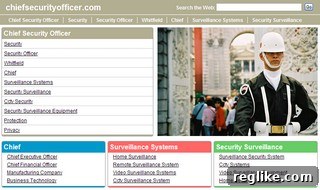
ChiefSecurityOfficer.com before customization: Note the generic security guard image, misaligned with the executive role.
A Step-by-Step Guide to Customizing Your Parked Domain
Once you’ve identified your target domain, the customization process is straightforward, yet requires attention to detail for optimal results.
1. Sourcing the Perfect Image: Relevance and Rights are Key
The first critical step is to find a suitable image that accurately represents your domain’s core concept and appeals to its likely audience. For ChiefSecurityOfficer.com, given that CSOs are deeply involved in network and data security, a visual depicting digital threats or robust defense mechanisms would be far more appropriate than a physical security guard. I specifically searched for an image conveying the concept of information security, perhaps someone protecting data or addressing a cybersecurity threat.
Crucial Reminder: Always ensure you have the legal rights to use any photos you upload. Copyright infringement can lead to significant legal issues. Reputable sources for royalty-free or licensed stock photography include platforms like iStockPhoto, Shutterstock, Adobe Stock, and Getty Images. You can often purchase high-quality images for a modest fee, sometimes as low as $1-$5, which is a worthwhile investment for the potential revenue boost. Alternatively, explore creative commons licenses (with proper attribution) or consider designing your own custom graphics if you have the skills or resources.
2. Preparing Your Image: Size, Format, and Quality
Before uploading, your chosen image needs to be optimized for web use. This involves careful resizing and potentially cropping to fit the specific dimensions required by the parking platform. For Parked.com, the optimal dimensions for the main graphic were 385 pixels wide by 261 pixels high. Using an image editing tool is essential for this step.
While many advanced tools are available, even basic image editors can handle resizing and cropping. For quick screen captures and simple edits, tools like FastStone Capture (as mentioned in the original context), Snipping Tool (Windows), or Preview (macOS) are useful. For more robust editing, consider free software like GIMP or online tools like Canva, which offer user-friendly interfaces for resizing, cropping, and even basic image enhancements. Always save your images in web-friendly formats like JPEG (for photos) or PNG (for graphics with transparency) and compress them to ensure fast loading times, which is vital for user experience and SEO.
3. Uploading Your Custom Graphic
With your perfectly sized and legally sourced image ready, the next step is to integrate it into your parked domain’s page. Within your domain parking portfolio (e.g., Parked.com’s interface), navigate to the specific domain you wish to edit. Look for an option labeled “customize template” or similar. This section will typically provide an interface to upload your new graphic. Follow the prompts, select your prepared image file, and initiate the upload. Within a few minutes, the changes should propagate and your new image will start appearing on your domain, giving it a fresh, professional look.
Beyond Visuals: Title and Keyword Optimization for SEO and Revenue
While visuals are powerful, they are just one piece of the optimization puzzle. Strategic adjustments to the page’s title and keywords can significantly improve search engine visibility and ad revenue potential.
1. Refining the Page Title
The title tag is a crucial SEO element that tells search engines and users what your page is about. For ChiefSecurityOfficer.com, the default title was simply “ChiefSecurityOfficer.com.” While accurate, it lacks the professional polish and keyword richness that a well-crafted title can offer. I changed the title at the top of the page from “ChiefSecurityOfficer.com” to “Chief Security Officer.” This seemingly small change has several benefits:
- Readability: It’s easier for users to read and understand.
- Professionalism: It presents the domain as a resource for the role, not just a domain name.
- Keyword Separation: By separating “Chief,” “Security,” and “Officer,” it allows search engines to better understand and index these terms individually and collectively.
2. Optimizing Main Keywords for Ad Relevance and Bidding
Domain parking platforms rely on keywords to display relevant ads. Choosing the right keywords can dramatically impact your RPM. For ChiefSecurityOfficer.com, while “Chief Security Officer” is the domain name, it’s often a niche term with limited ad bids. To broaden the scope and attract more profitable ads, I changed the main keyword associated with the page to “network security.”
This strategic shift capitalizes on a related, higher-volume, and more commercially active keyword. Many companies bid on “network security” because it’s a critical component of what a CSO oversees. By aligning your page’s keywords with terms that have more advertiser interest and higher CPC (Cost Per Click) bids, you directly increase your earning potential. It’s always beneficial to conduct basic keyword research to identify related terms with good commercial intent that complement your domain name.
3. Exploring Other Customization Options: Colors and Layout
Many advanced domain parking services, including Parked.com, also offer the flexibility to change colors on your page. This allows you to further align the landing page with your chosen image’s color scheme or even with branding principles that evoke trust and professionalism. While often overlooked, color psychology plays a subtle role in user perception. Harmonious color palettes contribute to a more aesthetically pleasing and trustworthy user experience, subtly encouraging engagement.
Measuring Success and Continuous Improvement
The optimization process isn’t a one-time task. To truly maximize your domain’s revenue, it’s crucial to monitor its performance after implementing changes. Pay close attention to metrics like RPM, CTR, and overall earnings for the customized domain. Most parking platforms provide analytics dashboards that allow you to track these figures over time.
Consider performing A/B testing if your platform supports it, or manually testing different images, titles, and keyword combinations to see which variations yield the best results. The online landscape and advertiser bids are constantly evolving, so periodic review and adjustment of your parked domain’s customization can ensure it remains a top performer in your portfolio.
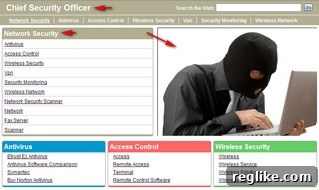
The new version of ChiefSecurityOfficer.com, featuring a more relevant visual and optimized text.
Conclusion: Elevate Your Domain Portfolio
The ability to upload custom photos and fine-tune content on your parked domains represents a significant leap forward in domain monetization. As demonstrated with ChiefSecurityOfficer.com, even subtle changes—from a highly relevant visual to carefully chosen keywords and page titles—can drastically improve engagement and revenue. Parked.com’s new photo uploading feature is user-friendly and highly effective, offering a powerful tool for domain investors and owners looking to optimize their digital assets.
By embracing these customization options, you move beyond generic templates and create a more professional, targeted, and ultimately profitable online presence for each of your domains. This strategic approach not only boosts your bottom line but also enhances the overall quality and user experience of your parked pages, setting you apart in a competitive market. Invest the time, choose wisely, and watch your parked domains transform into high-performing revenue streams.