
Safeguarding Your Domains: Unmasking the Latest PayPal Invoice Renewal Scam
The digital landscape is constantly evolving, and unfortunately, so are the tactics of cybercriminals. While fake domain name renewal emails have been a persistent threat for years, a new, more insidious variant is now making its rounds, leveraging the perceived trust of established payment platforms like PayPal. This sophisticated scam aims to trick unsuspecting domain owners into paying for non-existent renewals, highlighting an urgent need for enhanced vigilance and understanding of online security protocols.
Recently, a reader of Domain Name Wire brought to light a particularly deceptive scam. Instead of a typical fraudulent email originating directly from the scammer, this new scheme involves a fake renewal notice delivered via a seemingly legitimate PayPal invoice. This method adds a layer of credibility that many previous scams lacked, making it significantly more dangerous for the average internet user.
Unveiling the Deceptive PayPal Domain Renewal Invoice
The core of this scam lies in a fraudulent PayPal invoice designed to look authentic. The invoice itself contains a message crafted to instill panic and urgency, pressuring the recipient into immediate action. Here’s a closer look at the key elements of this deceptive tactic:
One of the most concerning aspects is the message embedded within the invoice. It typically states something along these lines:
The paid registration period of the domain [domain] expired. It is necessary to pay for the prolongation of domain name within a day from the date of having notice. We would like to inform you that if payment is not made within the specified time frame, domain delegation will be terminated. The domain will be deleted from the registry and can be accessible for registration to other customers.
Such language is designed to create immense pressure, implying that failure to act immediately will result in the loss of one’s valuable domain name. This urgency often overrides critical thinking, leading individuals to click and pay without proper verification.
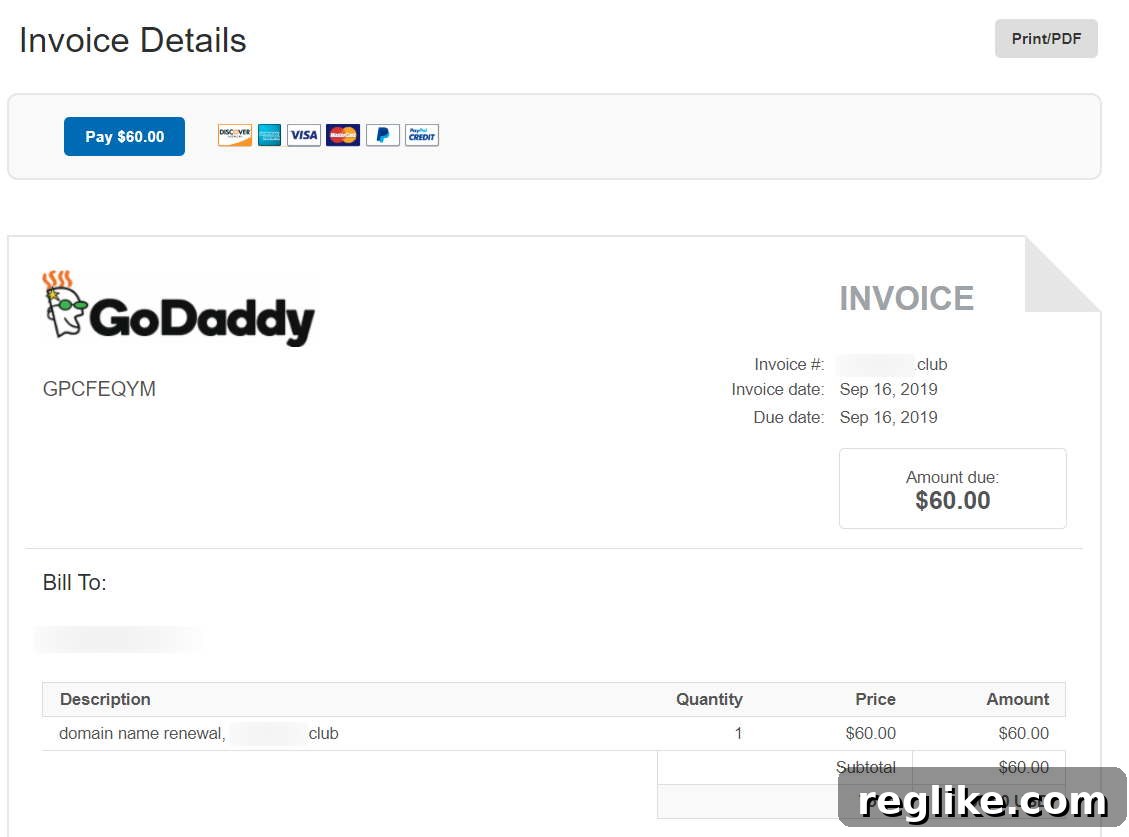
Adding to the illusion of legitimacy, the fraudulent invoice often prominently features the logo of a well-known domain registrar, such as GoDaddy. While PayPal allows users to upload custom logos for their invoices, the intention is for businesses to use their own branding. Scammers exploit this feature to impersonate reputable companies, lending an air of authenticity to their bogus demands. The invoice also includes a direct link that, upon clicking, leads the user straight to PayPal’s payment portal, seemingly streamlining the fraudulent transaction.
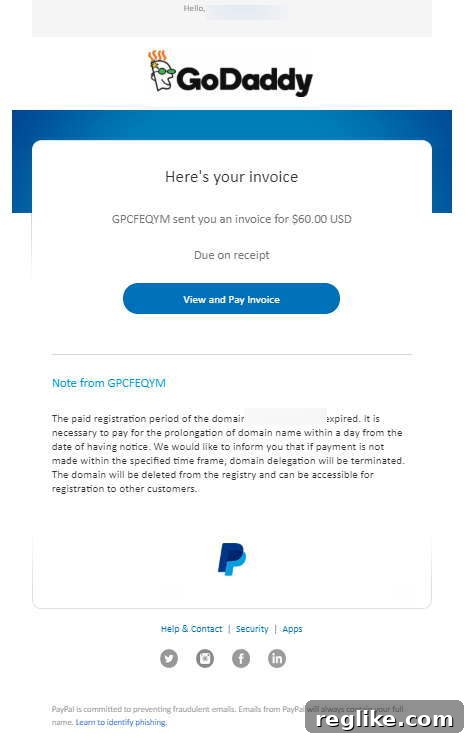
This sophisticated approach capitalizes on brand recognition and the user’s trust in PayPal as a secure payment gateway. The combination of a familiar logo, a high-stakes warning, and a direct payment link creates a powerful psychological trap.
The Data Source: How Scammers Obtain Your Information
A critical question often arises: how do these scammers know who owns which domain names? The answer frequently lies in publicly accessible databases, primarily WHOIS. The WHOIS database contains registration information for domain names, including the registrant’s name, organization, contact email, and sometimes even physical address and phone number.
While many domain owners utilize WHOIS privacy services to mask their personal details, not everyone does. Scammers routinely harvest this public data, creating targeted lists of domain owners whose information is readily available. By cross-referencing this data with common domain expiry patterns, they can craft highly convincing, personalized invoices that appear to be for legitimate services.
This exploitation of public data underscores the importance of WHOIS privacy protection, a service offered by most domain registrars to shield personal information from public view. Without this protection, anyone can potentially access your registration details, making you a prime target for various forms of online fraud, including these renewal scams.
Why This Particular Scam Poses a Significant Threat
This PayPal invoice scam is particularly effective and dangerous for several reasons:
- Leveraging Trust in PayPal: PayPal is a globally recognized and trusted payment platform. Receiving an invoice directly from PayPal, rather than a suspicious email address, instantly gives the scam an air of legitimacy that traditional phishing emails often lack. Users are conditioned to believe PayPal notifications are genuine.
- Impersonating Reputable Brands: The inclusion of logos from well-known registrars like GoDaddy further reinforces the scam’s credibility. Users may associate the logo with their actual domain provider, leading them to believe the invoice is legitimate.
- Exploiting Urgency and Fear: The language used in the invoice is designed to create panic. Threats of domain deletion and accessibility to other customers prey on the fear of losing a valuable digital asset, compelling quick, unverified action.
- Bypassing Email Spam Filters: Since the notification often comes from PayPal itself (albeit a fraudulent invoice within PayPal’s system), it might bypass traditional email spam filters that are designed to catch suspicious sender addresses or content.
- Targeting Less Tech-Savvy Users: Individuals who are less familiar with the nuances of domain management or online security practices are especially vulnerable. They may not know how to verify domain expiry dates independently or recognize the subtle red flags.
Comprehensive Strategies to Protect Yourself from Domain Renewal Scams
In an environment rife with digital threats, proactive measures are your best defense. Protecting yourself from domain renewal scams requires a combination of vigilance, verification, and smart online habits.
1. Always Verify the Sender and Source
Never take an invoice or renewal notice at face value. If you receive a PayPal invoice or an email notification about a domain renewal, independently verify its authenticity. Look closely at the sender’s email address (for email notifications), the invoice number, and any company details provided. Be suspicious of generic greetings or typos.
2. Access Accounts Directly, Never Through Links
This is arguably the most crucial rule of thumb. If you receive an alert about a domain renewal or a payment due, do not click on any links within the email or invoice. Instead, open a new browser tab and navigate directly to your domain registrar’s official website (e.g., GoDaddy.com, Namecheap.com) or to PayPal.com. Log in to your account securely and check your invoices, domain expiration dates, and payment history there. This bypasses any malicious links that might lead to phishing sites.
3. Keep Track of Your Domain Expiry Dates
Maintain a personal record of your domain registration and expiry dates. Most registrars allow you to view this information within your account dashboard. You can also use WHOIS lookup tools (for domains where you haven’t enabled privacy protection) to verify your domain’s official expiry date. Knowing your actual renewal schedule makes it easier to spot fake notices.
4. Be Wary of Urgency and Pressure Tactics
Scammers almost always rely on creating a sense of urgency to bypass rational thought. Phrases like “pay within 24 hours” or “your domain will be deleted immediately” are classic scammer ploys. Legitimate businesses typically provide ample notice for renewals and rarely employ such aggressive, fear-mongering language.
5. Scrutinize Invoice Details for Discrepancies
Examine the invoice content carefully. Does the domain name listed match yours exactly? Are there any odd charges or services you didn’t authorize? Look for grammatical errors, awkward phrasing, or inconsistent branding. These are often subtle indicators of a fraudulent message.
6. Secure Your WHOIS Information with Privacy Protection
As discussed, public WHOIS data is a goldmine for scammers. Enable WHOIS privacy protection for all your domain registrations. This service replaces your personal contact information with generic details or those of a privacy service, preventing your data from being harvested by malicious actors.
7. Implement Two-Factor Authentication (2FA)
Enable Two-Factor Authentication (2FA) on all your critical online accounts, especially your PayPal account and your domain registrar accounts. 2FA adds an extra layer of security, requiring a second form of verification (like a code from your phone) in addition to your password, making it significantly harder for unauthorized users to access your accounts even if they somehow obtain your credentials.
8. Understand PayPal’s Buyer Protection Policies
While PayPal does offer buyer protection, even for intangible goods, it’s always better to prevent fraud than to deal with its aftermath. Familiarize yourself with PayPal’s policies regarding disputes and unauthorized transactions. Knowing your rights can provide a safety net, but vigilance is the primary defense.
What to Do If You Receive a Suspicious PayPal Invoice
If you encounter one of these fraudulent PayPal invoices, swift and appropriate action is essential:
-
Do Not Engage: The most crucial step is to avoid interacting with the invoice. Do not click on any links, do not reply to any associated emails (if applicable), and absolutely do not make any payment.
-
Report to PayPal: Log directly into your PayPal account (do not use links from the suspicious invoice). Navigate to the Resolution Center or contact PayPal customer service to report the fraudulent invoice. PayPal has systems in place to investigate and shut down scam accounts.
-
Inform Your Domain Registrar: Even if the invoice is clearly fake, it’s a good practice to inform your actual domain registrar about the scam. They can issue warnings to their other customers and may have additional security measures to address such impersonations.
-
Report to Relevant Authorities: Consider reporting the scam to relevant government agencies that handle cybercrime and fraud. In the U.S., this includes the Federal Trade Commission (FTC) or the Internet Crime Complaint Center (IC3). Similar agencies exist in other countries.
-
Educate Others: Share your experience with friends, family, and colleagues. Spreading awareness about these evolving scam tactics can help protect others from falling victim.
PayPal’s Stance on Fraud and Buyer Protection
The good news in this scenario is that PayPal, as a major financial platform, is highly invested in preventing fraud and protecting its users. PayPal has sophisticated systems in place to detect suspicious activities, including unusual invoice patterns or reports of fraudulent activity. When scams like these are reported, PayPal typically acts quickly to investigate and freeze accounts associated with malicious activities.
Furthermore, PayPal offers buyer protection, which extends even to intangible goods and services, such as domain renewals. If you were to mistakenly pay such a fraudulent invoice, you would likely have recourse through PayPal’s dispute resolution process. However, navigating this process can be time-consuming and stressful, which is why prevention remains the best course of action. PayPal’s robust fraud detection and buyer protection policies act as a crucial safety net, but they should not be relied upon as a substitute for personal vigilance.
Beyond Domain Renewal: Recognizing Broader Phishing Tactics
This domain renewal scam is a specific manifestation of a broader category of cybercrime known as phishing. Phishing attacks aim to trick individuals into revealing sensitive information or performing actions that benefit the attacker. While this article focuses on domain renewal through PayPal invoices, it’s crucial to recognize that similar tactics are used across various online services:
- Email Phishing: Impersonating banks, social media platforms, or online stores to steal login credentials.
- SMS Phishing (Smishing): Sending fake text messages to trick users into clicking malicious links or calling premium rate numbers.
- Voice Phishing (Vishing): Using fraudulent phone calls to extract personal information.
- Tech Support Scams: Impersonating IT support to gain remote access to computers or demand payment for fake services.
Understanding the common psychological manipulation techniques employed by scammers – urgency, fear, impersonation, and false authority – will equip you to recognize and avoid a wide array of online threats, not just those related to domain renewals.
Conclusion: Stay Vigilant in the Digital Landscape
The rise of the PayPal invoice domain renewal scam serves as a stark reminder that cyber threats are constantly evolving and becoming more sophisticated. By leveraging trusted platforms and employing psychological tactics, scammers aim to exploit unsuspecting individuals. However, with increased awareness, diligent verification practices, and adherence to robust online security measures, you can significantly reduce your vulnerability.
Always prioritize skepticism over immediate action when faced with urgent online requests, particularly those involving payments or personal information. Your domain names are valuable assets; protecting them requires your active engagement and an unwavering commitment to cybersecurity best practices. Stay informed, stay vigilant, and safeguard your digital presence.