
Chrome’s Advanced Defense Against IDN Spoofing and Phishing Threats
In the vast and ever-expanding digital landscape, navigating the internet securely has become more critical than ever. As the web evolves to become truly global, accommodating diverse languages and scripts, new challenges arise, particularly concerning domain name security. One such challenge is the potential for Internationalized Domain Names (IDNs) to be maliciously used for spoofing. Fortunately, web browsers like Google Chrome employ a sophisticated and constantly evolving system to protect users from these deceptive practices. This article delves into Chrome’s robust defense mechanisms against IDN spoofing, explaining the complexities, inherent risks, and browser-led solutions designed to safeguard your online experience.
Unpacking a Real-World Warning: The Case of öttö.de
The intricacies of Chrome’s security protocols were recently brought to light during a routine investigation into end-user domain sales. While researching transactions at Sedo, a visit to the domain öttö.de, which had recently sold for €2,000, triggered an illuminating warning. Upon accessing the site, Chrome displayed a prominent alert:
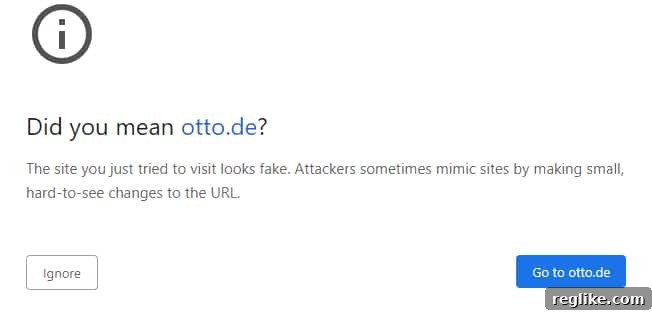
This warning, signaling a potential spoofing attempt due to an Internationalized Domain Name, marked a significant firsthand encounter with Chrome’s proactive security measures. Such alerts have been integrated into Chrome since approximately version 75, building upon a foundational shift in how the browser handles IDNs, which began as early as Chrome 51. With Chrome now well past version 100, these protections have matured considerably, offering a critical layer of defense against an increasingly subtle class of cyber threats like phishing and homograph attacks.
The Dual Nature of Internationalized Domain Names (IDNs)
Internationalized Domain Names, or IDNs, are domain names that contain characters not found in the traditional Latin alphabet, such as those used in Arabic, Chinese, Cyrillic, or Indic scripts. Their introduction was a monumental step towards making the internet truly global, allowing individuals and businesses worldwide to register domain names in their native languages and scripts. This promotes accessibility, cultural relevance, and localized branding, fostering a more inclusive digital environment.
Benefits of IDNs: Expanding Global Reach
- Global Accessibility: IDNs enable billions of internet users to navigate the web using their native languages, removing linguistic barriers to online participation.
- Cultural Relevance: They allow brands and individuals to establish an online presence that resonates culturally and linguistically with their target audience, enhancing trust and recognition.
- Enhanced Usability: For users of non-Latin scripts, typing and recognizing domain names in their own script is far more intuitive and reduces cognitive load compared to using transliterated Latin characters.
The Inherent Risks: Homograph Attacks and Sophisticated Spoofing
Despite their undeniable benefits, IDNs present a unique and potent security vulnerability, primarily through what are known as “homograph attacks” or “visual spoofing.” This deceptive tactic occurs when characters from different linguistic scripts appear visually identical or highly similar to Latin characters, making it possible to craft a malicious URL that looks indistinguishable from a legitimate one at first glance.
Consider a classic example that illustrates this danger:

This seemingly innocuous URL bears a striking resemblance to the domain of the globally recognized online marketplace, eBay.com. However, upon closer inspection, the character ‘a’ in this example is not the standard Latin ‘a’ but a Cyrillic ‘a’ (а). While visually identical to many users who are unfamiliar with Cyrillic script, this subtle difference means it points to an entirely separate domain. Such a tactic can be incredibly effective in deceiving unsuspecting users into visiting phishing sites, where they might unknowingly divulge sensitive personal information, download malware, or fall victim to various forms of online fraud.
The complexity of these attacks escalates significantly when domain names incorporate a mix of scripts within a single string. This “mixed-script” scenario makes it exceedingly difficult for the human eye to detect discrepancies without specialized tools or explicit browser warnings, pushing the boundaries of what users can realistically discern.
Chrome’s Sophisticated Defense: Navigating the IDN Decision Tree
Recognizing the critical nature of these evolving threats, Google Chrome has developed and continually refines a sophisticated decision tree to determine how to display IDNs to users. The core challenge for Chrome’s security team is to strike a delicate balance: on one hand, facilitating the seamless use of native scripts for legitimate IDNs to enhance global accessibility and user experience; on the other, meticulously guarding against their misuse for phishing and spoofing attacks. This balance is crucial for maintaining both usability and robust online safety.
This intricate decision tree evaluates numerous factors before rendering a domain name in either its human-readable Unicode form (how it visually appears to users) or its underlying technical Punycode representation. Punycode is an encoding syntax that translates complex Unicode characters into a sequence of standard ASCII characters, typically prefixed with “xn--“, ensuring compatibility with the foundational Domain Name System (DNS).
Key Factors Influencing Chrome’s IDN Display Policy:
- Mixed Scripts Detection: Domains containing characters from multiple distinct scripts (e.g., a mix of Latin and Cyrillic) are subjected to intense scrutiny, as this is a common indicator of a potential homograph attack.
- Homograph Potential Analysis: Advanced algorithms meticulously analyze character sets for visual similarities to common Latin characters. Domains containing characters with high potential for visual deception are flagged and handled cautiously.
- Top-Level Domain (TLD) Policy: The specific TLD of an IDN can influence its treatment. Certain TLDs might have stricter rules or be associated with higher risk profiles, prompting more conservative display choices.
- Known Whitelists and Blacklists: Chrome maintains dynamic lists of trusted IDNs (whitelists) that are safe to display in Unicode, as well as known malicious patterns or domains (blacklists) that always trigger warnings or Punycode display.
- Consistent Script Sets: The browser evaluates whether all characters in the domain belong to a single, consistent script or a limited, compatible set of scripts. Inconsistency often signals a potential threat.
- Brand Association and Popularity: If an IDN closely resembles the domain of a popular or high-profile brand, it receives increased scrutiny to prevent brand impersonation and targeted phishing attacks.
The overarching goal of this dynamic system is to present the user with the most intuitive and readable form of the domain when it is unequivocally safe to do so. However, when there is even a slight risk of deception, Chrome prioritizes user security by reverting to the less aesthetically pleasing but unambiguously clear Punycode representation, or by displaying an explicit, unavoidable warning message. This nuanced, risk-based approach prevents countless potential phishing attempts from ever reaching an unsuspecting user, forming a critical barrier in browser security.
Punycode: The Unsung Hero of DNS Compatibility
To fully grasp the mechanics behind Chrome’s IDN strategy, it’s essential to understand the role and function of Punycode. The Domain Name System (DNS), the internet’s phonebook, was originally designed to handle only a limited set of ASCII characters (A-Z, 0-9, and the hyphen). When Internationalized Domain Names were introduced to broaden the internet’s reach, a robust mechanism was needed to translate the vast array of Unicode characters from various world scripts into this ASCII-compatible format. Punycode fills this crucial technical gap, making IDNs technically functional within the existing DNS infrastructure.
For instance, a human-readable domain like пример.рф (a Russian IDN meaning “example.rf”) would be represented in Punycode as xn--e1afmkfd.xn--p1ai. The distinctive “xn--” prefix is a standard indicator, signifying that the following string is an encoded Internationalized Domain Name. This prefix ensures that DNS servers, which only understand ASCII, can correctly process and resolve the domain.
While Punycode ensures technical compatibility and unambiguous identification of IDNs, it inherently sacrifices readability. A Punycode string like xn--bb-eka .tld is significantly less user-friendly and harder to recognize than its Unicode counterpart, öbbö.tld. This brings us back to Chrome’s central dilemma: how to balance the benefit of readability (displaying Unicode) against the very real risk of visual deception, and when the absolute, unambiguous clarity of Punycode is paramount, even if it compromises user-friendliness.
When Chrome’s decision tree determines that an IDN poses a significant risk of spoofing or a homograph attack, it typically overrides the human-readable Unicode and displays the domain in its Punycode format directly in the address bar. Alternatively, as observed with the öttö.de example, it may present an explicit and unavoidable warning message to the user. This strategic choice forces the user to confront the underlying technical representation of the domain, making it substantially more difficult for malicious actors to hide behind visually deceptive characters and significantly enhancing the user’s ability to identify fraudulent sites.
Implications for Domain Owners and Robust Brand Protection Strategies
The stringent IDN policies and advanced security measures implemented by leading web browsers like Chrome have significant implications for domain owners, particularly those managing strong and recognizable brands. While IDNs offer excellent opportunities for global market penetration and expanded reach, they concurrently introduce a new and complex vector for brand impersonation, cybersquatting, and sophisticated phishing attacks.
Chrome’s developers actively provide practical suggestions for domain owners who register IDNs, especially when these registrations are made for defensive purposes. A common and highly recommended strategy involves proactively registering various IDN permutations and close visual variants of a brand name. This preemptive measure is crucial for preventing malicious actors from acquiring these look-alike domains and subsequently using them for illicit activities such as phishing or distributing malware. For legitimate IDN owners, ensuring their domain adheres strictly to Chrome’s guidelines (e.g., using consistent scripts, avoiding visually ambiguous character combinations) is paramount. Failure to do so could result in their legitimate sites being flagged as suspicious, displayed in the less readable Punycode format, or even blocked by default for security reasons.
The specific case of öttö.de perfectly exemplifies the proactive approach to defensive registration. The fact that this particular domain was registered through BrandShelter, a specialized brand protection service, strongly suggests that the owner of the legitimate otto.de (a prominent and widely recognized German retailer) acquired it precisely to prevent its misuse by cybercriminals. This strategic registration is not merely a best practice; it has become a common and absolutely necessary practice for large brands to effectively protect their intellectual property, maintain brand integrity, and safeguard their extensive user base from increasingly sophisticated and visually deceptive phishing attacks in the global digital arena.
Essential Best Practices for Online Safety and User Vigilance
While web browsers like Chrome provide a robust and continually evolving first line of defense against IDN spoofing and other digital threats, user awareness and proactive vigilance remain absolutely indispensable in the ongoing fight against online fraud. Users must adopt several critical best practices to effectively protect themselves from sophisticated cyber attacks and ensure a safer online experience:
- Scrutinize URLs Meticulously: Always take an extra moment to carefully double-check the URL displayed in the address bar, especially when clicking on links received from emails, instant messages, or social media platforms. Look for the “https://” prefix, which indicates a secure connection, and pay close attention to any subtle character differences or irregularities in the domain name.
- Heed Browser Security Warnings: If Chrome (or any other web browser) displays a security warning regarding a site, take it extremely seriously. These warnings are there for your protection. Do not proceed to the website unless you are absolutely certain of its legitimacy and have independently verified its safety.
- Utilize Reputable Password Managers: Implement a trusted password manager. Many reputable password managers offer an additional layer of security by detecting if you are attempting to log in to a spoofed or fraudulent site, as they typically only auto-fill credentials for known, legitimate domains.
- Enable Two-Factor Authentication (2FA): Always enable Two-Factor Authentication (2FA) on all your critical online accounts. 2FA adds an essential extra layer of security, making it significantly harder for attackers to gain access to your accounts even if they somehow manage to obtain your password through phishing.
- Keep All Software Updated: Make it a habit to regularly update your web browser, operating system, antivirus software, and all other applications. Software updates frequently include critical security patches that protect against newly discovered vulnerabilities and emerging digital threats.
The Evolving Landscape of Digital Security and Future Outlook
The constant evolution of IDN policies and browser security measures vividly highlights the ongoing cat-and-mouse game played between sophisticated cyber attackers and dedicated security professionals. As the adoption of Internationalized Domain Names continues to grow globally, so too does the complexity and sophistication of spoofing attempts and other related cyber threats. Chrome’s dynamic IDN decision tree, coupled with its advanced warning systems, represents vital tools in this continuous battle, constantly adapting to new attack vectors and striving to create a safer, more trustworthy internet for everyone.
In conclusion, while Internationalized Domain Names represent a significant and necessary leap towards a truly global and inclusive internet, their inherent potential for misuse necessitates stringent and proactive security protocols. Chrome’s sophisticated system, powerfully demonstrated by its proactive warnings and nuanced, intelligent handling of IDNs, stands as a clear testament to the unwavering commitment of browser developers to protect their users. By diligently understanding these complex security mechanisms and consistently practicing informed, vigilant online habits, we can collectively contribute to fostering a more secure, resilient, and trustworthy digital environment for all internet users worldwide.