
The digital landscape is constantly evolving, with user security at the forefront of this transformation. Google, a dominant force in shaping web standards, is once again raising the bar for website security, pushing more sites to adopt HTTPS. This initiative is leading to a significant change in how Chrome browser users perceive website security, particularly for those still relying on HTTP.
Google Chrome’s Escalating “Not Secure” Warning: A Call to Action for Website Owners
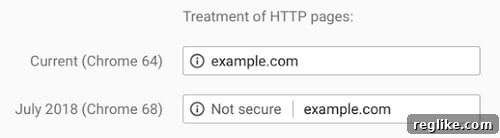
The image above clearly illustrates the shift in Google Chrome’s security indicators. Currently, the top image represents the display in the address bar for websites that operate over HTTP, meaning they lack an SSL (Secure Sockets Layer) certificate. The second image, on the other hand, is displayed when a user interacts with a form field on an HTTP site, explicitly flagging it as “Not Secure.” However, a significant update is on the horizon that will impact virtually all unencrypted websites.
Beginning in July, with the release of the latest version of Chrome, this explicit “Not Secure” warning will become omnipresent. It will appear for all websites running on HTTP, regardless of whether a user is inputting information into a form field or simply browsing content. This marks a critical turning point for web security, moving beyond conditional warnings to a blanket label for unencrypted connections.
Understanding the Impact of the “Not Secure” Label
While some might initially dismiss the impact of a small “Not Secure” label in the address bar, its implications are profound. In an age where data breaches and online scams are rampant, users are becoming increasingly security-conscious. This visible warning, even if subtle at first glance, can significantly erode user trust. Visitors might hesitate to share personal information, make purchases, or even continue browsing a site flagged as insecure, leading to higher bounce rates and diminished conversion rates.
Furthermore, this move by Google is likely just the beginning. The trajectory suggests an eventual escalation of these warnings. It wouldn’t be surprising to see Google adopt more prominent indicators in the future, perhaps displaying the “Not Secure” message in a striking red color or with a more assertive icon. This progressive tightening of security standards underscores the urgency for website owners to transition to HTTPS sooner rather than later. Delaying the upgrade only risks alienating visitors and falling behind in the competitive digital landscape.
Why HTTPS is No Longer Optional: A Comprehensive Look at its Benefits
The migration from HTTP to HTTPS, secured by an SSL certificate, is no longer a mere recommendation but an essential requirement for any modern website aiming for credibility, security, and optimal performance. Beyond merely avoiding Google’s “Not Secure” label, HTTPS offers a myriad of benefits that are crucial for both website owners and their users.
Enhanced Security and Data Integrity
At its core, HTTPS provides a secure channel over a computer network. When a website uses HTTPS, all communication between the user’s browser and the server is encrypted. This encryption safeguards sensitive information—such as login credentials, credit card numbers, and personal data—from being intercepted or tampered with by malicious actors. Without HTTPS, data transmitted over HTTP is vulnerable to eavesdropping, man-in-the-middle attacks, and unauthorized alteration. This robust encryption is foundational for protecting user privacy and maintaining data integrity, which is paramount in today’s digital environment.
Building User Trust and Credibility
The green padlock icon and the “Secure” label in the browser’s address bar are powerful trust signals. They assure users that their connection is secure and that their interactions with the website are private. This visual confirmation of security instills confidence, encouraging users to engage more freely with your content, complete transactions, and provide personal details. A “Not Secure” warning, conversely, can immediately deter visitors, leading them to question the legitimacy and safety of your site. Establishing trust is crucial for long-term customer relationships and brand reputation.
Significant SEO Advantages
Google officially announced in 2014 that HTTPS is a ranking signal. While it might be a lightweight signal, its importance has grown over time, especially as Google continues to prioritize user security. Websites secured with HTTPS tend to receive a slight boost in search engine rankings compared to their HTTP counterparts, all else being equal. Moreover, as Google pushes for a fully encrypted web, non-HTTPS sites may eventually face more severe SEO penalties beyond just a slight ranking disadvantage. Migrating to HTTPS is a proactive step that aligns your site with Google’s vision for a secure internet, potentially improving visibility and organic traffic.
Improved Performance with HTTP/2
Another often-overlooked benefit of HTTPS is its compatibility with HTTP/2, the latest version of the HTTP protocol. HTTP/2 offers significant performance improvements over its predecessor, including multiplexing (sending multiple requests over a single TCP connection), header compression, and server push. While HTTP/2 can technically run over unencrypted connections, all major browsers only support HTTP/2 over HTTPS. By switching to HTTPS, you unlock the potential for faster website loading times, which is a critical factor for user experience, engagement, and even SEO.
Enabling Modern Browser Features
Many advanced web functionalities and APIs require a secure context (HTTPS) to operate. These include geolocation, push notifications, service workers (which enable offline experiences and faster subsequent loads), WebRTC, and many other cutting-edge browser features. If your website plans to leverage any of these modern web capabilities to enhance user experience or functionality, HTTPS is a prerequisite. Remaining on HTTP will limit your ability to innovate and provide a rich, interactive experience to your users.
Compliance with Industry Standards and Regulations
For businesses handling sensitive customer data, such as e-commerce sites, adhering to industry standards and data protection regulations is non-negotiable. For instance, the Payment Card Industry Data Security Standard (PCI DSS) mandates the use of encryption for transmitting credit card data. Similarly, regulations like GDPR (General Data Protection Regulation) and CCPA (California Consumer Privacy Act) emphasize data protection and privacy, making HTTPS a fundamental requirement for compliance. Operating an unencrypted site risks not only data breaches but also severe legal and financial penalties.
Navigating the Transition: Making the Switch to HTTPS
While the benefits of HTTPS are clear, the process of migrating an existing HTTP site can seem daunting. However, with careful planning and execution, the transition can be smooth and relatively straightforward. It’s an investment that pays dividends in security, trust, and search engine performance.
1. Obtain an SSL Certificate
The first step is to acquire an SSL certificate. There are various types: Domain Validated (DV), Organization Validated (OV), and Extended Validation (EV). DV certificates are the easiest and quickest to obtain, often available for free from services like Let’s Encrypt or through your hosting provider. OV and EV certificates offer higher levels of assurance and are suitable for businesses requiring greater trust and verification.
2. Install the SSL Certificate on Your Server
Once you have your certificate, it needs to be installed on your web server. Most hosting providers offer easy-to-use interfaces (like cPanel) for SSL installation. If you manage your own server (e.g., Apache, Nginx), you’ll need to manually configure it to use the certificate.
3. Update Your Website Configuration
For Content Management Systems (CMS) like WordPress, there are plugins (e.g., Really Simple SSL) that can automate much of the migration process, updating database entries and rewriting URLs. For other CMS platforms or custom-built sites, you’ll need to update your site’s settings to reflect the new HTTPS URL. Ensure all internal links, images, CSS, and JavaScript files reference their HTTPS versions.
4. Implement 301 Redirects
Crucially, you need to set up permanent (301) redirects from all HTTP URLs to their corresponding HTTPS versions. This ensures that users and search engine bots attempting to access your old HTTP links are automatically directed to the secure HTTPS pages. This is typically done via your server’s configuration file (e.g., .htaccess for Apache, or Nginx configuration files). Proper 301 redirects preserve SEO value and prevent duplicate content issues.
5. Update Google Search Console and Analytics
After migrating, add the HTTPS version of your site as a new property in Google Search Console. While Google treats HTTPS as the preferred version, explicitly adding it helps Google index your new secure pages faster and allows you to monitor its performance. Similarly, update your website’s URL in Google Analytics property settings to reflect HTTPS, ensuring accurate data tracking.
6. Check for Mixed Content and Test Thoroughly
Mixed content occurs when an HTTPS page loads some resources (like images, scripts, or stylesheets) over HTTP. This can result in security warnings in browsers and negate the benefits of HTTPS. Use online tools or browser developer consoles to identify and fix all mixed content issues by updating resource URLs to HTTPS. Thoroughly test your entire website post-migration to ensure all functionalities work correctly and no broken links or security warnings appear.
7. Update External Links and Social Media
While 301 redirects handle most incoming traffic, it’s good practice to update any external links to your site (e.g., on social media profiles, directories, partner websites) to their HTTPS versions where possible.
Google’s Role and the Future of Web Security
It’s understandable to wish that Google would simplify the HTTPS migration process even further, perhaps through a one-click WordPress plugin or automatic integration in Google Webmaster Central (now Search Console) when switching protocols. These suggestions highlight a common desire among website owners for a less technical and more streamlined transition.
While Google provides numerous resources and tools, its approach emphasizes guiding the web towards security rather than directly managing every site’s infrastructure. The company’s focus is on setting standards and offering incentives—like the ranking boost and the “Not Secure” warning—to encourage adoption. Initiatives like supporting Let’s Encrypt, which provides free SSL certificates, demonstrate Google’s commitment to making HTTPS accessible.
The continuous push for HTTPS signifies Google’s long-term vision for a web where security is the default, not an option. This is not just about protecting individual users but about fostering a safer, more reliable internet ecosystem for everyone. As the digital landscape continues to evolve, adapting to these security standards is not just about compliance; it’s about future-proofing your online presence and safeguarding your audience.
Conclusion: Embrace HTTPS Today for a Secure Tomorrow
The impending change in Google Chrome, marking all HTTP sites as “Not Secure,” is a clear and unequivocal message: the time to migrate to HTTPS is now. This isn’t merely a technical tweak but a fundamental shift in web security that impacts user trust, search engine visibility, and overall website credibility. Proactively embracing HTTPS ensures that your website remains secure, trustworthy, and competitive in an increasingly security-conscious world. Don’t wait for more prominent warnings or potential penalties; make the upgrade to SSL a priority and secure your digital future.