
Updates make it easier to pinpoint hacks and recover from them.
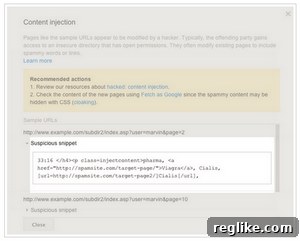 Google released significant improvements to its Webmaster Console – now known as Google Search Console – making it substantially easier for website owners to detect, understand, and recover from security breaches. This ongoing commitment by Google has fundamentally reshaped how webmasters approach site security and crisis management.
The Perilous Reality of a Hacked Website
As anyone who has experienced it can attest, a website hack is a profoundly miserable and often terrifying ordeal. The ramifications extend far beyond mere inconvenience, impacting user trust, search engine visibility, and the very foundation of your online presence. Many visitors are immediately deterred by browser notifications warning them that your site might be compromised, leading to a precipitous drop in traffic and engagement. Worse still, your site can temporarily lose its indexing, vanishing from search results, which is catastrophic for organic traffic and brand visibility.
Beyond the technical challenges, a hack often instills a profound sense of helplessness. Identifying the precise nature and source of the problem can feel like searching for a needle in a haystack, especially for those without deep technical expertise. The insidious nature of some attacks means malicious code can lie dormant, subtly redirecting users or injecting spam without immediate detection, causing long-term damage before the issue is even recognized.
Common Types of Website Hacks
Understanding the different types of attacks is the first step toward effective prevention and recovery. Google’s tools are designed to help pinpoint these various threats:
- Spam Injections: This is one of the most common types, where attackers inject spammy content, often related to pharmaceuticals (pharma hacks) or foreign language keywords, into your site’s pages or database. These pages are designed to rank for specific keywords and often redirect users to other malicious sites.
- Malicious Redirects: Visitors attempting to access your site are automatically redirected to another, often malicious or spammy, website without their consent. This can be implemented through server configurations, compromised database entries, or injected JavaScript.
- Phishing Pages: Attackers create fake login pages or forms on your compromised site to trick users into divulging sensitive information like usernames, passwords, or credit card details.
- Website Defacement: While less common for profit-driven attacks, defacement involves attackers altering the visual appearance of your website, often replacing content with their own messages.
- Malware Distribution: Your website might be used to host and distribute malware to unsuspecting visitors, turning your trusted platform into a threat.
Google’s Lifeline: The Evolution of Security Reporting Tools
The improvements Google released years ago in its Webmaster Console, which has since evolved into the comprehensive Google Search Console (GSC), laid the groundwork for the robust security features available today. These updates marked a pivotal moment, transforming what was once a daunting, often insurmountable task into a manageable process for site owners.
The core philosophy behind these enhancements was to provide clarity, consolidate information, and empower webmasters. Previously, identifying a hack involved manual checks, sifting through server logs, and often a lot of guesswork. Google recognized this challenge and stepped in to provide a centralized, authoritative source of truth regarding website security status.
Key Features of Google Search Console’s Security Section
Today, the “Security Issues” report within Google Search Console is an indispensable asset for any website owner. It offers a suite of features designed to simplify the complex process of hack detection and recovery:
- Unified Security Dashboard: All pertinent security information is presented in one clear, concise location. Instead of scattered alerts or vague warnings, GSC aggregates all detected security threats, allowing you to get a holistic view of your site’s health at a glance.
- Detailed Problem Identification: This is perhaps the most crucial improvement. Google doesn’t just tell you your site is hacked; it strives to tell you how. The report includes more specific information about exactly what code on your site is suspicious, which URLs are affected, and the type of attack detected. For instance, it might highlight specific PHP files injected with malicious code, or report instances of “Japanese keyword spam” affecting particular pages. This granular detail significantly reduces the time and effort required for diagnosis.
- Guided Recovery Steps: Google often provides actionable advice tailored to the specific type of hack detected. While not a step-by-step cleaning service, it outlines general best practices and crucial steps to take, guiding webmasters through the recovery process.
- Simplified Review Request Process: Once you’ve identified and cleaned your site, you need to inform Google so it can remove any warnings and re-index your pages. GSC allows you to more easily request a review directly from the security issues report. This streamlined process is vital for ensuring your site quickly regains its standing in search results and shed any “this site may be hacked” warnings.
A Step-by-Step Guide to Recovering from a Website Hack
Armed with Google Search Console’s powerful tools, webmasters can approach hack recovery with a structured, systematic plan. This process is critical not just for cleaning the immediate threat but also for preventing future incidents and restoring your site’s long-term health and reputation.
Phase 1: Detection and Diagnosis
The first step is always to confirm and understand the breach.
- Monitor GSC Alerts: Regularly check your Google Search Console for any new “Security Issues” notifications. These are often the first official indicators that something is wrong.
- Verify the Attack: Don’t just rely on GSC. Use online security scanners (like Sucuri SiteCheck, Wordfence, or your hosting provider’s tools) and manually inspect suspicious files, user accounts, and database entries if you have the technical expertise.
- Identify the Scope: Determine how widespread the hack is. Are only a few pages affected, or has the entire site been compromised? What type of hack is it (spam, redirects, phishing)? This will guide your cleaning efforts.
Phase 2: Cleaning and Restoration
Once diagnosed, the priority is to remove the malicious elements.
- Take Your Site Offline: Place your site in a maintenance mode or temporarily block public access. This prevents further damage to your users and allows you to work without interference.
- Restore from a Clean Backup: If you have a recent, clean backup of your site from before the hack, this is often the fastest and most reliable recovery method. Ensure the backup itself is truly free of malware.
- Manually Remove Malicious Code: If a clean backup isn’t available, you’ll need to meticulously identify and remove malicious code from your files (e.g., PHP, HTML, JavaScript), database, and server configurations (.htaccess, DNS records). This often requires advanced technical skills or the help of a security expert.
- Change All Passwords: Assume all credentials have been compromised. Immediately change passwords for your hosting account, FTP, database, CMS admin (WordPress, Joomla, etc.), and any other third-party services connected to your site. Use strong, unique passwords.
- Update All Software: Ensure your Content Management System (CMS), themes, plugins, and any server software are updated to their latest versions. Outdated software is a common entry point for attackers.
Phase 3: Securing and Preventing Future Attacks
Cleaning is only half the battle; preventing recurrence is equally vital.
- Implement a Web Application Firewall (WAF): A WAF acts as a shield, filtering out malicious traffic before it reaches your site. Services like Cloudflare or Sucuri provide excellent WAF solutions.
- Use Strong, Unique Passwords and 2FA: Enforce robust password policies and enable two-factor authentication (2FA) wherever possible for all administrative accounts.
- Regularly Update Software: Make a habit of keeping all your site’s components (CMS, themes, plugins) up to date. These updates often include critical security patches.
- Enforce HTTPS: An SSL certificate encrypts data between your server and users, adding a layer of security and improving trust.
- Perform Regular Backups: Implement an automated, reliable backup strategy. Store backups off-site and test them periodically to ensure they are recoverable.
- Monitor for Suspicious Activity: Use security plugins, server logs, and GSC to continuously monitor for unusual file changes, login attempts, or traffic patterns.
Phase 4: Requesting a Review from Google
Once your site is clean and secured, you must inform Google.
- Submit a “Security Issues” Review Request: Navigate to the “Security Issues” report in Google Search Console and follow the prompts to request a review.
- Provide Details: Clearly explain the steps you’ve taken to resolve the hack and secure your site. Google wants to know you’ve addressed the root cause.
- Patience During Review: The review process can take a few days. During this time, Google will re-crawl your site to verify that the issues have been resolved.
Phase 5: Post-Recovery Monitoring
Security is an ongoing commitment, not a one-time fix.
- Continued Vigilance in GSC: Regularly check your Google Search Console for any new or recurring security alerts.
- Regular Security Audits: Periodically run comprehensive security scans and audits on your website.
- Monitor Site Performance and Indexing: Keep an eye on your site’s performance in GSC and other analytics tools to ensure traffic and rankings recover as expected.
The Indispensable Role of SEO in Post-Hack Recovery
A hack is not just a technical problem; it’s an SEO crisis. Your search engine rankings, indexing status, and overall visibility can plummet overnight. Google’s enhanced tools are therefore not just about security; they are fundamentally about maintaining and restoring your site’s SEO health. Quick and efficient recovery, facilitated by GSC, directly mitigates long-term SEO damage.
Rebuilding Trust and Visibility
When Google flags your site as compromised, it directly impacts user trust and search engine behavior. By swiftly addressing security issues using GSC, you can:
- Regain Search Engine Rankings: Timely removal of malware and a successful Google review mean your site can quickly be re-indexed, and its warnings removed, allowing it to climb back to its previous ranking positions.
- Restore User Confidence: Without browser warnings, users are more likely to visit, engage with, and trust your content, leading to improved bounce rates and conversion metrics.
- Secure Long-Term SEO Health: A secure website is a fundamental ranking factor. By prioritizing security, you’re investing in the long-term stability and success of your organic search presence.
Leveraging Google Search Console for Overall SEO Health
Beyond security, GSC offers a wealth of other tools crucial for holistic SEO management. Integrating your security practices with your broader SEO strategy means a stronger, more resilient online presence:
- Crawl Stats and Index Coverage: Monitor how Google crawls and indexes your site, ensuring all your valuable content is discoverable.
- Performance Reports: Track your site’s organic search performance, identifying which queries bring traffic and how users interact with your site.
- Core Web Vitals: Ensure your site offers a great user experience, which is also a key ranking factor.
Conclusion: A Safer Web, One Website at a Time
Google’s continuous commitment to website security, exemplified by the evolution of its Webmaster Console into the indispensable Google Search Console, has transformed the landscape for webmasters. The ability to easily pinpoint hacks, receive detailed information about suspicious code, and streamline the recovery process empowers site owners to tackle security challenges head-on.
These tools are not just a technical convenience; they are a critical lifeline that helps maintain the integrity of the internet, one website at a time. By simplifying detection and recovery, Google enables webmasters to protect their users, preserve their hard-earned SEO rankings, and ultimately foster a more secure and trustworthy online environment. Prioritizing website security, leveraging the robust features of Google Search Console, and maintaining proactive vigilance are no longer optional—they are essential for any successful online venture.