
LinkedIn Battles Typosquatting Domains Used for Phishing Surveys
LinkedIn, the world’s leading professional networking platform, is actively combatting a rise in deceptive online practices. The company has initiated legal proceedings against the owner of several domain names that closely resemble its own, but are being used to redirect users to fraudulent surveys. This action highlights LinkedIn’s commitment to protecting its users and brand integrity from malicious online activities.
The core of the issue revolves around domain names that capitalize on common typos people might make when typing “LinkedIn” into their web browser. These subtly altered domain names then forward users to what appears to be a legitimate survey, complete with a logo designed to mimic the official LinkedIn branding. The ultimate goal of these deceptive surveys is to trick users into providing personal information or completing offers that benefit the scammers, not the users.
Legal Action Against Deceptive Domain Names
LinkedIn has formally filed a dispute with the National Arbitration Forum, seeking control over several key domain names involved in this fraudulent scheme. These domain names, specifically linedin.com, linnkedin.com, and lonkedin.com, represent common misspellings of the LinkedIn name. The company argues that the use of these domains constitutes trademark infringement and is actively harming the LinkedIn brand and its users.
The legal action underscores the seriousness with which LinkedIn views these types of online threats. By aggressively pursuing ownership of these deceptive domain names, LinkedIn aims to shut down the phishing operation and prevent further users from falling victim to the scam.
The SurveyRewardPanel.com Connection
The domain names in question redirect users to a specific page on SurveyRewardPanel.com. This page presents visitors with what appears to be a genuine survey. The survey is designed to look like it is affiliated with LinkedIn, leveraging the platform’s trusted brand to gain credibility.
After “completing” the survey, users are presented with the opportunity to select a prize, such as a Macbook Air or a Walmart gift card. However, to actually receive these rewards, users are required to participate in a series of offers. These offers often involve signing up for free trials of services like Netflix or registering for book clubs. These services may require credit card information, potentially exposing users to unwanted charges or subscriptions they did not intend to purchase.
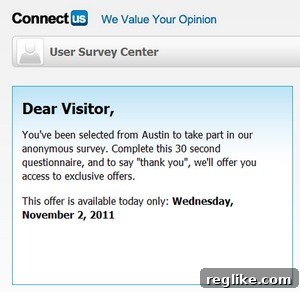
(Image: Screenshot of the deceptive survey on SurveyRewardPanel.com)
A Pattern of Brand Mimicry
LinkedIn is not the first major company to face this type of online scam. Google has previously filed similar complaints against domain names that mimic its Gmail and YouTube brands. These cases highlight a growing trend of scammers exploiting well-known brands to deceive internet users. The prevalence of these scams underscores the importance of remaining vigilant and cautious when encountering unfamiliar websites or online offers.
How to Protect Yourself from Phishing Scams
Staying safe online requires a proactive approach. Here are some tips to help you avoid falling victim to phishing scams like the one targeting LinkedIn users:
- Double-Check the Domain Name: Always carefully examine the domain name of any website before entering personal information. Look for subtle misspellings or unusual characters.
- Be Wary of Surveys Promising Rewards: Exercise caution when encountering online surveys that promise significant rewards in exchange for your participation. Often, these surveys are designed to collect personal information or trick you into signing up for unwanted services.
- Verify the Source: If you receive an email or see an offer that claims to be from LinkedIn (or any other reputable company), verify the legitimacy of the communication by contacting the company directly through their official website or customer service channels.
- Use Strong, Unique Passwords: Protect your online accounts by using strong, unique passwords for each platform. Avoid using the same password across multiple sites.
- Enable Two-Factor Authentication: Whenever possible, enable two-factor authentication (2FA) on your accounts. This adds an extra layer of security by requiring a second form of verification, such as a code sent to your phone, in addition to your password.
- Keep Your Software Updated: Ensure that your operating system, web browser, and antivirus software are always up to date. Software updates often include security patches that protect against known vulnerabilities.
- Report Suspicious Activity: If you encounter a website or online offer that you suspect is fraudulent, report it to the relevant authorities, such as the Federal Trade Commission (FTC) in the United States. You can also report phishing attempts directly to the company being impersonated.
LinkedIn’s Ongoing Commitment to Security
LinkedIn is committed to providing a safe and secure platform for its users. The company invests heavily in security measures and works continuously to detect and prevent fraudulent activity. In addition to taking legal action against domain name infringers, LinkedIn also employs a variety of other strategies to protect its users, including:
- Advanced Threat Detection: LinkedIn uses sophisticated algorithms and machine learning to identify and block suspicious activity on its platform.
- Account Security Features: LinkedIn offers a range of account security features, such as two-factor authentication and suspicious sign-in alerts, to help users protect their accounts.
- User Education: LinkedIn provides resources and guidance to help users stay informed about online security threats and how to protect themselves.
The Broader Impact of Typosquatting
The LinkedIn case highlights the broader problem of typosquatting, a practice where individuals register domain names that are similar to popular websites with the intent of profiting from users’ typos or misspellings. Typosquatting can be used for a variety of malicious purposes, including phishing, malware distribution, and advertising scams. It’s crucial for internet users to be aware of this threat and to take steps to protect themselves.
Conclusion: Vigilance is Key
The internet offers tremendous opportunities for connection and collaboration, but it also presents risks. By staying informed about online security threats and taking proactive steps to protect ourselves, we can minimize the risk of falling victim to scams like the one targeting LinkedIn users. Remember to always double-check domain names, be wary of surveys promising rewards, and report any suspicious activity you encounter. By working together, we can create a safer online environment for everyone.