
Mastering Domain Management: A Comprehensive Guide to Merging Network Solutions and Register.com Accounts
In the complex world of domain name management, efficiency and clarity are paramount. For many domain investors and website owners, the landscape has become increasingly intricate, especially with the consolidation of major players like Network Solutions and Register.com under the Newfold Digital umbrella. This guide addresses a common pain point: the creation of multiple, fragmented accounts, particularly those stemming from Web.com’s dropcatching services through platforms like SnapNames and NameJet. We’ll provide a clear, step-by-step methodology to merge Network Solutions accounts and merge Register.com accounts, streamlining your domain portfolio into a single, manageable entity.
The goal is simple: transform a disjointed collection of accounts into a cohesive domain management system. This not only simplifies your administrative tasks but also significantly enhances the security and oversight of your valuable digital assets. If you’ve ever found yourself juggling multiple logins just to manage a handful of domains, this article offers the definitive solution you’ve been searching for.
The Aftermarket Ecosystem: Understanding Newfold Digital’s Landscape
Newfold Digital, formed from the merger of Endurance International Group and Web.com, now presides over a vast empire of web services, including some of the internet’s oldest and most recognizable domain registrars and aftermarket platforms. This includes household names like Network Solutions, Register.com, NameJet, and SnapNames. While this consolidation aims to offer a comprehensive suite of services, it has inadvertently led to some operational quirks, especially in its domain aftermarket.
A primary frustration for users engaged in domain dropcatching – the process of acquiring expiring domain names – is the tendency of platforms like SnapNames to automatically create new registrar accounts. Even if you meticulously link an existing Network Solutions or Register.com account to your SnapNames profile, winning a dropped domain often results in the creation of a brand-new, distinct account to house that acquisition. This problem is compounded when multiple domains are won over time, leading to an ever-growing number of separate registrar accounts, each requiring its own login credentials.
Why Fragmented Accounts Are a Problem
- Administrative Overload: Managing multiple logins, passwords, and dashboards for domains that are essentially under the same corporate umbrella is inefficient and time-consuming.
- Increased Security Risk: Each additional account represents another potential vulnerability. Keeping track of diverse credentials across numerous accounts can lead to weaker password practices or overlooked security updates.
- Lost Domains: It’s surprisingly easy to lose track of domains spread across several accounts, potentially leading to missed renewals and the unfortunate loss of valuable assets.
- Confused Billing: Tracking renewal dates and billing cycles across fragmented accounts complicates financial management and can result in unexpected expirations.
This situation highlights a critical need for a streamlined solution, and thankfully, Newfold Digital does provide a mechanism to consolidate these accounts. However, the path to finding and correctly utilizing this feature isn’t always clear.
The Elusive Solution: Merging Your Registrar Accounts
Recognizing the challenges posed by fragmented portfolios, Newfold Digital offers an account merging feature. This functionality is designed to allow users to combine multiple Network Solutions or Register.com accounts into a single, unified entity. The primary benefit is straightforward: all your domains housed under these registrars will reside within one dashboard, accessible via one set of credentials.
Despite the existence of this crucial feature, the official support documentation can be misleading or outdated. Many users attempting to follow the instructions provided on Web.com or Network Solutions support pages find themselves hitting dead ends. The depicted interface in help documents often doesn’t match the live website, or specific options, such as a direct “merge accounts” button, are conspicuously absent from where they are said to be.
For instance, a common issue reported is that a support page might instruct users to click on a “merge accounts” link that simply isn’t visible in the specified location or within the accompanying screenshot. This discrepancy can be incredibly frustrating, transforming a simple task into a prolonged search for non-existent features. This article aims to cut through that confusion, providing you with the exact, up-to-date steps needed to successfully consolidate your registrar accounts.
Your Definitive Step-by-Step Guide to Merging Network Solutions and Register.com Accounts
This section will walk you through the precise actions required to merge your Network Solutions and Register.com user IDs. Follow these instructions carefully to ensure a smooth and successful consolidation of your domain assets.
Step 1: Choose Your Primary Account and Initiate Login
Before you begin, decide which of your existing accounts will be your primary, or “master,” account. This is the account you wish to retain and into which all other accounts will be merged. It’s crucial to select an account that you are comfortable managing long-term and that has up-to-date contact information. Once you’ve made your selection:
- Open your web browser and navigate to either Network Solutions or Register.com.
- Log in to your chosen primary account using its User ID and password. Ensure you are logging into the account you intend to keep.
Upon successful login, you will typically be directed to your account dashboard or an overview page.
Step 2: Access “My Profile & Security” Settings
The account merging feature is nested within your personal profile and security settings. To locate it:
- In the upper right-hand corner of the page, you will usually find your name or User ID displayed. Click on this.
- From the dropdown menu that appears, select “My Profile & Security”. This section is your central hub for managing personal details, login credentials, and various account-related security features.
This action will take you to a dedicated page where you can manage various aspects of your account, including contact information, login details, and crucially, security preferences.
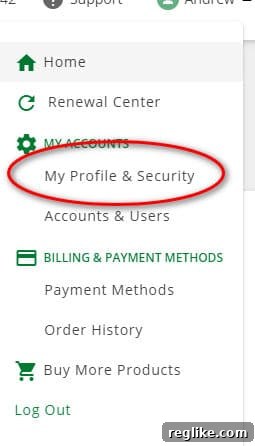
Step 3: Locate and Click “Merge User IDs”
Once you are on the “My Profile & Security” page, you’ll need to scroll down to find the specific merging option. The interface might vary slightly over time, but generally, this feature resides within the security-related sections:
- Scroll down the page until you find a section clearly labeled “Security”.
- Within this “Security” section, look for a link or button titled “Merge User IDs”. This is the gateway to initiating the consolidation process. Click on it.
If you do not immediately see this option, take a moment to carefully scan the “Security” section, as it might be subtly placed among other security-related settings like password changes or two-factor authentication.
Step 4: Enter the User ID of the Account to Merge
After clicking “Merge User IDs,” you will be prompted to provide the credentials for the account you wish to combine with your primary account:
- A new input field will appear, asking you to “Enter the User ID” of the account you want to merge. Carefully type in the User ID (username) of the secondary account.
- You will likely also need to enter the password for this secondary account to verify ownership.
It’s important to have the User ID and password for the secondary account readily available. Double-check your entry to avoid errors, as incorrect credentials will prevent the merge from proceeding. At this stage, you are essentially telling the system which “other” account should be absorbed into your current logged-in account.
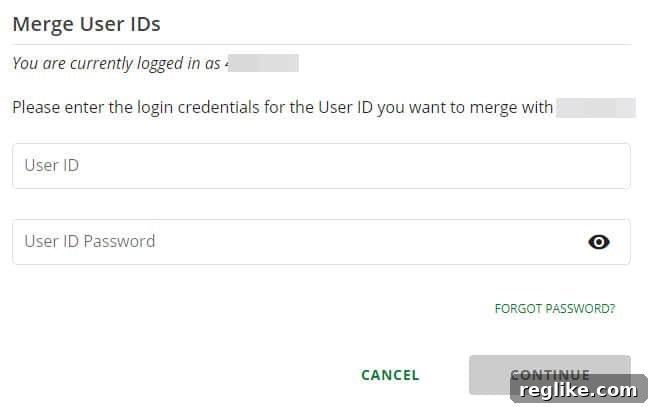
Step 5: Confirm Your Retained Account
The system will then present you with a crucial confirmation step. This is where you explicitly state which account will remain active and which one will be deactivated and absorbed:
- You will be asked to confirm which account you wish to keep and which one you intend to fold into the other.
- Carefully review the information presented to ensure that your chosen primary account (the one you are currently logged into) is designated as the account to be retained.
This step is critical. Selecting the wrong account to retain could lead to unintended consequences, potentially making your primary account the one that gets deactivated. Always confirm that you are merging the secondary account into your primary account.
Step 6: Verify Domain Transfer and Account Consolidation
Once you’ve confirmed your selection, the system will begin the process of transferring your domains. This typically involves moving all domains registered under the secondary account into your primary account. While the transfer is usually swift, it’s wise to verify the process:
- After the merge is confirmed, log out and then log back into your primary account.
- Navigate to your domain management dashboard. All domains previously residing in the merged secondary account should now appear alongside those already in your primary account.
- The secondary account’s User ID will typically become inactive. Attempting to log in with its credentials should result in an error or indicate that the account no longer exists independently.
If, for any reason, you do not see all your domains, or encounter issues with the merged account, refer to the troubleshooting section below.
Benefits of a Consolidated Domain Portfolio
Successfully merging your Network Solutions and Register.com accounts offers a multitude of advantages that go beyond mere convenience. A consolidated domain portfolio empowers you with better control, improved security, and a clearer overview of your digital assets.
- Simplified Management: No more juggling multiple logins and passwords. Access all your domains from a single, familiar dashboard, saving you significant time and effort.
- Enhanced Security Posture: Fewer independent accounts mean fewer potential points of vulnerability. You can focus your security efforts (like strong, unique passwords and two-factor authentication) on a single, primary account, making your entire portfolio more secure.
- Streamlined Renewals and Billing: With all domains under one roof, managing renewal dates and billing becomes straightforward. You’ll receive consolidated notifications and can process all renewals from one place, significantly reducing the risk of accidental expirations.
- Better Portfolio Overview: Gain a comprehensive, at-a-glance view of all your domains, their status, and their expiration dates. This holistic perspective is invaluable for strategic planning and portfolio optimization.
- Reduced Risk of Oversight: The chances of overlooking an important domain or missing a critical update are drastically reduced when all assets are managed centrally.
By taking the time to consolidate your accounts, you’re not just performing a technical task; you’re investing in the long-term efficiency and security of your entire domain operation.
Troubleshooting Tips and Further Assistance
While the account merging process is generally reliable, you might encounter specific situations or issues. Here are some common troubleshooting tips and advice on when to seek further assistance:
- “Merge User IDs” Option is Missing: If, after diligently following Step 3, you cannot find the “Merge User IDs” option within your “My Profile & Security” settings, it’s possible that the interface has changed, or your account type does not support this self-service feature. In this scenario, your best course of action is to contact Network Solutions or Register.com customer support directly. Be prepared to explain your situation and mention that you are trying to consolidate accounts acquired via dropcatching services.
- Domains Didn’t Transfer: If all your domains do not appear in your primary account after the merge, or if you encounter errors during the transfer process, immediately contact customer support. Provide them with both the User IDs of the primary and secondary accounts involved in the merge, and be ready to provide proof of ownership for the domains in question.
- Locked Accounts: If either of your accounts becomes locked during the process, do not attempt multiple login attempts that could further complicate the situation. Instead, use the “Forgot Password” or “Account Recovery” options, or contact customer support for assistance.
- Other Newfold Digital Platforms: This guide specifically addresses Network Solutions and Register.com accounts. While NameJet and SnapNames are part of the Newfold Digital ecosystem, their internal account structures are often separate. Merging registrar accounts generally does not affect your bidding or account history on these aftermarket platforms directly. For issues related to NameJet or SnapNames accounts themselves, refer to their specific support documentation.
Customer support for Network Solutions and Register.com can typically be reached via phone, live chat, or email, with contact details usually found in the “Support” or “Contact Us” sections of their respective websites. When contacting support, always be clear, concise, and have all relevant account information readily available.
Conclusion: Reclaiming Control Over Your Domain Portfolio
The journey to effective domain management can sometimes feel like navigating a maze, especially when dealing with the complexities introduced by consolidated service providers and the specific dynamics of dropcatching. However, by taking proactive steps to merge your Network Solutions and Register.com accounts, you can transform a fragmented and frustrating experience into one of streamlined efficiency and enhanced security.
This guide has provided the definitive steps to overcome the common hurdles associated with account consolidation within the Newfold Digital ecosystem. By unifying your domains under a single login, you not only simplify administrative tasks but also significantly reduce the risk of oversight and improve your overall control. Embrace the power of a consolidated domain portfolio and spend less time managing accounts and more time focusing on the growth and success of your digital ventures. The future of your domain management is clearer, simpler, and more secure than ever before.