
Navigating the New Moniker Interface: A Comprehensive Review of the RRPproxy Transition
The landscape of domain management continually evolves, and registrar platforms frequently undergo significant overhauls to enhance functionality, security, and user experience. The introduction of Moniker’s newly upgraded account interface marks one such pivotal moment, fundamentally transforming how users interact with their domain portfolios. This isn’t merely an update; it represents a complete migration to a new operational framework, specifically leveraging the robust RRPproxy reseller platform. For long-time Moniker users, this transition brings with it a definitive learning curve and a host of adjustments.
As with any substantial platform change, initial reactions are often a mix of curiosity and frustration. Users accustomed to the old interface will undoubtedly find themselves navigating unfamiliar menus and processes. This comprehensive review aims to dissect the intricacies of Moniker’s new system, highlighting both its promising features and areas that require refinement, all while offering insights into what domain managers can expect as they adapt to this new environment.
For further insights into the initial rollout and official responses, consider this important update: [Read this update with responses from Moniker CEO Bonnie Wittenburg]
The Dawn of a New Interface: Understanding the Shift
Moniker’s decision to adopt the RRPproxy reseller platform signals a strategic realignment, likely aimed at standardizing services, improving infrastructure, and potentially offering a broader array of domain-related functionalities. The RRPproxy platform is well-regarded in the industry for its comprehensive features and scalability, making it an attractive base for registrars seeking a powerful backend. However, for end-users, this means moving beyond a customized Moniker experience to a more generalized reseller interface. This shift naturally entails a period of adjustment.
The psychology of user interface changes is complex; most individuals, particularly those managing valuable assets like domain portfolios, tend to resist abrupt alterations to their established workflows. This inherent resistance often manifests as initial grumbling or frustration, even if the new system offers long-term benefits. Our initial exploration suggests a platform with both undeniable improvements and certain quirks that will demand user patience and learning.
First Impressions: The Evolved Dashboard and Domain Management
When You First Log In: A Redesigned Overview
Upon logging into the new Moniker interface, users are greeted with a foundational dashboard. This initial screen provides a concise overview, typically displaying headline metrics such as the total number of domains under management, upcoming expiration alerts, and possibly other high-level account statistics. However, to delve into the specifics of your domain portfolio, a subsequent click on a dedicated link is required. While this two-step process might seem minor, it represents a departure from direct access, potentially adding an extra click to routine tasks.
Customizable Domain View: Power at Your Fingertips
One of the more commendable enhancements in the new Moniker system is the improved basic domain view. This section allows users to see their entire domain inventory at a glance, presenting crucial information such as locking status, expiration dates, and nameserver configurations. The true strength of this view lies in its customizability. Users can effortlessly select which columns are displayed, tailoring the interface to prioritize the data most relevant to their specific needs. This flexibility is invaluable for domain investors and portfolio managers who require quick access to diverse metrics for effective decision-making.
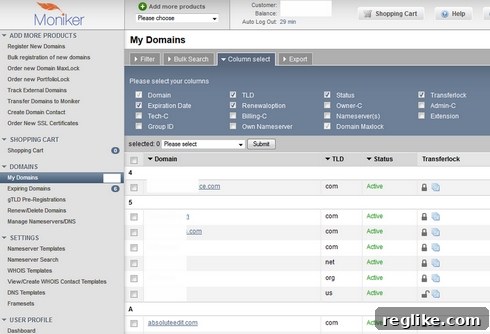
Beyond simple visibility, the new interface also streamlines common actions. The ability to change a domain’s renewal status directly through a convenient drop-down box within the domain list view significantly enhances operational efficiency. This small but impactful feature can save considerable time, especially for those managing large portfolios.
Enhanced Domain Details and WHOIS Customization
Clicking on an individual domain reveals a set of specific options, though it’s important to note that not all functionalities are immediately accessible from this primary panel. For advanced operations, such as pushing a domain to another account, users may need to select a different option from a drop-down menu situated at the top of the page. This nested approach to features might require some initial exploration to master.
A particularly nifty feature integrated into the new system is the ability to directly modify the WHOIS text for a domain. This allows domain owners to add custom messages, such as “For Sale” or contact information, directly within their WHOIS records. For domain investors, this functionality is a powerful tool for marketing and lead generation, providing a direct channel for potential buyers to connect.
The Search Experience: A Minor Relocation
Initial navigation can sometimes lead to minor frustrations. For instance, the prominent search box that was a staple of the old Moniker dashboard appeared to have vanished. However, it’s merely been relocated. Users will find the robust search functionality under the “Bulk Search” tab, positioned at the top of the interface. While the initial surprise of its absence might cause a momentary pause, the “Bulk Search” feature itself is designed for efficient querying across large domain lists, which is beneficial once its location is learned.
A Global Transition: Reseller Platform and European Operations
You’re on a Reseller Platform Now: The Key-Systems Connection
One of the most profound changes users must recognize is their migration to a full-fledged reseller platform, specifically one operated by Key-Systems. This means that many underlying processes and notifications are standardized across Key-Systems’ network of resellers. This standardization can have both advantages, such as potentially more stable infrastructure, and disadvantages, like a less personalized brand experience.
A prime example of this standardization manifested itself immediately post-transition: users began receiving domain expiration warning emails from `[email protected]`. Initially, many users might mistake these generic emails for phishing attempts, given their unbranded nature and unfamiliar sender address. It’s crucial for users to understand that `expirationwarning.net` is indeed owned and operated by Key-Systems, serving as a centralized notification system for all its reseller clients. While functionally sound, this generic branding requires users to educate themselves to avoid unnecessary alarm or confusion.
Welcome to Europe: Navigating a New Geographic and Financial Context
Another significant, albeit subtle, change is the shift to a European domain registration platform. For users primarily operating within the American market, or indeed any market outside the Eurozone, this introduces a new layer of consideration. While the interface may still display account balances and pricing in U.S. Dollars (USD), indicating an attempt to maintain user familiarity, a glaring discrepancy quickly emerges with pre-payment options. Many users have reported that when attempting to add funds to their account, the only available currency option is Euros (EUR).
This currency disparity presents a practical challenge for many users, potentially incurring foreign exchange fees or requiring extra steps for financial transactions. While this might be a temporary “glitch” that Moniker intends to rectify, it highlights the operational impact of transitioning to a European-centric platform. Users need to be aware of potential currency conversion issues and plan their financial interactions accordingly.
Critical Concerns: Security and Usability Hurdles
Missing Security: The Absence of Two-Factor Authentication
Perhaps the most critical and concerning aspect of the new Moniker interface, echoing a long-standing issue with the old system, is the apparent absence of two-factor authentication (2FA). In an era where digital security threats are rampant and sophisticated, and domain assets can be highly valuable, neglecting 2FA is a significant security vulnerability. Even in 2014, when this platform transition occurred, 2FA was rapidly becoming an industry standard for protecting online accounts, particularly those managing high-value assets like domain names.
The lack of 2FA means that account access relies solely on a username and password. Should these credentials be compromised through phishing, keylogging, or data breaches, an attacker could gain complete control over a user’s domain portfolio. For domain investors, businesses, and individuals, this poses an unacceptable level of risk. The absence of this fundamental security layer is, for many, a deal-breaker, undermining trust and potentially forcing users to consider alternative registrars that prioritize robust account security.
The Learning Curve for Key Operations: Domain Pushing
Beyond security, the usability of critical functions is paramount. The process of pushing domains from one account to another, a frequent operation for domain traders and portfolio managers, serves as an excellent example of the new system’s initial complexities. Upon attempting a domain push, users might be confronted with an interface that doesn’t immediately clarify the next steps:
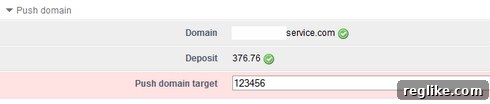
Two immediate questions arise: First, why is the account balance displayed prominently in a domain push workflow? Its relevance to the transfer itself isn’t immediately obvious, potentially distracting the user. Second, and more importantly, the interface provides insufficient guidance on how to proceed. Such lack of intuitive design for a critical function necessitates external assistance. Indeed, many users found themselves having to consult the Moniker wiki or support documentation to understand the process. The process is simple once known, but the initial interface design fails to convey this simplicity effectively.
The new domain pushing mechanism itself represents a shift from Moniker’s unique legacy system. Previously, a domain push required a specific security code from the receiving account, a mechanism that added a layer of sender-side control. The RRPproxy-based system adopts a more traditional approach: the initiating party starts the push, and the receiving party then needs to accept it. Whether this new method is inherently “better” or “worse” is subjective, depending on individual workflow preferences and security philosophies. However, it unequivocally requires users to unlearn old habits and adapt to the new standard.
Adapting to Change: Final Thoughts and the Road Ahead
In conclusion, Moniker’s transition to the RRPproxy-powered interface is a monumental shift that fundamentally redefines the user experience for domain management. While the platform introduces commendable features such as a customizable domain view, efficient renewal status changes, and valuable WHOIS text modification capabilities, it also presents significant challenges. The learning curve is steep, particularly for core operations, and the implications of operating on a generic reseller platform, including the European financial context and standardized notifications, require user adaptation.
However, the most pressing concern remains the absence of robust security measures like two-factor authentication. In an industry where domain assets are frequently targeted, neglecting such a fundamental security layer is a considerable drawback that may compel users to re-evaluate their registrar choices.
Ultimately, this new Moniker system will demand patience and active engagement from its user base. Like any major platform migration, it will take considerable time for users to fully acclimatize and leverage its full potential while navigating its current limitations. The success of this transition will largely depend on Moniker’s responsiveness to user feedback, its ability to address critical issues like 2FA, and its efforts to simplify complex workflows. The conversation has just begun, and the community’s collective experience will shape the future perception of this significant overhaul.
What are your initial thoughts and experiences with the new Moniker interface so far?