
In the vibrant digital landscape, user interaction is the lifeblood of any thriving website. Allowing comments on your WordPress website stands as a powerful testament to this principle, fostering a dynamic environment where you can engage directly with your loyal readers. This direct engagement provides an invaluable opportunity to build a strong community, gather authentic feedback, and gain profound insights into your audience’s preferences, pain points, and desires for future content.
Comments are more than just text; they are conversations. They offer a unique window into the minds of your readers, revealing what resonates with them, what challenges they face, and what topics they are eager to explore further. This user-generated content not only enriches your blog posts but also signals to search engines that your site is active, authoritative, and relevant, potentially boosting your search engine optimization (SEO) efforts through increased engagement metrics and fresh content.
However, the open nature of comment sections, while beneficial, also presents a significant challenge: the potential for unmanaged chaos. If not meticulously moderated, your website’s comment section can quickly devolve into a breeding ground for spam, negativity, and even malicious content. This lack of control can severely undermine your website’s credibility, diminish user trust, and ultimately deter both new visitors and long-time readers from interacting with your content.
Failing to moderate your site’s comments means exposing your valuable online space to various risks. Spam comments, often laden with irrelevant links and dubious promotional material, can make your website appear unprofessional and neglected. Such an environment can alienate even your most dedicated followers, discouraging them not only from commenting but also from continuing to consume your content. The perception of an unmanaged website can tarnish your brand image, suggesting a lack of care or attention to detail.
Beyond mere aesthetics, spam comments frequently contain malicious links. Should a curious reader click on one of these links, expecting to find something useful, only to be redirected to an unsavory or harmful website, the damage to user experience and trust can be irreversible. Even though you did not place the link, your readers may lose faith in your blog, associating your platform with negative experiences. This erosion of trust can lead to a significant drop in readership and engagement, directly impacting your website’s growth and authority.
To cultivate a healthy, interactive environment where site visitors feel valued and eager to return, diligent comment moderation is not merely advisable—it is absolutely essential. It’s about striking a delicate balance: encouraging vibrant discussion while maintaining a clean, safe, and professional space. Fortunately, safeguarding your comment section from undesirable elements doesn’t have to be an arduous manual task. Several straightforward methods exist to streamline the moderation process, allowing you to maintain control without consuming excessive amounts of your precious time.
If you’re looking to reclaim control over your comment section, prevent spam from overwhelming your legitimate discussions, and preserve your website’s reputation, keep reading. We’ll explore the most effective strategies to keep your sanity intact and your comments under complete control.
The Best Ways to Moderate Your Website’s Comments
1. Configure Your Website’s Discussion Settings
The foundational step to effectively managing your WordPress website’s comments begins with a proper configuration of its built-in settings. Navigate to your WordPress dashboard and select Settings > Discussion. This crucial section provides a comprehensive suite of options to customize how comments are handled on your site, offering the first line of defense against spam and the initial framework for fostering meaningful engagement.
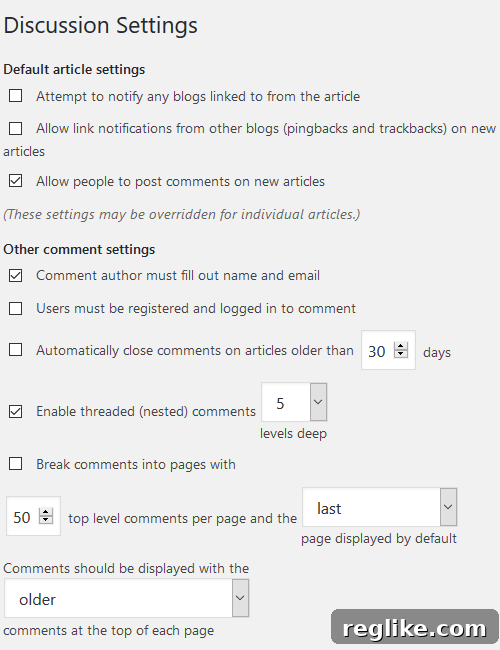
Within the Discussion settings, several key configurations are paramount for robust comment management:
- Allow/Disallow Trackbacks and Pingbacks: These are notifications from other blogs when they link to your content. While they can sometimes indicate genuine engagement, they are unfortunately a major source of comment spam. Disabling them can significantly reduce the volume of junk comments you receive, allowing you to focus on genuine human interactions.
- Enable Comments on New Posts: This is a fundamental setting. Ensure this option is checked to allow comments on your newly published content, encouraging fresh discussions and feedback from your audience. For specific pages or older posts, you can always override this default setting.
- Make Comment Authors Fill Out Name and Email: Requiring comment authors to provide a name and email address is a simple yet effective deterrent for casual spammers and anonymous trolls. It promotes accountability and encourages more thoughtful contributions, as individuals are less likely to post inappropriate content when their identity is partially revealed.
- Require Users to Be Registered and Logged In to Comment: This setting elevates comment control significantly. By demanding users to register an account and log in before commenting, you create a more exclusive and trusted community. This not only filters out a large portion of automated spam but also encourages a higher quality of discussion among verified members, enhancing the overall security and integrity of your comment section.
- Automatically Close Comments on Articles Older Than [X] Days: Older content, particularly evergreen articles, often becomes a magnet for spam over time. By automatically closing comments after a specified period (e.g., 60 or 90 days), you prevent an overload of spam on outdated discussions and free up moderation resources for newer, more relevant content. This also helps keep discussions focused on current topics.
- Enable Threaded (Nested) Comments and Define Depth: Threaded comments allow replies to specific comments, creating a hierarchical structure that makes conversations easier to follow. Enabling this feature, and setting a reasonable depth (e.g., 3 or 5 levels deep), enhances readability and encourages more organized, back-and-forth discussions, fostering a richer community experience.
- Choose the Chronological Order of Comments: You can select whether to display older or newer comments at the top of the thread. Displaying newer comments first is often preferred as it keeps the conversation fresh and immediately presents the latest interactions to your readers, improving user experience.
Beyond these foundational settings, defining your email notification preferences is crucial for staying informed. You can configure WordPress to send you an email alert anytime someone posts a new comment or when a comment is held for moderation. While manually moderating every single comment can be time-consuming for high-traffic sites, this option remains invaluable for site owners who prefer absolute control or those with smaller websites where the volume of comments is manageable. It allows for a proactive approach, enabling you to respond promptly and maintain a clean comment section.
To further streamline comment moderation without constant manual oversight, WordPress offers powerful default settings to automate some aspects:
- Hold Comments with a Specified Number of Links in Moderation: Spammers often include multiple links in their comments. By setting a threshold (e.g., “hold comments containing 2 or more links”), you can automatically flag suspicious comments for your review, catching a significant portion of spam before it goes live.
- Specify Specific Keywords that Force Comments into Moderation: Create a list of keywords or phrases commonly associated with spam (e.g., “buy now,” “SEO services,” “cheap Viagra,” or specific competitor names). Any comment containing these words will be automatically held for your approval, providing an intelligent filter for unwanted content.
- Create a Blacklist of Keywords that Force Comments into the Trash: For more aggressive spam or highly offensive terms, you can establish a comment blacklist. Comments containing any words or phrases from this list will be sent directly to the trash, bypassing the moderation queue entirely. This is ideal for definitive spam terms or profanity you absolutely do not want on your site.
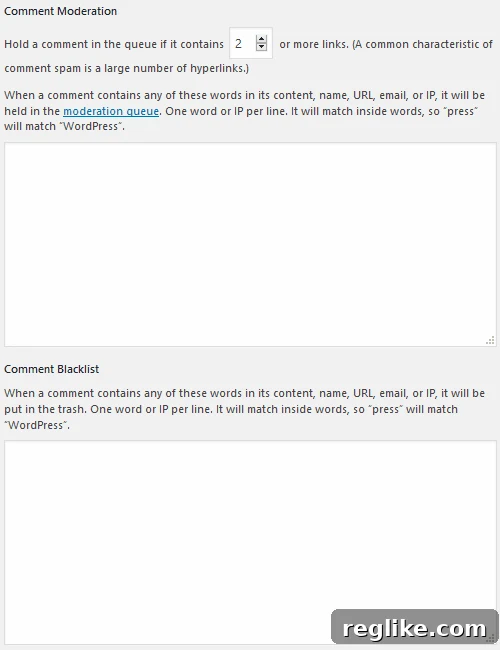
These configuration options are your first and most effective tools for creating a structured and secure comment environment, significantly reducing your manual workload while ensuring quality control.
2. Optimize WordPress Default Comment Moderation Workflow
Even if you prefer a degree of manual oversight for comments, WordPress offers built-in features that can significantly lighten the load. By optimizing your default comment moderation workflow, you can ensure genuine comments appear quickly while still catching suspicious ones.

Revisit your Settings > Discussion page and scroll down to the section labeled Before a comment appears. Here, you’ll find two crucial checkboxes that dictate the level of manual intervention required:
- Comment Must Be Manually Approved: If you check this box, every single comment submitted to your website will be held in a moderation queue awaiting your explicit approval. While this provides absolute control over all user-generated content, it is generally not recommended for websites with high traffic or frequent commenters, as it can quickly become an overwhelming and time-consuming task. The backlog of unapproved comments can lead to delays, potentially frustrating engaged readers who expect their contributions to appear promptly. However, for brand new websites, highly sensitive topics, or very low-traffic sites, this option offers peace of mind.
- Comment Author Must Have a Previously Approved Comment: This is a highly effective and popular option for managing comments on established websites. By checking this box, once a user has had one of their comments manually approved by you, all subsequent comments from that same user (using the same name and email address) will automatically bypass the moderation queue and appear live on your site immediately. This feature drastically cuts down on your moderation efforts for loyal and trusted readers. It rewards your regular contributors with instant visibility, fosters a sense of community, and allows you to focus your attention on moderating comments from new or unverified users. For websites with a robust community of loyal readers who regularly contribute, this setting provides an excellent balance between moderation and engagement.
Choosing the right combination of these settings, in conjunction with the keyword and link moderation options discussed earlier, allows you to craft a tailored comment moderation strategy that aligns with your website’s size, traffic, and community dynamics. It means you can largely automate the approval process for known, good actors while still retaining control over new or potentially suspicious interactions.
3. Moderate Using a WordPress Plugin for Enhanced Control
For many WordPress website owners, particularly those with a significant volume of traffic and comments, relying solely on manual moderation or default WordPress settings can become insufficient. This is where WordPress comment moderation plugins become indispensable. These powerful tools are specifically designed to automate the process of filtering, identifying, and often eliminating suspicious or spammy comments, vastly reducing your manual workload and significantly improving the efficiency of your moderation efforts. They act as sophisticated gatekeepers, either flagging questionable comments for your final review or entirely disposing of outright spam without any further action required on your part.
Akismet Anti-Spam
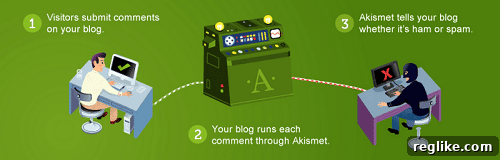
Akismet Anti-Spam is arguably the most well-known and widely used anti-spam plugin for WordPress, and for good reason. It comes bundled with every WordPress installation as a core plugin, meaning it’s readily available once your site is up and running—you just need to activate it and obtain an API key. Akismet works by filtering comments through its vast, cloud-based global spam database, which learns from millions of websites daily. This collective intelligence allows it to identify and block spam with remarkable accuracy.
Key features that make Akismet an essential tool include:
- Automatic Filtering of Suspicious Comments: Akismet automatically checks all incoming comments against its global spam database, identifying and filtering out known spam before it even reaches your moderation queue. This proactive approach saves countless hours of manual review.
- Reveals Comments with Hidden or Misleading Links: Beyond simple spam, Akismet is adept at detecting comments that try to sneak in malicious or deceptive links, which are often used in phishing attempts or to redirect users to unsavory websites.
- Comprehensive Status History: The plugin provides a detailed status history for every comment, allowing you to see which comments were caught as spam, cleared as legitimate, marked as spam, or unspammed by a moderator. This transparency helps in understanding the plugin’s effectiveness and in training it over time.
- Number of Approved Comments Per User: Akismet shows you how many approved comments each user has, offering a quick indicator of a commenter’s history and trustworthiness.
- Discard Feature for Clearing Out Actual Spam: For comments that are unequivocally spam, Akismet includes a “discard” feature that deletes them immediately, preventing them from cluttering your database and improving site performance.
While Akismet is incredibly effective, it’s always wise to periodically check the “Spam” folder in your comments section. Occasionally, legitimate comments might be mistakenly flagged as spam due to specific keywords or patterns. A quick review ensures no valuable interaction is lost.
WordPress Zero Spam

WordPress Zero Spam stands out for its elegant simplicity and robust effectiveness. It offers a refreshingly seamless approach to spam prevention by eliminating the need for cumbersome CAPTCHAs or complex configurations, which can often detract from user experience. The plugin works silently in the background, employing intelligent techniques like JavaScript-based validation and hidden honeypot fields that bots trigger but human users do not. This method allows it to detect and block spam without requiring any active input from your legitimate users.
Some of its most compelling features include:
- No CAPTCHA Requirements: One of its biggest advantages is providing a frictionless experience for your users. No more asking humans to solve puzzles or identify images, which can significantly improve conversion rates for comments and forms.
- No Configuration – Just Install and Activate: True to its name, WordPress Zero Spam requires virtually no setup. Once installed and activated, it begins protecting your site immediately, making it incredibly user-friendly even for beginners.
- Captures 99.9% of All Spam Registrations and Comments: Its advanced, non-intrusive methods are highly effective at catching a vast majority of automated spam bots. This includes not just comments but also spam registrations if you have a membership site.
- No Moderation Queues: By intelligently identifying and discarding spam before it ever reaches your database or moderation queue, Zero Spam ensures your dashboard remains clean, and you only see legitimate interactions.
Furthermore, this plugin boasts broad compatibility, supporting various popular forms and plugins such as WPForms, BuddyPress, and Contact Form 7, extending its spam protection beyond just WordPress comments. This makes it a versatile solution for safeguarding multiple points of user interaction on your site.
WP-SpamShield Anti-Spam
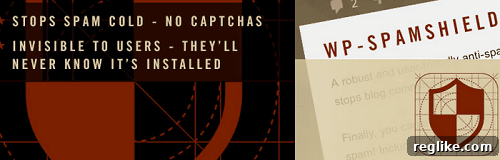
WP-SpamShield is an all-in-one anti-spam solution that provides comprehensive protection across various vectors on your WordPress website. Unlike plugins that focus solely on comments, WP-SpamShield aims to eliminate all types of automated spam, including comment spam, contact form spam, user registration spam, and even the often-overlooked trackback and pingback spam. This holistic approach makes it a robust choice for sites that experience diverse forms of unwanted automated submissions.
Its effectiveness stems from its dual-layered defense mechanism:
- JS/Cookies Anti-Spam Layer: This layer utilizes JavaScript and cookies to verify that a submission is coming from a real human browser rather than a bot. Bots typically don’t execute JavaScript or handle cookies in the same way, making this an effective initial filter.
- Algorithmic Anti-Spam Layer: Complementing the first layer, this advanced algorithmic system analyzes various characteristics of incoming submissions, looking for patterns, IP addresses, and content common to spam. This intelligent analysis helps catch more sophisticated spam attempts that might bypass simpler filters.
WP-SpamShield operates entirely in the background, intercepting spam requests before they can even hit your WordPress database. This not only keeps your comment sections and other forms clean but also significantly reduces the load on your server. Less spam processing means fewer database queries, which directly contributes to improved page speed and overall site performance. Like Zero Spam, it also proudly operates without the need for CAPTCHAs, ensuring a smooth and uninterrupted user experience.
Ultimately, by preventing thousands of spam comments and other malicious submissions, WP-SpamShield helps preserve your server resources, boosts your website’s performance, ensures faster page loading times, and most importantly, protects the integrity of your user experience and the reputation of your brand.
Final Thoughts on Mastering WordPress Comment Moderation
Managing the comment section of your WordPress website can indeed be a challenging undertaking, especially as your site grows in popularity, attracting high volumes of traffic and fostering enthusiastic user engagement. The balance between encouraging lively discussion and maintaining a clean, secure, and professional online environment requires a proactive and strategic approach. Ignoring comment moderation is not an option; doing so risks undermining the very community you strive to build and tarnishing your digital presence.
Short of entirely disabling the commenting feature—which would mean sacrificing a vital channel for user interaction, feedback, and community building—you must implement robust strategies to control your comments. By doing so, you not only preserve your website’s integrity but also solidify your authoritative stance within your niche. A well-moderated comment section is a sign of a professional website owner who values their audience and takes pride in their platform.
We’ve explored several powerful methods to achieve this, from leveraging WordPress’s built-in discussion settings to deploying advanced anti-spam plugins like Akismet, WordPress Zero Spam, and WP-SpamShield. Each tool and configuration offers a unique advantage, and by combining them strategically, you can create a multi-layered defense against unwanted content while fostering genuine interactions.
Take the initiative today to implement one or several of these recommended tips and tricks. You will undoubtedly witness tangible improvements across multiple facets of your website. From enhanced user engagement and trust to improved page speed and overall site performance, effective comment moderation is a cornerstone of a successful and popular online presence. Invest in managing your comments wisely, and watch your WordPress website flourish into a vibrant, respected, and thriving digital community.