
Navigating GoDaddy WHOIS Privacy: When and How to Expose Your Domain Information
In the evolving landscape of domain management, understanding WHOIS privacy settings is crucial. GoDaddy, a leading domain registrar, has implemented a default setting of private registration for all new domains through its Domains by Proxy (DBP) service. While this offers significant benefits, there are specific scenarios where you might need or want to make your domain information publicly accessible. This comprehensive guide will walk you through the intricacies of GoDaddy’s WHOIS privacy, explain why you might choose to expose your details, and provide step-by-step instructions on how to adjust these settings for individual or multiple domains.
Understanding GoDaddy’s Default WHOIS Privacy
For years, anyone registering a new domain name faced an immediate onslaught of unsolicited communications. The public WHOIS database, designed for transparency and accountability, became a prime target for spammers, telemarketers, and unscrupulous service providers. Domain owners frequently reported receiving countless spam emails, robocalls, and text messages attempting to pitch irrelevant services, some even falsely claiming affiliation with their registrars.
To combat this persistent issue and enhance customer protection, GoDaddy proactively integrated WHOIS privacy as a default for all domains. This move was not only a direct response to customer complaints about overwhelming spam but also a strategic step towards complying with a growing number of global privacy regulations, such as GDPR (General Data Protection Regulation) in Europe and CCPA (California Consumer Privacy Act) in the United States. These regulations mandate stronger protection for personal data, making default privacy a necessity for registrars operating internationally.
When your domain benefits from GoDaddy’s Domains by Proxy service, your personal information – including your name, address, email, and phone number – is replaced with generic DBP contact details in the public WHOIS record. This shield significantly reduces your exposure to unwanted solicitations and provides an added layer of security against identity theft and data harvesting. If someone attempts to look up your domain’s ownership in the WHOIS database, they will encounter a record similar to this:
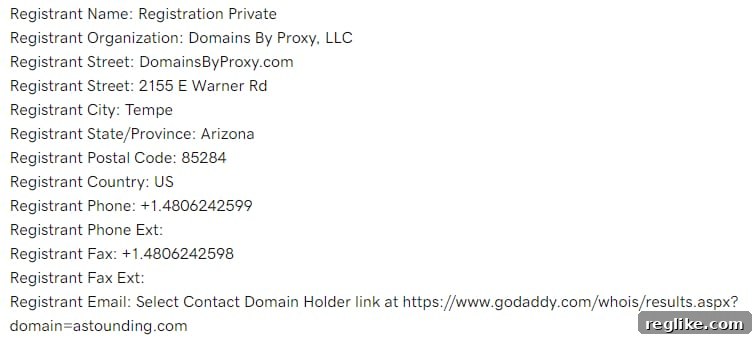
As illustrated, all sensitive owner information is obscured. This privacy measure ensures that while domain ownership is recorded, personal contact details remain confidential. However, ICANN (Internet Corporation for Assigned Names and Numbers), the governing body for domain names, still requires registrars to provide a legitimate method for interested parties to contact a domain owner. In GoDaddy’s system, this typically involves a unique URL within the Registrant Email field that directs users to an online contact form. Messages submitted through this form are then securely forwarded to the actual domain owner, maintaining privacy while facilitating necessary communication.
Compelling Reasons to Expose Your Domain Information
While the benefits of WHOIS privacy are clear for the average domain owner, certain situations necessitate making your information public. Making an informed decision requires weighing the advantages of privacy against the specific needs of your domain or business. Here are the primary reasons why you might choose to expose your personal details in the public WHOIS database:
1. Facilitating Domain Sales and Acquisitions for Domain Investors
For domain investors, having easily accessible contact information is often paramount. The domain investing landscape thrives on quick, direct communication between potential buyers and sellers. While GoDaddy’s contact form provides a mechanism for outreach, it’s generally less efficient than direct email. Buyers might be hesitant to use a generic form, especially if they are looking to initiate a confidential negotiation or include specific details in their initial inquiry. A public email address in WHOIS allows for immediate, unmediated contact, streamlining the lead generation and negotiation process.
Furthermore, publicly displaying your contact details can signal a readiness to sell and instill greater trust. A transparent WHOIS record can make a buyer feel more confident that they are dealing with a legitimate seller, speeding up transaction times and potentially securing better deals. Some buyers may also wish to verify ownership directly before making a significant offer, and a public WHOIS record serves as an undeniable proof of ownership for a specific domain.
2. Enhancing Business Transparency and Legitimacy
For certain businesses, particularly those heavily reliant on public trust or requiring specific legal disclosures, exposing WHOIS information can be beneficial. For instance, high-profile brands, established corporations, or entities with stringent compliance requirements might prefer to display their official contact details. This transparency can reinforce credibility, assure customers of legitimacy, and provide a direct channel for business inquiries or legal notices. It can also be a strategic move for fostering direct relationships with clients, partners, and media outlets.
3. Meeting Legal or Regulatory Requirements
In some specific jurisdictions or for certain types of organizations, there might be legal mandates to publish specific organizational or contact information. While less common for standard domain registrations, certain business types or governmental entities may face unique compliance obligations that override the general desire for privacy.
4. Personal Branding and Direct Engagement
For individuals building a personal brand or operating a small, customer-centric business, direct accessibility can be a competitive advantage. Having your professional email or phone number visible can encourage direct engagement, make you appear more approachable, and remove perceived barriers between you and your audience or customers.
Recognizing these diverse needs, ICANN mandates that all registrars provide customers with the option to opt-in and display their WHOIS information. GoDaddy adheres to this requirement by offering clear, user-friendly options to manage your privacy settings, either for individual domains or in bulk.
How to Change Your WHOIS Privacy Settings on Individual Domains
Managing the privacy settings for a single domain through your GoDaddy account is a straightforward process. Follow these detailed steps to expose your personal information in the WHOIS database:
- Log In to Your GoDaddy Account: Begin by signing into your GoDaddy account dashboard.
- Navigate to Your Domain Portfolio: From the main menu, find and click on “Domains” or “My Domains” to access your list of registered domains.
- Select the Specific Domain: Locate the domain for which you wish to modify the WHOIS privacy settings and click on it. This will open the domain’s individual management page.
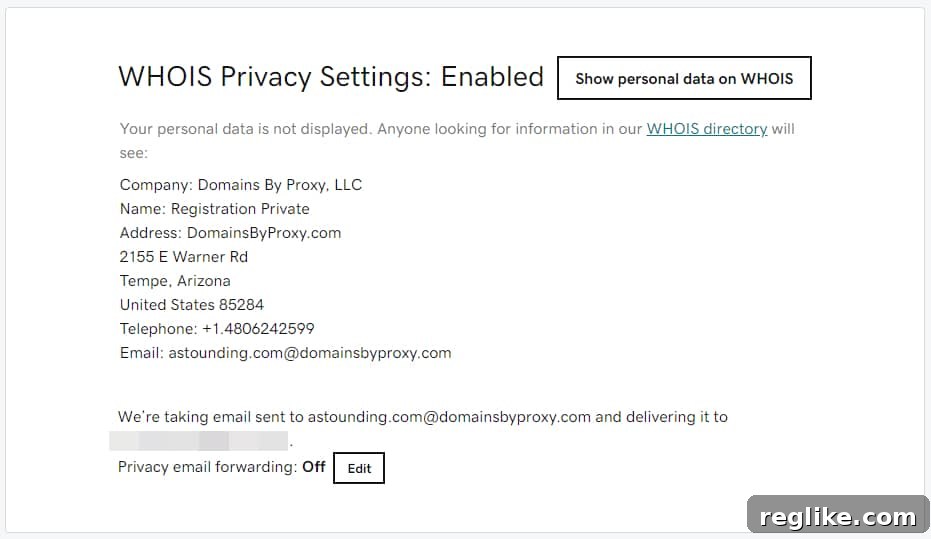
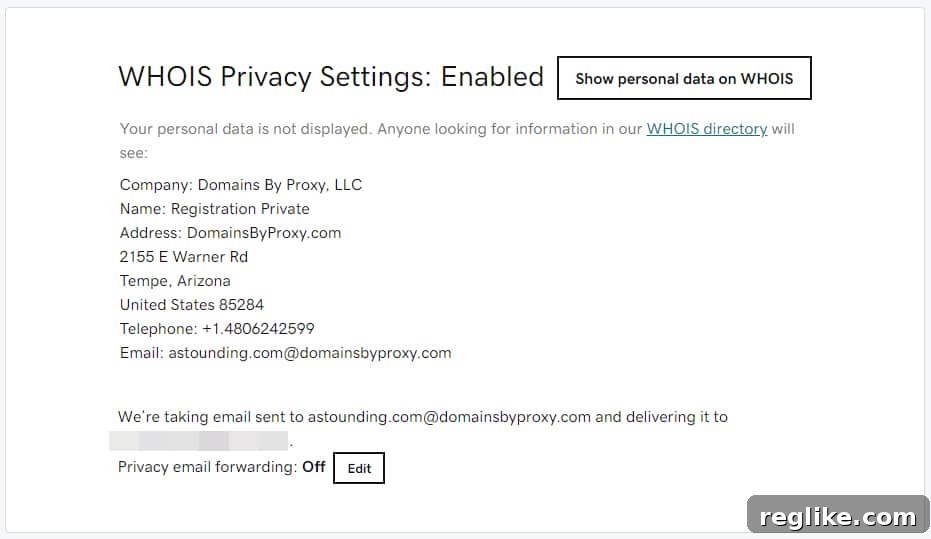
- Locate “WHOIS Privacy Settings”: Scroll down the domain management page until you find a section or box explicitly labeled “WHOIS Privacy Settings.” This section typically contains the options related to your privacy service.

- Choose to Show Personal Data: Within the “WHOIS Privacy Settings” box, you will see two primary options. To expose your personal details, locate and click the “Show Personal data on WHOIS” button, usually positioned in the upper right corner of this section.
- Acknowledge the Warning: Upon clicking, GoDaddy will display a warning message. This serves as an important reminder that by proceeding, your previously protected personal information (name, address, email, phone number) will become publicly visible in the WHOIS database. Carefully review this warning to ensure you understand the implications.
- Alternative: TXT Records for Ownership Verification: The warning message may also provide a link to instructions on using TXT records. It’s important to understand that TXT records offer an alternative method for proving domain ownership without requiring the exposure of your private WHOIS data. While this tutorial focuses on exposing WHOIS, TXT records are a valuable tool for verification purposes, especially if your primary goal is just to prove ownership to a third party rather than receive direct communication.
- Consider Email Forwarding for Domains by Proxy: The second option within this section is to enable email forwarding for the @domainsbyproxy.com email addresses. By default, this forwarding is off. If you choose to activate it, any emails sent to the DBP proxy address will be forwarded to your registered email address. However, it’s worth noting that even with forwarding enabled, GoDaddy does not typically display the @domainsbyproxy.com email address in the public WHOIS record. This means that only highly sophisticated users or persistent solicitors who might specifically guess or infer the DBP address would be able to use it to contact you. For most users seeking direct communication, this option offers limited utility compared to simply exposing your primary email address.
How to Change Your WHOIS Privacy Settings in Bulk
For domain investors or users managing a large portfolio, changing WHOIS privacy settings one by one can be time-consuming. GoDaddy offers bulk management options to streamline this process, though the steps may vary slightly depending on which domain manager interface you are using:
Using the Standard Domain Manager:
- Log In and Access Domain Portfolio: Log into your GoDaddy account and navigate to your domain portfolio.
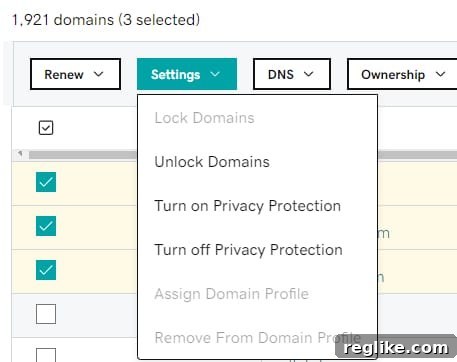
- Select Multiple Domains: Use the checkboxes next to each domain name to select all the domains for which you want to disable privacy protection.
- Access Bulk Settings: Once domains are selected, look for the “Settings” button at the top of the domain list, usually found above the domain names. Click this button to reveal a dropdown menu of bulk actions.
- Choose “Turn off Privacy Protection”: From the dropdown menu, select the option labeled “Turn off Privacy Protection.”
- Confirm Your Action: A confirmation box will appear, asking you to verify that you wish to turn off privacy protection for the selected domains. Review the implications and confirm your decision to proceed.
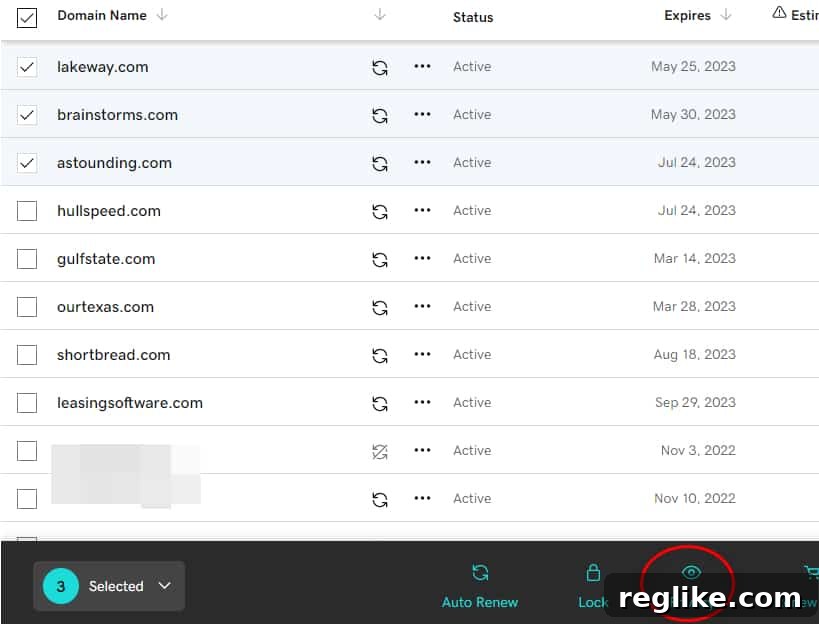
Using the New Beta Domain Manager:
- Log In and Access Beta Domain Portfolio: Access your GoDaddy account and navigate to your domain portfolio, ensuring you are in the “new beta” interface if prompted.
- Select Multiple Domains: Check the boxes corresponding to the domains whose privacy settings you intend to change.
- Locate the Privacy Link: In the beta manager, after selecting domains, you will typically find a set of action links or buttons in a box at the bottom of the page. Look for a link specifically labeled “Privacy.” Important Note: Be careful not to confuse this with any “Privacy” button or filter located at the very top of the page, which is usually for filtering your domain list, not performing actions.
- Turn Off Privacy: Clicking the “Privacy” link will typically trigger a pop-up box with options to manage privacy settings for the selected domains. Within this box, you should find an option to turn off privacy protection.
- Verify Your Choice: A final confirmation dialog will prompt you to verify your intention to remove privacy protection for the chosen domains. Confirm to apply the changes.
Always double-check your WHOIS record after making changes to ensure your settings have been applied correctly. You can use any online WHOIS lookup tool to verify the visible information.
Strategic Considerations Before Exposing Your Information
Deciding to make your personal information public in the WHOIS database is a significant choice with various implications. Before proceeding, it’s crucial to consider the potential trade-offs and ensure it aligns with your specific goals for each domain.
The Trade-Offs: Privacy vs. Visibility
Before registrars adopted default WHOIS redaction in response to privacy regulations, many domain owners, especially investors, often opted for public WHOIS records. The logic was simple: direct contact facilitates business. However, personal experience often reveals a different reality. The author, like many others, has come to appreciate the significant reduction in unwanted solicitations, spam, and robocalls that comes with protected WHOIS data. This is particularly noticeable immediately after a new domain registration, which historically triggered a barrage of marketing attempts.
Exposing your details means opening yourself up to:
- Increased Spam and Unsolicited Contact: Expect a potential surge in emails, calls, and texts from various service providers, many of whom obtain contact lists by scraping public WHOIS data.
- Potential Security and Privacy Risks: Publicly available data can be exploited for phishing attempts, targeted scams, or even more serious privacy invasions. Identity theft risks can also increase.
- Unwanted Attention: For personal domains or less formal websites, public contact information can lead to unwanted attention from individuals with various motives.
Effective Alternatives for Contact
It’s important to remember that exposing your WHOIS information isn’t the only way to facilitate contact. Modern domain management offers several professional and privacy-preserving alternatives:
- Professional Landing Pages: For domains actively for sale or under development, a dedicated landing page with a clear contact form is an excellent solution. This allows you to control the communication channel, pre-qualify leads, and gather specific information from interested parties without revealing your private data.
- Registrar’s Contact Box/Form: As mandated by ICANN, GoDaddy and other registrars provide a contact form that forwards messages to the domain owner while keeping their details private. While it might involve an extra step for the sender, it’s a secure and compliant method of communication.
- Dedicated Business Email: Using a professional, domain-specific email address (e.g., [email protected]) prominently displayed on your website, instead of your personal email in WHOIS, can serve as an effective contact point.
Making an Informed and Strategic Decision
Ultimately, the decision to expose your WHOIS information should be a strategic one, evaluated on a domain-by-domain basis. Consider the primary purpose of each domain:
- Is it a high-value domain explicitly for sale, where direct buyer contact is critical?
- Is it a business domain where transparency enhances credibility and customer service?
- Or is it a personal project, a placeholder, or a defensive registration where privacy is paramount?
For many domains, especially those not actively being marketed for sale or representing a core business with specific transparency needs, maintaining WHOIS privacy offers a valuable layer of protection without hindering legitimate communication. Always weigh the potential benefits of direct contact against the undeniable advantages of reduced spam and enhanced personal security.