
Unifying Your Web Presence: Google Search Console’s Transformative Domain Properties Feature
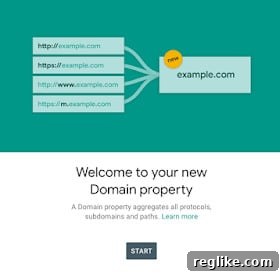 Google is continually evolving its tools to provide website owners and SEO professionals with clearer, more actionable insights. Among its most significant recent updates is the introduction of “domain properties” within Google Search Console. This groundbreaking feature marks a pivotal shift in how webmasters monitor and manage their online presence, promising a more streamlined and comprehensive view of their entire digital footprint.
The Challenge of Fragmented Data: A Look Back
For years, website owners utilizing Google Search Console (GSC) to gain critical insights into their Google search traffic – including invaluable keyword data, crawling statistics, and backlink profiles – faced a persistent challenge. The system required users to add every possible variation of their main URL as a separate property. This meant registering the HTTP version, the HTTPS version, the ‘www’ version, the ‘non-www’ version, and even subdomains like ‘m.’ or ‘blog.’ separately. Each of these variations, while fundamentally pointing to the same website or a part of it, was treated as a distinct entity within GSC.
Imagine managing a complex website with several subdomains and having recently migrated from HTTP to HTTPS. This scenario would necessitate monitoring at least four to six different properties in Google Search Console: http://example.com, http://www.example.com, https://example.com, https://www.example.com, https://blog.example.com, and so on. Switching between these properties to get a complete picture of overall site performance was not only tedious and time-consuming but also prone to misinterpretation. It made it incredibly difficult to aggregate data, compare trends across the entire domain, or identify sitewide issues affecting all variations simultaneously. This fragmentation often led to incomplete analyses and hindered effective decision-making for SEO strategies and technical website management.
Introducing Domain Properties: A Unified Solution
The advent of domain properties is Google’s elegant solution to this longstanding problem. This innovative feature consolidates all possible versions of a website – encompassing all protocols (HTTP and HTTPS), all subdomains (www, blog, shop, m, etc.), and all paths – into a single, unified view. Instead of sifting through disparate data sets for each URL prefix, webmasters can now access a holistic performance report for their entire domain under one roof. This means that whether a user accesses your site via http://example.com/page, https://www.example.com/page, or https://blog.example.com/post, all traffic and performance data related to these variations will be aggregated and displayed within a single domain property in Search Console.
This consolidation drastically simplifies the process of monitoring, analyzing, and reporting on website performance. It eliminates the need for manual data aggregation or relying on external tools to combine fragmented insights. For any website owner, irrespective of their site’s complexity, domain properties represent a significant leap forward in usability and data clarity within Google Search Console.
Key Advantages of Adopting Domain Properties
The introduction of domain properties brings a multitude of benefits for website owners, SEOs, and digital marketers alike:
- Comprehensive Data View: The most significant advantage is the ability to see all your site’s data in one location. This includes total clicks, impressions, average position, and CTR across all protocols, subdomains, and paths. This consolidated view provides a truly accurate representation of your domain’s overall performance in Google Search.
- Streamlined Management: No more toggling between multiple properties to check individual URL variations. This saves invaluable time and reduces the administrative overhead associated with managing your Google Search Console account.
- Enhanced SEO Analysis: With a unified dataset, it becomes easier to identify sitewide trends, potential issues, and opportunities. For instance, you can quickly assess the collective impact of your SEO efforts across your entire domain, rather than trying to piece together performance from different subdomains or protocol versions.
- Accurate Performance Metrics: Get a clearer picture of your organic search performance without the risk of double-counting or missing data points from specific variations. This accuracy is crucial for making informed decisions about content strategies, technical SEO improvements, and marketing campaigns.
- Simplified Migration Monitoring: For websites undergoing major changes, such as an HTTP to HTTPS migration or a change in the primary domain, domain properties make monitoring the transition much simpler. You can track the overall health and performance of your domain during and after such migrations without having to compare several individual properties.
- Proactive Issue Detection: A unified view makes it simpler to spot sudden drops in traffic or impressions that might be affecting only one subdomain but are indicative of a broader problem across your entire digital presence.
How Domain Properties Work: Automatic Creation and Verification
Google has made the transition to domain properties remarkably straightforward for many website owners. For those who already have DNS verification set up for their website – a common method for proving ownership that involves adding a specific record to your domain’s DNS settings – Google will automatically create domain properties within the next few weeks (or has already done so). This seamless integration means many users will find their new domain property already populated with historical data without any manual intervention required.
However, if you don’t have DNS verification in place, or if you wish to add a new domain that hasn’t been verified via DNS before, you will need to follow a simple process:
- Add a New Property: In Google Search Console, click on the property selector dropdown and choose “Add property.”
- Select “Domain” as the Property Type: You’ll be presented with two options: “Domain” and “URL prefix.” To create a domain property, select the “Domain” option.
- Enter Your Domain Name: Input your root domain name (e.g.,
example.com). It’s crucial not to include “http://”, “https://”, or “www.” at this stage, as the domain property inherently covers all these variations. - Verify Ownership via DNS: This is the critical step for domain properties. Google will provide you with a unique TXT record or CNAME record that you need to add to your domain’s DNS configuration. This typically involves logging into your domain registrar’s control panel (e.g., GoDaddy, Namecheap, Cloudflare) and navigating to the DNS management section. Once the record is added, it may take some time for the changes to propagate across the internet.
- Confirm Verification: Return to Google Search Console and click “Verify.” If the DNS record has propagated successfully, your domain property will be verified, and GSC will begin collecting data for all associated variations.
DNS verification is the only method supported for domain properties because it proves ownership over the entire domain, encompassing all its potential subdomains and protocols. This is different from URL prefix properties, which can be verified using various methods like HTML file upload, HTML tag, Google Analytics, or Google Tag Manager.
Who Benefits Most from Domain Properties?
While domain properties offer advantages to virtually all website owners, certain scenarios and types of websites will find this feature particularly transformative:
- Large Websites with Multiple Subdomains: E-commerce sites, news portals, and enterprise websites often utilize multiple subdomains for different sections (e.g.,
shop.example.com,news.example.com,support.example.com). Domain properties provide an invaluable aggregated view that was previously difficult to obtain. - Websites Undergoing Migrations: Whether it’s an HTTP to HTTPS migration, a change from non-www to www, or a complete domain migration, the unified data makes monitoring the health and performance during these critical transitions significantly easier.
- International Websites: Sites serving different regions often use subdomains (e.g.,
de.example.com,fr.example.com) or ccTLDs (e.g.,example.de,example.fr– though domain properties only cover a single root domain). For subdomains, the unified view is incredibly useful. - Agencies and SEO Professionals: Managing multiple client websites becomes more efficient. Agencies can quickly grasp the overall performance of a client’s domain without needing to combine data from numerous individual properties.
- Any Website Owner Seeking Simplicity: Even for smaller, simpler websites, the ability to see all data in one place removes complexity and enhances the user experience within Search Console.
Impact on SEO Strategy and Decision Making
The shift to domain properties has profound implications for how SEO strategies are formulated and executed. By consolidating data, Google empowers webmasters to make more data-driven and holistic decisions:
- Holistic Performance Tracking: SEOs can now assess the aggregate performance of their entire domain, identifying top-performing pages or queries across all subdomains and protocols. This facilitates a more complete understanding of user behavior and search intent.
- Efficient Issue Identification: If a sitewide technical issue arises, such as a drop in crawl rate or indexing problems, domain properties immediately highlight the impact across the entire domain, rather than just isolated URL prefixes. This allows for quicker diagnosis and resolution.
- Content Strategy Refinement: Analyzing keyword performance across the entire domain can reveal untapped opportunities or areas where content needs improvement. It helps identify which content types or topics resonate most strongly with the target audience across all parts of the website.
- Link Profile Analysis: While GSC’s link reports are still evolving, having a consolidated view of incoming links across the entire domain simplifies the process of identifying valuable backlinks and disavowing harmful ones.
- Improved Reporting: Generating reports for stakeholders becomes significantly easier. Instead of compiling data from multiple sources, a single domain property report can provide a comprehensive overview of the site’s organic search health.
Domain Properties vs. URL Prefix Properties: When to Use Which?
It’s important to understand that domain properties do not entirely replace URL prefix properties. Both types serve different, valuable purposes within Google Search Console:
- Domain Property: Use this for a comprehensive, holistic view of your entire domain, encompassing all protocols (HTTP/HTTPS) and all subdomains (www, m, blog, etc.). This is the go-to choice for overall site management and SEO strategy. Verification is exclusively via DNS.
- URL Prefix Property: Use this when you need to focus on a specific URL variation, such as
https://www.example.comorhttps://blog.example.com. URL prefix properties allow you to use specific tools like the URL Inspection tool for a particular URL, submit sitemaps for a specific prefix, or set specific crawl preferences (if still available for that property type). They also allow for more granular verification methods like HTML file upload. This is useful for detailed debugging or monitoring specific sections of a site that might have unique configurations or issues.
Ideally, website owners should use both. A domain property provides the big picture, while URL prefix properties can be maintained for more granular analysis or specific actions on particular segments of the website.
Maximizing Your Use of Domain Properties
To fully leverage the power of domain properties, consider these best practices:
- Verify Your Root Domain: Ensure your main domain (e.g.,
example.com) is verified as a domain property using DNS verification. - Explore All Reports: Dive into the Performance, Coverage, Sitemaps, and other reports within your domain property. Pay attention to aggregated data and look for trends that affect the entire domain.
- Combine with Google Analytics: For even deeper insights, integrate your GSC data with Google Analytics. This allows you to correlate search performance with user behavior metrics like bounce rate, time on site, and conversions.
- Monitor Core Web Vitals: The Core Web Vitals report within GSC provides performance data for your domain. With domain properties, you get a consolidated view of these crucial user experience metrics across all variations of your site.
- Regularly Check for Messages: Google Search Console sends important messages about your site’s health. With a domain property, you’ll receive notifications relevant to your entire domain, simplifying communication.
The Future of Webmaster Tools
The introduction of domain properties is indicative of Google’s ongoing commitment to simplifying and enhancing webmaster tools. It reflects a growing understanding of the complexities website owners face and a desire to provide more intuitive, powerful instruments for managing online visibility. As websites become increasingly sophisticated, with dynamic content, multiple subdomains, and global reach, tools like domain properties become indispensable for maintaining a healthy and high-performing presence in search results. This evolution ensures that Google Search Console remains at the forefront of essential SEO tools, continually adapting to the needs of the modern web.
Conclusion
Google Search Console’s domain properties feature represents a significant leap forward in website management and SEO. By consolidating all domain variations into a single, unified view, it eliminates the inefficiencies of fragmented data, provides a clearer picture of overall performance, and empowers webmasters to make more informed decisions. For anyone serious about their online presence, embracing and effectively utilizing domain properties is no longer an option but a necessity. It simplifies monitoring, enhances analytical capabilities, and ultimately contributes to a more robust and successful SEO strategy in the ever-evolving landscape of search engines.