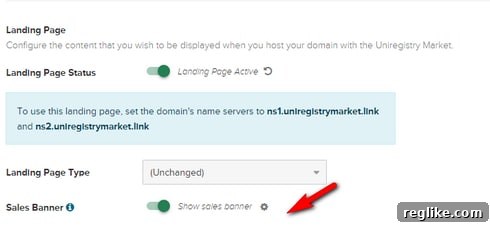
Maximizing Domain Sales: The Crucial Uniregistry ‘For Sale’ Banner You Can’t Afford to Miss
In the dynamic world of domain investing, every detail counts. Acquiring promising domain names, whether through expired auctions or direct purchases, is only the first step. The ultimate goal is often to sell these digital assets for a profit or to develop them into thriving online ventures. However, a common and often overlooked pitfall on platforms like Uniregistry Market can silently undermine your sales efforts: the absence of a visible “for sale” banner. Many investors, myself included, have discovered that merely adding domains to the marketplace and setting up a PPC (Pay-Per-Click) lander doesn’t automatically signal intent to sell to potential buyers. This seemingly minor oversight can have significant implications, transforming what you believe to be an active listing into a missed opportunity.
The Unseen Hurdle: Your Domain’s Silent Status
My journey through the Uniregistry Market platform recently brought a critical realization to light. Over the past few months, I’ve diligently added numerous domain names acquired from expired auctions, transferring them to Uniregistry, updating their nameservers, and configuring them with PPC landers. My assumption, a reasonable one shared by many, was that once these steps were completed, the domains were effectively listed for sale. “Done, right?” I thought. But as it turns out, this common understanding was fundamentally flawed, leading to domains quietly sitting without any clear indication of their availability for purchase.
The core of the issue lies in the fact that simply assigning a domain to Uniregistry Market, even when you explicitly select a PPC lander for monetization, does not inherently activate the prominent “for sale” banner at the top of the domain’s landing page. Without this vital visual cue, visitors who land on your domain have no intuitive or immediate way to understand that the domain is available for acquisition, let alone how to submit an offer. This omission creates a significant communication gap between a motivated seller and a potential buyer, effectively rendering your domain invisible in terms of its sales potential.
Diving Deeper into Uniregistry Market’s Functionality
Uniregistry Market is a robust platform designed to facilitate the buying, selling, and management of domain names. For domain investors, it offers a streamlined process to consolidate portfolios, set up monetization options, and ultimately list domains for sale. The initial workflow typically involves transferring domains or updating nameservers to point them to Uniregistry. Following this, investors often proceed to configure their domains within the market interface, choosing options like parking pages or PPC landers, which can generate passive income while the domain awaits its next owner.
The selection of a PPC lander is often seen as a dual-purpose strategy: monetize traffic and provide a temporary placeholder. It’s logical to assume that a platform built for domain sales would integrate the sales aspect directly into this setup. However, the current implementation disconnects these two crucial functions. A PPC lander, while generating ad revenue, does not inherently broadcast that the domain itself is an asset up for grabs. This architectural choice necessitates an additional, manual step that can easily be overlooked, especially when managing large portfolios of domains, turning what should be an efficient process into a potential bottleneck for sales.
The Critical Step: Activating Your “For Sale” Banner
To ensure your domains are truly visible to prospective buyers, the “for sale” banner must be explicitly added to each listing. This banner serves as an unequivocal signal, informing any visitor that the domain name they are viewing is available for purchase and providing a clear mechanism for them to initiate an offer. Without it, even the most captivating domain name might fail to attract interest, as visitors, uncertain of the domain’s status, might simply navigate away without exploring options to buy.
The importance of this banner cannot be overstated. It acts as a direct call to action, guiding interested parties toward making an inquiry or an offer. In a competitive market where first impressions are everything, a clear “for sale” message can be the decisive factor in securing a quick and profitable sale. Unfortunately, Uniregistry’s current system does not include a default option to automatically include this banner when a domain is first added or a PPC lander is selected. This means that after the initial setup, investors must proactively return to their listings to enable this crucial sales indicator.
A Step-by-Step Guide to Adding the “For Sale” Banner
Understanding this requirement is one thing; executing it efficiently is another. Fortunately, Uniregistry provides tools to manage this process, both for individual domains and in bulk. However, the key is to remember that this is an “added step” that needs to be consciously performed after your domains have been submitted to the marketplace.
Method 1: Individual Domain Management
For those managing a smaller portfolio, or when making a quick update to a specific domain, the individual management route is straightforward. After adding your domain to Uniregistry Market and setting up its nameservers and desired lander (like PPC), you’ll need to navigate back to that specific domain’s settings within your Uniregistry account. Look for options related to “For Sale” settings or “Marketplace Listing” details. Here, you should find a toggle or an explicit option to activate the “for sale” banner. Ensure this is enabled and save your changes. This process needs to be repeated for each domain that you wish to display the banner on.
Method 2: Leveraging Bulk Management Tools
For domain investors with extensive portfolios, applying the “for sale” banner one by one is simply not feasible. Thankfully, Uniregistry offers bulk management tools to streamline this process. To add the banner in bulk, you will need to:
- Log in to your Uniregistry account and navigate to your Market portfolio.
- Select multiple domains that you wish to apply the “for sale” banner to. There’s typically a checkbox next to each domain name.
- Once your domains are selected, look for a “Bulk Actions” or “Tools” menu, usually located at the top or bottom of the domain list.
- Within the bulk actions menu, search for an option related to “For Sale Banner,” “Listing Options,” or “Marketplace Features.”
- Select the option to enable the “for sale” banner for the chosen domains and confirm your selection.
You can find more detailed instructions and visual aids on using Uniregistry’s bulk management tools by visiting their help section: Uniregistry Market Bulk Management. Utilizing this feature can save countless hours and ensure that your entire portfolio is properly configured for sale, making sure no potential buyer is left wondering about a domain’s availability.
The Cost of Oversight: Why This Matters for Domain Investors
Forgetting to activate the “for sale” banner is more than just a minor inconvenience; it can lead to tangible financial losses and missed opportunities. Each day a domain sits without this crucial signal is a day it’s not truly marketed for sale. This means:
- Lost Revenue: Potential buyers might visit your domain, see a generic parking page or PPC lander, and assume the domain is not for sale, moving on to competitors. Each such visitor represents a lost lead and a potential sale foregone.
- Wasted Investment: You invest time and money in acquiring valuable domains. Failing to properly list them for sale means that investment is not working as hard as it could be, extending your holding period and delaying your return on investment.
- Diminished Portfolio Performance: A portfolio of domains, even premium ones, will underperform if they are not correctly presented to the market. Regular sales contribute to the overall health and liquidity of your domain investing business.
Ultimately, a domain investor’s goal is to convert acquired assets into profit. The “for sale” banner is a fundamental tool in achieving this goal, serving as the front-line communication to the market. Its absence is akin to opening a retail store but forgetting to put up a “Now Open” sign, leaving potential customers to guess your intentions.
Enhancing User Experience: A Call for Uniregistry
While the current system requires an extra step, the experience highlighted by this oversight points to a clear area for improvement within the Uniregistry platform. Making the “for sale” banner a default option, or at least a highly visible checkbox during the initial domain setup process, would significantly enhance the user experience for domain investors.
Such an integration would eliminate the need for an additional, easily forgotten step, saving users time and ensuring their domains are correctly marketed from day one. It would reduce friction in the selling process, potentially leading to more active listings and, consequently, more sales facilitated through the Uniregistry Market. This would benefit not only the users but also Uniregistry itself, as increased sales volume generally translates to increased platform activity and revenue. Incorporating a clear prompt or a default “for sale” banner option, especially when a domain is being pointed to the Uniregistry Market, would be a welcome enhancement for the entire domain investing community.
Furthermore, Uniregistry could consider a dashboard alert system for domains added to the market that do not have a “for sale” banner enabled, guiding users to take the necessary action. Proactive UX design in this area would empower investors to manage their portfolios more effectively and confidently.
Best Practices for Domain Portfolio Management
Given the current functionality, it’s essential for domain investors to adopt best practices to prevent this oversight from recurring. Consider implementing a rigorous checklist for every new domain added to your Uniregistry Market portfolio:
- Acquisition & Transfer: Secure the domain and initiate transfer to Uniregistry.
- Nameserver Update: Point nameservers to Uniregistry.
- Marketplace Addition: Add the domain to Uniregistry Market.
- Lander Configuration: Select a suitable monetization option (e.g., PPC lander).
- CRITICAL STEP: Activate “For Sale” Banner: Ensure the “for sale” banner is explicitly enabled (individually or in bulk).
- Price Setting: Set your desired asking price or indicate “Make Offer.”
- Regular Audits: Periodically review your portfolio to ensure all domains intended for sale have the banner enabled and are correctly configured.
Developing such a systematic approach ensures that every domain you acquire is primed for sale and actively communicating its availability to the market. Attention to these seemingly small details can significantly impact the overall success and profitability of your domain investing endeavors, turning potential oversights into proactive sales opportunities.
The Broader Context: Domain Investing and Monetization
The issue of the “for sale” banner highlights a broader principle in domain investing: effective monetization and sales strategies require continuous attention to detail. While PPC landers are an excellent way to generate passive income from traffic, they are a separate function from actively marketing a domain for sale. A comprehensive strategy involves both: maximizing immediate income through parking and ensuring clear communication for long-term asset liquidation.
Understanding the nuances of each platform you use is crucial. Whether it’s Uniregistry, Sedo, Dan.com, or others, each marketplace has its own specific steps for listing domains and signaling intent to sell. Familiarizing yourself with these processes and building them into your routine ensures that your domains are always working for you, either through direct monetization or by being perpetually available for acquisition by an interested party. The “for sale” banner, in essence, is the digital equivalent of a salesperson standing ready at the entrance, ensuring no potential buyer walks by unnoticed.
Conclusion: Don’t Let Your Domains Languish in Limbo
The discovery that adding domains to Uniregistry Market doesn’t automatically activate the “for sale” banner might come as a surprise to many, but it serves as a powerful reminder of the importance of vigilance in domain investing. This seemingly minor configuration detail can significantly impact your ability to attract offers and sell your domains effectively. Without that banner, your valuable digital assets sit in a silent limbo, invisible to the very buyers you hope to reach.
By understanding this critical distinction and incorporating the necessary steps into your domain management routine, you can ensure that every domain in your portfolio is correctly positioned for sale. Whether you manage a handful of domains or a vast collection, taking that extra moment to activate the “for sale” banner, either individually or using Uniregistry’s bulk tools, is a small effort with potentially massive returns. Don’t let your domains languish in the digital shadows; illuminate their availability and open the door to successful sales.