
My Comprehensive Review of Building a Website with Wix: Leveraging Wix Code for Dynamic Sites
Wix stands as a true titan in the competitive website builder market, empowering millions of users to create stunning online presences. With an impressive roster of 3.4 million paying customers, Wix has solidified its position as a go-to platform for individuals and businesses alike seeking to establish an online footprint without extensive coding knowledge. Beyond its user-friendly drag-and-drop interface, Wix distinguishes itself as a significant innovator, continuously pushing the boundaries of what a typical small business website can achieve, particularly with its powerful offering known as Wix Code.
The Website Building Journey with Wix: From ADI to Advanced Functionality
For most newcomers, the journey of creating a website with Wix begins seamlessly with its “Artificial Design Intelligence” (ADI) system. While the term “artificial intelligence” might be a piece of clever marketing-speak, this system is, in essence, an intelligent wizard that guides users through a series of questions. By inputting preferences such as the website’s topic, desired aesthetic (e.g., fancy or contemporary), and core functionalities, ADI quickly generates a foundational website tailored to those initial choices. It’s an incredibly intuitive and efficient launchpad, providing a solid structure that users can then customize further. While it might not possess the self-learning capabilities of true AI, Wix ADI undeniably simplifies the initial design phase, making website creation accessible to even the most novice users.
However, my primary objective with Wix extended beyond mere design aesthetics. Platforms like Squarespace and Wix itself are renowned for their ease of use in crafting visually appealing sites. My focus was squarely on evaluating the advanced capabilities of Wix Code. Specifically, I aimed to delve into its functionality concerning databases and dynamic pages. The overarching promise of Wix Code is its ability to simplify the creation of complex, database-driven websites, making sophisticated features attainable for users who might not have a strong programming background.
A Practical Case Study: Rebuilding Comptroller.com with Wix Code
To rigorously test the potential of Wix Code, I embarked on a significant project: revitalizing my long-neglected comptroller website. This site, which hadn’t seen an update in nearly a decade and was originally built using a now-defunct website builder, was in dire need of a complete overhaul. Despite its age, the site remarkably still attracted a consistent stream of traffic and generated approximately $20 per month through AdSense. The main challenge, however, was its outdated data, which diminished its overall utility and authority.
The Project: A Database-Driven State Guide
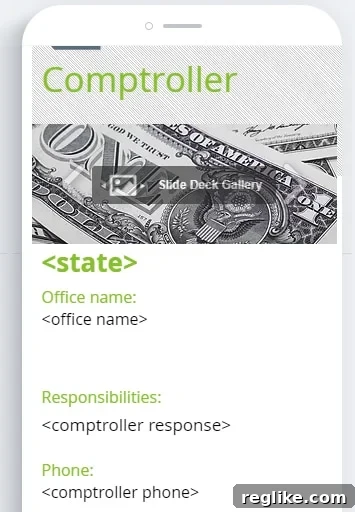
The comptroller website serves as a comprehensive, state-by-state guide to public officials or offices bearing the title of “Comptroller” in the United States. Each individual page on the site follows a highly consistent structure, presenting the same categories of information for each state. This inherent uniformity made it an ideal candidate for leveraging Wix’s database collections and dynamic page capabilities. For instance, consider a page dedicated to the Texas Comptroller. Such a page includes specific, repeatable data fields:
- Office name
- Responsibilities
- Phone
- Address
- Comptroller name
- Comptroller bio
Crucially, despite needing individual pages for 17 different states, the power of Wix Code meant I only had to design a single template. All the specific data for each state is then seamlessly pulled from a centralized database to automatically populate and generate each unique page, a significant time-saver compared to creating each page manually.
Database Setup and Integration
My initial step involved preparing the data. I compiled all the necessary information into a simple Excel spreadsheet, with columns corresponding to each of the aforementioned fields. This straightforward spreadsheet was then effortlessly imported into Wix, forming the backbone of the dynamic content. Wix Code provides a clear interface for managing these database collections, making the import process incredibly smooth and accessible.

Connecting Data to Design: The Template Challenge
The next phase involved connecting these database fields to the design template, a process that proved to be somewhat less intuitive than anticipated. My initial expectation was that I could simply insert “tokens” or placeholders directly into a single text box within the template. For example, if I wanted to display the office name, I imagined typing something like:
Office name:
This approach would have allowed me to create one comprehensive text element and dynamically pull all the relevant data for an entire content section directly from the database field named “office name.” Such a method would have significantly streamlined the design and layout process.
However, the reality was different. Instead of a token-based system within a single element, I had to insert numerous individual elements for each piece of data. This meant placing distinct text boxes or elements for each field label (e.g., “Office name:”) and separate elements for each corresponding data value (e.g., “Texas Comptroller of Public Accounts”). For a page with several data points, this translated into inserting approximately 12 separate elements for each page – six for the labels and six for the data. This approach introduced several noticeable drawbacks:
- Bloated HTML Structure: The drag-and-drop nature of individual elements, each with its own positioning data, unfortunately resulted in significantly bloated HTML on the dynamic pages. While Wix generally optimizes for clean code, the method required for data display led to an excess of div wrappers and styling declarations. This can negatively impact page load times, which is a critical factor for both user experience and search engine optimization (SEO). Search engines favor leaner, faster-loading pages, so this structural inefficiency was a concern.
- Mobile Responsiveness Headaches: The individual, independently positioned elements made mobile optimization a more tedious and complex task than it should have been. When data elements were placed side-by-side on a desktop layout, their arrangement often broke on smaller screens. I frequently found myself having to revisit the mobile editor to manually adjust and rearrange elements for each dynamic page, a time-consuming and repetitive process that detracted from the efficiency gains promised by dynamic content. A more intuitive system for responsive design, especially when dealing with multiple data fields, would greatly enhance the user experience for designers.
While Wix Code does offer the flexibility to add text and fields using JavaScript, this option immediately places the functionality beyond the reach of its target audience: users who typically possess only basic HTML knowledge and prefer a visual builder. Relying on JavaScript for core content integration undermines the platform’s promise of making advanced features accessible to non-coders.
Menu Navigation for Dynamic Pages: Room for Improvement
Another area that lacked intuitive design was the creation of menus linking to each of these dynamic pages. While it’s possible, the process wasn’t as straightforward as anticipated for a platform known for its user-friendliness. Ideally, a website builder designed for dynamic content should offer a streamlined way to automatically generate navigation menus based on database entries, providing a cohesive user experience.
In conclusion, while Wix Code holds immense potential for non-coders to create powerful, database-driven sites, the current implementation of linking data to design elements and menu creation could greatly benefit from further refinement and simplification to truly deliver on its promise of ease of use.
Enhancing Your Site: Wix Apps and Custom Integrations
Wix offers a robust App Market, where users can “install” various functionalities and integrations to extend their site’s capabilities. These apps cover a wide spectrum, from marketing tools to e-commerce solutions. My personal experience with the AdSense app, however, was somewhat underwhelming. The app provides a limited selection of ad sizes, and critically, it requires individual installation for each specific ad unit. This makes managing multiple ads across a site cumbersome. I encountered difficulties when attempting to place more than one ad on a single page using the app’s functionality. A more effective workaround for Google AdSense, particularly for those looking to implement Auto Ads, involves placing the provided AdSense code directly into the site’s header section, a feature designed primarily for analytics code but effective here. It’s worth noting, however, that the majority of users building websites on Wix, especially small businesses and portfolio creators, may not prioritize placing advertisements on their sites.
Beyond the pre-built apps, one of the most compelling aspects of Wix Code is its capacity to allow users to create their own custom applications and leverage various APIs. This opens up a world of possibilities for developers and advanced users who need highly specific integrations or unique functionalities not available off-the-shelf. This extensibility transforms Wix from a simple website builder into a powerful development platform for those willing to dive into custom code.
Wix Pricing and Plans: Choosing the Right Package
Wix provides a range of flexible pricing plans designed to cater to different needs and budgets. A basic plan, featuring a Wix subdomain and branding, is available completely free of charge, offering an excellent starting point for those looking to test the waters or build a personal project. However, to connect a custom domain and unlock more advanced features, investing in one of their premium packages is necessary.
Understanding Wix Premium Plans:
- Connect Domain – $7.50 a month or $60.00 a year: This entry-level premium plan allows users to connect their own custom domain, elevating their professional online presence.
- Combo – $14.50 a month or $132 a year: A popular choice, the Combo plan removes all Wix branding from your site and typically includes a free domain for the first year on an annual subscription.
- Unlimited – $17.50 a month or $168 a year: Ideal for larger websites or those with more media, this plan offers additional apps and increased bandwidth, ensuring smooth performance even with high traffic.
- eCommerce $21.50 a month or $204 a year: Specifically tailored for online stores, this plan provides all the necessary tools for selling products and managing an e-commerce business, including secure payment processing and inventory management.
- VIP – $30 a month or $300 a year: The top-tier plan, VIP offers priority customer support and enhanced features, catering to users who require the highest level of service and advanced capabilities.
Similar to Squarespace, Wix has also forged a partnership with Google to offer G Suite for professional email services, available as an additional charge. This integration allows businesses to maintain a consistent brand identity across their website and email communications.
Publishing and Promotion: Wix’s SEO Prowess
One of Wix’s most commendable strengths lies in its commitment to search engine optimization (SEO), particularly through its strong relationship with Google. The company deserves high marks on the SEO front, providing robust tools and integrations that empower users to improve their website’s visibility in search results. Like Squarespace, Wix offers seamless integration with Google Search Console, a vital tool for monitoring a site’s performance in Google Search. However, Wix’s implementation of this integration feels particularly user-friendly and accessible, especially for small business owners or individuals who may not have a deep understanding of complex SEO principles or the intricacies of Search Console.
Wix goes a step further by promising instant indexing of new sites in Google. While rapid indexing can often be achieved manually through Google Search Console, this automated and integrated feature is incredibly valuable for small to medium-sized businesses (SMBs) who want their content discovered quickly without having to navigate technical SEO processes. The platform even celebrates your milestones, sending an encouraging email notification when your site receives its very first click from Google Search. This level of engagement highlights Wix’s dedication to supporting its users’ success in the online landscape.

Furthermore, Wix provides a comprehensive, step-by-step checklist to guide users through optimizing all their website pages. This checklist covers essential white-hat SEO practices, such as optimizing meta titles and descriptions, ensuring proper heading structures, and improving content relevance. This proactive guidance ensures that even beginners can implement fundamental SEO strategies to enhance their site’s search engine ranking.
Concluding Thoughts: Is Wix the Right Website Builder for You?
In summary, Wix stands out as a powerful and versatile website builder that extends far beyond typical static sites, primarily through its innovative Wix Code functionality. While my experience highlighted that Wix Code could benefit from some improvements to make the process of connecting databases to dynamic pages more intuitive and reduce HTML bloat, its core capabilities for creating advanced, data-driven websites are undeniably strong.
For the typical user, including small businesses, entrepreneurs, and creatives looking for an accessible yet robust online presence, Wix offers an exceptional platform. Its user-friendly ADI system, extensive app market, and impressive SEO tools make it an excellent choice for those who prioritize ease of use and effective online visibility. For those with slightly more ambitious projects requiring dynamic content or custom integrations, Wix Code provides the necessary tools, albeit with a steeper learning curve in certain aspects of its implementation. Ultimately, Wix continues to evolve, making sophisticated website creation increasingly attainable for a broad audience, solidifying its reputation as a leading solution in the website building industry.