
Maximize Your Domain Sales: A Step-by-Step Guide to Migrating Domains from GoDaddy to Afternic Premium
In the dynamic and competitive world of domain investing, maximizing the visibility of your assets and optimizing your sales channels are not merely advantages, but necessities. For years, domain investors have utilized platforms like GoDaddy Premium Listings to facilitate the sale of their valuable domain names. However, a pivotal shift occurred with the full integration of GoDaddy and the Afternic Premium network, introducing a robust “Fast Transfer” option. This powerful collaboration presents an unprecedented opportunity for domain owners to significantly broaden their domain’s market reach and substantially reduce sales commissions.
This comprehensive guide is meticulously crafted to walk you through each essential step required to seamlessly transition your domain names from GoDaddy Premium Listings to Afternic Premium. If your current strategy involves listing domains exclusively on GoDaddy, embracing this switch is a paramount strategic decision. It promises not only enhanced distribution across a vast network but also a more favorable commission structure, decreasing from a standard 30% to a far more attractive 20%. While the migration process involves several steps and is not a one-click solution, the long-term benefits in terms of increased sales and profitability far outweigh the initial effort. By following this detailed tutorial, you can unlock the full potential and value of your domain portfolio.
For those interested in a deeper dive into the strategic advantages and mechanics of sales distribution through Afternic and GoDaddy, we highly recommend exploring this informative free report. It provides valuable insights into how these platforms can revolutionize your domain selling approach.
Why Seamlessly Transition to Afternic Premium? Key Advantages for Domain Investors
The strategic integration of GoDaddy with Afternic Premium transcends a simple technical update; it represents a significant market advantage for savvy domain sellers. Understanding the core benefits of migrating your listings is crucial for making an informed decision:
- Unrivaled Expanded Reach and Global Exposure: Afternic’s Premium network is a colossal marketplace, boasting distribution across more than 100 prominent domain registrars and aftermarket sales channels globally. This extensive network includes industry giants such as GoDaddy, Sedo, Enom, and many others. This ensures your domain names are exposed to an exponentially larger and more diverse audience of potential buyers than they would be if listed solely on GoDaddy. Increased exposure directly translates to a higher probability of sale.
- Substantial Reduction in Commission Rates: Perhaps the most immediately appealing and tangible benefit is the significant reduction in sales commission. By choosing to list your domains through Afternic Premium, you will incur a competitive commission rate of 20% per sale. This is a substantial saving compared to GoDaddy Premium Listings’ 30% rate. Over time, especially with a growing portfolio or higher-value sales, these savings can dramatically boost your overall profitability and return on investment.
- Accelerated Sales with “Fast Transfer” Technology: The innovative “Fast Transfer” technology is a game-changer. It enables the instant or near-instant transfer of domains between GoDaddy and Afternic buyers. This eliminates the often cumbersome and time-consuming manual transfer process that traditionally characterizes domain sales, which can sometimes take days. The result is quicker sales, a more streamlined transaction experience for both buyer and seller, and faster access to your funds.
- Centralized and Efficient Portfolio Management: For domain investors who manage a sprawling portfolio with assets potentially spread across various platforms, Afternic offers a much-needed centralized hub. This consolidation simplifies the administration of your premium listings, allowing for more efficient management, pricing adjustments, and tracking of your entire domain inventory from a single, intuitive dashboard.
Step 1: Export Your Current GoDaddy Premium Listing Data
The foundational step in initiating your domain migration is the precise and thorough collection of your existing premium listing information directly from GoDaddy. This exported data will serve as the master record for transferring your domain names and their meticulously set pricing to Afternic. Ensuring absolute accuracy at this preliminary stage is paramount, as it will proactively prevent potential discrepancies, save considerable time, and mitigate any unforeseen complications later in the process.
To commence the export process, please follow these detailed instructions:
- Log In to Your GoDaddy Account: Navigate to the GoDaddy website and securely log in using your established account credentials.
- Access the Domain Dashboard: Once authenticated, proceed directly to your main domain management area, typically referred to as the “Domain Dashboard” or “My Domains.”
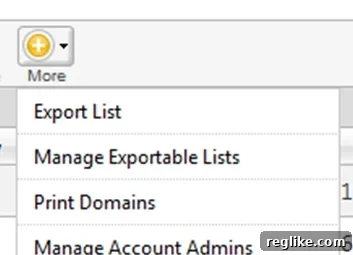
- Locate the “More” Icon and Export Option: On the upper-right hand corner of your domain dashboard interface, you will typically find a “More” icon. This icon is commonly represented by three horizontal lines, three vertical dots, or a cogwheel symbol. Click on this icon to reveal a dropdown menu.
- Select “Export List”: From the dropdown menu that appears, carefully choose the “Export List” option. This action will seamlessly launch the GoDaddy export wizard, guiding you through the subsequent steps.
You will then be prompted to configure specific settings for your export:
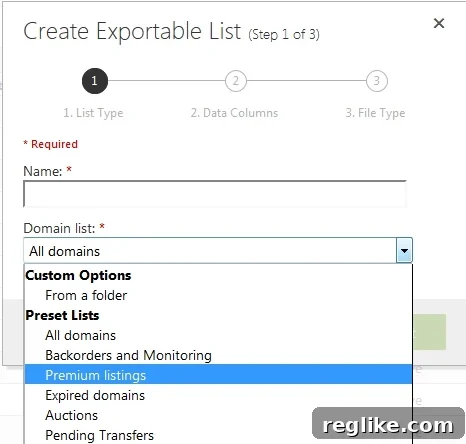
- Name Your Export List for Easy Identification: In the subsequent dialog box, it is advisable to provide a clear and descriptive name for your exported list. A common practice is to include the date (e.g., “GoDaddy Premium Listings Export 2024-03-15”) for future reference and organization.
- Crucially Select “Premium Listings” as the List Type: From the provided dropdown menu, it is absolutely imperative to select “Premium Listings.” This ensures that your export specifically captures the domains that are currently configured for premium sale, excluding any other types of domain lists you might have.
- Include “List Price (USD)” in Your Export: On the following screen, locate and check the box labeled “List Price (USD).” This selection is critically important as it will export the exact ‘Buy Now’ prices you have assigned to your domains. These prices will need to be accurately replicated when you list these domains on Afternic. Once confirmed, click “Next.”
- Choose Export Format (CSV is Highly Recommended): The final prompt will present you with various options for your export file format. The CSV (Comma Separated Values) option is overwhelmingly recommended. This format allows for effortless opening, viewing, and manipulation of your data in popular spreadsheet applications such as Microsoft Excel, Google Sheets, or Apple Numbers, making the subsequent steps much simpler.
After a brief processing interval, which may vary in duration depending on the size of your domain portfolio, you will be prompted to download a comprehensive list of all your GoDaddy Premium Listings, complete with their current ‘Buy Now’ prices. Take the time to meticulously review this spreadsheet to confirm that all data is accurate, complete, and correctly formatted before proceeding to the next pivotal stage of the migration process.
Step 2: Adding Your Domain Portfolio to Afternic
With your precisely exported GoDaddy premium listings data now readily available, the next vital phase involves the efficient transfer and listing of these domains within your Afternic portfolio. The most effective method for this step largely depends on the sheer volume and scale of the domain names you intend to manage.
To commence, securely log into your Afternic account. Once you have gained access, navigate to the “Portfolio” menu, typically located on the left-hand side of the interface, and subsequently select the “Add Domains” option.
For Managing Smaller Domain Portfolios (Manual Entry):
If your domain portfolio consists of a limited number of assets (generally considered to be under 20-30 domains), the most direct and least complicated approach is to manually copy and paste each domain name directly into the designated text box, usually found on the left side of the “Add Domains” page. Following the entry of your domain names, Afternic’s intuitive guided listing process will then prompt you to set individual ‘Buy Now’ prices and configure any other specific listing details for each domain.
For Managing Larger Domain Portfolios (Spreadsheet Upload – The Recommended Method):
For domain investors overseeing a substantial number of assets, leveraging Afternic’s “Upload a Spreadsheet” option, strategically positioned on the right-hand side of the page, is by far the most superior and efficient method. This approach significantly minimizes the potential for manual input errors and dramatically accelerates the entire listing process, saving considerable time and effort.
A. For Domains Not Previously Listed on Afternic (New Listings):
If these specific domains are entirely new additions to your Afternic portfolio, adhere to these precise steps:
- Download the Official Blank Spreadsheet Template: Afternic provides a standardized blank spreadsheet template. Downloading this template is crucial as it ensures all necessary data fields are correctly formatted and positioned for seamless upload.
- Populate with Your GoDaddy Export Data: Open both the blank Afternic spreadsheet you just downloaded and your previously exported GoDaddy Premium Listings CSV file. Carefully copy the domain names from your GoDaddy export and accurately paste them into the designated column within the Afternic spreadsheet (this column is typically labeled “Domain Name”).
- Input Corresponding ‘Buy Now’ Prices: This is a critical action. Copy the ‘List Price (USD)’ values from your GoDaddy export and paste these precise values into the “Buy Now Price” column within your Afternic spreadsheet. Maintaining absolute consistency in pricing during this transition is vital for a smooth and accurate listing.
- Set the Listing Status to “3”: Locate column K (or the equivalent column specifically labeled “Listing Status”) in the Afternic spreadsheet. For every domain you wish to activate for immediate sale through Afternic Premium, change the corresponding value in this column to “3”. This numerical designation unequivocally marks the domains as active premium listings ready for distribution.
- Upload Your Prepared Spreadsheet: Once you have meticulously ensured all data is accurately entered, formatted, and thoroughly reviewed, save your Afternic spreadsheet. Then, proceed to upload it back through the “Upload a Spreadsheet” interface on Afternic’s platform.
B. For Updating Existing Afternic Listings (Domains Already in Your Afternic Portfolio):
This particular scenario necessitates a slightly nuanced approach, as your goal is to merge or update new information with data that already exists within your Afternic account. It’s important to note that Afternic’s user interface generally does not permit direct download of your *entire* existing portfolio spreadsheet for accounts managing beyond a very small handful of domains. Consequently, you will most likely need to take the following actions:
- Proactively Contact Afternic Customer Service: It is essential to reach out directly to Afternic’s dedicated support team. Request a complete export of your existing domain portfolio spreadsheet. Be prepared to provide your account details and any necessary verification information to facilitate this request.
- Receive and Meticulously Review the Spreadsheet: Once you receive your comprehensive account spreadsheet from Afternic, open it. This document will contain all your current Afternic listings, providing a snapshot of your existing portfolio.
- Add/Edit Domains and Update Prices as Needed:
- For newly migrated domains from GoDaddy: Add these as new, distinct rows to this Afternic spreadsheet. Follow the identical steps as outlined for new listings (i.e., accurately copy the domain name and its corresponding ‘Buy Now’ price).
- For domains that are already present on Afternic but were also previously on GoDaddy Premium: Carefully update their ‘Buy Now’ prices within the Afternic spreadsheet to precisely match your GoDaddy export, if any discrepancies exist.
- Confirm “Listing Status” to “3”: For all domains you intend to actively sell via Afternic Premium, rigorously ensure that the “Listing Status” in column K (or its equivalent) is consistently set to “3”.
- Upload the Comprehensive, Updated Spreadsheet: After meticulously verifying all modifications and additions, save your fully updated spreadsheet. Proceed to upload it back through the Afternic interface. Afternic’s sophisticated system is engineered to expertly process these updates, seamlessly integrating new domains and precisely modifying existing ones based on the data contained within your uploaded file.
It is critically important to thoroughly double-check all entries, with particular attention to domain names and their associated prices, before finalizing the upload. This diligence will effectively prevent any errors that could potentially impact your sales or listing accuracy.
Step 3: Opting-In to GoDaddy’s Fast Transfer Integration
Following the successful addition of your domains to Afternic and the precise configuration of their sales prices, the subsequent and equally critical step is to officially authorize Afternic’s “Fast Transfer” capability directly with GoDaddy. This seamless integration is the technological backbone that facilitates instant domain transfers and activates your domain listings across the entire Afternic network, significantly enhancing your selling efficiency. The initial trigger for this authorization process will be communicated to you via email.
You should expect to receive two distinct email notifications pertinent to this authorization:
- Afternic’s Preliminary Notification: The first email will originate from Afternic itself. This communication will serve as an informative alert, notifying you that your domain listings require explicit authorization from GoDaddy in order to become fully active and eligible for the Fast Transfer service. Consider this email a heads-up, preparing you for the next, more decisive communication.
- GoDaddy’s Official Authorization Request: The second, and arguably most crucial, email will be dispatched directly from GoDaddy. This email serves as an explicit request for your authorization, enabling the Fast Transfer functionality for the specific domains you have listed on Afternic.
Important Note Regarding GoDaddy Email Delivery Timelines: Based on historical experience, the GoDaddy authorization email is frequently dispatched in batches and may not arrive instantaneously. The typical delay can vary considerably, ranging from as little as an hour to potentially a full day or even longer. It is imperative to exercise patience during this waiting period. There is no need for immediate concern if the email does not appear in your inbox immediately after you complete your Afternic upload.
The subject line of this vital GoDaddy email will generally be phrased as “Authorize your domain listings” or a very similar descriptive title. Critically, it will contain a unique, embedded link that you must absolutely click to successfully complete the authorization process.
Detailed Steps for Completing the Fast Transfer Authorization:
While minor occasional system glitches can occur, the authorization process is typically designed to be straightforward and user-friendly. Here’s the ideal workflow you should expect:
- Click the Authorization Link: Carefully locate the GoDaddy authorization email in your inbox and click on the embedded link. This link is specifically generated for your account and the particular batch of domains awaiting authorization.
- Log In to Your GoDaddy Account Securely: You will be automatically redirected to a secure GoDaddy webpage. Here, you will be prompted to log in using your established GoDaddy account credentials. This step is a vital security measure, verifying your identity and confirming your rightful ownership of the domains in question.
- Thoroughly Confirm Authorization Details: After successfully logging in, you will be presented with a dedicated confirmation page. This page will meticulously detail all the domains that are slated to be authorized for Fast Transfer via the Afternic network. It is crucial to carefully review this list to ensure it precisely matches your expectations and the domains you intend to authorize.
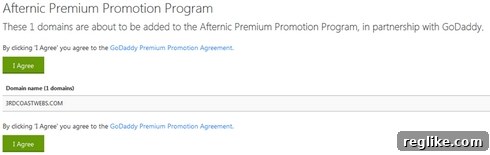
- Receive Final Confirmation of Listing: Upon your successful confirmation on the previous page, you will receive a definitive message. This message will explicitly state that your domains are now successfully listed on Afternic and are fully enabled for the Fast Transfer service. This is your clear indication that the integration between GoDaddy and Afternic for your domains is complete and operational.
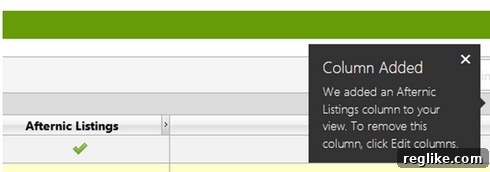
Should you encounter any unexpected issues, such as the authorization link not functioning correctly or the authorization process inexplicably failing, it is advisable to wait for a short period and attempt the process again. If persistent problems arise, the most logical and effective next step would be to promptly contact the dedicated support teams at either Afternic or GoDaddy for expert assistance and troubleshooting.
Step 4: Deleting Your Redundant GoDaddy Premium Listings
This particular step is not merely important but absolutely critical to fully realize the strategic and financial benefits of your migration to Afternic Premium. Once your domain names have been successfully onboarded, actively listed on Afternic, and configured with Fast Transfer capabilities, it is imperative to meticulously remove their preceding listings from GoDaddy Premium. Neglecting this crucial action can lead to several undesirable outcomes that diminish the advantages of your strategic move:
- Incurring Higher Commission Rates Unnecessarily: If a particular domain is simultaneously listed on both GoDaddy Premium and Afternic Premium, and a sale for that domain originates directly from the GoDaddy.com marketplace, the GoDaddy Premium listing will, by default, take precedence. This means that despite your migration efforts, you would still be subjected to the higher 30% commission rate, effectively negating one of the primary financial incentives for switching to Afternic.
- Creating Listing Conflicts and Market Confusion: Maintaining duplicate listings across two separate premium platforms can invariably lead to confusion for potential buyers and internal system conflicts. This might manifest as discrepancies in displayed pricing, availability issues, or a generally less efficient and transparent sales process.
However, before you proceed with any deletion, it is absolutely paramount to rigorously verify that all your target domains have unequivocally completed the entire Afternic integration process and are visibly showing as active, saleable listings on Afternic’s platform. Under no circumstances should you delete your GoDaddy listings until you have received explicit confirmation of their successful migration and activation on Afternic.
To accurately delete your outdated GoDaddy Premium Listings, please follow these instructions:
- Navigate to Your Premium Listings Section: Securely log into your GoDaddy account and proceed directly to your main domain control center. Within this interface, locate the specific section dedicated to “Premium Listings.”
- Carefully Select Domains for Deletion: On the Premium Listings page, you will be presented with an organized list of your domains. Meticulously check the selection box situated next to each individual domain that you have definitively and successfully migrated to Afternic Premium.
- Initiate the Deletion Process: Once all the appropriate domains have been selected, locate and click on the option typically labeled “Delete Listings” or a similarly worded command. Be prepared to confirm your decision when prompted by the system, as this action is irreversible for the selected listings.
Crucial Consideration: Understanding the 60-Day Transfer Restriction
It is critically important for all domain investors to be acutely aware of a specific policy that may impact certain domains within their portfolio: Domain names must remain registered with GoDaddy for a minimum, uninterrupted period of 60 days before they become eligible to opt-in for the Afternic Fast Transfer service. This mandatory policy is a stringent requirement implemented to ensure compliance with ICANN’s universally recognized transfer restrictions. These regulations are designed with the primary objective of preventing unauthorized domain transfers and upholding the stability and integrity of domain ownership. Therefore, if you have recently acquired or transferred domains into your GoDaddy account, these particular assets will regrettably need to temporarily remain within your GoDaddy Premium Listings until the full 60-day holding period has successfully elapsed. Once these domains fulfill this eligibility criterion, you can then confidently proceed with their migration to Afternic. Always exercise due diligence by reviewing the status and eligibility of your domains thoroughly to ensure a smooth and compliant transition.
Step 5: Sit Back, Relax, and Strategically Sell More Domains
Congratulations! By diligently following each of the preceding steps, you have successfully and strategically migrated your valuable domain names to the expansive Afternic Premium network, fully activating the highly efficient Fast Transfer capabilities through your GoDaddy account. You have now expertly positioned your domain portfolio for unparalleled enhanced visibility, significantly faster sales cycles, and a much more advantageous, reduced commission rate. At this stage, the rewarding part begins: observing increased market activity, engaging with potential buyers, and ultimately closing more profitable domain sales.
Understanding What Happens Next:
- Expansive Global Market Exposure: Your domains are now being actively and dynamically marketed across Afternic’s truly extensive network, which comprises over 100 distinguished partner registrars and premier marketplaces worldwide. This formidable network includes major industry players such as GoDaddy, Sedo, Enom, and a multitude of other high-traffic platforms, dramatically increasing the number of qualified eyeballs on your carefully selected listings.
- The Invaluable Instant Transfer Advantage: When a buyer successfully purchases one of your Fast Transfer-enabled domains, the subsequent transfer process is typically executed with remarkable speed, often instantaneously. This rapid fulfillment mechanism not only significantly enhances overall buyer satisfaction but also accelerates your payout, allowing you quicker access to your earned revenue.
- Streamlined Portfolio Management and Optimization: You retain complete control and flexibility to continually manage your listings, make necessary price adjustments, and track your sales performance directly from your intuitive Afternic account dashboard. It is highly advisable to consistently monitor current market trends and buyer demand to dynamically optimize your pricing strategy and maintain competitive advantage.
Best Practices for Sustained Success and Maximizing Your Domain Sales:
- Maintain Highly Competitive Pricing: While the overarching objective is to sell your domains, ensuring your asking prices are acutely competitive within the prevailing market conditions is absolutely crucial. Regularly conduct research on comparable domain sales and be prepared to adjust your ‘Buy Now’ prices dynamically as market conditions and demand fluctuate.
- Craft Professional and Engaging Listings: Although Afternic manages a significant portion of the listing presentation, for specific high-value or highly brandable domains, consider taking the extra step to add concise, compelling descriptions. If the platform allows, highlight unique selling points, potential use cases, or any distinctive features that enhance the domain’s appeal to potential buyers.
- Proactively Monitor Your Afternic Account: Develop a routine of regularly logging into your Afternic account. This allows you to diligently check for new inquiries, incoming offers, and critical sales notifications. Prompt and professional responses to legitimate offers can often be the decisive factor in swiftly closing a deal.
- Stay Consistently Informed and Adaptable: Make it a practice to stay abreast of the latest industry news, significant domain market trends, and any official updates or announcements from Afternic or GoDaddy. Staying informed will enable you to proactively adapt your selling strategy and maintain a competitive edge in the evolving domain aftermarket.
By effectively leveraging the robust and powerful integration between GoDaddy and Afternic, you have taken a monumental and strategic step towards completely optimizing your domain investment strategy. Embrace the benefits of unparalleled broader market reach, significantly quicker sales cycles, and ultimately, more profitable transactions from your valued domain portfolio!