
Mastering GoDaddy API: A Comprehensive Guide to Retrieving Your Domain List
This tutorial, inspired by insights from Alvin Brown, offers a practical walkthrough on leveraging the GoDaddy API to programmatically fetch a detailed list of domains from your GoDaddy account. If you’re looking to automate tasks, integrate domain data into custom applications, or simply gain more control over your digital assets, understanding the GoDaddy API is a game-changer.
Many users are familiar with GoDaddy’s intuitive Domain Manager interface for handling their domain portfolio. However, for those with extensive domain holdings or specific operational needs, relying solely on manual interfaces can become time-consuming and inefficient. This is precisely where the GoDaddy Application Programming Interface (API) shines, offering unparalleled opportunities to streamline domain management. Throughout this guide, we’ll demystify the process and demonstrate how the API provides capabilities far beyond what a traditional user interface can offer for automation and custom development.
Why Choose GoDaddy API for Domain Management?
While GoDaddy has continuously refined its user experience over the years, the API opens up a universe of possibilities for advanced users and developers. It allows for programmatic interaction with various aspects of your GoDaddy account, transforming routine tasks into automated workflows. The core advantage lies in its ability to enable bulk operations, real-time data retrieval, and seamless integration with other systems you might be using. Imagine having a custom dashboard that displays specific domain metrics, or a script that automatically updates DNS records across multiple domains – these are all within reach with the API.
The GoDaddy API provides access to a wide array of services, each designed to manage specific components of your account:
- Abuse API: For managing abuse complaints.
- Aftermarket API: For interacting with domain aftermarket services.
- Agreements API: Accessing and managing legal agreements.
- Certificates API: For managing SSL certificates.
- Countries API: Retrieving country data.
- Domains API: The primary interface for domain registration and management.
- Orders API: For handling order-related operations.
- Shoppers API: Managing shopper account details.
- Subscriptions API: For managing recurring subscriptions.
In this specific tutorial, our focus will be squarely on the powerful Domains API section. More precisely, we will delve into the GET Domains method. This method is specifically designed to efficiently “Retrieve a list of Domains for the specified Shopper,” making it an essential tool for any domain portfolio manager or developer.
With a little development effort, integrating the Domains API with a custom landing page and a database can form the foundation of a sophisticated domain inquiry tracking system, an automated renewal reminder service, or at the very least, a robust, programmatic backup of your entire domain portfolio. The possibilities are truly extensive once you harness the power of direct API interaction.
Getting Started: Essential Prerequisites
Before you embark on this journey into the GoDaddy API, ensure you have the following essential components in place. Having these prerequisites ready will significantly smooth out your development process:
- A Web Host Environment or Localhost Environment: A server environment capable of executing PHP scripts is crucial. We highly recommend a Linux hosting environment for its widespread compatibility and robust performance, though a local development setup (like XAMPP or MAMP) will also suffice.
- A GoDaddy Developer Account: Access to the API requires a developer account. If you don’t already have one, you can easily sign up here. This account is separate from your regular GoDaddy customer account and provides the necessary tools and documentation.
- GoDaddy API Credentials: Once your developer account is set up, you’ll need to generate a unique API Key and Secret. These credentials act as your authentication tokens for making API requests. Detailed instructions on how to obtain these keys can be found on the GoDaddy developer portal. Keep these credentials secure, as they grant access to your account data.
- A Text Editor: Any code editor will work, such as Notepad++, Sublime Text, VS Code, Atom, or even a basic text editor like Notepad. Choose one you are comfortable with for writing and editing your PHP code.
Should you encounter any difficulties during the setup or login process for your GoDaddy Developer account, a helpful visual guide is available. You can watch this video for a step-by-step resolution to common issues.
Furthermore, familiarity with making HTTP requests using PHP cURL is fundamental for interacting with any RESTful API, including GoDaddy’s. If you’re new to cURL in PHP, we highly recommend reviewing this foundational tutorial: Getting Started With GoDaddy API Using PHP. This resource will equip you with the necessary understanding to execute API calls effectively.
To begin our practical implementation, open your preferred text editor. Create a new PHP file and save it as domains.php. This file will house all the code necessary for our domain retrieval script.
Once domains.php is created, the very first step within your script will be to define a variable named $domains and assign it the result of a function we’ll soon define: getDomains();. This sets up the structure for calling our main API interaction logic:
$domains = getDomains();
Implementing the `getDomains` Function to Retrieve Your Domain List
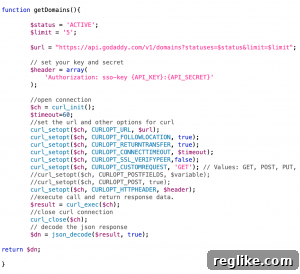
To efficiently retrieve a list of domains using the GoDaddy API, we’ll encapsulate the API call logic within a custom PHP function named getDomains. Functions are an excellent way to organize code, making it modular, reusable, and significantly easier to manage and debug. This approach promotes clean code practices and portability.
The getDomains function will serve as the core of our script. Internally, it will utilize PHP’s cURL extension to construct and execute the HTTP request to the GoDaddy API. This request, when successful, will interact with the designated API endpoint to retrieve a comprehensive list of domains associated with your GoDaddy account.
While this tutorial won’t cover every intricate detail of setting up and executing a GoDaddy API call using PHP cURL from scratch, there’s no need to worry if you’re not fully acquainted with it. A dedicated resource, Getting Started With GoDaddy API Using PHP, provides a thorough introduction and guides you through the process, ensuring you’re well-prepared to understand the underlying mechanics.
For the specifics of our getDomains function, it’s beneficial to consult the official Domains API documentation on the GoDaddy Developer Portal. Specifically, we’re interested in the “list” method under the /v1/domains endpoint, which is designed for retrieving domain collections.
The Domains API list method offers several parameters that act as powerful filters, allowing you to tailor the domain list retrieved from your GoDaddy account. Understanding these parameters is key to getting precisely the data you need:
- X-Shopper-Id: This is a crucial parameter that identifies the shopper account from which domains are being retrieved. Importantly, while it designates the shopper, it is not passed as a traditional query parameter in the URL. Instead, the
X-Shopper-Idis inherently linked to the authentication or authorization process, typically via the API Key and Secret, which implicitly identifies the shopper making the request. - statuses: This parameter allows you to filter the returned domains based on their current status. With over 224 possible values (e.g.,
ACTIVE,PENDING,EXPIRED,DELETED), you can refine your results significantly. For this tutorial, we will explicitly set the value to ‘ACTIVE’ to retrieve only currently active domains. Refer to the official documentation for a complete list of all available status values. - statusGroupsOnly: Use this parameter to return domains that fall into predefined status groups. There are five distinct values for this field: INACTIVE, PRE_REGISTRATION, REDEMPTION, RENEWABLE, VERIFICATION_ICANN, and VISIBLE. These groups provide a broader classification than individual statuses. For the scope of this tutorial, we will not set a value for this parameter, meaning all domains (subject to other filters) will be considered regardless of their group status.
- limit: This parameter controls the maximum number of domains the API will return in a single response. It’s excellent for pagination or for retrieving a small sample set. For our demonstration, we will use ‘5’ (or any other small integer) as the value. To retrieve all domains in your account, you can either omit this parameter entirely or choose not to set a specific value, allowing the API to return its default or maximum allowed number of domains per request (often requiring subsequent requests for full pagination).
- marker: The
markerparameter is invaluable for paginating through large domain portfolios. If your account contains hundreds or thousands of domains, you can use this parameter to offset your results, effectively returning domains that come *after* a specified domain name in an ordered list. This enables you to fetch results in batches without re-fetching previously seen data. For simplicity in this initial tutorial, we will not set a value for this parameter. - includes: This parameter allows you to include optional, additional details about the domains in the API response. The available values are authCode, contacts, and nameServers. Including these details can make your domain list much richer, providing immediate access to critical information like transfer authorization codes or current name server configurations. For this tutorial, we will not set a value for this parameter to keep the initial response concise.
- modifiedDate: This parameter enables filtering of results to only include domains that have been modified since a specified date and time. This is particularly useful for tracking recent changes or for synchronization processes. The date should typically be in ISO 8601 format. For our current demonstration, we will not set a value for this parameter.
Now that we’ve identified the key parameter options, it’s time to define and assign values to them within our PHP script. For our example, we’ll set the statuses and limit parameters using respective PHP variables:
$status = 'Active';
$limit = '5';
Next, we construct the API request URL. Drawing from GoDaddy’s API Documentation, define a $url variable. This variable will hold the base API URL to retrieve domains, with our $status and $limit variables dynamically appended as query parameters. This forms the specific request we’ll send to the GoDaddy server:
$url = "https://api.godaddy.com/v1/domains?statuses=$status&limit=$limit";
Crucially, before making any API calls, you need to authenticate your request. This is done by replacing the placeholder values {API_KEY} and {API_SECRET} with your actual GoDaddy API credentials. These unique keys are generated from your GoDaddy Developer account and are essential for authorizing all your API interactions. You can generate your API key and secret here. Always handle these credentials with extreme care; in a production environment, it’s best practice to store them securely, perhaps in environment variables, rather than hardcoding them directly into your script.
Once your API key and secret credentials are correctly integrated into your script’s authentication headers (which cURL handles for us implicitly when configured correctly), the API call can be initiated. This call will request and retrieve the filtered list of active domains associated with your GoDaddy account.
The actual API request is made using PHP’s built-incURLmethod. The getDomains function, upon successful execution, will return a decoded JSON response object. This object, typically stored in a variable (e.g., $dn or $response) at the end of the function, will contain your requested list of domains and their associated attributes.
Robust Error Checking and Efficient Domain Response Parsing
While the excitement of retrieving domain data is understandable, incorporating robust error checking into your API integration is not just good practice—it’s essential for building reliable applications. Even if you don’t anticipate issues, unexpected network problems, invalid credentials, or API rate limits can occur. To handle such scenarios gracefully, we implement a simple yet effective if else statement.
This conditional statement checks the response received from the API, specifically looking at the $domains variable (which holds the output of our getDomains function). If the $domains variable contains an object with a key named code, it signifies that an error of some kind occurred during the instantiation or execution of the GoDaddy API call request. Common error codes might indicate authentication failures (401), invalid requests (400), or server-side issues (500).
Within the if statement block, you can then proceed to parse the error response data. Typically, error objects include a message object key which contains a human-readable description of the error. You can use PHP functions like json_decode (if the response is JSON) and access the message property to obtain and display this user-friendly error message. For a more detailed understanding and definition of each potential error code and its context, always refer to GoDaddy’s API Documentation: Domains API Error Explanations.
Conversely, within the else statement block, assuming no errors were detected, we can confidently proceed to parse and display the successful response data. The API returns a wealth of information for each domain. You can iterate through the response object (which is usually an array of domain objects) and access the following attributes for each individual domain:
- createdAt: The timestamp when the domain was originally registered.
- domain: The actual domain name (e.g., example.com).
- domainId: A unique identifier assigned by GoDaddy to this specific domain registration.
- expirationProtected: A boolean indicating if the domain has expiration protection enabled.
- expires: The exact date and time when the domain registration is set to expire.
- holdRegistrar: A boolean indicating if the domain is currently on registrar hold.
- locked: A boolean indicating if the domain is locked against transfers.
- nameServers: An array listing the name servers currently associated with the domain.
- privacy: A boolean indicating if domain privacy is enabled.
- renewAuto: A boolean indicating if auto-renewal is enabled for the domain.
- renewDeadline: The deadline by which the domain must be renewed.
- renewable: A boolean indicating if the domain is currently eligible for renewal.
- status: The current lifecycle status of the domain (e.g., ‘ACTIVE’, ‘PENDING_TRANSFER’).
- transferProtected: A boolean indicating if the domain has transfer protection enabled.
Most of these attributes are intuitively named and self-explanatory. However, for a complete and precise understanding of each attribute’s definition, data type, and possible values, it is always best to consult the definitive GoDaddy API Documentation for the Domains API list method.
For the purpose of this tutorial’s output, we will simply extract and display the domain name itself, followed by a line break, by echoing the relevant part of the $msg variable (or iterating through the $domains array) directly to the web browser. This provides a clear and concise demonstration of the API’s successful retrieval of your domain list.
Time to Test Your Technical Chops and See the Results!
Congratulations on making it this far! You’ve navigated through the conceptual framework and the coding logic. Now comes the exciting part: putting your technical skills to the test and seeing your script in action. The complete, functional code should closely resemble the contents of the gd-domains.php file, which is conveniently packaged within the YourGoDaddyDomains.zip archive.
DOWNLOAD YourGoDaddyDomains.zip
CRITICAL REMINDER: PLEASE DO NOT FORGET TO INSERT YOUR SPECIFIC GODADDY API CREDENTIALS (KEY AND SECRET) INTO THE APPROPRIATE SECTIONS OF THE SCRIPT. FAILURE TO DO SO WILL PREVENT THIS TUTORIAL FROM FUNCTIONING CORRECTLY!
Once you’ve downloaded and extracted the YourGoDaddyDomains.zip file, save the gd-domains.php file to an accessible web directory on your server or localhost environment (e.g., /var/www/html/ for Linux Apache, or within your XAMPP/MAMP htdocs folder). After saving, open gd-domains.php through your web browser, just as you would visit any other webpage (e.g., http://yourdomain.com/gd-domains.php or http://localhost/gd-domains.php).
Upon successful execution of gd-domains.php via your web browser, your browser window should proudly display a list of domains. This list should be identical to (or a filtered subset of, based on your parameters) the domains registered under your GoDaddy account, confirming the successful API integration.
Concluding Thoughts and Future Possibilities
We sincerely hope that this tutorial, along with previous guides, has ignited your interest and sparked innovative ideas on how the GoDaddy API can be strategically employed to significantly enhance the efficiency and effectiveness of managing your domain portfolio. Moving beyond GoDaddy’s native user interface and experience, the API empowers you to create tailored solutions that meet your unique operational demands.
As highlighted in the introduction, the foundational script demonstrated here is just the beginning. By integrating a custom landing page for user interaction and a robust database for persistent storage, you can transform this simple domain retrieval mechanism into a sophisticated domain inquiry tracking system. Furthermore, it serves as an excellent starting point for creating an automated, off-site backup of your entire domain portfolio, providing an extra layer of security and data integrity.
In closing, the world of API integration is vast and offers incredible potential for automation and customization. We encourage you to explore the GoDaddy Developer Portal further, experiment with other API methods, and envision how these tools can solve your specific challenges. Please do not hesitate to leave your questions, comments, or propose ideas for future tutorials using the GoDaddy API. Your feedback fuels our content, and we are always eager to assist you on your development journey!