
Unlock the Hidden Potential of Your Parked Domains: A Comprehensive Guide to Catch-All Email Forwarding
For domain investors and online entrepreneurs, parked domains often represent dormant assets, silently awaiting their next chapter. While many focus solely on their potential as future websites or acquisition targets, a significant amount of untapped value often goes unnoticed: the emails sent directly to these domains. Imagine missing out on sales inquiries, partnership opportunities, or crucial feedback simply because your parked domains aren’t configured to receive email. Fortunately, thanks to recent advancements in domain management platforms like Squadhelp, capturing these valuable communications is now easier than ever.
This guide will walk you through a simple yet powerful process to set up a catch-all email address for all your domains managed on Squadhelp. By doing so, you’ll transform your parked domains from silent placeholders into active intelligence hubs, revealing hidden opportunities and insights. We’ll leverage the custom DNS capabilities recently enabled by Squadhelp and combine them with a robust, free email forwarding service to ensure you never miss an important message again.
Why Catch-All Email for Your Parked Domains is a Game-Changer
Before diving into the technical steps, let’s explore the compelling reasons why implementing catch-all email forwarding for your parked domains is an indispensable strategy:
- Uncover Hidden Sales Opportunities: Potential buyers or partners might try to reach you directly via email (e.g., [email protected], [email protected]) even if your domain doesn’t host a website. These could be direct inquiries for acquisition, collaboration, or specific services they assume your domain might offer. Without a catch-all, these valuable leads would simply vanish into the digital ether.
- Monitor Brand and Domain Interest: By observing the types of emails your domains receive, you gain invaluable insights into how people perceive or attempt to interact with your brand. Are they confusing your domain with another business? Are they looking for specific services related to your domain name? This intelligence can inform future development, marketing, or even sale strategies.
- Track Non-Web Traffic and Engagement: While website analytics track visitors, catch-all email allows you to monitor a different kind of “traffic” – direct email communication. This provides a holistic view of how your domains are being engaged with across various channels, helping you understand their true reach and relevance.
- Identify Typo-Squatting and Accidental Emails: People often make typos when entering email addresses. If your domain is similar to a well-known brand or another business, you might receive emails intended for them. While these are often not direct leads, they can indicate the domain’s value due to potential confusion or serve as a heads-up for potential brand conflicts.
- Proactive Issue Resolution: In some cases, you might receive emails related to issues (e.g., mistaken abuse reports, technical inquiries) that, while not directly targeted at your business, could still impact your domain’s reputation or future use. A catch-all allows you to address these proactively.
- Prevent Missed Communications: Simply put, a catch-all ensures that any email sent to *any* address at your domain name (e.g., [email protected]) will reach you. This eliminates the uncertainty of whether you’re missing important messages to specific, unconfigured email addresses.
Squadhelp’s Custom DNS Feature: Empowering Domain Owners
The ability to easily manage custom DNS settings for your domains is a significant enhancement, particularly for those with extensive domain portfolios. Squadhelp, known for its marketplace and branding services, recently rolled out this crucial feature. When you point your domain names to Squadhelp’s nameservers, you now have the flexibility to add essential records like MX (Mail Exchanger) and TXT (Text) records. This seemingly technical capability is the cornerstone of setting up catch-all email. MX records tell the internet where to deliver emails for your domain, while TXT records serve various purposes, including email authentication and verification.
This expanded control means you’re no longer limited to basic domain parking. You can now configure your domains to receive email, enhance their security, and verify ownership for various services, all directly within your Squadhelp dashboard. This level of integration simplifies management, especially for those managing numerous domains.
Step-by-Step Guide to Setting Up Catch-All Email for Your Squadhelp Domains
Now, let’s get down to the practical steps. We’ll use ForwardEmail.net, a reliable service that offers a generous free tier perfect for this purpose.
1. Sign Up for ForwardEmail.net: Your Email Forwarding Solution
ForwardEmail.net stands out as an excellent choice for setting up catch-all email forwarding, primarily because it offers a free tier with unlimited catch-all email address forwarding. This means you can forward emails from an indefinite number of addresses at your domains without incurring any costs. It’s precisely what we need to get started.
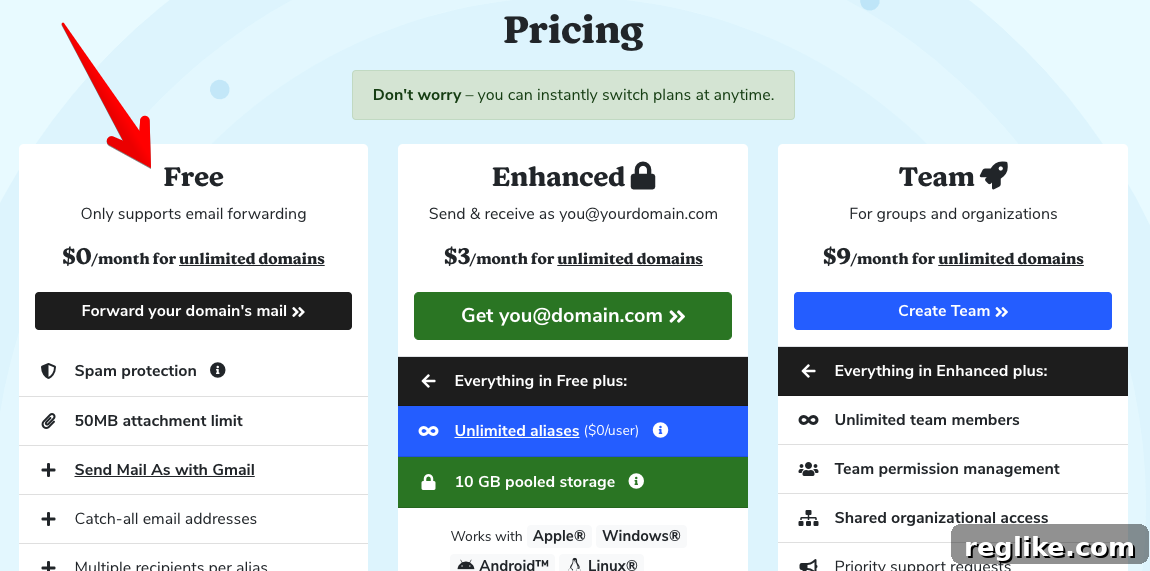
Crucial Tip for Signup: Choosing Your Destination Mailbox
When signing up, you will be prompted to enter the email address where you’d like to receive all forwarded messages. This is a critical decision. While it might be tempting to use your primary email address, we highly recommend setting up a dedicated mailbox specifically for receiving these forwarded emails. Here’s why:
- Potential Volume: Once active, your catch-all inbox might start receiving a significant volume of emails, including spam, accidental messages, and legitimate inquiries. Directing this to a separate inbox prevents your primary email from becoming overwhelmed and cluttered.
- Organization: A dedicated mailbox allows for better organization and easier filtering. You can set up rules within your email client to categorize messages, prioritize genuine inquiries, and swiftly discard irrelevant ones.
- Security and Privacy: By isolating forwarded emails, you maintain better control over your primary inbox’s security and privacy, reducing exposure to potential phishing attempts or unwanted solicitations that might slip through.
Think of this dedicated mailbox as an “intelligence gathering” hub for your domains. Once signed up, you’re ready for the next step.
2. Obtain the Necessary MX and TXT Records from ForwardEmail.net
After successfully signing up, ForwardEmail.net will guide you to a page where you can generate the specific DNS records required to activate email forwarding for your domains. You’ll typically be asked to enter a domain name during this step, but don’t overthink which one to choose initially. The records provided by ForwardEmail.net are generic and apply to any domain you configure with their service. All emails sent to any of your Squadhelp domains, once configured, will be forwarded.
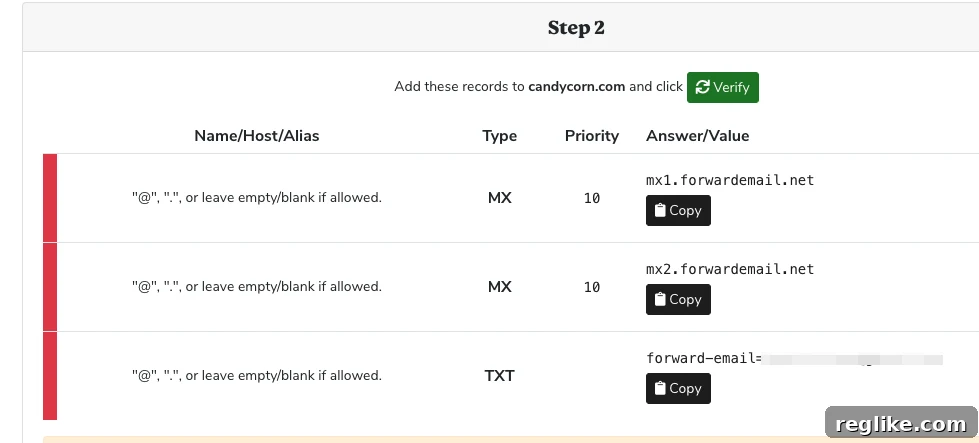
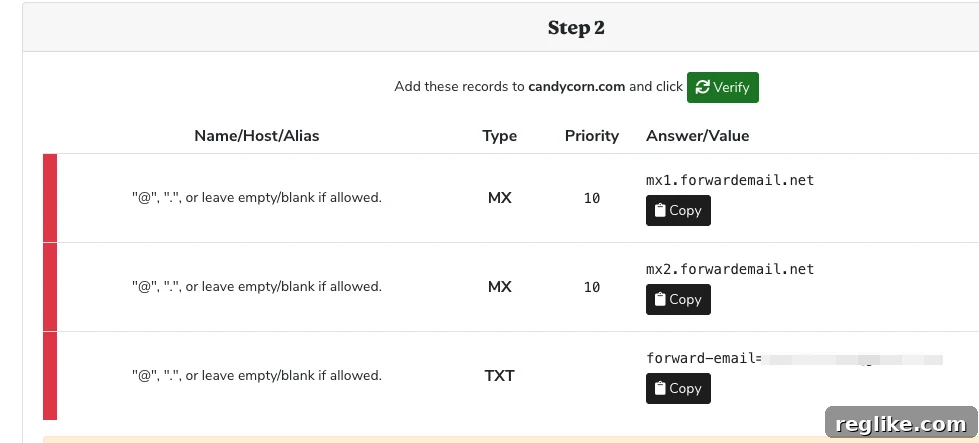
You will typically see two types of records: MX (Mail Exchanger) records and TXT (Text) records. These are essential for directing email traffic to ForwardEmail.net’s servers and verifying your domain ownership respectively. Carefully copy these records, ensuring accuracy as even a small typo can prevent email forwarding from working correctly. It’s often best to use the copy-paste functionality provided by the service.
3. Configure Custom DNS Settings in Squadhelp
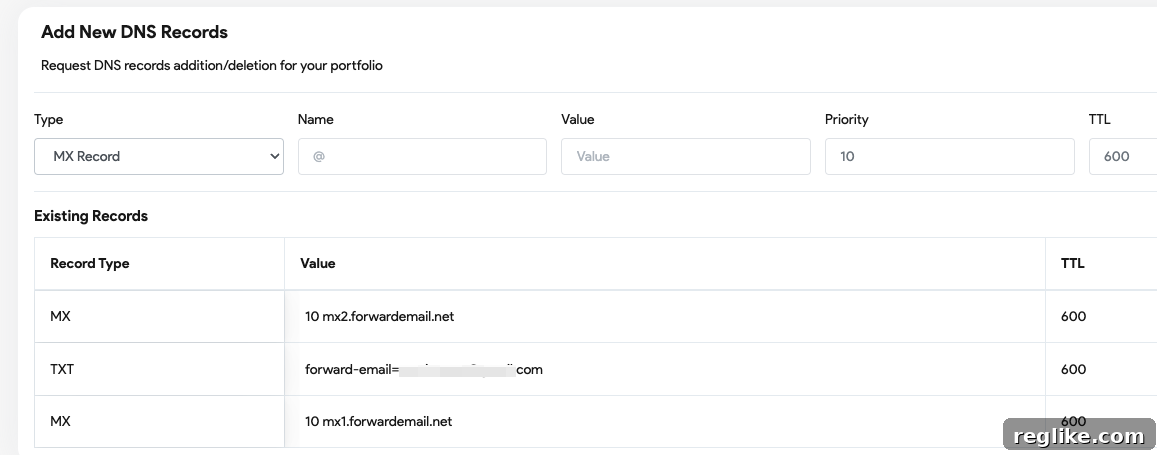
With your MX and TXT records in hand, it’s time to head over to your Squadhelp account. Navigate to the Custom DNS Settings page within your dashboard. This is where you will input the records you obtained from ForwardEmail.net.
The Custom DNS Settings page allows you to create new MX and TXT records. For each record provided by ForwardEmail.net, you will need to create a corresponding entry in Squadhelp. Pay close attention to the record type (MX or TXT), the host/name (often `@` or your domain name), and the value/data (the specific string provided by ForwardEmail.net). For MX records, you’ll also need to specify a priority value, usually provided by ForwardEmail.net.
Adding an Essential SPF Record for Email Security
While you are configuring MX records for email delivery, this is also the perfect opportunity to enhance your domain’s email security and prevent abuse by setting up an SPF (Sender Policy Framework) record. An SPF record is a type of TXT record that specifies which mail servers are authorized to send email on behalf of your domain. This helps prevent spammers from spoofing your domain and sending malicious emails that appear to originate from you.
To implement this, create a new TXT record with the following value: v=spf1 -all
Let’s break down what this means:
v=spf1: This indicates the SPF version being used.-all: This is a “hard fail” mechanism, meaning that any email originating from a server not explicitly listed in your SPF record should be rejected by the receiving mail server. While there are other options like~all(soft fail),-allis generally recommended for parked domains where no legitimate outbound email is expected, as it offers the strongest protection against spoofing.
Implementing an SPF record is a best practice for any domain, even parked ones, as it significantly improves your domain’s reputation and helps ensure that if you ever do decide to send email from it, your messages are less likely to be marked as spam.
4. Verify Your Settings in ForwardEmail.net
Once you’ve entered all the necessary MX and TXT records into your Squadhelp Custom DNS settings, return to ForwardEmail.net. You should find a link or a button to verify that your DNS settings have been correctly configured and propagated across the internet.
Understanding DNS Propagation and Patience
It’s crucial to understand that DNS changes, once made, do not instantly update globally. This process, known as DNS propagation, can take anywhere from a few minutes to up to 48 hours to fully update across all internet servers. During this period, ForwardEmail.net’s verification tool might initially report that the records are not yet found.
Be patient. Periodically re-check the verification link in ForwardEmail.net. Once the DNS changes have propagated successfully, ForwardEmail.net will confirm that your setup is correct, and your catch-all email forwarding will become active.
From this point forward, you will start receiving emails sent to any address at your configured domains. Whether it’s [email protected], [email protected], [email protected], or even a random string like [email protected], all messages will be directed to the dedicated mailbox you set up in Step 1. This means you are now fully equipped to capture every piece of email communication directed at your parked domain names.
Maximizing the Value of Your Catch-All Email
Setting up catch-all email is just the beginning. To truly leverage this new capability, consider these strategies:
- Regular Review: Make it a habit to check your dedicated catch-all inbox regularly. This ensures prompt responses to legitimate inquiries and allows you to quickly identify any emerging trends or issues.
- Smart Filtering and Organization: Utilize the filtering and labeling features of your email client. Create rules to automatically sort emails, flag potential leads, or move spam to a separate folder. This keeps your inbox manageable and helps you focus on high-priority messages.
- Identifying High-Value Leads: Pay close attention to the content of incoming emails. Look for clear expressions of interest in your domain, business proposals, or specific questions that indicate a potential buyer or collaborator.
- Responding Strategically: Even for parked domains, a thoughtful response can go a long way. If someone is inquiring about purchasing your domain, have a clear process in place. If they’re confused with another business, politely clarify. Your responsiveness reflects positively on your brand.
- Privacy Considerations: Be mindful that a catch-all may bring in unsolicited or misdirected personal information. Handle such emails responsibly and in accordance with privacy best practices.
Conclusion
The ability to set up custom DNS records on Squadhelp, coupled with the power of services like ForwardEmail.net, represents a significant opportunity for domain owners. No longer do your parked domains need to be silent digital assets. By implementing a catch-all email strategy, you transform them into dynamic sources of information, revealing sales opportunities, market insights, and potential partnerships that would otherwise remain hidden.
This simple yet effective configuration empowers you to unlock the full potential of your domain portfolio, ensuring you’re always in the loop regarding any communication directed at your assets. Take control of your parked domains today and start leveraging every possible avenue for growth and insight. The path to discovering hidden opportunities for your domains is now clearer and more accessible than ever before.