
Mastering Your Domain Portfolio: A Comprehensive Guide to Effective Management
In the fast-paced world of domain investing, web development, and online business, managing your digital assets efficiently is paramount. Whether you’re a seasoned domain investor with hundreds or thousands of domains, or a business owner safeguarding your brand’s online presence, the complexity of a growing domain portfolio can quickly lead to disarray. Over time, domains can accumulate outdated information, point to defunct servers, or simply get lost in the shuffle, creating a “messy” portfolio that poses significant risks.
This comprehensive guide will walk you through a simple yet powerful process to audit, clean, and optimize your domain portfolio, ensuring every asset is configured exactly as it should be. By adopting proactive domain hygiene practices, you can prevent costly errors, mitigate security risks, and unlock the full potential of your domain investments.
Why a Pristine Domain Portfolio is Non-Negotiable
A disorganized domain portfolio isn’t just an inconvenience; it’s a liability. Neglecting regular maintenance can lead to a cascade of problems that impact your financial bottom line, operational efficiency, and even your brand’s reputation. Here’s a closer look at why maintaining a clean and accurate domain portfolio is absolutely critical:
Preventing Lost Revenue and Opportunities
- Missed Sales Opportunities: Domains pointing to stale nameservers, generic parking pages, or error pages will never generate leads or direct sales. Each potential visitor encountering a non-functional domain is a lost opportunity for monetization or brand engagement.
- Expired Domain Loss: Incorrect contact information or overlooked renewal dates can lead to a domain expiring and potentially being snapped up by a competitor or a domain squatter. Recovering an expired domain can be expensive, and sometimes impossible, resulting in the permanent loss of a valuable digital asset.
- Wasted Parking Revenue: If your domains are intended for monetization through parking, but their nameservers are misconfigured, you’re missing out on potential income from advertising impressions.
Mitigating Operational and Security Risks
- Website Downtime: Incorrect nameserver settings are a primary cause of website downtime. If your domain points to the wrong server, your website becomes inaccessible, leading to frustrated users and a direct hit to your online operations.
- Email Delivery Issues: Email services tied to your domains can fail if DNS records are not correctly configured, disrupting critical business communications.
- Security Vulnerabilities: Outdated registrant information or neglected transfer locks can make your domains vulnerable to unauthorized transfers or hijacking. An abandoned domain with weak security is an open invitation for malicious actors.
- Compliance and Legal Challenges: ICANN regulations require accurate registrant information. Non-compliance can lead to domain suspension or even loss. Furthermore, in legal disputes over domain ownership, accurate and current records are crucial for proving your legitimate claim.
Enhancing Efficiency and Strategic Planning
- Streamlined Management: A well-organized portfolio is easier to navigate, allowing for quicker decisions on renewals, sales, and development projects.
- Accurate Valuation: Knowing the exact status and configuration of each domain allows for more precise valuation, which is essential for buying, selling, or financial reporting.
- Better Resource Allocation: Identifying underperforming or redundant domains helps you reallocate resources more effectively, focusing on assets that provide the most value.
When to Conduct Your Domain Portfolio Audit
While an annual checkup is a good starting point, domain portfolios, particularly those actively managed by domain investors, benefit from more frequent attention. Consider these optimal times for a thorough audit:
- Quarterly Reviews: For active investors or businesses with dynamic online presences, a quarterly audit ensures consistent health and catches issues before they escalate.
- End of Year / Beginning of New Year: This period often aligns with strategic planning and budget reviews, making it an ideal time to assess your digital assets.
- After Significant Portfolio Changes: Any major acquisition, divestment, or large-scale development project should trigger an immediate audit to integrate new assets or confirm the proper disposition of old ones.
- Before Major Business Initiatives: Prior to launching a new product, rebranding, or initiating a marketing campaign, verify all associated domains are in perfect order.
Step-by-Step Guide: Exporting Your Domain Data
The first and most crucial step in auditing your domain portfolio is to centralize your data. Most registrars offer a robust export feature that allows you to download a comprehensive list of your domains and their associated details.
Exporting from GoDaddy
For those managing domains with GoDaddy, one of the largest registrars, the process is straightforward:
- Access Your Domain Manager: Log in to your GoDaddy account and navigate to your domain list.
- For Standard Domain Manager Users:
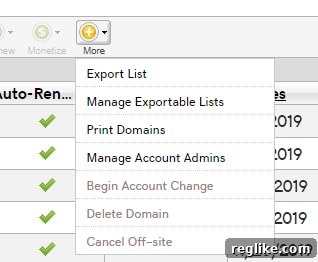
Look for the “More” button, typically located near the top of your domain list. Click on it, and then select the first option to “Export list.” This will usually generate a CSV file containing your domain data.

- For Beta Account Manager Users:
If you’re using GoDaddy’s newer beta account manager interface, the process is even more intuitive. First, select the domains you wish to export (or select all if you’re doing a full audit). Once domains are selected, an “Export” button will typically appear, allowing you to download your list.

Exporting from Other Registrars
While the exact steps may vary, the general principle applies across most major registrars (e.g., Namecheap, Cloudflare, Dynadot, Sav, Porkbun). Look for options such as:
- “Export Domains”
- “Download Domain List”
- “Manage Domains” (then look for an export function within that section)
- A small icon representing a spreadsheet or download.
The goal is always to obtain a CSV (Comma Separated Values) file. This format is universally compatible and can be easily opened and manipulated in spreadsheet programs like Microsoft Excel, Google Sheets, or LibreOffice Calc.
Verifying Key Fields: What to Look For in Your Export
Once you have your domain list in a spreadsheet, it’s time for the meticulous work of verification. This is where you identify and rectify discrepancies. Pay close attention to these critical fields:
1. Registrant Name
The registrant name is the legal owner of the domain. It’s essential for proving ownership, facilitating transfers, and resolving disputes. Verify that the name (or organization name) is correct and consistent across all your domains. Inaccurate registrant information can complicate domain transfers and potentially lead to legal challenges if ownership is disputed.
2. Email Addresses
The email address associated with your domain is your primary point of contact for crucial notifications. This includes renewal reminders, security alerts, transfer requests, and ICANN verification requests. Ensure the email address is active, accessible, and regularly monitored. Using an outdated or defunct email address is a common reason for missing critical renewal notices, which can lead to inadvertent domain expiration.
3. Nameservers
Nameservers direct traffic for your domain. They tell browsers where to find your website and email services. This is perhaps one of the most critical fields to verify. Look for:
- Defunct Parking Company Servers: Many domains are initially pointed to a parking service. If you’ve moved a domain to a website or another service, these old nameservers are now stale.
- Forwarding Servers of Prior Registrars: If you’ve transferred a domain from one registrar to another, sometimes the nameservers might still point to the old registrar’s default forwarding servers, even if you intended for them to point elsewhere.
- Development Server Nameservers: Domains used for staging or testing might still point to temporary development servers long after the project has gone live.
- Unused Nameservers: Domains you intended to use but never got around to configuring might still be pointing to generic defaults.
Incorrect nameservers directly impact website availability, email routing, and any other services dependent on your domain’s DNS. A domain pointing to the wrong nameservers is effectively dead in the water, leading to lost sales opportunities and a poor user experience.
4. Address
The physical address associated with your domain is part of your registrant information. Like the registrant name, it’s a legal requirement for ICANN compliance. Ensure it’s current and accurate. An outdated address can complicate identity verification during transfers or disputes, and may also be used for critical postal mail notifications by some registrars or authorities.
5. Phone Number
Similar to email, a current phone number is vital for urgent communications, especially for security verifications or in cases of suspected unauthorized activity on your account. Ensure the listed number is active and easily reachable.
6. Expiration Date & Auto-Renewal Status (Bonus Field)
While not explicitly mentioned in the original list, the expiration date and auto-renewal status are paramount. Create a column for this in your spreadsheet. This helps you plan renewals, identify domains approaching expiration, and ensure that critical assets are set to auto-renew. Manually renewing hundreds of domains is a recipe for disaster; leveraging auto-renewal with accurate billing information is a best practice, but always double-check its status during an audit.
Addressing Common Issues and Their Solutions
During your audit, you’re likely to uncover several common problems. Here’s how to tackle them:
A. Stale Nameservers
Issue: Your domain points to a server that no longer hosts your website or service, or to a generic parking page when it should be active.
Solution: Log in to your registrar’s domain management panel. Navigate to the DNS or nameserver settings for the affected domain. Update the nameservers to point to your current web host, DNS provider, or a legitimate parking service if the domain is purely for monetization. Remember that DNS changes can take up to 48 hours to propagate globally.
B. Incorrect or Outdated Contact Information
Issue: Registrant name, email, address, or phone number are incorrect or no longer valid.
Solution: Access the “Contact Information” or “Registrant Details” section within your registrar’s control panel. Update all fields with accurate, current information. Be prepared for potential verification steps, such as email confirmation, especially when changing email addresses.
C. Missing Auto-Renewal
Issue: A valuable domain’s auto-renewal is turned off, increasing the risk of expiration.
Solution: Enable auto-renewal for all critical domains. Crucially, verify that the associated payment method on file with your registrar is current and valid. An auto-renewal setting is useless if the credit card expires.
D. Lack of Privacy Protection
Issue: Your personal contact information is publicly visible in Whois records, potentially exposing you to spam or unwanted solicitations.
Solution: Most registrars offer Whois Privacy Protection (sometimes free, sometimes for a fee). Enable this service to mask your personal details with the registrar’s proxy information, protecting your privacy. Note that for some legal entities or specific domain extensions, privacy protection may not be available or advised.
Navigating Multi-Registrar Portfolios
Managing domains across multiple registrars significantly amplifies the complexity of an audit. Each registrar has its own interface, export options, and management quirks. This decentralization makes a unified view challenging.
Challenges with GDPR and Whois Data
The introduction of GDPR (General Data Protection Regulation) has profoundly impacted access to Whois data. Historically, Whois records were a public directory of domain ownership, allowing easy verification. Now, much of this information is redacted for privacy reasons, making it harder to verify ownership details across different platforms manually.
Tools for Consolidated Management
While a custom spreadsheet is a good starting point, specialized tools can provide a more integrated approach:
- Watch My Domains Pro: As mentioned, Watch My Domains Pro is a powerful desktop application designed to track and manage domains from various registrars. While GDPR has complicated its direct Whois lookup capabilities, it remains a valuable tool, especially if you can leverage its API features.
- Registrar APIs: Many registrars offer Application Programming Interfaces (APIs) that allow you to programmatically access and manage your domain data. For large portfolios, integrating with these APIs can enable automated data retrieval for a consolidated view, bypassing some of the GDPR-related Whois limitations. This usually requires some technical expertise.
- Third-Party Domain Management Platforms: A growing number of online services offer centralized dashboards to manage domains across multiple registrars. These platforms often provide advanced reporting, bulk actions, and integrated renewal reminders.
- Custom Database Solutions: For those with significant technical resources, building a custom database to aggregate and track all domain-related information, cross-referenced with your registrar accounts, offers the ultimate control.
Best Practices for Multi-Registrar Users
- Centralized Billing: Where possible, try to consolidate billing for your domains to simplify expense tracking and reduce the risk of missed payments.
- Unique Credentials: Use strong, unique passwords and enable Two-Factor Authentication (2FA) for every registrar account.
- Regular API Key Rotation: If using APIs, rotate your API keys periodically for enhanced security.
- Documentation: Maintain a master document or spreadsheet that lists all your registrars, account logins, and API keys (stored securely).
Establishing Best Practices for Ongoing Domain Management
A single audit is a great start, but true domain portfolio mastery comes from implementing ongoing best practices:
- Automate Renewals Wisely: Enable auto-renewal for all essential domains, but pair this with regular checks of your payment methods and email notifications to ensure success.
- Leverage Registrar Notifications: Configure your registrar to send renewal and expiration notifications to multiple active email addresses.
- Implement Transfer Locks: Ensure transfer locks are active on all domains to prevent unauthorized transfers. Only disable them when you intentionally want to move a domain.
- Regular Security Reviews: Periodically review the security settings of your registrar accounts, including password strength, 2FA status, and authorized users.
- Consolidate When Possible: If you find yourself with just a few domains scattered across many registrars, consider consolidating them under one or two preferred registrars to simplify management.
- Document Everything: Maintain a detailed, up-to-date record of each domain’s purpose, associated website/service, nameserver configuration, and renewal cycles.
- Stay Informed: Keep abreast of ICANN policies, registrar updates, and new domain management tools.
Conclusion: Your Path to a Seamless Domain Portfolio
A well-maintained domain portfolio is more than just an organized list; it’s a foundation for sustained success in the digital realm. By periodically auditing your domains, meticulously verifying critical information, and proactively addressing potential issues, you transform a potential liability into a robust asset.
Embrace these practices not as a chore, but as an essential investment in the longevity, security, and profitability of your online presence. The final weeks of any year, or indeed, any quiet period, present an opportune moment to embark on this vital portfolio checkup. Take control of your digital assets today and ensure your domains are set out exactly how they should be – clean, secure, and poised for optimal performance.