
Google Chrome is fundamentally shifting its approach to web security indicators, moving away from positive affirmations for secure sites to a clear emphasis on warning users about non-HTTPS connections. This pivotal change underscores a deeper commitment to a truly secure web, highlighting the critical importance of SSL for all online platforms.
For several years, Google has spearheaded an ambitious initiative to encourage, and in some cases compel, website owners to adopt SSL/TLS certificates and transition their sites to HTTPS. Leveraging the dominant market position of its Chrome browser, Google strategically introduced positive visual cues, such as the prominent “Secure” label and green padlock icon, for sites that embraced HTTPS. Conversely, websites still operating over unencrypted HTTP connections began to display less reassuring, though initially subtle, warnings.
As the web continues its inexorable march towards ubiquitous encryption, the landscape has evolved dramatically. A significant majority of websites now successfully employ SSL/TLS, making HTTPS the de facto standard for secure online communication. Recognizing this monumental shift, Google is now poised to refine its strategy further. The company plans to gradually phase out the positive indicators that once celebrated HTTPS-enabled sites. Instead, its focus will sharpen exclusively on clearly and explicitly identifying sites that lack the fundamental security offered by HTTPS. This adjustment marks a significant inflection point in how Chrome communicates web security to its vast user base.
The changes, meticulously detailed by Google, signal a more proactive and assertive stance on web security. Here’s a closer look at the impending transformations and their implications:
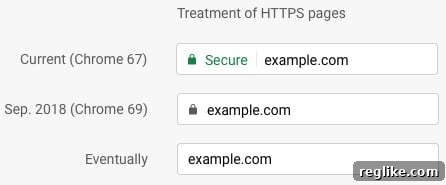
The image above illustrates the visual evolution of Chrome’s security indicators, vividly demonstrating Google’s escalating commitment to highlighting insecure connections. This progression underscores the browser’s role in educating users about the security status of the websites they visit.
In essence, Google is raising the stakes for websites that lag in adopting SSL, while simultaneously scaling back the overt accolades for sites that have already secured their connections. The new paradigm dictates that all websites operating without an SSL certificate will conspicuously display a “Not Secure” warning directly within the address bar. This warning, initially somewhat subtle, will escalate in prominence and urgency, turning bright red and becoming significantly more noticeable when users attempt to input sensitive information into forms on these unencrypted pages. This deliberate escalation is designed to unequivocally alert users to potential risks associated with submitting personal data over insecure channels.
The Rationale Behind Google’s Strategic Shift: Addressing the “False Sense of Security”
This strategic pivot by Google is not only logical but also addresses a critical, albeit often overlooked, problem with the previous treatment of SSL in Chrome. By positively labeling sites with SSL as “Secure,” Google inadvertently risked fostering a false sense of absolute safety among users. While an SSL certificate undeniably provides crucial encryption, protecting data in transit between a user’s browser and the server, it does not inherently validate the trustworthiness or legitimacy of the website itself. It’s relatively simple and inexpensive for malicious actors, such as phishers or scammers, to acquire a domain-validated (DV) SSL certificate. A DV certificate merely confirms that the applicant controls the domain name, not that the entity behind the domain is reputable or benevolent.
Consequently, a user might see a green padlock and a “Secure” label on a phishing site designed to mimic a legitimate bank or e-commerce platform. This visual reassurance could mistakenly lead them to believe the site is safe for entering login credentials, credit card details, or other sensitive personal information. The new approach mitigates this risk by shifting the focus from positive, potentially misleading, affirmations to clear, unambiguous warnings about the absence of fundamental encryption. This ensures that users are primarily alerted to a lack of a baseline security measure, rather than being given a potentially over-optimistic impression of overall site safety.
Implications for Website Owners: The Imperative to Act Now
For website owners, particularly those who have yet to migrate to HTTPS, Google’s latest policy shift serves as an urgent and undeniable call to action. The era of considering HTTPS an optional enhancement has unequivocally passed. It is now a foundational requirement for any website that seeks to maintain user trust, search engine visibility, and a professional online presence. Ignoring this imperative carries increasingly severe consequences.
Enhanced User Trust and Conversion Rates: In today’s digitally savvy world, users are becoming increasingly aware of browser security indicators. A persistent “Not Secure” warning can significantly erode trust, causing visitors to abandon carts, refrain from filling out forms, or simply leave the site altogether. Conversely, a secure HTTPS connection conveys reliability and professionalism, fostering a more positive user experience and potentially boosting conversion rates.
SEO Advantages (Beyond Ranking): While Google has long confirmed that HTTPS is a minor ranking signal, its importance extends far beyond direct SEO boosts. A “Not Secure” label can indirectly harm SEO by increasing bounce rates, reducing time on site, and discouraging repeat visits – all factors that Google’s algorithms consider when evaluating website quality. Migrating to HTTPS ensures your site remains competitive and aligns with Google’s vision for a secure web.
Avoiding Browser Warnings and Reduced Traffic: The more prominent and alarming “Not Secure” warnings, especially the red indicator on input fields, are designed to deter users. This deterrence can lead to a noticeable drop in organic traffic, as users actively choose to navigate away from sites flagged as insecure. Furthermore, many modern browsers and even some internet service providers are increasingly flagging or blocking access to unencrypted sites, further isolating non-HTTPS platforms.
Navigating the HTTPS Migration Process: A Step-by-Step Guide
Migrating a website from HTTP to HTTPS involves several crucial steps, and while it may seem daunting, it is a manageable process that yields significant long-term benefits:
- Acquire an SSL/TLS Certificate: The first step is to obtain an appropriate SSL certificate. Options include:
- Domain Validated (DV): The most basic, verifying domain ownership. Ideal for blogs and informational sites.
- Organization Validated (OV): Requires validation of the organization’s existence and domain ownership. Suitable for businesses.
- Extended Validation (EV): The most rigorous, providing the highest level of trust by displaying the organization’s name in the browser bar (though this visual cue is also being phased out by some browsers). Essential for e-commerce and financial institutions.
- Many hosting providers offer free SSL certificates (e.g., Let’s Encrypt), making it more accessible than ever.
- Install and Configure on Your Server: Once acquired, the certificate needs to be installed on your web server. This process varies depending on your hosting environment (e.g., Apache, Nginx, IIS) or CMS (e.g., WordPress).
- Update Internal Links and Canonical Tags: Crucially, all internal links within your website, as well as canonical tags, must be updated from HTTP to HTTPS to prevent mixed content warnings and ensure proper indexing.
- Implement 301 Redirects: Set up permanent (301) redirects from all HTTP URLs to their corresponding HTTPS versions. This ensures that search engines and users are seamlessly directed to the secure version of your site, preserving SEO value.
- Update External Resources: Check for any external resources (images, scripts, CSS files) that are still loaded over HTTP. These can cause “mixed content” warnings, even on an otherwise secure HTTPS page, undermining the integrity of your security.
- Update Google Search Console and Analytics: Inform Google of your site’s move to HTTPS by adding the new HTTPS property in Google Search Console. Monitor for any crawl errors or security issues. Update any analytics tracking codes to reflect the new URLs.
- Test Thoroughly: After migration, thoroughly test your entire website to ensure all pages load correctly, forms function as expected, and no mixed content issues are present.
The User’s Perspective: Navigating the Modern Web with Confidence
For internet users, Google’s evolving security indicators empower them to make more informed decisions about where and how they share their personal information. The shift means that users will be trained to recognize the absence of security rather than relying on the presence of positive affirmation.
Understanding “Not Secure”: Users should understand that seeing “Not Secure” in the address bar means that any information they send to or receive from that website is not encrypted and could potentially be intercepted by third parties. This is especially critical when dealing with login credentials, financial details, or personal data.
Beyond the Lock: While HTTPS is a fundamental baseline, users should also develop a holistic understanding of online safety. Even with a “Secure” label, vigilance is key. Always scrutinize the URL for misspellings (a common phishing tactic), evaluate the overall professionalism and legitimacy of the site, and be wary of unsolicited requests for personal information. The “Secure” label confirms encryption, not necessarily the site’s overall integrity.
The Future of Web Security: A Continuous Evolution
Google’s latest move is just one step in the ongoing evolution of web security. As threats become more sophisticated, browsers and web standards must continually adapt. Beyond HTTPS, initiatives like HTTP Strict Transport Security (HSTS) further harden secure connections, while advancements in content security policies (CSPs) and other browser-level protections aim to mitigate various forms of attacks.
Google’s commitment to encrypting the web has already yielded tremendous success, transforming what was once a niche technical feature into a universal expectation. By shifting the spotlight from positive reinforcement to clear warnings for non-compliance, Google is reinforcing a critical message: an unencrypted web is an insecure web, and it will be increasingly flagged as such. This aggressive push will undoubtedly accelerate the global adoption of HTTPS, creating a safer and more trustworthy digital environment for everyone.
Conclusion: Securing the Digital Frontier
The latest evolution in Chrome’s security indicators represents a crucial milestone in the journey towards a fully encrypted internet. Google’s transition from overtly praising secure sites to unequivocally warning about insecure ones is a clear signal that HTTPS is no longer an option but a mandatory component of responsible web presence. For website owners, the message is clear: migrating to HTTPS is no longer just about SEO or a perceived advantage; it’s about fundamental user trust, data protection, and maintaining credibility in an increasingly security-conscious digital landscape. Embrace HTTPS now, secure your digital frontier, and provide your users with the confidence they deserve when interacting with your online platform. The future of the web is secure, and those who fail to adapt will inevitably be left behind, explicitly flagged as “Not Secure.”
Google Chrome is fundamentally shifting its approach to web security indicators, moving away from positive affirmations for secure sites to a clear emphasis on warning users about non-HTTPS connections. This pivotal change underscores a deeper commitment to a truly secure web, highlighting the critical importance of SSL for all online platforms.
For several years, Google has spearheaded an ambitious initiative to encourage, and in some cases compel, website owners to adopt SSL/TLS certificates and transition their sites to HTTPS. Leveraging the dominant market position of its Chrome browser, Google strategically introduced positive visual cues, such as the prominent “Secure” label and green padlock icon, for sites that embraced HTTPS. Conversely, websites still operating over unencrypted HTTP connections began to display less reassuring, though initially subtle, warnings.
As the web continues its inexorable march towards ubiquitous encryption, the landscape has evolved dramatically. A significant majority of websites now successfully employ SSL/TLS, making HTTPS the de facto standard for secure online communication. Recognizing this monumental shift, Google is now poised to refine its strategy further. The company plans to gradually phase out the positive indicators that once celebrated HTTPS-enabled sites. Instead, its focus will sharpen exclusively on clearly and explicitly identifying sites that lack the fundamental security offered by HTTPS. This adjustment marks a significant inflection point in how Chrome communicates web security to its vast user base.
The changes, meticulously detailed by Google, signal a more proactive and assertive stance on web security. Here’s a closer look at the impending transformations and their implications:
The image above illustrates the visual evolution of Chrome’s security indicators, vividly demonstrating Google’s escalating commitment to highlighting insecure connections. This progression underscores the browser’s role in educating users about the security status of the websites they visit.
In essence, Google is raising the stakes for websites that lag in adopting SSL, while simultaneously scaling back the overt accolades for sites that have already secured their connections. The new paradigm dictates that all websites operating without an SSL certificate will conspicuously display a “Not Secure” warning directly within the address bar. This warning, initially somewhat subtle, will escalate in prominence and urgency, turning bright red and becoming significantly more noticeable when users attempt to input sensitive information into forms on these unencrypted pages. This deliberate escalation is designed to unequivocally alert users to potential risks associated with submitting personal data over insecure channels.
The Rationale Behind Google’s Strategic Shift: Addressing the “False Sense of Security”
This strategic pivot by Google is not only logical but also addresses a critical, albeit often overlooked, problem with the previous treatment of SSL in Chrome. By positively labeling sites with SSL as “Secure,” Google inadvertently risked fostering a false sense of absolute safety among users. While an SSL certificate undeniably provides crucial encryption, protecting data in transit between a user’s browser and the server, it does not inherently validate the trustworthiness or legitimacy of the website itself. It’s relatively simple and inexpensive for malicious actors, such as phishers or scammers, to acquire a domain-validated (DV) SSL certificate. A DV certificate merely confirms that the applicant controls the domain name, not that the entity behind the domain is reputable or benevolent.
Consequently, a user might see a green padlock and a “Secure” label on a phishing site designed to mimic a legitimate bank or e-commerce platform. This visual reassurance could mistakenly lead them to believe the site is safe for entering login credentials, credit card details, or other sensitive personal information. The new approach mitigates this risk by shifting the focus from positive, potentially misleading, affirmations to clear, unambiguous warnings about the absence of fundamental encryption. This ensures that users are primarily alerted to a lack of a baseline security measure, rather than being given a potentially over-optimistic impression of overall site safety.
Implications for Website Owners: The Imperative to Act Now
For website owners, particularly those who have yet to migrate to HTTPS, Google’s latest policy shift serves as an urgent and undeniable call to action. The era of considering HTTPS an optional enhancement has unequivocally passed. It is now a foundational requirement for any website that seeks to maintain user trust, search engine visibility, and a professional online presence. Ignoring this imperative carries increasingly severe consequences.
Enhanced User Trust and Conversion Rates: In today’s digitally savvy world, users are becoming increasingly aware of browser security indicators. A persistent “Not Secure” warning can significantly erode trust, causing visitors to abandon carts, refrain from filling out forms, or simply leave the site altogether. Conversely, a secure HTTPS connection conveys reliability and professionalism, fostering a more positive user experience and potentially boosting conversion rates.
SEO Advantages (Beyond Ranking): While Google has long confirmed that HTTPS is a minor ranking signal, its importance extends far beyond direct SEO boosts. A “Not Secure” label can indirectly harm SEO by increasing bounce rates, reducing time on site, and discouraging repeat visits – all factors that Google’s algorithms consider when evaluating website quality. Migrating to HTTPS ensures your site remains competitive and aligns with Google’s vision for a secure web.
Avoiding Browser Warnings and Reduced Traffic: The more prominent and alarming “Not Secure” warnings, especially the red indicator on input fields, are designed to deter users. This deterrence can lead to a noticeable drop in organic traffic, as users actively choose to navigate away from sites flagged as insecure. Furthermore, many modern browsers and even some internet service providers are increasingly flagging or blocking access to unencrypted sites, further isolating non-HTTPS platforms.
Navigating the HTTPS Migration Process: A Step-by-Step Guide
Migrating a website from HTTP to HTTPS involves several crucial steps, and while it may seem daunting, it is a manageable process that yields significant long-term benefits:
- Acquire an SSL/TLS Certificate: The first step is to obtain an appropriate SSL certificate. Options include:
- Domain Validated (DV): The most basic, verifying domain ownership. Ideal for blogs and informational sites.
- Organization Validated (OV): Requires validation of the organization’s existence and domain ownership. Suitable for businesses.
- Extended Validation (EV): The most rigorous, providing the highest level of trust by displaying the organization’s name in the browser bar (though this visual cue is also being phased out by some browsers). Essential for e-commerce and financial institutions.
- Many hosting providers offer free SSL certificates (e.g., Let’s Encrypt), making it more accessible than ever.
- Install and Configure on Your Server: Once acquired, the certificate needs to be installed on your web server. This process varies depending on your hosting environment (e.g., Apache, Nginx, IIS) or CMS (e.g., WordPress).
- Update Internal Links and Canonical Tags: Crucially, all internal links within your website, as well as canonical tags, must be updated from HTTP to HTTPS to prevent mixed content warnings and ensure proper indexing.
- Implement 301 Redirects: Set up permanent (301) redirects from all HTTP URLs to their corresponding HTTPS versions. This ensures that search engines and users are seamlessly directed to the secure version of your site, preserving SEO value.
- Update External Resources: Check for any external resources (images, scripts, CSS files) that are still loaded over HTTP. These can cause “mixed content” warnings, even on an otherwise secure HTTPS page, undermining the integrity of your security.
- Update Google Search Console and Analytics: Inform Google of your site’s move to HTTPS by adding the new HTTPS property in Google Search Console. Monitor for any crawl errors or security issues. Update any analytics tracking codes to reflect the new URLs.
- Test Thoroughly: After migration, thoroughly test your entire website to ensure all pages load correctly, forms function as expected, and no mixed content issues are present.
The User’s Perspective: Navigating the Modern Web with Confidence
For internet users, Google’s evolving security indicators empower them to make more informed decisions about where and how they share their personal information. The shift means that users will be trained to recognize the absence of security rather than relying on the presence of positive affirmation.
Understanding “Not Secure”: Users should understand that seeing “Not Secure” in the address bar means that any information they send to or receive from that website is not encrypted and could potentially be intercepted by third parties. This is especially critical when dealing with login credentials, financial details, or personal data.
Beyond the Lock: While HTTPS is a fundamental baseline, users should also develop a holistic understanding of online safety. Even with a “Secure” label, vigilance is key. Always scrutinize the URL for misspellings (a common phishing tactic), evaluate the overall professionalism and legitimacy of the site, and be wary of unsolicited requests for personal information. The “Secure” label confirms encryption, not necessarily the site’s overall integrity.
The Future of Web Security: A Continuous Evolution
Google’s latest move is just one step in the ongoing evolution of web security. As threats become more sophisticated, browsers and web standards must continually adapt. Beyond HTTPS, initiatives like HTTP Strict Transport Security (HSTS) further harden secure connections, while advancements in content security policies (CSPs) and other browser-level protections aim to mitigate various forms of attacks.
Google’s commitment to encrypting the web has already yielded tremendous success, transforming what was once a niche technical feature into a universal expectation. By shifting the spotlight from positive reinforcement to clear warnings for non-compliance, Google is reinforcing a critical message: an unencrypted web is an insecure web, and it will be increasingly flagged as such. This aggressive push will undoubtedly accelerate the global adoption of HTTPS, creating a safer and more trustworthy digital environment for everyone.
Conclusion: Securing the Digital Frontier
The latest evolution in Chrome’s security indicators represents a crucial milestone in the journey towards a fully encrypted internet. Google’s transition from overtly praising secure sites to unequivocally warning about insecure ones is a clear signal that HTTPS is no longer an option but a mandatory component of responsible web presence. For website owners, the message is clear: migrating to HTTPS is no longer just about SEO or a perceived advantage; it’s about fundamental user trust, data protection, and maintaining credibility in an increasingly security-conscious digital landscape. Embrace HTTPS now, secure your digital frontier, and provide your users with the confidence they deserve when interacting with your online platform. The future of the web is secure, and those who fail to adapt will inevitably be left behind, explicitly flagged as “Not Secure.”