
Safeguarding Your Digital Assets: A Critical GoDaddy Domain Renewal Advisory
In today’s digital landscape, a domain name is more than just an address; it’s your online identity, your brand’s cornerstone, and a valuable asset. Losing it can have significant consequences, from disrupting your website traffic to damaging your brand reputation. This article focuses on a crucial aspect of domain management, specifically within GoDaddy, and provides actionable steps to prevent the potentially devastating loss of your domains due to overlooked payment settings.
Recently, I participated in a GoDaddy premium domain auction, acquiring five domains that I believed held substantial potential. Fortunately, my intuition proved correct; I successfully sold one of these domains within a mere 48 hours. The proceeds from this single sale not only recouped my entire investment in the five domains but also generated a profit. This positive experience reinforced the importance of strategic domain acquisition.
However, this success story comes with a cautionary tale. Shortly after the auction concluded, I received an unsettling notification regarding one of my newly acquired domains. The message indicated that the domain was nearing its renewal date and, crucially, that renewal was impossible because no payment method was associated with the domain. This notification served as a stark reminder of a potential pitfall that can easily lead to the unintended loss of valuable domain assets.
The GoDaddy Payment Method Quirk: A Potential Trap for Domain Owners
This issue with GoDaddy’s payment handling is not new to me. I’ve encountered similar situations in the past and have consistently found their payment system for products without assigned payment methods to be less than ideal. In my opinion, a more user-friendly and secure approach would involve implementing a default payment method that is automatically charged when no specific payment method is linked to a particular product or service. This would provide a safety net, preventing unintentional service interruptions and potential domain loss.
Therefore, if you’ve recently participated in a GoDaddy domain auction and emerged victorious, it is absolutely essential to proactively verify and, if necessary, add a payment method to each of your newly acquired domains. Failing to do so could result in the expiration and subsequent loss of your valuable digital assets. This is especially important for premium domains acquired at auction, as they often represent a significant investment.
Step-by-Step Guide: Adding a Payment Method to Your GoDaddy Domains
To ensure the continued ownership and uninterrupted operation of your GoDaddy domains, follow these detailed steps to add or update the payment method associated with each domain:
- Log in to Your GoDaddy Account: Begin by accessing your GoDaddy account using your registered email address and password. Ensure you are logging into the correct account if you manage multiple GoDaddy accounts.
- Navigate to “Renewals & Billing”: Once logged in, locate your name or account icon, typically positioned at the top-right corner of the page. Click on this icon, and a dropdown menu will appear. From this menu, select the “Renewals & Billing” option. This will take you to the section where you can manage your subscriptions and payment settings.
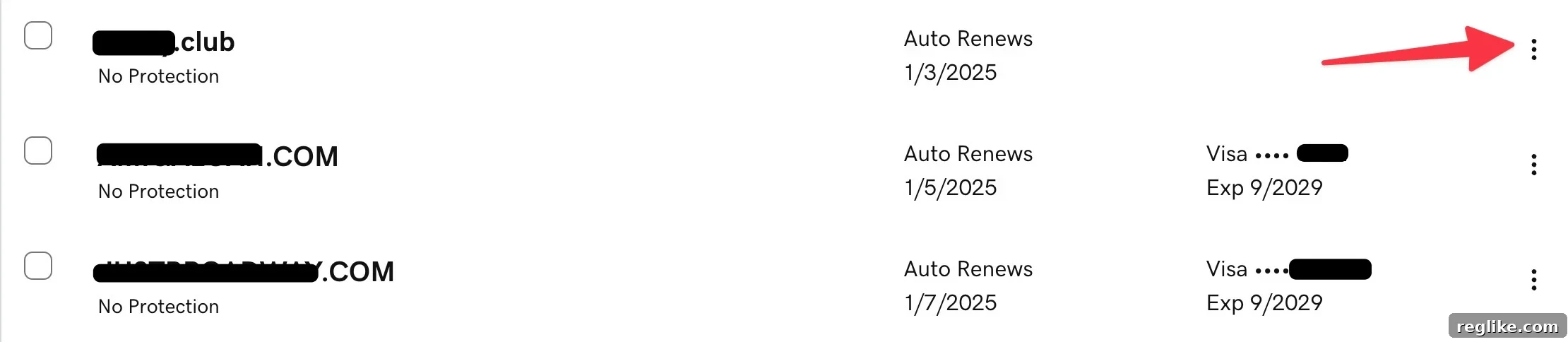
- Review Assigned Payment Methods: The “Renewals & Billing” page provides an overview of your GoDaddy products and services, along with the payment method assigned to each. Take a moment to carefully review this list to identify any domains that may be lacking a designated payment method.
- The Filter Button Caveat: GoDaddy offers a filter button that purportedly allows you to search for domains lacking payment methods. However, based on my personal experience, this filter may not accurately display all products without assigned payment methods. Therefore, relying solely on this filter may not be sufficient to identify all potential issues.
- Individual Domain Search: To ensure complete accuracy, I recommend searching for each domain individually. This involves entering the full domain name, including the top-level domain (e.g., example.com), into the search bar. This method provides a more reliable way to identify domains requiring payment method updates.
- Update Payment Method: After locating the specific domain in the search results, look for three dots (ellipsis) located on the far right of the domain listing. Click on these dots, and a dropdown menu will appear. Select the “Update payment method” option from this menu.
- Select or Add a Payment Method: You will then be presented with a screen allowing you to select an existing payment method from your saved options or add a new credit card or other payment method. Choose the desired payment method and confirm your selection.
- Repeat for All Domains: Repeat steps 5-7 for each of your domains to ensure that all domains have a valid payment method assigned. This meticulous approach will significantly reduce the risk of unintentional domain expiration.
The Importance of Proactive Domain Management
While GoDaddy is a popular and widely used domain registrar, it is ultimately the responsibility of the domain owner to actively manage their domains and ensure that all necessary settings are correctly configured. Relying solely on automated systems or assuming that a default payment method will be applied can be risky and may lead to unintended consequences.
By taking a proactive approach to domain management, you can minimize the risk of losing your valuable digital assets and maintain uninterrupted online presence. Regularly review your domain settings, update payment methods as needed, and stay informed about any changes to GoDaddy’s policies or procedures.
Beyond GoDaddy: General Domain Management Best Practices
The principles outlined in this article extend beyond GoDaddy and apply to domain management in general. Regardless of your chosen domain registrar, consider implementing these best practices:
- Maintain Accurate Contact Information: Ensure that your contact information (email address, phone number, physical address) is up-to-date with your domain registrar. This allows them to effectively communicate important notices, such as renewal reminders.
- Enable Auto-Renewal: While this article highlights a potential issue with payment methods, enabling auto-renewal is generally a good practice. This ensures that your domains are automatically renewed before their expiration date. However, always verify that a valid payment method is associated with the domain.
- Set Up Renewal Reminders: In addition to auto-renewal, configure renewal reminders to be sent to your email address well in advance of the expiration date. This provides an extra layer of protection against unintentional domain loss.
- Consider Domain Privacy: Domain privacy services mask your personal contact information in the WHOIS database, protecting you from spam and potential privacy breaches.
- Regularly Back Up Your Website: While not directly related to domain renewal, backing up your website is crucial for protecting your online presence. In the event of a website issue or data loss, you can quickly restore your website from a backup.
Conclusion: Take Control of Your Domain Destiny
Losing a domain name can be a costly and frustrating experience. By understanding the nuances of GoDaddy’s payment system and implementing proactive domain management practices, you can significantly reduce the risk of unintentional domain expiration and safeguard your valuable online assets. Take the time to review your domain settings, update payment methods as needed, and empower yourself to control your domain destiny.