
The Deceptive Padlock: Why SSL Doesn’t Guarantee Website Safety
In today’s digital landscape, online security is paramount. We’re constantly bombarded with warnings about phishing scams, malware, and data breaches. One of the most common pieces of advice is to look for the “padlock” icon in your browser’s address bar, indicating a secure connection via Secure Sockets Layer (SSL). However, the increasing prevalence of SSL certificates on phishing sites presents a significant challenge to this widely accepted security practice. This article will delve into the complexities of SSL, its limitations, and how you can protect yourself from falling victim to sophisticated online scams.
The Rise of SSL and the Illusion of Security
For years, major players like Google have championed the widespread adoption of SSL. The goal was to encrypt data transmitted between your browser and the website server, preventing eavesdropping and ensuring data integrity. When a website uses SSL, the address bar displays “https://” instead of “http://,” and a padlock icon appears, signaling a secure connection. This visual cue has become ingrained in the minds of internet users as a symbol of trust and safety.
Unfortunately, this has created a false sense of security. While SSL does encrypt data, it doesn’t verify the legitimacy of the website itself. Cybercriminals have recognized this and are increasingly leveraging SSL certificates to make their phishing sites appear more credible. According to recent research, a significant percentage of phishing sites now utilize SSL, effectively deceiving unsuspecting users into believing they are interacting with a secure and trustworthy platform.
SSL: Encryption, Not Authentication
It’s crucial to understand that SSL primarily provides encryption. This means that the data you send to the website, such as usernames, passwords, and credit card details, is scrambled and protected from being intercepted by malicious actors during transit. However, SSL doesn’t guarantee that the website you’re interacting with is legitimate. It simply means that the connection between you and the server is secure.
Think of it like sending a valuable package in a locked box. SSL is the locked box, protecting the contents during delivery. However, it doesn’t verify the identity of the person receiving the package. You could be sending your valuable information to a criminal who is perfectly capable of decrypting it once it arrives.
The Downside of Over-Reliance on SSL
The over-reliance on SSL as a sole indicator of website security can have serious consequences. Users who blindly trust the padlock icon are more likely to fall victim to phishing scams, unknowingly submitting their personal information to malicious websites that mimic legitimate ones. This can lead to identity theft, financial loss, and other serious repercussions.
Google’s Evolving Approach to SSL Indicators
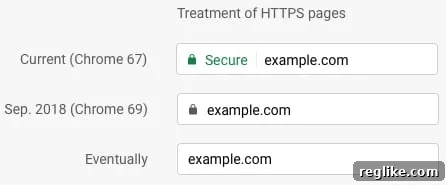
Recognizing the limitations of SSL as a security indicator, Google has been gradually downgrading the positive designations it uses in its Chrome browser. The green padlock with the word “Secure” has been replaced with a less prominent gray padlock. The long-term goal is to eventually remove any positive designation for sites with SSL, while explicitly marking sites without SSL as “Not Secure.”
This shift in approach reflects a more nuanced understanding of online security. It acknowledges that SSL is a necessary but insufficient condition for a safe browsing experience. Users need to be more discerning and rely on other factors to assess the legitimacy of a website.
Beyond the Padlock: How to Identify Phishing Sites
So, if the padlock isn’t a reliable indicator of security, how can you protect yourself from phishing scams? Here are some crucial steps to take:
- Examine the URL Carefully: Phishing sites often use URLs that are subtly different from legitimate websites. Look for typos, misspellings, or variations in the domain name. Pay close attention to the part of the URL before the “.com,” “.org,” or “.net.” For example, “paypa1.com” is likely a phishing site impersonating PayPal.
- Be Wary of Suspicious Emails: Phishing attacks often begin with deceptive emails that appear to be from legitimate organizations, such as banks, retailers, or social media platforms. These emails typically urge you to click on a link and enter your personal information. Be extremely cautious of such emails, especially if they contain urgent requests or threats.
- Verify the Sender’s Address: Even if an email looks legitimate, carefully examine the sender’s address. Phishing emails often come from addresses that are different from the official domain of the organization they claim to represent.
- Don’t Click on Links in Suspicious Emails: Instead of clicking on links in suspicious emails, manually type the website address into your browser. This will help you avoid being redirected to a phishing site.
- Look for Grammatical Errors and Poor Writing: Phishing emails and websites often contain grammatical errors, typos, and awkward phrasing. Legitimate organizations typically have professional copywriters who ensure their communications are polished and error-free.
- Check the Website’s Contact Information: Legitimate websites usually have readily available contact information, including a phone number, email address, and physical address. If a website lacks this information or provides only a generic contact form, it may be a phishing site.
- Use a Reputable Password Manager: Password managers can help you identify phishing sites by automatically filling in your login credentials only on legitimate websites. If a password manager doesn’t recognize a website, it’s a red flag that it may be a phishing site.
- Enable Two-Factor Authentication (2FA): 2FA adds an extra layer of security to your online accounts. Even if a phisher manages to steal your password, they won’t be able to access your account without the second factor, such as a code sent to your phone.
- Keep Your Software Updated: Regularly update your operating system, web browser, and antivirus software. These updates often include security patches that protect you from the latest phishing threats.
- Trust Your Gut: If something feels off about a website or email, trust your instincts. It’s always better to err on the side of caution and avoid entering your personal information if you have any doubts.
The Importance of Education and Awareness
Ultimately, the best defense against phishing attacks is education and awareness. By understanding the limitations of SSL and learning how to identify other red flags, you can significantly reduce your risk of falling victim to these scams. Stay informed about the latest phishing techniques and share your knowledge with others to help create a more secure online environment.
Conclusion: SSL is Not a Silver Bullet
While SSL encryption remains a valuable tool for protecting data in transit, it’s crucial to recognize that it’s not a silver bullet for online security. The increasing prevalence of SSL on phishing sites highlights the need for a more nuanced and comprehensive approach to website authentication. By being vigilant, examining URLs carefully, and relying on multiple security indicators, you can navigate the digital landscape with greater confidence and protect yourself from the ever-evolving threat of phishing attacks. The padlock is no longer a guarantee of safety; informed awareness is your strongest defense.