
Dreamweaver.com Redirection Issue: A Deep Dive into Adobe’s Domain Management
This morning, while researching prominent web design software, I naturally thought of Dreamweaver, a long-standing and well-recognized application in the field. I typed “Dreamweaver.com” into my browser, expecting to be directed to the official Adobe Dreamweaver product page. The result, however, was quite unexpected.
The experience raised a simple yet crucial question: Why doesn’t Dreamweaver.com correctly redirect users to the official Adobe Dreamweaver product page? This seemingly minor issue can have significant implications for user experience, brand perception, and overall marketing effectiveness. Let’s delve deeper into the issue and explore potential reasons behind this misdirection.
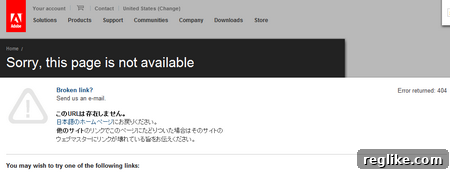
As the screenshot illustrates, the domain name Dreamweaver.com, which Adobe indeed owns, does not point to the intended destination. The correct URL for comprehensive information about Dreamweaver is adobe.com/products/dreamweaver. This discrepancy immediately raises several questions about Adobe’s domain management strategy and its impact on potential customers.
The Importance of Correct Domain Redirection
In the digital landscape, a domain name is more than just an address; it’s a brand identifier and a crucial entry point for potential customers. A correctly functioning domain name ensures a seamless user experience and reinforces brand credibility. When a user types a domain name into their browser, they expect to be directed to the relevant page without any hiccups or confusion. Incorrect redirection, on the other hand, can lead to frustration, distrust, and ultimately, lost opportunities.
For a company like Adobe, which prides itself on providing cutting-edge software solutions and exceptional user experiences, this misdirection is particularly noteworthy. Dreamweaver is a flagship product, and the fact that its primary domain name doesn’t lead directly to its product page raises questions about attention to detail and overall marketing strategy.
Possible Reasons for the Redirection Issue
There could be several reasons behind the Dreamweaver.com redirection issue. Understanding these potential causes can shed light on the complexities of domain management and the challenges faced by large organizations like Adobe.
- Negligence or Oversight: While unlikely given Adobe’s size and resources, simple negligence or oversight could be a contributing factor. Domain names require periodic maintenance and updates, and it’s possible that the redirection settings for Dreamweaver.com were inadvertently overlooked during a routine update.
- Strategic Redirection: Adobe may have intentionally chosen to redirect Dreamweaver.com to a different page for strategic reasons. For instance, they might be using the domain to promote a broader suite of Adobe products or to direct users to a landing page with specific marketing offers. However, if this is the case, the current redirection strategy appears to be ineffective, as it doesn’t clearly guide users to the Dreamweaver product page.
- Technical Glitches: Technical glitches, such as DNS server issues or incorrect server configurations, can sometimes cause redirection problems. These issues can be difficult to diagnose and resolve, particularly for complex websites with multiple servers and domain names.
- Legacy Issues: Dreamweaver has a long history, and it’s possible that the current redirection settings are a result of legacy systems or previous marketing campaigns. These older configurations might not have been updated to reflect the current product offerings and marketing strategies.
- Internal Restructuring: Organizational changes within Adobe, such as restructuring of marketing teams or changes in product management, could also contribute to the redirection issue. During such transitions, domain management responsibilities might be overlooked or temporarily neglected.
The Impact on User Experience and Brand Perception
Regardless of the reason behind the redirection issue, the impact on user experience and brand perception can be significant. When a user types “Dreamweaver.com” into their browser, they expect to be taken directly to the official Dreamweaver product page. Anything less than that can create confusion, frustration, and a negative impression of Adobe’s attention to detail.
Imagine a potential customer who is unfamiliar with Adobe’s product offerings. They type “Dreamweaver.com” into their browser, hoping to learn more about the software. If they are directed to an irrelevant page or a generic Adobe website, they might become discouraged and abandon their search. This lost opportunity can have a tangible impact on Adobe’s sales and marketing efforts.
Furthermore, the redirection issue can also damage Adobe’s brand reputation. In today’s digital age, users expect seamless and intuitive online experiences. When a company fails to deliver on these expectations, it can erode trust and credibility. Even a seemingly minor issue like incorrect domain redirection can contribute to a negative perception of the brand.
The Correct Destination: Adobe.com/products/dreamweaver
For those seeking accurate information about Dreamweaver, the correct URL is adobe.com/products/dreamweaver. This page provides a comprehensive overview of the software, including its features, benefits, pricing, and system requirements. It also offers access to trial versions, tutorials, and other resources that can help users learn more about Dreamweaver.
Recommendations for Adobe
To address the Dreamweaver.com redirection issue and improve user experience, Adobe should consider the following recommendations:
- Immediate Redirection Update: The most immediate step is to update the redirection settings for Dreamweaver.com to point directly to adobe.com/products/dreamweaver. This simple change will ensure that users are directed to the intended destination without any confusion or frustration.
- Regular Domain Audits: Adobe should conduct regular audits of its domain portfolio to identify and address any similar redirection issues. These audits should include a review of DNS settings, server configurations, and marketing strategies to ensure that all domain names are functioning correctly and effectively.
- Improved Domain Management Processes: Adobe should implement robust domain management processes to prevent future redirection issues. This includes assigning clear responsibilities for domain maintenance, establishing regular review schedules, and implementing automated monitoring tools to detect and address any problems promptly.
- Strategic Redirection Review: If Adobe has intentionally chosen to redirect Dreamweaver.com to a different page for strategic reasons, they should carefully review this strategy to ensure that it is still effective and aligned with their marketing goals. If the current redirection is not clearly guiding users to the Dreamweaver product page, it should be revised or abandoned altogether.
- User Feedback Monitoring: Adobe should actively monitor user feedback regarding their website and domain names. This can help them identify and address any potential issues quickly and effectively. User feedback can be gathered through surveys, social media monitoring, and direct communication channels.
Conclusion
The Dreamweaver.com redirection issue highlights the importance of effective domain management and its impact on user experience and brand perception. While the issue may seem minor, it can have significant consequences for Adobe’s sales, marketing, and reputation. By addressing this issue and implementing robust domain management processes, Adobe can ensure that its online presence is seamless, intuitive, and aligned with its overall business goals. Correcting this seemingly small issue demonstrates a commitment to user experience and reinforces Adobe’s position as a leader in the software industry. It’s a prime example of how attention to detail, even in the seemingly mundane aspects of online presence, can significantly impact a company’s success.