Selecting TLDs from the keyboard: Apple iOS 8 tip #10
Millions of iOS 8 users are being reminded regarding how to quickly insert .com using the iOS keyboard.
I made the switch from Android to iOS the prior week with the iPhone 6.
iOS 8 has a “tips” app that pushes a fresh usage tip to you every few days. It’s helpful for someone like me who’s learning a fresh operating system. Some things in iOS aren’t intuitive to those that haven’t used the operating system ahead of.
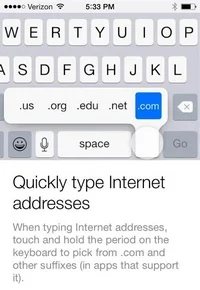
Last night I received a push notification regarding shortcuts for typing .com and other “suffixes” directly from the keyboard. The tip, the 10th in the series, is pictured to the right.
You might recall that iPhones and iPads used to have a .com key. That was dropped in iOS 7, but there was still a shortcut to easily insert .com from the keyboard, and the same shortcut exists in iOS 8.
Essentially, if you hold the period button (.) for a second it inserts .com. When doing this, you can also slide over to select .us, .org, .edu or .net.