
Following up on my previous exploration of popular website builders like Wix, Weebly, and Squarespace, this article dives deeper into my hands-on experience with Squarespace. My goal isn’t to rank these platforms but to provide a clear, practical guide on how I successfully built a functional and visually appealing website using Squarespace, detailing each step of the journey.
It’s important to clarify that this isn’t a comparative ranking of website builders. Each service excels in different areas, and my aim here is to transparently explain the process and functionality of Squarespace through the lens of a specific project. I approached each platform with a distinct website concept, and for Squarespace, I aimed to create an educational hub.
Building Your Dream Website with Squarespace: A Comprehensive Guide and Review
The Journey Begins: Choosing Squarespace and Securing Your Domain
My project for Squarespace revolved around establishing an online educational platform, so I decided to use a newly registered, niche-specific domain name: Bartending.school. This choice reflects a strategic move towards a premium domain name, which, despite its annual cost of $220, presented a compelling value proposition. The high search volume associated with “bartending school” topics justified the investment, promising significant organic traffic potential for a dedicated educational resource. Such a domain instantly communicates the site’s purpose, enhancing brand recognition and search engine relevance from the outset.
A notable aspect of the Squarespace onboarding process, similar to other leading site builders, is its user-centric approach. The platform doesn’t immediately prompt you for domain details. Instead, it encourages users to dive straight into the creative process: selecting a template and beginning the site’s construction. This allows for a focus on design and content development without the immediate commitment of linking a domain or making a payment. The financial and domain connection steps are thoughtfully deferred until the site is ready for public launch, streamlining the initial creative phase and reducing upfront pressure on new users.
Designing with Ease: Navigating the Squarespace Platform
Upon entering the Squarespace ecosystem, the first step involved selecting a template. Squarespace boasts an impressive collection of professionally designed, mobile-responsive templates, categorized to suit various industries and purposes. While the sheer variety might seem overwhelming at first, the intuitive filtering options and preview features make the selection process surprisingly straightforward. I opted for a template that aligned with the clean, educational aesthetic I envisioned for Bartending.school, recognizing its flexibility for future content expansion.
Overall, my experience with Squarespace’s interface proved to be remarkably intuitive and user-friendly. The drag-and-drop editor, combined with a clear block-based system for adding content, made the initial site construction phases highly accessible. However, like any new software, there was a minor learning curve. I encountered a few instances where specific design procedures, such as precisely customizing the top navigation menu or adjusting certain website sections, initially confused me. For example, I sometimes struggled to exit a particular editing screen and resorted to using the browser’s back button – a small hiccup in an otherwise smooth experience.
Fortunately, Squarespace’s commitment to user support shines through its extensive and well-organized help pages. These resources proved invaluable in overcoming the minor hurdles I faced. Each query was met with clear, step-by-step instructions, often accompanied by visual aids, transforming potential frustrations into quick learning opportunities. This robust support system underscores Squarespace’s suitability for users of all technical proficiencies, from complete beginners to seasoned web designers.
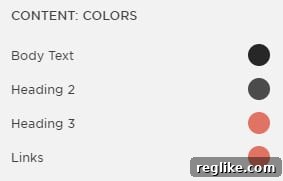
One feature that particularly stood out and significantly enhanced the design process was the Style Editor. This powerful tool provides unparalleled control over sitewide design elements, allowing for consistent branding with minimal effort. I could effortlessly adjust fonts, text sizes, colors, button styles, and spacing across the entire website from a single, centralized panel. This capability is a game-changer for maintaining brand consistency and achieving a polished, professional look without having to manually edit individual page elements. It truly streamlines the design workflow and empowers users to create a cohesive visual identity.
Versatile Content Creation: Pages and Blogging Capabilities
My Bartending.school site leverages both standard informational pages and dynamic blog pages to deliver comprehensive content. Squarespace’s built-in blog system, while perhaps not as feature-rich as dedicated platforms like WordPress, perfectly aligns with its philosophy of simplicity and ease of use. It offers all the essential tools for creating, editing, and publishing engaging blog posts without overwhelming the user with complex options.
The blogging interface is clean and straightforward, making content creation a joy rather than a chore. Users can easily add text, images, videos, and other content blocks, ensuring a visually rich experience for readers. For a site focused on educational content, this streamlined approach meant I could concentrate on drafting high-quality articles and tutorials rather than grappling with intricate technical configurations. It’s an ideal solution for small businesses, creatives, and individuals who need a reliable and elegant blogging solution without the overhead of maintenance associated with more complex CMS platforms.

Furthermore, an important SEO advantage of Squarespace’s blog pages is their compatibility with Accelerated Mobile Pages (AMP). This feature automatically generates a stripped-down, faster-loading version of your blog posts for mobile users, which can significantly improve page loading speeds on smartphones. Faster load times are crucial for user experience and are also a ranking factor for Google, potentially leading to increased organic traffic and better visibility in mobile search results. This integrated AMP support is a testament to Squarespace’s commitment to modern web standards and search engine optimization.
Seamless Integrations and Efficient Content Workflow
While some website builders, like Wix or Shopify, rely on an “app store” model for extended functionality, Squarespace takes a different approach. It offers a curated suite of powerful integrations that are available by default, often pre-built into the platform. These “integrations,” as Squarespace calls them, cover a wide range of functionalities, from analytics and marketing tools to e-commerce and social media connectivity. You can explore the full list of these native integrations here, showcasing the platform’s comprehensive ecosystem without the need for external plugin management.
During the development of Bartending.school, I dedicated a considerable amount of time to drafting all the content from scratch. This intensive initial phase was crucial for establishing the site’s foundational knowledge base. However, once I became familiar with the Squarespace interface and its content management system, the process of adding new articles, updating existing pages, and expanding the course material became remarkably easy and efficient. The learning curve was minimal, and the intuitive design tools made ongoing content management a streamlined process. This ease of use ensures that even after the initial build, maintaining and growing the website remains a hassle-free experience.

Understanding Squarespace Plans and Pricing
A key difference with Squarespace, compared to some competitors that offer free, branded sub-domain sites, is its requirement for users to select and pay for a plan before publishing their website. This ensures that every Squarespace site goes live with a professional, custom domain and access to all premium features from day one, reflecting the platform’s focus on high-quality, fully functional online presences. While this means no “free” testing environment, it streamlines the transition from development to live publication.
Squarespace offers distinct pricing tiers, primarily categorized for regular (non-e-commerce focused) websites:
- Personal Plan: Priced at $16 per month or a discounted $144 annually (saving you $48 per year), this plan is ideal for individuals, small portfolios, or personal blogs. It includes essential features like unlimited bandwidth and storage, free custom domain for one year (with annual billing), SSL security, and basic website metrics. It’s a robust starting point for establishing an online presence without advanced customization needs.
- Business Plan: Available at $26 per month or a more cost-effective $216 annually (saving $96 per year), the Business Plan significantly expands capabilities. It builds upon the Personal Plan by adding advanced features crucial for growing ventures. These include premium integrations, full CSS customization, the ability to inject custom code (e.g., for analytics, tracking pixels, or third-party widgets like Google AdSense) into the site header or footer, and powerful e-commerce functionalities with a 3% transaction fee. While it offers basic e-commerce, businesses serious about online sales might consider Squarespace’s dedicated e-commerce plans for lower transaction fees and more specialized features.
The inclusion of custom code injection and code blocks within the Business Plan is particularly valuable for users who require advanced customization or wish to integrate third-party JavaScript widgets. This functionality allows for greater flexibility in terms of marketing, analytics, and interactive elements. However, it’s crucial to understand that Squarespace, by design, does not permit line-by-line code editing of its core framework. This approach prioritizes stability and ease of use, ensuring that users don’t inadvertently break their site through complex code modifications. While this might be a limitation for highly technical developers, it serves as a protective measure for the vast majority of Squarespace users, allowing them to extend functionality safely.
It’s also worth noting that Squarespace does not provide native email hosting services. Instead, it maintains a strategic partnership with Google to offer seamless integration with G Suite’s basic plan. This collaborative model is common among website builders, as it allows Squarespace to focus on its core competency of site building while leveraging Google’s industry-leading email, calendar, and productivity tools. Users can easily set up professional email addresses tied to their custom domain directly through their Squarespace account, ensuring a cohesive and professional online brand presence.
After carefully evaluating the plans, I selected one that aligned with the educational goals and potential future growth of Bartending.school. The next step involved connecting my premium domain, Bartending.school, to the newly built website. This process typically involves adding or modifying DNS (Domain Name System) records at your domain registrar. Squarespace provides clear, step-by-step instructions for this, often making it a straightforward process. It’s important to remember that while annual Squarespace packages often include a free domain for the first year, this usually applies to standard domains, not premium ones like Bartending.school, which require separate purchase and annual renewal.
Optimizing for Visibility: Publishing and SEO with Squarespace
One of the most satisfying aspects of using Squarespace is its seamless publishing workflow. Once your site is built and content is added, any changes you make and save are instantly published live. This real-time update capability is incredibly efficient, eliminating the need for manual uploads or lengthy deployment processes, and allowing for rapid iterations and content updates without disruption to the user experience. This immediacy is a significant advantage for businesses and individuals who need to keep their online presence fresh and up-to-date.
Built-in SEO Tools and Google Search Console Integration
Squarespace also offers robust built-in SEO features, making it easier for your website to be discovered by search engines like Google. A key highlight is its direct integration with Google Search Console. After your site is ready, you can connect it to Search Console with just a few clicks from within your Squarespace dashboard. This process automatically submits your sitemap to Google, informing the search engine about your site’s structure and content, which is crucial for efficient indexing and ranking. This integration simplifies a traditionally technical process, making advanced SEO accessible to all users.
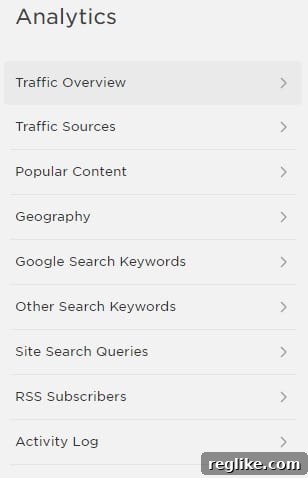
Furthermore, Squarespace enhances this integration by allowing users to access much of their Google Search Console data directly within the platform’s own Analytics section. This invaluable feature means you don’t have to constantly switch between different dashboards to monitor your site’s performance in search results. You can view key metrics like organic traffic, top-performing keywords, and crawl errors alongside your Squarespace-specific analytics (such as visitor behavior, traffic sources, and conversion rates), providing a holistic view of your website’s health and effectiveness. This consolidated data empowers users to make informed decisions about their SEO strategy and content optimization.
Beyond Search Console, Squarespace templates are inherently mobile-responsive, automatically adapting to different screen sizes, which is a critical factor for mobile SEO. The platform also automatically provides an SSL certificate for every site, ensuring secure connections (HTTPS) – another essential ranking signal for Google. Users can also customize page titles, meta descriptions, and image alt text for individual pages and blog posts, giving them fine-grained control over their on-page SEO. These comprehensive features ensure that Squarespace provides a strong foundation for organic search visibility.
Final Verdict: Why Squarespace Shines for Specific Users
Reflecting on my experience building Bartending.school, I am profoundly impressed by Squarespace’s capabilities. The resulting website is visually stunning and functionally robust, exuding a level of professionalism that I frankly believe would have been challenging to achieve in the same timeframe using a platform like WordPress, especially without extensive technical expertise or significant investment in third-party themes and plugins. Squarespace truly excels at enabling users to create high-quality, aesthetically pleasing websites with remarkable efficiency.
For small businesses, independent creatives, photographers, artists, or anyone prioritizing a strong visual online presence and ease of management, Squarespace presents a compelling alternative to more complex content management systems. Its intuitive interface, beautiful templates, and integrated features eliminate many of the technical headaches often associated with website development, such as server management, plugin compatibility, and security updates. This allows business owners and creators to focus on what they do best – running their business or perfecting their craft – rather than getting bogged down in web development intricacies.
While WordPress offers unparalleled flexibility and customization for those with the technical know-how or budget for extensive development, Squarespace provides a streamlined, all-in-one solution that delivers exceptional results without the steep learning curve. The combination of elegant design, powerful SEO tools, and user-friendly content management positions Squarespace as an ideal platform for building a professional, impactful online presence quickly and effectively. My Bartending.school project stands as a testament to its power and accessibility, making it a highly recommended choice for a wide array of users seeking a premium website builder experience.