
GoDaddy WHOIS Privacy: How to Make Your Domain Information Public
In the evolving landscape of domain name management, privacy has become a paramount concern for domain owners. Traditionally, the WHOIS database served as a public directory, making registrant information readily available to anyone. However, with growing concerns over spam, unsolicited contact, and personal data protection, major registrars like GoDaddy have implemented significant changes to how this information is displayed. This guide delves into GoDaddy’s WHOIS privacy features and provides a comprehensive, step-by-step walkthrough on how to make your domain registrant information public, should you choose to do so.
Understanding WHOIS and the Shift Towards Privacy
The WHOIS protocol has been an integral part of the internet’s infrastructure since its inception. It functions as a public query and response protocol widely used for querying databases that store the registered users or assignees of an Internet resource, such as a domain name, an IP address block, or an autonomous system. Its primary purpose was to provide transparency, facilitate network administration, and ensure accountability, allowing anyone to identify the responsible party behind a particular domain name for technical, administrative, and billing contacts.
However, the internet landscape has changed dramatically. What began as a tool for transparency gradually became a conduit for unsolicited commercial communications, identity theft risks, and privacy invasions. Regulatory changes, most notably the European Union’s General Data Protection Regulation (GDPR), significantly accelerated the move towards greater privacy for domain registrants. In response to these global privacy mandates and growing user demand, leading domain registrars, including GoDaddy, began redacting personal information in Whois records.
The Era of Redacted WHOIS
Earlier, WHOIS records typically displayed detailed registrant information, including their full name, postal address, phone number, and email address. Today, with redacted WHOIS, much of this personal data is hidden from public view. Instead of revealing sensitive personal identifiers, a typical WHOIS record for a domain registered with privacy enabled will look something like this:
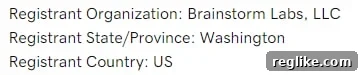
As you can see, critical fields such as Registrant Name, Registrant Street, Registrant Phone, and Registrant Email are replaced with generic placeholders like “Data Redacted,” “Privacy Protected,” or a registrar’s proxy service details. The “Registrant Organization” field, however, remains visible if your domain is registered under a corporate or organizational name, offering a degree of transparency for businesses while protecting individual registrants.
Benefits of Redacted WHOIS (Default GoDaddy Setting)
The implementation of WHOIS redaction has brought significant advantages for domain owners:
- Reduced Spam and Unsolicited Contact: This is arguably the most immediate and appreciated benefit. By concealing your email address and phone number, you dramatically cut down on the incessant stream of spam emails, telemarketing calls, and SMS messages often targeting new domain registrants.
- Enhanced Personal Security: Redacted WHOIS offers a layer of protection against identity theft, doxxing, and other forms of online harassment by keeping your personal contact details out of reach of malicious actors.
- Protection from Data Harvesting: Preventing automated bots and scrapers from easily collecting your personal information, which can be used for various unsolicited marketing campaigns or even more nefarious purposes.
- Privacy Compliance: For many, it aligns with their fundamental right to privacy in an increasingly public digital world, helping them comply with personal data protection regulations.
Potential Drawbacks of Redacted WHOIS
While privacy is largely beneficial, it does come with a few trade-offs, particularly for those involved in the domain buying and selling market:
- Difficulty for Domain Buyers to Make Direct Contact: One of the primary downsides is that a potential domain buyer or broker cannot directly contact you via your email, phone, or address information as they could in the past. This can complicate the process of initiating a domain acquisition.
- Challenges in Dispute Resolution: In cases of domain disputes or technical issues, identifying and contacting the responsible party can become more indirect and time-consuming, as communication might need to be routed through the registrar’s privacy services.
- Perception of Reduced Transparency: Although increasingly rare, some parties might view a fully private WHOIS record with less trust or transparency, especially in professional or high-value domain transactions.
Making Your Domain Information Public on GoDaddy
Recognizing that some domain owners might still prefer or require their contact information to be publicly accessible – perhaps to facilitate domain sales or for specific business reasons – GoDaddy provides the option for domain registrants to expose their information in WHOIS. This choice is made on a domain-by-domain basis, giving you granular control over your privacy settings.
Here’s how to adjust your WHOIS privacy settings within your GoDaddy account:
For an Individual Domain
If you wish to make the WHOIS information public for a single domain name, follow these straightforward steps:
- Log In to Your GoDaddy Account: Navigate to GoDaddy’s website and sign in using your credentials.
- Access Your Domain List: From your account dashboard, typically find and click on “My Products” or “Domains” to view a list of all your registered domain names.
- Select the Desired Domain: Locate the specific domain name you want to modify. Click on it to access its individual settings page.
- Locate Privacy Settings: Scroll down the domain settings page until you find the “Privacy Settings” or “Domain Privacy” section. This area is dedicated to managing how your personal information is displayed in WHOIS.
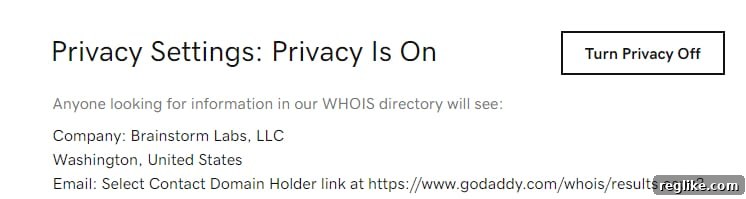
- Turn Privacy Off: Within the “Privacy Settings” section, you will typically find a toggle switch or a button labeled “Turn Privacy Off” or similar. Click this button to initiate the change.
- Review and Confirm: GoDaddy will usually present you with a preview of what your exposed information will look like in the public WHOIS record. This is a crucial step to ensure you are comfortable with the data that will be made visible. Carefully review the details.
- Accept the Change: Once you have reviewed and are satisfied, accept the change. Your WHOIS record will then be updated, making your registrant information publicly accessible.
For Multiple Domains (Bulk Management)
For users managing several domains, GoDaddy offers a convenient bulk action feature to modify privacy settings across multiple domains simultaneously:
- Log In to Your GoDaddy Account: Access your GoDaddy account.
- Go to Your Domain Portfolio: Navigate to your complete list of domains.
- Select Desired Domains: Check the boxes next to all the domain names for which you want to change the privacy preference.
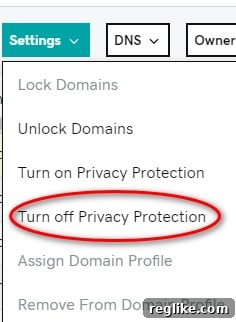
- Access Bulk Settings: After selecting multiple domains, a bulk action menu or “Settings” dropdown will usually appear at the top or bottom of your domain list. Click on this dropdown.
- Choose Privacy Protection Option: From the available options in the bulk action menu, select “Change Privacy Protection” or a similar phrase.
- Specify Privacy Level: You will then be prompted to choose your desired privacy level for the selected domains (e.g., “Full Privacy,” “Standard Privacy,” or “Privacy Off”). Select the option to turn privacy off.
- Confirm Changes: Review the changes and confirm your selection to apply the new privacy settings to all chosen domains.
Revisiting the Dilemma: To Disclose or Not to Disclose?
Historically, many domain investors and business owners were staunch proponents of including their contact information in WHOIS records. The rationale was simple: direct visibility facilitated easy contact from potential buyers, partners, or interested parties, streamlining domain acquisition processes. However, as the digital landscape continues to evolve, my opinion on this matter has significantly shifted.
The trade-off for making your personal information public might no longer be worth the inherent risks of spam, unwanted solicitations, and potential security vulnerabilities. Modern domain market dynamics and communication tools offer equally effective, if not superior, methods for connecting with potential buyers without compromising your privacy.
Modern Avenues for Domain Buyer Contact
Even with your private information redacted, legitimate domain buyers have several effective ways to contact you:
- WHOIS Contact Form or Proxy: Most registrars, including GoDaddy, provide a privacy-protected contact form accessible via the public WHOIS record. This form allows interested parties to send you an email without ever seeing your actual email address. The message is typically forwarded to the email address on file in your GoDaddy account.
- Domain Marketplaces: Listing your domains on reputable domain marketplaces like Sedo, Afternic, Dan.com, or Flippa is one of the most proactive and effective ways to signal that your domain is for sale. These platforms are frequented by serious buyers and brokers, providing structured communication channels and often facilitating the entire sales process securely.
- “For Sale” Landing Pages: Implementing a professional “for sale” landing page on your domain is a highly recommended practice. This lander can explicitly state that the domain is available for purchase and provide a dedicated contact form or a specific email address (perhaps a disposable one or one set up solely for sales inquiries) for interested parties. This gives you full control over how and when you are contacted.
- Domain Brokers: Engaging a professional domain broker can facilitate high-value sales confidentially. Brokers act as intermediaries, shielding your identity while negotiating on your behalf, ensuring your privacy is maintained throughout the transaction.
These methods collectively provide three robust ways for people to inquire about buying your domain without you having to expose your phone number, personal email address, or home address to the entire internet. The balance has clearly shifted towards favoring privacy, with effective alternatives for business communication readily available.
Best Practices for Domain Owners
To strike the right balance between privacy and accessibility, consider these best practices:
- Regularly Review Settings: Periodically check your WHOIS privacy settings to ensure they align with your current needs and preferences.
- Use Professional Contact Information: If you decide to make information public, consider using a dedicated business email address and phone number rather than personal ones.
- Leverage Marketplaces and Landers: Actively list your domains on major marketplaces and deploy professional “for sale” landing pages to attract serious buyers.
- Stay Informed: Keep abreast of any policy changes regarding WHOIS data from ICANN or your specific registrar.
Conclusion
The evolution of WHOIS privacy, particularly GoDaddy’s implementation of redacted records, marks a significant step forward in protecting domain registrants’ personal information. While the option to make your data public remains available, the benefits of enhanced privacy, coupled with modern, secure communication alternatives for domain sales, often outweigh the perceived advantages of full public disclosure. By understanding your options and utilizing the tools GoDaddy provides, you can confidently manage your domain portfolio while safeguarding your personal data, ensuring both control and peace of mind.