Accept Payments and Maximize Revenue on Your Website — How to
These days, it seems everyone has an online shop that sells products and services.
And rightfully so.
With 71% of people believing they can get a better deal online, it’s no wonder businesses of all sizes and kinds are throwing up eCommerce stores to supplement their income.
To add to that, it is estimated that by 2019, there will be nearly 224 million digital shoppers in the United States alone.
Online shopping is a multi-billion dollar enterprise that spans the globe. People all over choose to buy online since it is simple, easy to price compare, and is relatively low pressure. Plus, they can do it from the comfort of their own home if they choose to.
And in response, as I mentioned above, website owners worldwide are jumping in and building their very own eCommerce shop so they too can reap the benefits online shopping brings to business owners.
But what if you are just starting out in the eCommerce biz? How are you supposed to know what you need on your website in order to securely collect payments from your clients?
[clickToTweet tweet=”Find out what essentials you need on your eCommerce website in order to accept payments.” quote=”Find out what essentials you need on your eCommerce website in order to accept payments.”]
If this is something you are struggling with, keep reading. Today I have a list of what it takes for you to accept payments on your website so that you too can generate revenue from the slew of online shoppers that prefer to buy online.
Must-Have Features so You Can Accept Payments on Your Website
1. eCommerce Platform
This piece of software is an essential building block to being able to accept payments on your website. For instance, an eCommerce platform allows you to manage your online shop, sales, and associated operations. In addition, it often comes with all the necessary tools to begin accepting payments directly from clients on your website.
Popular eCommerce platforms include:
- Shopify
- BigCommerce
- Magento
- Squarespace
- WooCommerce
Depending on the size of your shop, and other factors such as support, cost, mobile-friendliness, security, and scalability, you will want to make sure you do your due diligence in researching which eCommerce platform best suits your needs.
*Keep in mind that many of the essential “must-haves” I am regarding to share with you come included with some of the top eCommerce platforms on the market today.
2. PCI Compliance
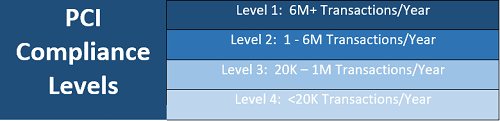
The PCI Security Standards Council is responsible for the ongoing development, enhancement, storage, dissemination, and implementation of security standards as it applies to your clients’ data. In short, they make sure you are protecting your client’s credit card data during checkout.
No matter how big or modest your eCommerce shop is, it’s your responsibility to make sure you are PCI compliant. The level of compliance you need is determined by how many credit card transactions are processed through your shop annually. The more transactions you process, the higher your PCI compliance must be.
3. Payment Processor
For smaller eCommerce shops, integrating a simple payment gateway onto your website such as PayPal, Stripe, Google Wallet, or Authorize.net may suffice for finalizing transactions.
Still, for larger retail sites that process thousands in revenue daily, it is better to install a payment processor onto your website. This will ensure top notch security, prevent chargebacks and revenue loss, and make sure your website can handle the traffic that flows through your online shop on a consistent basis.
Though we have discussed popular payment processors in the past, here is a look at some of the best options you have to choose from:
- Selz
- Helcim
- PayJunction
- 2CheckOut
4. SSL Certificate
The purpose of an SSL certificate is to protect your clients’ personal and financial information. In short, SSL certificates guarantee that data passed between a web server and a browser remain secure and private.
If you do not have an SSL certificate on your eCommerce website, all data that is processed through your website, counting sensitive information such as credit card numbers, are vulnerable to hackers looking to steal and use that information.
You can tell when a website is SSL certified by looking at their URL. If you see an “https://”, the site is secure. On the other hand, if you see “http://” it is not secure.
Getting a free SLL certificate is not difficult to do, especially if your eCommerce platform or website hosting provider provides one. If not, still, you can always use the popular Let’s Encrypt SLL certificates.
5. Secure Login Options
Have you ever tried to purchase something online and realized that the only way to finalize your purchase was to register an account with stated shop?
Pretty annoying right?
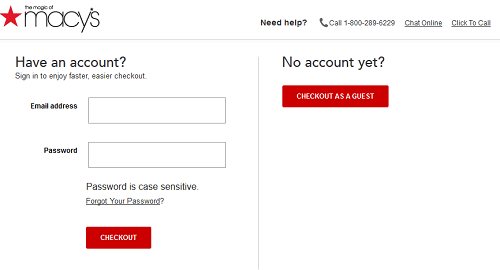
Cater to clients that hate the thought of registering for accounts in order to make purchase by having multiple login options available. This means having an account section for those that are interested or by now have an account with you. Additionally, have a “Checkout as Guest” option.
In addition, you will want to make sure that any login requirements you have are secure. This includes answering security questions in the case of a forgotten password or locked accounts following a specific number of failed login attempts.
6. Smooth Checkout Process
In order for you to collect payments from your clients, you must provide easy ways for them to finalize their purchases. This is done in a number of ways:
Checkout Buttons
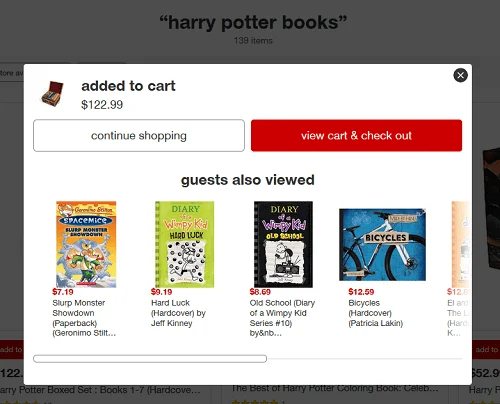
Make it very clear to clients where the checkout process begins by using an extremely visible checkout button such as the one found on Target.com.
Following all, the less time a client has to spend figuring out how to get to their cart and make their payment, the less likely they are to abandon their cart. And, with abandonment rates reaching nearly 70%, it’s notable to prevent this as much as possible.
Visible Checkout Process

Clients get anxious the longer the checkout process is. Especially if it spans across multiple pages. This can lead to cart abandonment, which does no good for your bottom line or client satisfaction.
Amazon does a good job of directing clients through the checkout process step-by-step. You always know which part of the process you are at, can easily navigate back if necessary, and in the end you can always make changes to your purchase.
Refund and Return Policy
Though not exactly required to accept payments on your website, a clearly defined refund and return policy will help satisfy your clients’ need to know what steps to take in the case something goes wrong with their purchase.
Clients place a lot of trust in your firm when they buy something online from you since they cannot physically check out the product they are purchasing. In addition, they want to know that if for whatever reason they are not satisfied, they can return or exchange the item.
If you make your refund and return policy visibly on your website, you solidify that trust and put clients at ease to continue finalizing their transaction. This of course generates you more revenue and provides your shop an opportunity to grow.
Final Thoughts
In the end, there is a lot that goes into accepting payments from your clients online. From payment processors to site security, checkout processes to refund policies, it is notable you touch on all of the essentials.
In doing so, you will instill clients with a sense of confidence in your brand. Plus, you will breed loyalty amongst clients and give your online shop the ability to grow and succeed.