Get transfer authorization codes in bulk using Claude — How to
No more manual effort thanks to Claude.
A good domain registrar will allow you to export your transfer authorization/EPP codes in bulk. Some don’t, still, which adds friction to the process of moving your domains to another registrar.
Fortunately, Claude and other AI tools now make it possible to get auth codes for all your domains without the painstaking process of manually getting them one-by-one.
Here’s how to do it with Claude:
1. Download the Claude App
2. Install the Claude browser extension for Chrome
3. Log in to your domain registrar control panel
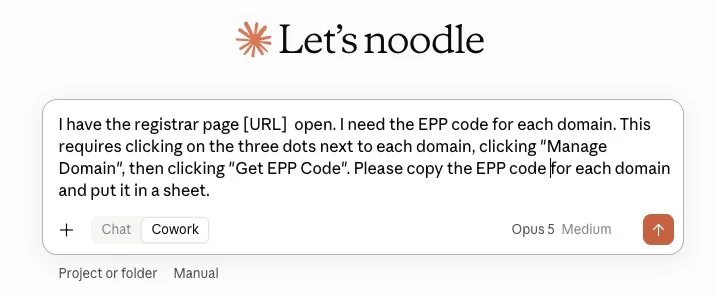
In Claude, choose the CoWork option, and provide a prompt that explains exactly what it ought to do. Here’s an example prompt:
I have the registrar page [URL] open. I need to get the EPP code for each of the domains. This requires clicking on the three dots next to each domain, clicking “Manage Domain”, then clicking “Get EPP Code”. Please copy the EPP for each domain and put it in a sheet.
Claude will use your browser to grab all of the codes for you and put them in a spreadsheet.
If you have a lot of domains, it might make sense to batch them in groups of 40 or 50 in case something goes wrong. It’s easy to do this for a subset of your portfolio; just tell Claude which domains to get auth codes for.