
Enhance Your Afternic Account Security: A Detailed Guide to Two-Factor Authentication
In the domain aftermarket, security is paramount. One of the significant vulnerabilities has historically been the absence of robust two-factor authentication (2FA) for Afternic accounts. A compromised Afternic account can lead to severe consequences, including unauthorized price reductions and subsequent acquisition of valuable domains at unfairly low prices. This guide provides a comprehensive overview of how to fortify your Afternic account with two-factor authentication, ensuring the protection of your digital assets.
Understanding the Importance of Afternic Account Security
Your Afternic account holds significant value, representing your domain portfolio and your ability to transact in the domain marketplace. A security breach can expose you to financial losses and reputational damage. Imagine the scenario: an attacker gains unauthorized access to your Afternic account. They could then manipulate the pricing of your premium domains, setting them at drastically reduced rates. Subsequently, they (or an accomplice) could purchase these domains through a partner registrar, effectively stealing them at a fraction of their true market value. This highlights the critical need for proactive security measures.
Two-Factor Authentication: Your First Line of Defense
Two-factor authentication (2FA) adds an extra layer of security to your account login process. It requires you to provide two distinct forms of identification before granting access. This significantly reduces the risk of unauthorized access, even if your password has been compromised. Afternic has recently updated its login platform to offer improved security options, including two-factor authentication. You now have two primary methods to secure your account:
- Sign in with GoDaddy: If you are creating a new Afternic account, signing in with GoDaddy is highly recommended. GoDaddy has long offered robust two-factor authentication options, providing a seamless and secure login experience. Leveraging GoDaddy’s existing security infrastructure simplifies the process of protecting your Afternic account.
- Use a Unique Afternic Login with Two-Factor Authentication: If you prefer to maintain a separate Afternic login, you can now enable two-factor authentication directly within your Afternic account settings. This allows you to benefit from the added security of 2FA while retaining control over your independent Afternic credentials.
Step-by-Step Guide to Setting Up Two-Factor Authentication on Afternic
Enabling two-factor authentication on your Afternic account is a straightforward process. Follow these steps to enhance your account security:
- Log into Your Afternic Account: Begin by logging into your Afternic account using your existing username and password.
- Navigate to Account Settings: Once logged in, locate the “Account” option in the left-hand navigation panel and click on it. Then, select “Account Details” from the submenu.
- Access Security Settings: Scroll down the “Account Details” page until you find the “Security” section. Within this section, you will see the option labeled “2-step verification.” Click on this option to begin the two-factor authentication setup process.
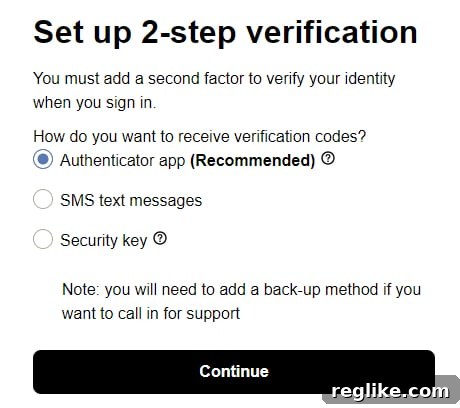
- Choose Your Authentication Method: Afternic offers several options for setting up 2-step verification, including:
- Authenticator App: This method utilizes a dedicated authenticator app on your smartphone, such as Google Authenticator, Authy, or Microsoft Authenticator. The app generates time-sensitive codes that you must enter during the login process.
- SMS Text Messages: This option sends a verification code to your registered mobile phone number via SMS text message. You will need to enter this code during login.
- Physical Security Key: A physical security key is a small hardware device that plugs into your computer’s USB port. It provides a highly secure method of authentication.
- Configure Your Chosen Method: Follow the on-screen instructions to configure your chosen authentication method. This typically involves scanning a QR code with your authenticator app or entering your phone number for SMS verification.
- Save Your Recovery Codes: After successfully setting up two-factor authentication, Afternic will provide you with a set of recovery codes. These codes are crucial for regaining access to your account if you lose access to your primary authentication method (e.g., if you lose your phone or security key). Store these codes in a safe and secure location.
Choosing the Right Authentication Method for Your Needs
While Afternic suggests using an authenticator app as the primary method for two-factor authentication, it’s essential to consider the strengths and weaknesses of each available option:
- Authenticator App: Authenticator apps are generally considered a secure and convenient option. They generate time-based codes offline, reducing reliance on cellular networks or internet connectivity.
- SMS Text Messages: While SMS-based authentication is better than no 2FA at all, it is the least secure option. SMS messages can be intercepted or spoofed, making them vulnerable to attack.
- Physical Security Key: Physical security keys offer the highest level of security. They are resistant to phishing and other common attack vectors. However, they may require more technical knowledge to set up and use.
The optimal choice depends on your individual security needs and technical comfort level. If you prioritize maximum security, a physical security key is the recommended option. However, an authenticator app provides a good balance of security and convenience for most users.
Why Avoid SMS-Based Authentication?
Although SMS-based authentication is an option offered by Afternic, it is generally discouraged due to its inherent security vulnerabilities. SMS messages are transmitted over insecure networks and can be intercepted by malicious actors. Furthermore, SMS spoofing techniques can be used to impersonate legitimate senders and trick users into providing sensitive information. Therefore, it is strongly recommended to choose a more secure authentication method, such as an authenticator app or a physical security key.
Securing Your Domains: A Continuous Process
Enabling two-factor authentication on your Afternic account is a crucial step in protecting your domain assets. However, it is important to remember that security is an ongoing process. Regularly review your account settings, update your passwords, and stay informed about the latest security threats. By taking proactive measures, you can minimize your risk and ensure the long-term security of your valuable domain portfolio. Protecting your Afternic account is a vital investment in the security and future of your online assets.