Two-factor authentication on your Afternic account — Set up
Here’s how to add security to your Afternic account.
One of the bigger security risks in the domain aftermarket has been the lack of two-factor authentication for Afternic accounts. If someone hacks into your Afternic account, they can decrease the price of a domain and then buy it through a registrar partner at the lower price.
Afternic has updated its login platform and there are two options now that resolve this. One is to sign in with GoDaddy, which I recommend to anyone creating a fresh account. GoDaddy has offered two-factor for a long time. The other is to continue using a unique Afternic login and add two-factor authentication.
To set up two-factor authentication on Afternic, log into your account and select “Account” in the left-hand panel and then “Account Details”. Scroll down to “Security” and select “2-step verification”.
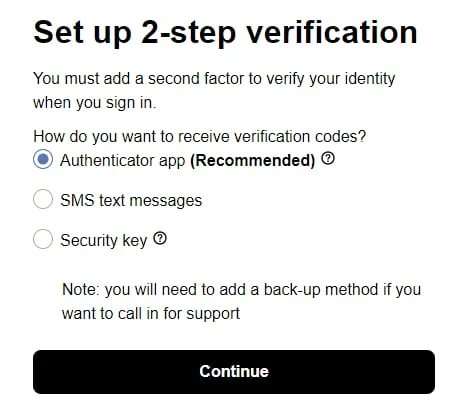
You can then set up 2-step verification using an authenticator app such as Google Authenticator, SMS text messages, or a physical security key. For some reason, Afternic suggests the Authenticator app rather than the more secure physical key, but I suspect this is since the physical key would confuse people who aren’t familiar with the option. A physical key also doesn’t allow for authentication if you call support.
I recommend against SMS-based authentication, but it’s better than nothing.