
Securing Your Digital Fortress: Why App-Based Two-Factor Authentication Trumps SMS for Domain Security
In an increasingly digital world, the security of your online assets is paramount. For businesses and individuals alike, domain names represent a critical piece of digital real estate, serving as the foundation for websites, email, and online identity. Protecting these assets from unauthorized access, transfer, or theft is no longer just a recommendation – it’s an absolute necessity. At the forefront of modern cybersecurity defenses for your domain name registrar accounts stands two-factor authentication (2FA), an indispensable layer of security that goes beyond a simple password.
Most reputable domain registrars now offer 2FA, and if your current registrar doesn’t, it’s a glaring red flag signalling an urgent need to migrate to a more security-conscious provider. But not all 2FA methods are created equal. While many registrars initially adopted SMS-based authentication due to its perceived convenience, the landscape of digital threats has evolved, revealing significant vulnerabilities in this approach. This article will delve into why app-based authentication has emerged as the superior and more secure choice, guiding you through its benefits and urging you to make the switch for robust domain protection.
Understanding Two-Factor Authentication (2FA): A Core Security Pillar
Two-factor authentication adds a crucial second layer of verification beyond your username and password. It requires you to provide two different types of credentials from distinct categories of authentication factors: something you know (like a password), something you have (like a phone or a physical security key), or something you are (like a fingerprint or facial scan). For most online services, including domain registrars, 2FA typically combines “something you know” with “something you have.”
The primary goal of 2FA is to significantly reduce the risk of unauthorized access even if your password falls into the wrong hands. In an era plagued by data breaches, phishing attempts, and sophisticated credential-stuffing attacks, relying solely on a password is akin to leaving your front door unlocked. 2FA acts as a powerful deterrent, ensuring that even if a malicious actor acquires your password, they would still need the second factor – a temporary code or a physical token – to gain entry to your account.
The Pitfalls of SMS-Based Two-Factor Authentication
SMS-based 2FA, often referred to as “SMS OTP” (One-Time Password), operates by sending a unique, time-sensitive verification code via text message to your registered mobile phone number after you’ve entered your username and password. While this method gained popularity due to its simplicity and ubiquitous availability, its reliance on cellular networks introduces several critical vulnerabilities and practical drawbacks that compromise its effectiveness as a strong security measure.
1. Reliability Issues
One of the most immediate problems with SMS authentication is its inherent unreliability. Mobile phone networks, particularly during peak times or in areas with poor coverage, can experience delays, dropped messages, or complete outages. This can lead to frustration for users who are unable to log in, hindering access to critical accounts, sometimes at the most inconvenient moments. International travel can further complicate matters, as roaming charges or incompatible networks can prevent the delivery of essential authentication codes.
2. Significant Security Vulnerabilities
Far more concerning than reliability issues are the security weaknesses inherent in SMS. Cybercriminals have developed sophisticated methods to bypass or exploit SMS-based authentication, making it an increasingly precarious option for safeguarding high-value accounts like domain registrar access.
- SIM Swapping (or SIM Hijacking): This is arguably the most dangerous threat to SMS 2FA. Attackers use social engineering tactics to trick mobile carriers into porting your phone number to a SIM card they control. Once they control your number, they can intercept all incoming text messages, including your 2FA codes, and gain access to your accounts. This method has been successfully used to compromise cryptocurrency wallets, social media profiles, and other sensitive accounts.
- SMS Interception: While less common for the average user, SMS messages are not inherently end-to-end encrypted and can, under certain circumstances, be intercepted by sophisticated attackers, especially those with access to cellular network infrastructure or through malware installed on your device.
- Phishing Attacks: Attackers can create fake login pages that mimic legitimate sites. If you enter your credentials and then the SMS code on such a page, the attacker can immediately use those details on the genuine site to gain access, effectively performing a real-time “man-in-the-middle” attack.
- Lack of Cryptographic Strength: Unlike app-based methods, SMS authentication relies on the integrity of the cellular network and the user’s phone number, neither of which offers the same cryptographic protections as dedicated authenticator apps.
Given these growing threats, security experts and organizations are increasingly advising against the use of SMS for two-factor authentication, especially for critical accounts like those managing domain names.
The Superiority of App-Based Two-Factor Authentication
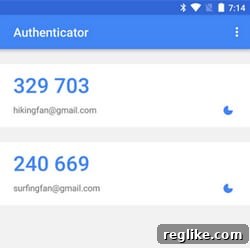
App-based two-factor authentication utilizes a dedicated application on your smartphone or computer to generate Time-based One-Time Passwords (TOTP). These codes are typically six to eight digits long and refresh every 30 to 60 seconds. This method offers a robust, cryptographically secure alternative to SMS, addressing the vulnerabilities and limitations of its predecessor. Many leading domain registrars, including GoDaddy, Uniregistry, and eNom, now offer and strongly recommend app-based 2FA.
1. Enhanced Security and Resilience
The primary advantage of app-based authentication lies in its superior security model. The codes are generated locally on your device using a shared secret key established during the initial setup process. This means:
- No Reliance on Mobile Networks: Codes are generated offline, eliminating the risk of network delays, outages, or interception by third parties on the cellular network.
- Immunity to SIM Swapping: Since the authenticator app is tied to the physical device and not the phone number, SIM swapping attacks become ineffective against accounts protected by app-based 2FA.
- Cryptographically Strong: TOTP algorithms are designed to be highly secure and resistant to brute-force attacks, making it extremely difficult for attackers to guess valid codes.
- Device-Bound Protection: Even if your password is stolen, an attacker still needs physical access to your device (or its backup) to generate a code, adding a significant hurdle.
2. Reliability and Convenience
Beyond security, app-based 2FA often provides a more reliable and streamlined user experience:
- Instant Code Generation: Codes are generated instantly on your device, avoiding the delays associated with SMS delivery.
- Centralized Management: Popular authenticator apps like Google Authenticator, Authy, and Microsoft Authenticator allow you to manage TOTP codes for dozens of different accounts from a single interface. This eliminates the clutter of receiving multiple SMS messages from various services.
- Cross-Platform Compatibility: Most authenticator apps are available across various mobile operating systems (iOS, Android), ensuring broad accessibility.
- Mitigating the “Downside”: While the original article mentioned a slight downside when needing to switch back to the authenticator app, modern apps often have convenient features like copy-paste buttons or even auto-fill functionality, making the process very quick. The minor inconvenience is a small price to pay for significantly enhanced security.
Popular Authenticator Apps
The most widely adopted and recommended app for generating two-factor authentication codes is Google Authenticator. It’s free, straightforward to use, and supports a vast array of online services. Other excellent alternatives include Authy, which offers cloud backup and multi-device syncing, and Microsoft Authenticator, which integrates well with Microsoft services and provides passwordless login options.
How to Set Up App-Based Two-Factor Authentication
Enabling app-based 2FA is a simple yet impactful step:
- Download an Authenticator App: Choose a reputable app like Google Authenticator, Authy, or Microsoft Authenticator from your device’s app store.
- Access Your Registrar’s Security Settings: Log in to your domain registrar account and navigate to the security or 2FA settings.
- Initiate Setup: Select the option to enable app-based or authenticator app 2FA. The registrar will typically display a QR code or a long secret key.
- Scan or Enter Key: Open your authenticator app and either scan the QR code with your phone’s camera or manually enter the secret key.
- Verify: Your authenticator app will immediately start generating codes. Enter the current code displayed in the app back into your registrar’s setup screen to verify the connection.
- Save Recovery Codes: Crucially, your registrar will provide a set of one-time recovery codes. Download, print, and store these in a secure, offline location (e.g., a safe). These codes are your lifeline if you lose your device or cannot access your authenticator app.
Beyond Apps: The Future with Security Keys (U2F/FIDO2)
While app-based 2FA offers a significant leap in security, the cutting edge of authentication technology lies with hardware security keys, based on standards like U2F (Universal 2nd Factor) and the newer FIDO2. These physical devices, such as YubiKeys, offer the highest level of phishing resistance and are increasingly supported by major online platforms, including Google, Facebook, and some financial institutions.
How Security Keys Work:
When logging in, after entering your password, you simply insert the security key into a USB port or tap it against your NFC-enabled phone. The key then cryptographically verifies your identity to the service. This method is exceptionally secure because:
- Phishing Resistant: The key only authenticates with the legitimate website, making it impossible for a phishing site to trick it into releasing credentials.
- Highly Secure: It’s virtually impossible for attackers to remotely compromise a physical security key.
- User-Friendly: Tapping or inserting a key can often be faster and simpler than typing out codes.
It is my strong hope that domain registrars will accelerate their adoption and support for these advanced security keys soon. For critical assets like domain names, U2F/FIDO2 keys represent the ultimate defense against sophisticated attacks.
Comprehensive Domain Security: Beyond 2FA
While two-factor authentication, particularly app-based, is fundamental, a holistic approach to domain security requires attention to several other best practices:
- Strong, Unique Passwords: Even with 2FA, your primary password should be complex, unique to your registrar account, and frequently updated. Use a reputable password manager.
- Registrar Lock (Domain Lock): Ensure your domain name is always locked at the registrar level. This prevents unauthorized transfers or changes to your domain’s DNS settings.
- WHOIS Privacy Protection: Consider enabling WHOIS privacy to hide your personal contact information from public databases, reducing the risk of targeted social engineering attacks.
- Secure Email for Registrar Account: The email address associated with your registrar account is extremely sensitive. Ensure it’s protected with its own strong, unique password and, crucially, app-based 2FA.
- Registrar-Specific Enhanced Security: Many registrars offer additional security layers. For example, if you spend enough money with GoDaddy to have a dedicated account manager, you can often arrange for them to call and verbally verify any domain transfers before they are processed. Explore similar premium security features with your own registrar.
- Regular Account Audits: Periodically review your registrar account’s security settings, authorized contacts, and domain registration details to ensure everything is in order and no unauthorized changes have occurred.
Conclusion: Prioritizing Your Domain’s Security
The digital world demands vigilance, and securing your domain names should be at the top of your cybersecurity priority list. While SMS-based two-factor authentication offered an initial step towards better security, its inherent vulnerabilities in the face of evolving cyber threats make it an outdated and risky choice for critical accounts.
By migrating to app-based authentication, you significantly bolster your domain’s defenses against SIM swapping, phishing, and various forms of unauthorized access. This switch provides a more reliable, robust, and cryptographically sound security layer. Furthermore, as technology advances, embracing hardware security keys (U2F/FIDO2) offers the pinnacle of protection, representing the future of secure online authentication.
Take proactive steps today: enable app-based two-factor authentication for all your domain registrar accounts, explore the potential of security keys, and implement comprehensive security best practices. Your digital assets deserve nothing less than the strongest possible protection.