
Unlock Website Insights with Microsoft Clarity: Free Heatmaps and Session Recordings to Improve User Experience
In today’s digital landscape, understanding how users interact with your website is paramount to success. Optimizing your website’s user experience (UX) directly translates to increased engagement, higher conversion rates, and ultimately, a stronger bottom line. Traditionally, gaining these insights required expensive tools and specialized expertise. However, Microsoft Clarity has revolutionized the field by offering free heatmaps and session recordings, empowering website owners of all sizes to analyze user behavior and make data-driven improvements.
The evolution of website analytics has been remarkable. Back in 1997, launching a simple website involved navigating complex hosting configurations and domain name connections. Fast forward to 2001, e-commerce solutions were either prohibitively expensive or demanded advanced coding skills. Even basic analytics tools that are now freely available commanded hefty monthly fees. Today, thanks to advancements in technology and a commitment to accessibility, anyone can launch an e-commerce store in a matter of hours for a minimal investment.
The democratization of web development and analytics extends to powerful tools like session tracking and heatmaps. These features, once reserved for large enterprises with substantial budgets, are now readily accessible to all through platforms like Microsoft Clarity. The ability to understand user behavior through visual representations and real-time recordings is a game-changer for website optimization.
Diving Deep with Microsoft Clarity: Heatmaps, Click Maps, and Session Recordings
Microsoft Clarity stands out as a comprehensive, user-friendly, and completely free analytics platform. It provides a suite of features designed to help you understand how users navigate your website, identify areas for improvement, and ultimately enhance the overall user experience. The core features include:
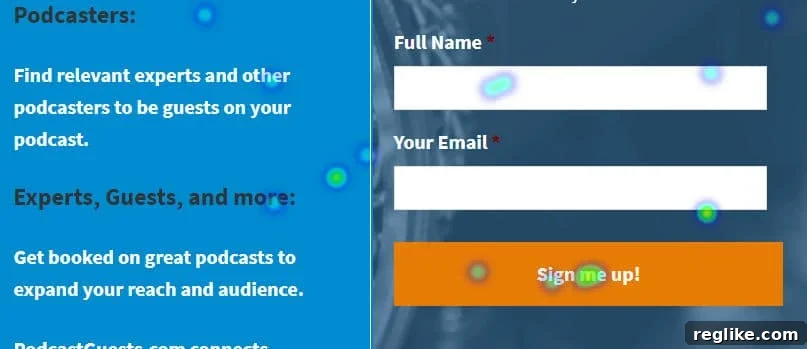
- Heatmaps: Heatmaps provide a visual representation of where users click, tap, and scroll on your website. This allows you to quickly identify the most popular areas of your pages and understand which elements are attracting the most attention. Are users clicking on your call-to-action buttons? Are they engaging with your key content? Heatmaps provide the answers.
- Click Maps: Click maps offer a more granular view of user clicks, showing you exactly where users are clicking on each page. This is particularly useful for identifying broken links, misaligned elements, or areas where users are expecting interactivity but not finding it.
- Session Recordings: Session recordings allow you to watch real users interact with your website. This provides invaluable insights into how users navigate your site, where they encounter difficulties, and what ultimately leads them to convert (or abandon) their journey. Watching session recordings is like having a fly on the wall, observing user behavior in its natural context.
Real-World Application: Optimizing PodcastGuests.com with Clarity
To illustrate the practical benefits of Microsoft Clarity, consider the example of PodcastGuests.com, a platform designed to connect podcast hosts with potential guests. One of the key features of the site is a detailed profile creation form for paid members. This form requires users to provide a significant amount of information, and ensuring a smooth and intuitive user experience is crucial for maximizing conversions and user satisfaction.
By implementing Microsoft Clarity on PodcastGuests.com, it became possible to observe users as they completed the profile form. Analyzing session recordings revealed several key areas for improvement. For example, users were frequently hesitating on certain fields, indicating confusion or ambiguity. By tweaking the wording of labels and providing clearer instructions, the form completion process became significantly smoother and less frustrating for users. Furthermore, Clarity helped identify instances where users were clicking on non-interactive elements, suggesting a need for improved design and visual cues.
The insights gained from Clarity allowed for data-driven adjustments to the profile form, resulting in a more streamlined and user-friendly experience. This, in turn, led to increased completion rates, improved user satisfaction, and ultimately, a stronger value proposition for paid members.
Beyond E-commerce: Clarity’s Versatility for All Types of Websites
While the PodcastGuests.com example highlights the benefits of Clarity for membership-based websites, the platform’s versatility extends to a wide range of applications. Whether you operate an e-commerce store, a blog, a news website, or a portfolio site, Clarity can provide valuable insights into user behavior and help you optimize your website for your specific goals.
Here are just a few examples of how different types of websites can benefit from Microsoft Clarity:
- E-commerce Stores: Identify bottlenecks in the checkout process, optimize product page layouts, and understand how users interact with your shopping cart.
- Blogs: Analyze which articles are attracting the most attention, understand how users are engaging with your content, and optimize your website layout for readability and engagement.
- News Websites: Track which stories are being clicked on the most, understand how users are navigating your website, and optimize your website for speed and performance.
- Portfolio Sites: Analyze which projects are attracting the most attention, understand how users are interacting with your portfolio, and optimize your website to showcase your best work.
The Power of Free: Accessibility and Democratization of Website Analytics
The fact that Microsoft Clarity is offered completely free of charge is a testament to Microsoft’s commitment to empowering website owners of all sizes. This accessibility levels the playing field, allowing small businesses, startups, and individual creators to leverage the same powerful analytics tools that were once reserved for large corporations.
By providing free heatmaps and session recordings, Microsoft Clarity democratizes website analytics, enabling anyone to gain a deeper understanding of their users and make data-driven improvements. This empowers website owners to optimize their websites for conversions, engagement, and ultimately, success.
Getting Started with Microsoft Clarity: A Simple and Straightforward Process
Implementing Microsoft Clarity on your website is a simple and straightforward process. The platform provides clear instructions and readily available documentation to guide you through the setup. In most cases, it involves adding a small snippet of code to your website’s header. Once the code is in place, Clarity will begin collecting data and generating heatmaps, click maps, and session recordings. The user interface is intuitive and easy to navigate, allowing you to quickly access and analyze the data you need to optimize your website.
Embrace the Power of User Insights: Transform Your Website with Microsoft Clarity
In conclusion, Microsoft Clarity is a powerful and versatile tool that provides invaluable insights into user behavior. By offering free heatmaps, click maps, and session recordings, Clarity empowers website owners of all sizes to optimize their websites for conversions, engagement, and ultimately, success. Whether you operate an e-commerce store, a blog, a news website, or a portfolio site, Clarity can help you understand your users better and make data-driven improvements that transform your website.
Embrace the power of user insights and unlock the full potential of your website with Microsoft Clarity. It’s a free, easy-to-use, and incredibly valuable resource that can make a significant difference in your online success.