
Secure Your Online Identity: The Essential Guide to GoDaddy Backup Payment Methods
In today’s interconnected world, your domain name is more than just a web address; it’s the digital cornerstone of your brand, business, and online presence. The thought of losing your domain due to an oversight, such as an expired payment method, can be a source of significant anxiety. An accidental domain expiration can lead to website downtime, email disruptions, and even the permanent loss of your valuable digital asset to opportunistic buyers. Fortunately, leading domain registrars like GoDaddy provide powerful tools to prevent such scenarios, with the backup payment method standing out as a critical safeguard.
The Hidden Dangers of Neglecting Domain Renewal
Many individuals and businesses underestimate the potential fallout from a lapsed domain registration. While it might seem like a minor administrative detail, an expired domain can trigger a cascade of problems:
- Immediate Website Downtime: Your website will become inaccessible, turning away potential customers and disrupting ongoing operations.
- Email Service Interruption: All email addresses associated with your domain will cease to function, leading to missed communications, lost leads, and a significant blow to professional credibility.
- Loss of Brand Trust: An offline website suggests unprofessionalism or instability, eroding customer confidence and potentially damaging your brand reputation.
- Revenue Loss: For e-commerce sites, every minute of downtime translates directly into lost sales and diminished revenue.
- Domain Snatching: Expired domains are frequently targeted by domain speculators who acquire them with the intent to resell at a higher price or use them for nefarious purposes, making recovery both costly and challenging, if not impossible.
- SEO Impact: Search engine rankings can suffer significantly from extended downtime, requiring considerable effort to regain lost visibility.
These severe consequences underscore the absolute necessity of robust domain management strategies, with the primary goal of ensuring continuous availability and protection of your online identity.
GoDaddy’s Proactive Defense: Understanding Backup Payment Methods
GoDaddy, recognizing the critical importance of uninterrupted domain service, offers a straightforward yet highly effective solution: the backup payment method. As highlighted by GoDaddy experts like Joe Styler, this feature acts as an indispensable safety net, ensuring your domain renewals proceed smoothly even if your primary payment source encounters an issue.
A backup payment method is an alternative financial instrument (e.g., a different credit card, a PayPal account) that you designate within your GoDaddy account. If the primary payment method linked to your domain or account fails during an automated renewal attempt—perhaps due to an expired card, insufficient funds, or a bank-imposed block—GoDaddy will automatically attempt to charge your designated backup. This seamless transition prevents any interruption in your domain’s registration, keeping your website live and your services operational without manual intervention.
Why is this so crucial? Consider these common scenarios:
- Expired Credit Cards: Most credit cards have a limited lifespan. Forgetting to update an expired card on file is a frequent cause of failed renewals.
- Insufficient Funds: A temporary dip in your bank balance or credit limit could cause a primary transaction to fail.
- Fraud Alerts & Cancellations: If your primary card is reported lost, stolen, or flagged for suspicious activity, it will be canceled, making it unusable for renewals.
- Technical Glitches: Occasionally, a payment gateway might experience a temporary issue, preventing a transaction from completing.
- Auctioned Domains: Domains acquired through premium auctions or transfers might not always have a specific payment method automatically assigned upon acquisition, increasing the risk of expiration if not promptly updated.
In each of these situations, the backup payment method acts as your last line of defense, intercepting a potential crisis before it impacts your online presence.
Step-by-Step Guide: Setting Up Your GoDaddy Backup Payment Method
Enabling this essential safeguard is a quick and intuitive process within your GoDaddy account. By dedicating just a few minutes, you can significantly enhance your domain’s security and enjoy greater peace of mind:
- Access Your GoDaddy Account: Begin by logging into your GoDaddy account using your registered username and password.
- Navigate to “Renewals & Billing”: Once logged in, locate the main navigation menu or your account dashboard. You’ll typically find a section titled “Account Settings” or directly “Renewals & Billing.” Click on “Renewals & Billing” to proceed.
- Go to “Payment Methods”: Within the “Renewals & Billing” sub-menu, select “Payment Methods.” This page will display all payment methods currently saved in your GoDaddy profile.
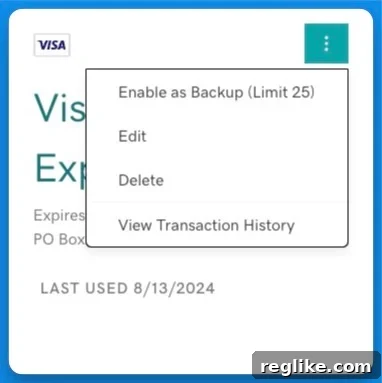
- Identify and Select a Payment Method: Browse through your listed payment methods. For the one you wish to designate as a backup, look for a small icon, usually represented by three vertical or horizontal dots, or a gear symbol, typically located in the upper right-hand corner of that payment method’s entry. Click on this icon.
- Enable as Backup: A dropdown menu will appear. From the options provided, select “Enable as Backup.” This action formally designates the chosen payment method as your secondary option for automatic renewals.
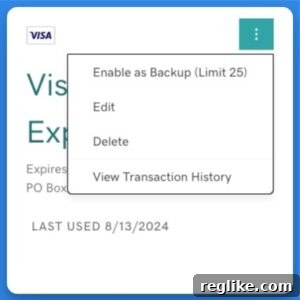
GoDaddy offers remarkable flexibility, allowing users to configure up to 25 different payment methods as backups. This robust capability is particularly beneficial for individuals or agencies managing extensive domain portfolios, ensuring multiple layers of financial redundancy.
The Unquestionable Benefits of Proactive Payment Management
While the process of setting up a backup payment method is simple, its advantages are far-reaching and impactful:
- Guaranteed Business Continuity: The most significant benefit is the assurance that your website and associated services will remain online, preventing interruptions to your business operations and customer experience.
- Eliminate Renewal Anxiety: Remove the constant worry about missed renewal dates or primary payment failures. A backup provides a strong safety net, allowing you to focus on growth and innovation.
- Enhanced Security Against Domain Theft: By ensuring your domain never expires, you effectively prevent it from becoming available for registration by malicious actors or opportunistic resellers.
- Seamless Integration with Auto-Renewal: When combined with GoDaddy’s auto-renewal feature, a backup payment method creates an almost foolproof system for maintaining continuous domain ownership.
- Adaptability to Financial Changes: Life is unpredictable. A backup method safeguards your domains against issues like lost credit cards, bank fraud, or personal financial fluctuations that could affect your primary payment.
- Time and Cost Savings: Preventing expiration avoids the significant time, effort, and potential costs associated with recovering an expired domain, which can include redemption fees or legal expenses.
Comprehensive Domain Management: Beyond the Backup
While enabling a backup payment method is a critical step, it’s part of a holistic approach to domain management. For optimal security and peace of mind, consider integrating these best practices into your routine:
- Enable Auto-Renewal for All Critical Domains: Make auto-renewal your default setting. This is your primary defense against accidental expiration.
- Regularly Audit Your Payment Methods: Periodically log into your GoDaddy account (e.g., quarterly or biannually) to ensure all primary and backup payment methods are current and valid. Pay close attention to expiration dates.
- Maintain Up-to-Date Contact Information: Ensure your registered email address and phone number with GoDaddy are always current. This is how you’ll receive crucial renewal notifications, warnings, and security alerts.
- Assign Specific Payment Methods to Domains: Even with a backup, it’s a good practice to explicitly assign a valid primary payment method to each individual domain, especially if you manage many. This ensures direct billing for each.
- Consolidate Your Domain Portfolio: If you own domains registered across various platforms, consider consolidating them under one GoDaddy account. This streamlines management and oversight.
- Utilize Domain Locking: This essential feature prevents unauthorized transfers of your domain name to another registrar, adding a vital layer of security against malicious attacks.
- Set Calendar Reminders: As an additional personal safeguard, set reminders in your personal calendar for upcoming renewal dates, particularly for high-value domains.
Important Considerations and What to Expect
It’s important to understand that even with a backup payment method enabled, you may still receive warning emails from GoDaddy. These emails typically alert you if the primary payment method associated with a specific domain is nearing expiration or has failed. These are not signs that your backup method isn’t working, but rather proactive alerts designed to prompt you to update or fix your primary billing details. The backup method will only be charged if the primary attempt fails and the domain is at risk of expiration.
Therefore, while the backup prevents an immediate crisis, it doesn’t negate the importance of maintaining accurate and current primary payment information. Think of the backup as your emergency parachute, not your everyday flight plan. Always strive to address and resolve any issues with your primary payment methods promptly to ensure the smoothest possible renewal process.
Conclusion: Proactive Security for a Seamless Digital Future
Your domain name is an invaluable asset in the digital landscape. Taking proactive steps to protect it is not merely good practice; it’s a fundamental requirement for anyone serious about their online presence. GoDaddy’s backup payment method feature offers a robust, user-friendly solution that significantly mitigates the risk of accidental domain expiration. By taking a few moments to configure this essential safeguard, combined with other best practices for comprehensive domain management, you invest in the uninterrupted continuity of your website, your brand’s integrity, and your overall digital future. Don’t leave your online identity to chance; secure it today with a backup payment method.