
I built USMCA.com easily thanks to GoDaddy’s wizard and Beaver Builder.
Effortless Website Creation: Building USMCA.com with GoDaddy Managed WordPress and Beaver Builder
In today’s interconnected world, establishing a robust online presence is no longer just an advantage but a fundamental requirement for businesses, organizations, and individuals alike. Whether you’re a burgeoning startup, a seasoned entrepreneur, a non-profit, or simply someone looking to share information, a professional website serves as your digital storefront, portfolio, or information hub. Yet, for many, the journey to create such a site is fraught with challenges, often perceived as a highly technical and time-consuming endeavor demanding specialized coding skills or a substantial investment in web development expertise.
My extensive experience in the digital landscape has allowed me to observe firsthand the common struggles faced by the typical small business owner attempting to navigate popular content management systems (CMS) like WordPress. While WordPress is an incredibly powerful, flexible, and widely used platform, its traditional setup can present a steep learning curve. The process often involves grappling with hosting configurations, database management, theme selection, plugin installations, and a plethora of technical jargon that can quickly overwhelm a non-technical user. Indeed, I recently penned an article highlighting the inherent complexities of WordPress, emphasizing its inaccessibility for those without prior web development experience.
Overcoming WordPress Complexity: GoDaddy’s Solution for Easy Website Building
Recognizing these significant barriers, numerous platforms and services have emerged with the goal of demystifying the website creation process. Among the solutions available today, GoDaddy’s Managed WordPress hosting truly stands out as a game-changer. It directly addresses the core issues of WordPress complexity by providing a streamlined, user-friendly environment for both setup and ongoing management, thereby making professional website creation attainable for virtually anyone. From my perspective, GoDaddy offers one of the most intuitive and efficient pathways to launching a WordPress site, especially beneficial for newcomers to the platform.
GoDaddy’s Managed WordPress hosting transcends the basic function of web hosting; it’s a comprehensive, all-in-one package meticulously designed to alleviate the technical headaches commonly associated with operating a WordPress site. Within this managed ecosystem, GoDaddy expertly handles crucial backend tasks such as routine security updates, continuous performance optimization, and automatic daily backups. This invaluable support liberates users, allowing them to channel their energy entirely into their content, design aesthetics, and ultimately, their online goals. The remarkable simplicity of this offering is anchored in two distinct yet powerfully synergistic features that profoundly elevate the user experience from the moment they begin their website journey.
The Intuitive GoDaddy Website Setup Wizard: Your Guided Path to Launch
The first cornerstone of this simplified experience is GoDaddy’s intelligent and highly effective setup wizard. When you embark on creating your WordPress site with GoDaddy Managed WordPress, you are immediately greeted by a guided quick-start process. This wizard functions as your personal digital assistant, expertly navigating you through a series of straightforward questions designed to ascertain your specific needs and objectives. The journey commences with a prompt to select your industry or niche – a pivotal step that allows the wizard to intelligently curate initial site structures, design templates, and even content suggestions tailored precisely for your field. Whether your ambition is to launch a vibrant e-commerce store, a local service business portal, a captivating online portfolio, or an engaging blog, the wizard ensures you begin with a highly relevant and optimized foundation. This targeted approach significantly mitigates the notorious “blank-canvas paralysis” that often afflicts new website builders, replacing it with focused guidance.
Beyond the initial industry selection, the wizard adeptly guides you through the process of naming your site and offers a thoughtfully curated selection of child themes derived from GoDaddy’s elegant Primer theme. These child themes provide diverse variations in layout, color schemes, and stylistic elements, ensuring that your site boasts a polished and professional aesthetic right from the outset, without requiring extensive design decisions. To further accelerate the visual development, the wizard even suggests a range of pertinent stock photos. This invaluable feature ensures your site is instantly visually appealing, removing the immediate need for users to source or create their own imagery. This entire wizard-driven process is remarkably efficient, empowering users to transition from a nascent idea to a functional, aesthetically pleasing site shell within a matter of minutes, primed and ready for personalized content and further customization.
Visual Editing Made Simple: Unleashing Creativity with Beaver Builder Lite
The second, equally vital component that contributes to the unparalleled ease of use is the seamless integration of Beaver Builder Lite. Once the foundational site structure has been intelligently laid out by the wizard, Beaver Builder transforms the subsequent customization process into an intuitive, highly visual drag-and-drop experience. For anyone who has ever yearned for the ability to simply “point, click, and edit” their website, Beaver Builder is nothing short of a revelation. It robustly empowers users to effortlessly modify pre-designed templates, rearrange elements, and even construct entirely custom layouts without ever needing to write a single line of code. This powerful no-code website builder makes advanced design techniques accessible to everyone.
Beaver Builder operates on a sophisticated visual frontend editing principle, meaning precisely what you see on your screen is exactly what your website visitors will experience. This real-time editing capability allows for direct manipulation of site elements: you can click directly on text to edit it, effortlessly drag and drop sections to rearrange their order, swap out images with new ones, and fine-tune colors and fonts with unprecedented ease. This powerful page builder meticulously eliminates the necessity of delving into labyrinthine theme options panels or wrestling with a multitude of confusing and often incompatible WordPress widgets. Its impeccably user-friendly interface extends sophisticated web design capabilities to non-technical individuals, facilitating significant site modifications and robust personal branding without encountering the typical steep WordPress learning curve. It truly exemplifies simplified web design.
A Real-World Success Story: Building USMCA.com in Minutes
To rigorously test GoDaddy’s assertions and validate my own observations regarding its ease of use, I embarked on a practical, real-world project over a recent weekend: the creation of a fully functional informational website for USMCA.com. The narrative behind this particular domain acquisition adds an additional layer of topical relevance to the entire process. Shortly after the official announcement of the new United States-Mexico-Canada Agreement – the significant successor to the North American Free Trade Agreement (NAFTA) – I proactively checked for the availability of the corresponding domain, USMCA.com. Discovering it was readily available for purchase within GoDaddy’s extensive NameFind inventory at an attractive “buy now” price, I promptly secured the domain, recognizing its timely significance and immense potential as a public information resource.
My objective was clear: to swiftly launch an authoritative informational site dedicated to the specifics of this new trade agreement. Utilizing GoDaddy’s Managed WordPress hosting, I was genuinely astonished by the sheer speed and elegant simplicity of the entire setup process. Within an astonishingly brief period, approximately ten minutes from initiation, I had successfully established a coherent and visually appealing site shell. This wasn’t merely a blank slate; it was a thoughtfully structured layout, complete with intelligently placed placeholder content and relevant design elements, requiring only my specific content additions and minor aesthetic refinements to bring it to full fruition. This efficiency underscores the power of GoDaddy for quick website setup and launch.
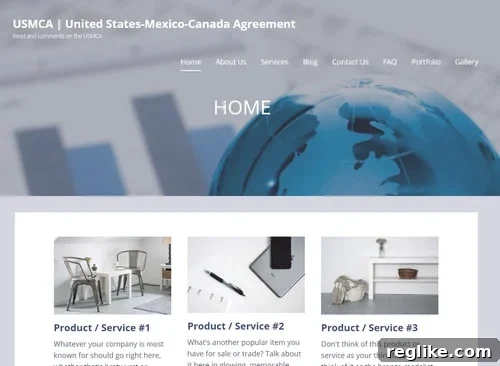
The preceding image visually represents the immediate progress I achieved, vividly showcasing the initial site structure and design template generated effortlessly by the wizard. To accomplish this impressive speed and foundational design, my required actions were remarkably minimal, intuitive, and guided:
- Industry Selection: I simply chose a broad category, such as “Business” or “Informational Site,” which instantly guided the wizard to provide templates and content suggestions perfectly aligned with creating a factual resource portal.
- Site Naming: I provided “USMCA.com” as the desired site name, which was then seamlessly integrated into the site’s default branding, headers, and metadata.
- Theme Customization: I selected from a handful of distinct, professionally designed child themes offered under GoDaddy’s robust Primer theme. These options presented diverse aesthetic directions without overwhelming me with the countless choices often found in vast, unfiltered theme marketplaces.
- Stock Photo Integration: The wizard intelligently presented a curated selection of high-quality stock photos. I chose an image that resonated strongly with themes of international relations, economics, and trade, instantly imbuing the homepage with a professional and relevant visual anchor.
Seamless Content Editing and Advanced Customization with Beaver Builder
Once this robust initial framework was established, the true power and elegance of Beaver Builder came brilliantly into play. The transition from the setup wizard’s guided steps to the intuitive visual editor was utterly seamless. I could effortlessly navigate through the site, clicking directly on individual content blocks to modify text, upload new high-resolution images, or rearrange entire sections with simple drag-and-drop actions. For instance, I could easily add a new content row to highlight key articles or summaries of the USMCA agreement, fluidly drag a column to adjust the page layout for optimal readability, or precisely change the background color of a specific section – all without the need to write or even look at a single line of underlying code. This visual editing freedom is pivotal for no-code website builders.
Beaver Builder’s interface is exceptionally intuitive, positioning it as an indispensable tool for anyone seeking to extensively customize their website without needing any coding expertise. Its foundational drag-and-drop functionality means that incorporating new page elements – whether they be simple headings, detailed paragraphs, compelling images, engaging buttons, or even more complex modules like accordions or testimonials – is as straightforward as selecting them from a convenient sidebar and placing them directly onto the desired area of the page. The invaluable ability to preview all changes in real-time ensures that you consistently have a clear understanding of how your site will appear to visitors, effectively eliminating guesswork and dramatically accelerating the entire design and refinement process. This level of control makes Beaver Builder an outstanding choice for simplified web design and efficient content management.
The Future of WordPress: Simplified, Accessible, and Empowering
Reflecting on this transformative experience, it is unequivocally clear that GoDaddy Managed WordPress hosting, synergistically coupled with the formidable power of Beaver Builder, represents a significant and much-needed leap forward in making WordPress genuinely accessible to a broader audience. While some rudimentary familiarity with the general concept of website builders might offer a slight initial advantage, the overall barrier to entry is dramatically lowered when compared to the traditional, often arduous, manual installation and complex configuration processes of WordPress themes and frameworks. This evolution is not merely about making things “easier”; it is fundamentally about empowering a vast and diverse segment of the population – including small business owners, dedicated freelancers, visionary artists, dedicated educators, and countless other professionals – who possess brilliant ideas and compelling content but historically lacked the technical expertise or resources to effectively bring their digital visions to life online.
This intelligently streamlined approach offers precisely the kind of experience that non-technical individuals critically need and richly deserve when embarking on the journey of website creation. It stands as a profound testament to how intelligent design principles, combined with seamlessly integrated tools, can effectively democratize the entire field of web development. Ideally, the ongoing evolution of WordPress itself, or the innovative services meticulously built around it, will continue to gravitate towards a more refined “WordPress lite” model. This envisioned model would ideally involve a thoughtfully guided, progressive disclosure of options and functionalities, where advanced capabilities are “unlocked” only when a user actively demonstrates readiness for them. Such a system would effectively prevent overwhelming complexity during the crucial initial stages of website building. Until such a universal standard is widely adopted across the CMS landscape, pioneering solutions like GoDaddy’s Managed WordPress with Beaver Builder serve as an invaluable and robust bridge, enabling virtually anyone to construct a professional, fully functional, and visually captivating website with remarkable ease, efficiency, and newfound confidence.