
The End of an Era: JetPack Discontinues Its Built-in Proofreading Tool in Latest Update
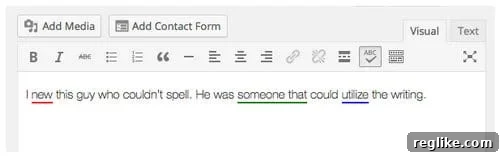
In a significant development for the millions of WordPress users relying on the popular JetPack plugin, Automattic, the company behind WordPress, has officially removed its integrated Proofreading tool. This change, effective with the release of JetPack 7.3, marks a strategic pivot for the multifaceted plugin, pushing content creators to explore external, specialized solutions for grammar and spelling checks.
The decision to sunset this once-valuable feature has prompted discussions within the WordPress community, with many users reflecting on the tool’s utility and speculating on Automattic’s long-term vision for JetPack. While the immediate impact for some might be a slight adjustment to their content creation workflow, this move underscores the rapid evolution of digital writing aids and the increasing specialization of software tools.
A Look Back at JetPack’s Proofreading Feature
For years, JetPack’s Proofreading tool served as a convenient, built-in grammar and spelling checker for WordPress posts and pages. Prior to publishing, authors could quickly scan their content for common errors, receiving suggestions for corrections and even improved word choices. Many users found it to be a reliable first line of defense against typos and grammatical slips.
The tool was particularly appreciated for its seamless integration into the WordPress editor, eliminating the need to copy and paste text into external applications. It provided instant feedback, helping bloggers, content marketers, and website owners maintain a professional standard for their written output. Its simplicity and accessibility made it a favorite for those who preferred an all-in-one solution within their WordPress dashboard. It often caught nuances that other basic checkers might miss, offering suggestions that genuinely enhanced the clarity and quality of the writing.
Automattic’s Rationale: Redundancy and Strategic Focus
The official explanation for the removal comes from WordPress engineer James Huff, who articulated the decision in a support forum. Huff stated:
We removed the feature as it has become a bit redundant lately. Most major web browsers have some form of this already built-in, and free extensions like [Grammarly] are making huge strides in the field.
It felt like the right time to back out of that field and focus more on everything else we offer.
This statement highlights two primary reasons for the discontinuation: the perceived redundancy of the feature and Automattic’s desire to concentrate resources on JetPack’s core strengths. Indeed, the landscape of digital writing tools has transformed dramatically over the past few years. Modern web browsers like Chrome, Firefox, and Safari now incorporate robust spell-checkers directly into their text input fields, flagging basic errors as users type. While these browser-level tools are excellent for catching simple typos, they often lack the sophisticated grammar and style analysis offered by dedicated solutions.
Beyond browser functionality, the emergence and widespread adoption of advanced writing assistants like Grammarly have set a new industry standard. These platforms utilize artificial intelligence and machine learning to provide comprehensive feedback on grammar, spelling, punctuation, clarity, engagement, and delivery. They offer real-time suggestions, context-aware corrections, and even tone detection, far surpassing the capabilities of many simpler, integrated checkers. For Automattic, maintaining a less powerful, duplicate feature likely became a drain on resources that could be better allocated to developing and enhancing JetPack’s unique offerings in areas such as security, performance, backups, and site management.
The Evolving Landscape of Writing Assistants
The decision by Automattic is a testament to the rapid innovation happening in the realm of writing technology. What was once a niche feature is now a highly competitive field dominated by companies whose sole focus is improving written communication. These specialized tools offer several advantages:
- Advanced AI and Machine Learning: They go beyond simple rule-based checks to understand context and suggest more nuanced improvements.
- Broad Integrations: Many tools offer extensions for browsers, desktop applications, and popular word processors, making them accessible across various platforms.
- Personalized Feedback: Some premium versions offer insights into writing style, consistency, and even plagiarism checks.
- Regular Updates: As dedicated products, they receive continuous updates and improvements, staying ahead of evolving language nuances and user needs.
This evolution means that users now have access to more powerful and versatile proofreading solutions than ever before. Automattic’s move acknowledges this shift, effectively decentralizing the proofreading function and encouraging users to leverage the best-in-class tools available on the market.
What This Means for WordPress Users: Adapting to the Change
For long-time users who relied heavily on JetPack’s Proofreading tool, this discontinuation will necessitate a small adjustment to their workflow. The immediate implication is the need to find and integrate an alternative solution for ensuring content quality before publishing.
While this might seem like an inconvenience initially, it presents an opportunity for WordPress authors to upgrade their writing arsenal. By adopting a dedicated grammar and spelling checker, users can potentially achieve a higher standard of written communication, benefiting from more accurate and comprehensive feedback than JetPack’s integrated tool could provide. This adaptation process is relatively straightforward, given the abundance of excellent alternatives available.
Top Alternatives to JetPack’s Proofreading Tool
The market is rich with tools that can effectively replace and even surpass the functionality of JetPack’s former proofreading feature. Here are some of the leading options:
Browser-Integrated Spell Checkers
Most modern web browsers, including Google Chrome, Mozilla Firefox, Microsoft Edge, and Apple Safari, come with built-in spell-checkers. These work in real-time as you type in any text field, including the WordPress editor. They are excellent for catching basic spelling mistakes and sometimes minor grammatical errors. While convenient, they are generally less sophisticated than dedicated tools and may not offer comprehensive grammar or style suggestions.
Dedicated Grammar and Writing Assistants
These tools are designed specifically for improving written content and offer the most robust alternatives:
- Grammarly: Arguably the most popular and comprehensive writing assistant, Grammarly offers real-time checks for grammar, spelling, punctuation, clarity, engagement, and delivery. It has a free version with essential features and a premium version that unlocks advanced checks, tone detection, plagiarism detection, and more. Grammarly integrates seamlessly with browsers (via extensions), desktop applications, and popular word processors, making it highly versatile for WordPress authors. Its AI-powered suggestions are often context-aware and significantly improve writing quality.
- ProWritingAid: A powerful alternative to Grammarly, ProWritingAid focuses on in-depth analysis of writing style, readability, overused words, clichés, and more. It’s particularly favored by authors and professional writers for its extensive reports and ability to help refine specific writing styles. It also offers browser extensions and integrations with various writing platforms.
- LanguageTool: For those seeking an open-source and privacy-focused option, LanguageTool is an excellent choice. It supports over 25 languages and provides grammar, spelling, and style checks. While it may not be as feature-rich as Grammarly or ProWritingAid, it’s a strong contender for users prioritizing data privacy and multi-language support. It also offers browser extensions and desktop versions.
- Hemingway Editor: This tool stands out for its focus on readability and conciseness. Instead of comprehensive grammar checks, it highlights complex sentences, passive voice, adverbs, and phrases that can be simplified. Its goal is to make your writing bold and clear, much like Ernest Hemingway’s style. While not a direct grammar checker, it’s an invaluable tool for refining the clarity and impact of your WordPress content.
Built-in Features of Word Processors
If you draft your content outside of WordPress, tools like Google Docs and Microsoft Word also offer excellent integrated grammar and spell checkers. Google Docs, for instance, has significantly improved its AI-powered suggestions, providing robust checks for spelling, grammar, and even some stylistic issues. Drafting in these environments before transferring to WordPress can be an effective strategy for maintaining high content quality.
Maintaining Content Quality: Best Practices for WordPress Authors
The removal of JetPack’s Proofreading tool serves as a timely reminder of the critical importance of impeccable grammar and spelling for any online presence. High-quality content not only enhances user experience but also plays a significant role in SEO and establishing credibility. Here are some best practices for WordPress authors:
- Adopt a Dedicated Writing Assistant: Integrate a tool like Grammarly or ProWritingAid into your content creation workflow. Utilize their browser extensions for real-time checks directly within the WordPress editor or use their desktop applications for more extensive review.
- Prioritize Readability: Beyond just grammar, focus on making your content easy to read and understand. Tools like Hemingway Editor can assist with this by highlighting areas for improvement in sentence structure and word choice.
- Manual Review is Key: Even with the best AI tools, a human touch is indispensable. Always proofread your content manually before publishing. Reading aloud can often help catch awkward phrasing or errors that automated tools might miss.
- Get a Second Pair of Eyes: If possible, have someone else review your content. A fresh perspective can identify mistakes or unclear sections you might have overlooked.
- Understand Your Audience: Tailor your language and tone to your target audience. Different niches require different communication styles.
The Future of JetPack: A Sharper Focus
Automattic’s decision to remove the Proofreading tool from JetPack is not a sign of the plugin’s decline, but rather a strategic repositioning. By shedding features that are now effectively handled by specialized third-party services, Automattic can dedicate its development efforts to enhancing the core functionalities that make JetPack an indispensable tool for many WordPress sites.
Users can expect JetPack to continue evolving as a comprehensive suite for site security, performance optimization, automated backups, analytics, and design tools. This refined focus will likely lead to even more robust and innovative features in these key areas, ensuring that JetPack remains a vital component of the WordPress ecosystem, even as specific functionalities shift to external, best-of-breed solutions.
Conclusion
The discontinuation of JetPack’s built-in Proofreading tool in version 7.3 marks a significant, albeit understandable, change for WordPress users. While some may miss the convenience of an integrated checker, this move reflects the maturity of the digital writing tool market and Automattic’s strategic decision to focus on JetPack’s core strengths. Far from leaving users stranded, this shift encourages authors to leverage the advanced capabilities of dedicated grammar and writing assistants, which often provide more comprehensive and nuanced feedback.
Ultimately, this change paves the way for a more streamlined JetPack and empowers WordPress users with access to superior tools for ensuring the highest quality of their written content. By embracing these powerful alternatives, content creators can continue to produce engaging, error-free material that captivates audiences and strengthens their online presence.