
The Curious Case of the Missing .Com Shortcut on iPad iOS 9.1
A recent iOS update has introduced a subtle yet impactful change to the way iPad users interact with the on-screen keyboard, specifically regarding a long-standing shortcut for top-level domains. What was once a convenience for quickly typing web addresses has now become a point of confusion and a potential snag in workflow for many. Is this an intentional design shift, an overlooked bug, or a harbinger of future UI changes from Apple?
The Beloved Dot-Com Shortcut: A History of Convenience
For years, iOS users have enjoyed a handy shortcut built into the native keyboard. When typing a web address into a browser or an email, a simple press and hold of the period (.) key would magically bring up a small pop-over menu displaying a selection of common top-level domains (TLDs), such as .com, .org, .net, and .edu. Crucially, .com was always pre-selected and highlighted, meaning a quick tap-and-release would instantly insert it into your text. This feature, seemingly minor, significantly streamlined the process of entering URLs, saving precious seconds and countless keystrokes over time. It was a testament to Apple’s attention to detail, enhancing user productivity and making the digital experience smoother across its ecosystem.
This functionality was consistent across iPhones and iPads, regardless of screen size, providing a unified and intuitive user experience. Users developed muscle memory around this shortcut, relying on it for efficiency in an increasingly web-centric world. The expectation was that such a fundamental and useful feature would remain a staple of the iOS keyboard experience.
The Unveiling of an Inconsistency: iOS 9.1 and the iPad Keyboard
However, a recent update to iOS 9.1 has introduced a curious divergence in this behavior. Upon updating iPads to this version, a noticeable change occurred: the automatic insertion of .com vanished. While the TLD selection pop-over still appears when you press and hold the period key on an iPad, the crucial blue highlight and pre-selection of .com are gone. More importantly, if you simply release the key after the options appear, no TLD is inserted at all. Users are now forced to explicitly tap on .com (or any other TLD) from the pop-up menu, adding an extra step to a previously seamless process.
This change is particularly perplexing because it is not uniformly applied across all iOS devices. The iPhone, even after updating to iOS 9.1, continues to exhibit the old, familiar behavior. The .com option remains highlighted in blue, and releasing the period key still auto-inserts it without requiring an additional tap. This stark contrast between the two devices raises significant questions about Apple’s design philosophy and the consistency of its user interface across its product line.
Below is an illustration of how the iPhone keyboard still handles the TLD shortcut, with .com clearly highlighted for automatic insertion:
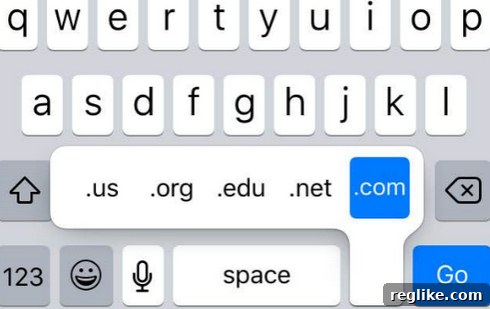
Notice how the blue highlight on .com signals its readiness for immediate insertion. This visual cue and functional consistency are precisely what is now absent on the iPad’s keyboard after the 9.1 update.
Exploring the Possibilities: Intentional Design, Bug, or Future Trend?
The sudden and device-specific nature of this change has sparked considerable speculation among users and tech enthusiasts. Three primary theories emerge:
1. An Intentional Design Decision by Apple
One possibility is that this is a deliberate design choice. Apple is renowned for its meticulous attention to user experience, and every UI element often serves a specific purpose. Could the difference in screen size or usage patterns between the iPhone and iPad be a factor? Perhaps Apple believes that on the larger iPad screen, users have more space and are better equipped to make an explicit selection rather than relying on a default. This could be aimed at promoting more conscious input, especially with the proliferation of new TLDs beyond .com, such as .app, .xyz, or country-code TLDs.
Another angle might be related to reducing accidental inputs. While the auto-insertion of .com was convenient, a user who intended to select, say, .org but released the key too quickly would end up with the wrong TLD, requiring a correction. By removing the auto-insert, Apple might be forcing users to confirm their choice, thus reducing errors. However, this argument seems weak given the long-standing success and user satisfaction with the previous behavior on both devices.
2. An Unintended Software Bug or Oversight
Software development is complex, and even the most rigorous quality assurance processes can miss minor regressions or bugs. It’s plausible that this change is simply an unintended side effect of other modifications or optimizations made to the iPad’s keyboard framework in iOS 9.1. A bug of this nature, affecting only one device type for a specific feature, could easily slip through testing, especially if the focus was on broader system stability or new features.
Given Apple’s usual commitment to a consistent user experience across its devices, a bug seems a more likely explanation for such an odd inconsistency. If this were truly an intentional change, one might expect clearer communication from Apple or a more unified implementation across all iOS devices.
3. A Glimpse into Future UI/UX Directions
Could this subtle alteration be a test or an early indication of a broader shift in how Apple approaches touch-based input? Perhaps Apple is experimenting with new interaction models, where explicit selection is preferred over defaults in certain contexts. With ongoing advancements in predictive text, contextual input, and Siri integration, the role of traditional keyboard shortcuts might be evolving. This could be a small step towards a more adaptive or “smarter” keyboard that requires more direct user input for specific actions, moving away from “convenience defaults.” However, without further changes or official statements, this remains pure speculation.
Impact on User Experience and Productivity
While seemingly a minor detail, the loss of the .com auto-insert feature can have a cumulative impact on user experience and productivity. For individuals who frequently type web addresses, this small change disrupts established muscle memory. The momentary pause to explicitly select .com from the pop-over, however brief, adds friction to the workflow. In an era where every tap and swipe is optimized for speed, even minor inconveniences can lead to frustration and a perception of reduced efficiency.
The inconsistency between the iPhone and iPad further exacerbates the issue. Users accustomed to a fluid input method on their phone might find themselves fumbling on their tablet, breaking their flow and requiring a cognitive adjustment. This lack of uniformity across devices within the same ecosystem can lead to a less cohesive and more disjointed user experience.
Potential Workarounds and The Path Forward
Until Apple clarifies whether this is a feature or a bug, iPad users are left with a few workarounds:
- Manual Tapping: The most obvious, albeit less efficient, method is to explicitly tap
.comfrom the TLD selection pop-over. - Typing Manually: Simply type out
.com,.org, etc., directly. - Text Replacement: Users can create custom text replacement shortcuts in iOS Settings (Settings > General > Keyboard > Text Replacement). For example, typing
..ccould expand to.com, offering a personalized way to regain some speed. - Safari’s Smart Search: When in Safari, typing just the domain name (e.g., “apple”) and hitting Go will often automatically append
.comor search intelligently. However, this doesn’t help when typing URLs in other apps.
Ultimately, the hope is for Apple to either acknowledge this change as intentional and provide a clear rationale, or, preferably, to restore the beloved auto-insertion functionality to the iPad’s keyboard in a future update. The consistency of user interface elements across devices is a hallmark of the Apple ecosystem, and this particular divergence feels like an anomaly that diminishes, rather than enhances, the user experience.