
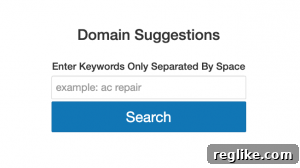
Unlock the potential of custom domain discovery with a powerful, personalized suggestion tool built using GoDaddy’s robust API.
For those looking to streamline the domain registration process or simply find the perfect name for their next big idea, a tailored domain suggestion tool can be an invaluable asset. This comprehensive guide will walk you through the creation of a simple yet effective application that leverages GoDaddy’s API to generate available domain names based on your submitted keywords and creative concepts.
Following up on previous tutorials that explored utilizing GoDaddy’s API for managing existing domains, today’s focus shifts to proactive domain discovery. We aim to construct a user-friendly tool capable of returning a curated list of domain options, helping you cut through the noise and pinpoint the ideal online identity.
The digital landscape is teeming with domain name suggestion tools, each offering various features to aid in brainstorming for new products, services, businesses, or personal projects. However, building your own allows for unparalleled customization, giving you complete control over the suggestion criteria and presentation. This tutorial empowers you to craft a tool that precisely meets your unique needs or even those of a specific niche market.
Before embarking on this development journey, it is highly recommended to review previous tutorials on getting started with GoDaddy’s API. Understanding the fundamentals of API interaction and familiarizing yourself with the various API endpoints will provide a solid foundation for this project. These foundational tutorials cover essential concepts, including authentication and basic query structures, which are crucial for effective API utilization.
For your convenience, a link to download the complete source code for this domain name suggestion tool will be provided at the conclusion of this tutorial. This allows you to quickly implement and experiment with the concepts discussed here.
It’s important to note that for the sake of simplicity and clarity, the tutorial code adopts a procedural programming style rather than an object-oriented approach. While effective for learning and demonstration, this structure is generally not recommended for complex, production-ready environments where maintainability, scalability, and reusability are paramount. For deployment in live systems, consider refactoring the code into an object-oriented architecture.
A critical detail that cannot be overstated is the absolute necessity of replacing placeholder GoDaddy API credentials with your own valid API Key and Secret. Failing to do so will result in authentication errors, and this tutorial’s code will not function. Securely obtaining and managing your API credentials is the first essential step.
With these prerequisites and considerations in mind, let’s prepare our development environment. Open your preferred text editor, and let the journey of creating your personalized domain suggestion tool begin.
While this guide won’t delve into every minute detail of the GoDaddy API, it will provide a high-level overview of the key components required to effectively utilize GoDaddy’ssuggestmethod. This method is the core of our tool, designed to retrieve a dynamic list of alternative domain name suggestions based on specified parameters.
Designing the User Interface: Crafting the Domain Name Suggestion Search Form
The first step in building any interactive web application is to establish the user interface (UI). This involves creating an HTML form that allows users to input their keywords or domain ideas. In your text editor, create a new file and save it as suggest.php. This file will house both our HTML structure and the underlying PHP logic.
Begin by embedding the following HTML code into your suggest.php file. This segment defines the basic structure of our search form:
As you review the screenshot of the code, you’ll observe a straightforward combination of HTML elements designed for user input. While the core functionality is driven by PHP, the aesthetic appeal and responsive behavior are achieved through cascading style sheets (CSS) and, as mentioned in the original source, some JavaScript for client-side interactions. The styling for this page is derived from two primary CSS files:
- bootstrap.min.css: This widely-used framework, Bootstrap 3, provides a robust foundation for responsive design, ensuring the tool looks good on various devices.
- `dnw-gd-suggest.css`: A custom local stylesheet that contains specific rules to tailor the appearance to our desired look and feel. (This file is included in the downloadable zip archive).
The latter portion of the suggest.php file, specifically the final ten or so lines of code, contains the crucial logic responsible for displaying the suggested list of alternate domains. This section of the code springs into action only after the form has been successfully submitted, processing the user’s input and preparing the results for presentation.
It’s important to understand the user experience flow here: while the PHP logic for displaying results is part of the suggest.php file, these results are not immediately visible when the page first loads in a web browser. The form acts as the gateway; users must interact with it by entering keywords and clicking the submit button to trigger the server-side processing and unveil the domain suggestions.
With the client-side user interface (UI) and user experience (UX) elements in place, we can now shift our focus to the server-side functionality. This next phase will involve implementing the PHP logic that processes user input, communicates with the GoDaddy API, and ultimately generates the list of suggested domain names.
Implementing Server-Side Logic: Creating the PHP Backend for Domain Suggestions
The core intelligence of our domain suggestion tool resides in its PHP backend. At the very top of your suggest.php file, above the HTML structure, copy and paste the following PHP logic. This section will handle variable definitions, API authentication, and the conditional processing of form submissions.
The initial lines of PHP code introduce the use of PHP’s built-in define function. This function is instrumental for defining constant variables, which, once set, cannot be changed during script execution. In this context, it’s used to define `SITE_NAME`, allowing for a consistent display title across the application, such as “Domain Suggestions.”
Following this, a crucial set of variables must be defined for authenticating and initiating requests to the GoDaddy API. The `API_KEY` and `API_SECRET` credentials are your unique identifiers, enabling your application to securely communicate with GoDaddy’s services. These vital credentials can be securely obtained by visiting the GoDaddy API Key Management page. It is imperative to replace the placeholder values with your actual keys to ensure proper functionality. For production environments, consider more secure ways to store and retrieve these credentials, such as environment variables, to avoid hardcoding them directly in your script.
After successfully defining these critical GoDaddy API authentication variables, the next set of variables are set up to manage the suggestion logic and user feedback:
prepend: This is an optional variable that provides flexibility. You can use it if you wish to automatically add specific prefixes (e.g., alphanumeric values like “my” or “best”) to the keywords submitted by the user. This can help generate a broader range of suggestions.typer: This is a required variable that dictates the type of domain suggestion strategy the GoDaddy API should employ. Its value will influence how the API generates alternatives (e.g., keyword spin, extension-based).msg: A default variable initialized to capture and return user-friendly error messages. This is vital for providing clear feedback to the user, for instance, if a required field is left blank.searchDNAvailable: This flag variable controls the visibility of domain results. When its value is `0`, no domain suggestions are displayed (typically on the initial page load). When set to `1`, it indicates that the form was successfully submitted, and a list of alternate domain suggestions is ready for presentation.
The PHP logic for handling form submissions begins once these initial variables are defined. The following block of code is designed to detect whether the search button has been activated by the user. This conditional check forms the gateway for processing user input.
If the submit button has indeed been pressed, the `msg` variable is immediately populated with a default error message. This message serves as an initial safeguard, displaying an alert to the user if they attempt to submit the form without providing any keywords, ensuring a minimal level of input validation.
Subsequently, the script proceeds with a critical security measure: sanitizing the submitted keywords. The value from `$_POST[‘domain’]` is carefully cleaned and assigned to the `keywords` variable. This sanitization process is absolutely essential, particularly if the tool is hosted on a public web server, as it helps to ward off potential malicious injections or hijacking attempts by sanitizing user input before it is processed or used in API calls.
The final line of this logic block encapsulates the core functionality. If the `keywords` variable is not empty and is properly defined, a series of important actions are triggered:
- The `msg` variable is reset to an empty string, clearing any previous error messages, indicating a successful input.
- The `typer` variable is set to `KEYWORD_SPIN`. It’s worth noting that GoDaddy’s API documentation for the `suggest` method offers several other valuable types of suggestions, such as `EXTENSION`, `PREMIUM`, and `CC_TLD`, allowing for diverse search strategies.
- The `searchDNAvailable` variable is set to `1`, signaling that domain results are now ready to be displayed.
- Finally, the `searched` variable is assigned the result of calling the `getDomains` function. This function receives `typer` as its first argument and the sanitized `keywords` as its second, initiating the actual domain search and API interaction.
Completing these variable definitions and conditional logic sets the stage for establishing and ultimately displaying the suggested list of alternate domains. However, if you were to attempt to run the code at this juncture, you would encounter errors, specifically “function not defined” warnings for `getDomains`, `RemoveSpecialChar`, and `printDomainResults`. These are the essential helper functions that complete the functionality, and we will explore them next.
Essential PHP Functions: Powering the Domain Suggestion Logic
The three functions outlined below are critical for the successful execution of this tutorial. Each plays a distinct role in processing data, interacting with the API, and presenting results, and all are included within the suggest.php file.
1. getDomains()
The `getDomains` function serves as the intelligence hub for our tool. Its primary responsibility is to construct and execute the API request to GoDaddy, subsequently compiling the suggested list of alternate domains. This function takes two key arguments: the `typer` variable (which defines the suggestion source or strategy) and the `keywords` variable (the user’s input). Internally, this function leverages PHP’s built-inCURLmethod. CURL (Client URL Library) is a powerful tool for making HTTP requests to external services, making it ideal for interacting with RESTful APIs like GoDaddy’s.
Within this function, you have the flexibility to modify existing variables like `country` and `limit`, and to introduce new parameters to either narrow or expand your domain search. This customization is based directly on the rich set of attributes offered by GoDaddy’ssuggestmethod:
country: A two-letter ISO country code, used as a hint to target domain suggestions to a specific geographical region (e.g., “US” for United States, “GB” for Great Britain).city: The name of a city, further refining the geographical hint for region-specific domain suggestions.sources: Specifies the types of suggestion sources to be queried by the API. (Refer to the `typer` variable discussion in the previous section for available values like `KEYWORD_SPIN`, `EXTENSION`, `PREMIUM`, `CC_TLD`).tlds: An array of desired top-level domains (TLDs) to include in the suggestions (e.g., `[‘.com’, ‘.net’, ‘.org’]`). This allows for precise control over the domain extensions returned.lengthMax: Sets the maximum permissible length for the second-level domain (the part before the TLD).lengthMin: Sets the minimum permissible length for the second-level domain.limit: Determines the maximum number of suggestions the API should return in response to a single request.waitMS: Specifies the maximum amount of time, in milliseconds, the API should wait for responses. If this duration elapses, the API will return whatever results have been compiled up to that point, preventing undue delays.
2. RemoveSpecialChar()
The `RemoveSpecialChar` function is the simplest of the three, yet it plays a crucial role in data sanitization. It employs PHP’spreg_replacefunction in conjunction with regular expressions (regex) to strip any special characters from the submitted keywords. This prevents potential issues with API queries, ensures data integrity, and acts as a basic defense against certain types of input-based vulnerabilities.
3. printDomainResults()
The `printDomainResults` function is responsible for the presentation layer of our tool. After the `getDomains` function has successfully retrieved a list of suggested domains from the GoDaddy API, this function meticulously prepares those results for display within the user’s web browser, formatting them using HTML. Each suggested domain is dynamically constructed as a hyperlink. This link directs the user to GoDaddy’s domain availability page, providing a seamless way to immediately check the domain’s registration status and potentially proceed with registration. This enhances user convenience significantly.
The visual presentation is key to a positive user experience. This function not only displays the suggested names but can be further enhanced to include additional information from the API response, such as pricing, premium status, or alternative TLDs, making the results even more actionable for the user.
Concluding Thoughts and Future Possibilities
We encourage you to download the complete tutorial code, experiment with it, and make the necessary modifications to truly personalize this tool. The provided code serves as a robust starting point, offering a solid foundation for your domain discovery endeavors.
DOWNLOADdnsuggest.zipfor GoDaddy API Suggest
Whether your strategy involves hand-registering domains for your portfolio, or you simply require assistance in unearthing an elusive alternative domain for your forthcoming business, innovative idea, personal project, or any other venture, this custom tool is designed to significantly save you valuable time and resources. Instead of manually checking countless permutations, the GoDaddy API automates this tedious process, delivering targeted suggestions directly to you.
With minimal additional effort and perhaps some refined adjustments to the `printDomainResults` function, you could effortlessly host your very own public-facing domain search tool. Imagine offering a valuable service to the general public, helping countless individuals and businesses find their perfect online identity.
Taking this a step further, the aforementioned path opens a compelling avenue for transforming this utility into a potential profit center. By integrating affiliate marketing services, such as those offered by CJ Affiliate (formerly Commission Junction), you can seamlessly associate successful domain registrations with various domain registrars. This means every time a user discovers and registers a domain through your tool, you could earn a commission. Prominent registrars like NameCheap.com, GoDaddy itself, HostGator, and many others participate in such affiliate programs, offering a lucrative opportunity to monetize your creation. (Hint hint: this offers a powerful incentive for further development!) 😉
Please do not hesitate to share your thoughts, questions, or any technical challenges you might encounter while implementing this tutorial in the comments section below. Your feedback is invaluable, and we are here to assist you in making the most of this powerful domain suggestion tool.
Thank you for following along, and that concludes this comprehensive guide for now!