
Domaining.com Security Breach: What You Need to Know
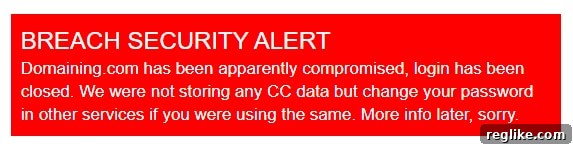
Domaining.com, a popular domain blog aggregator, has announced a security breach. While the extent of the breach is still under investigation, the site’s operator, Francois Carrillo, has confirmed that login functionality has been temporarily disabled as a precautionary measure.
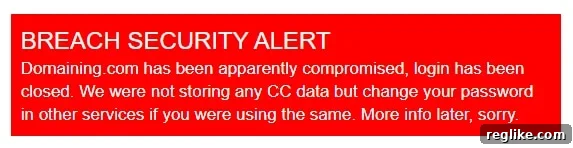
The announcement was initially made via Twitter, where Carrillo assured users that the site does not store credit card details. However, he strongly advised users who utilize the same password on other services to change their passwords immediately as a security precaution.
Immediate Actions to Take if You’re a Domaining.com User
If you have a Domaining.com account, regardless of how frequently you use it, taking proactive steps to secure your online presence is crucial. Here’s a detailed guide on what you should do:
- Change Your Password Immediately: This is the most important step. Even if you haven’t logged into Domaining.com recently, change your password on the site as soon as possible. Choose a strong, unique password that you haven’t used anywhere else.
- Update Passwords on Other Sites: This is where it gets crucial. If you used the same password for your Domaining.com account on any other website, including email accounts, social media platforms, or online banking services, change those passwords immediately. Using the same password across multiple platforms makes you vulnerable to credential stuffing attacks, where hackers use stolen login credentials from one site to try and access your accounts on other sites.
- Enable Two-Factor Authentication (2FA) Wherever Possible: Two-factor authentication adds an extra layer of security to your accounts. Even if someone knows your password, they won’t be able to log in without the second factor, which is usually a code sent to your phone or generated by an authenticator app. Enable 2FA on all your important accounts, including email, social media, banking, and any other service that offers it.
- Monitor Your Accounts for Suspicious Activity: Keep a close eye on your bank accounts, credit card statements, and other online accounts for any unauthorized transactions or suspicious activity. Report anything unusual to the relevant institution immediately.
- Be Wary of Phishing Emails: Cybercriminals often exploit security breaches to launch phishing campaigns. Be cautious of any emails you receive that claim to be from Domaining.com or related services, especially if they ask you to click on links or provide personal information. Always verify the sender’s address and avoid clicking on links in suspicious emails. Go directly to the website of the service in question to log in or make changes to your account.
Why This Breach Matters: Understanding the Risks
Even though Domaining.com states that it doesn’t store credit card information, the breach still poses a significant risk to users. Here’s why:
- Password Reuse: As mentioned earlier, the biggest risk is password reuse. If you use the same password on multiple sites, a breach on one site can compromise your accounts on other sites. This is because hackers can use the stolen login credentials to try and access your accounts on other platforms.
- Data Exposure: Even if Domaining.com doesn’t store sensitive financial information, it likely stores other personal data, such as email addresses, usernames, and potentially even names and locations. This information can be used for identity theft, phishing attacks, and other malicious purposes.
- Compromised Accounts: A compromised Domaining.com account could be used to spread malware, launch phishing attacks, or deface the website. This could damage the reputation of Domaining.com and harm its users.
Domaining.com’s Response and Ongoing Investigation
Domaining.com has taken swift action by disabling login functionality to prevent further unauthorized access. The company is currently investigating the extent of the breach and working to identify the source of the attack. They have also promised to provide more information to users as soon as it becomes available.
It’s important for Domaining.com to conduct a thorough investigation to determine how the breach occurred and implement appropriate security measures to prevent future incidents. This includes:
- Identifying the Vulnerability: Finding the specific vulnerability that allowed hackers to gain access to the system. This could be a software flaw, a weak password, or a security misconfiguration.
- Patching the Vulnerability: Once the vulnerability is identified, it needs to be patched immediately to prevent further attacks. This may involve updating software, changing passwords, or reconfiguring security settings.
- Implementing Enhanced Security Measures: Domaining.com should implement additional security measures to protect its systems and data. This could include stronger passwords, multi-factor authentication, intrusion detection systems, and regular security audits.
- Notifying Affected Users: It’s important for Domaining.com to notify all affected users about the breach and provide them with clear instructions on what they need to do to protect themselves.
Protecting Yourself from Future Security Breaches
Security breaches are becoming increasingly common, so it’s important to take proactive steps to protect yourself online. Here are some tips:
- Use Strong, Unique Passwords: As mentioned earlier, using strong, unique passwords for each of your online accounts is crucial. A strong password should be at least 12 characters long and include a mix of uppercase and lowercase letters, numbers, and symbols.
- Use a Password Manager: A password manager can help you create and store strong, unique passwords for all your accounts. This eliminates the need to remember multiple passwords and makes it easier to keep your accounts secure.
- Enable Two-Factor Authentication (2FA): Enable 2FA on all your important accounts. This adds an extra layer of security and makes it much harder for hackers to access your accounts, even if they know your password.
- Keep Your Software Up to Date: Keep your operating system, web browser, and other software up to date. Software updates often include security patches that fix vulnerabilities that hackers can exploit.
- Be Careful What You Click On: Be wary of suspicious emails, links, and attachments. Hackers often use phishing attacks to trick people into clicking on malicious links or downloading malware.
- Monitor Your Accounts Regularly: Keep a close eye on your bank accounts, credit card statements, and other online accounts for any unauthorized transactions or suspicious activity.
- Use a Reputable Antivirus Program: A reputable antivirus program can help protect your computer from malware and other threats.
- Educate Yourself About Online Security: Stay informed about the latest online security threats and best practices. There are many resources available online that can help you learn how to protect yourself.
The Importance of Cybersecurity Awareness
The Domaining.com security breach serves as a reminder of the importance of cybersecurity awareness. In today’s digital age, it’s essential to be vigilant and take proactive steps to protect yourself from online threats. By following the tips outlined above, you can significantly reduce your risk of becoming a victim of a security breach.
This incident also highlights the responsibility of website owners and operators to prioritize security and protect their users’ data. Implementing robust security measures, conducting regular security audits, and responding promptly to security incidents are all crucial steps in maintaining a safe and secure online environment.
As the investigation into the Domaining.com breach continues, it’s important for users to remain vigilant and take the necessary steps to protect their accounts. By working together, we can create a more secure online world for everyone.
We will continue to update this article as more information becomes available. Stay safe online!