Set up a backup payment method at GoDaddy — How to
Select a backup payment method to avoid an accidental expiration.
The prior week I wrote regarding the need to add a payment method for domains you win in GoDaddy premium auctions.
Godaddy’s Joe Styler commented that there is a way to add a backup payment method to your account. This protects you in case a domain that doesn’t have a payment method expires or if the payment method has expired.
To set up a backup method, go to Renewals & Billing > Payment Methods.
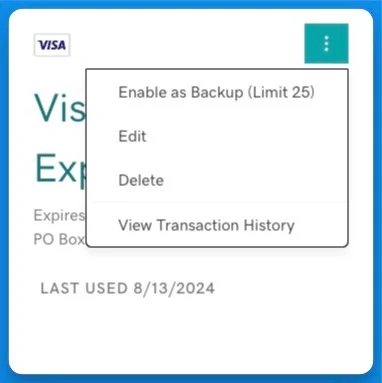
For any payment method you have, click the three dots in the upper right and select “Enable as Backup”:
Up to to 25 payment methods can be set as a backup.
It’s still worth adding a payment method to any domains that don’t have one. Even with a backup selected, you will receive warning emails stating that the domain won’t be renewed without a payment method. Still, if the renewal fails since of the lack of a payment method, your backup will be charged to prevent the expiration.