
Mastering Domain Sales: How to Audit Your Afternic Portfolio and Prevent Costly Mistakes
In the dynamic world of domain investing, securing your assets and maximizing profitability requires diligent management. One of the most critical yet often overlooked aspects is ensuring the accuracy of your domain pricing, especially the “floor price” on platforms like Afternic. An incorrectly set floor price can lead to accidental sales far below your desired value, turning a potential profit into an unexpected loss. This comprehensive guide will walk you through a simple yet powerful audit process to protect your valuable domain investments and optimize your selling strategy on Afternic.
The experience of many domain investors, including my own, highlights this prevalent issue. Not long ago, I discovered a lead in my Afternic account for a domain I had recently acquired. While the “buy now” or “asking price” was accurately set to reflect its market value, a closer inspection revealed a crucial flaw: the “floor price” – the minimum acceptable price at which the domain could automatically sell or at which a negotiation would cease – was actually below what I had originally paid for the domain. This significant discrepancy was due to a simple but impactful typo made during the initial entry, a common oversight that many investors might unknowingly make.
This personal discovery prompted a thorough audit of my entire Afternic portfolio. The findings were quite eye-opening: several other domains also had floor prices substantially below their intended asking prices, exposing them to the risk of being sold at an undesirable loss. Such errors are not merely administrative hiccups; they represent a direct threat to your investment returns and can erode the hard-earned value of your domain portfolio.
The Hidden Risk: Why Incorrect Floor Prices Can Cost You Dearly
Understanding the implications of an incorrect floor price is paramount for any serious domain investor. Afternic, as a leading domain marketplace, facilitates millions of transactions annually. Many of these sales occur through automated systems or expedited negotiations where the floor price acts as a critical safety net. If this net is compromised, your domains could be sold without your direct intervention at a price that doesn’t meet your investment objectives. Consider these potential financial pitfalls:
- Direct Financial Loss: Selling a domain for less than its acquisition cost or perceived market value means a direct loss on your investment.
- Opportunity Cost: A quick, low-price sale prevents you from selling the domain later for its true, higher market value, especially if you had a longer-term strategy in mind.
- Undermining Negotiation Power: Even in manual negotiations, if the buyer’s offer breaches your low floor price, your account manager might be obligated to accept it or push you towards accepting it, weakening your stance.
- Erosion of Portfolio Value: Multiple such sales can significantly diminish the overall value and profitability of your domain portfolio.
The good news is that preventing these costly mistakes is straightforward with a systematic approach. The following audit method provides an easy, efficient way to review your entire Afternic portfolio, identify any domains with potentially incorrect floor prices, and take corrective action before a damaging sale occurs. This process empowers you to maintain control over your domain sales and ensure your pricing strategy aligns with your investment goals.
Step-by-Step Afternic Portfolio Audit: Secure Your Domain Sales
This simple spreadsheet-based audit allows you to quickly identify domains where the floor price might be dangerously low compared to the asking or “buy now” price. Follow these steps carefully to safeguard your domain assets:
1. Accessing Your Afternic Portfolio
Your first step is to log into your Afternic account. Once authenticated, navigate directly to your portfolio view, specifically the “Selling” section. This is where all your domains listed for sale on Afternic are managed, and it provides the comprehensive data we need for our audit. Ensure you are viewing all your listed domains, not just a subset, for a complete audit.
2. Exporting Your Domain Data
To analyze your data effectively, you’ll need to export it into a spreadsheet format. Look for the “Export” button, typically located towards the right-hand side of your portfolio interface. Click this button and select the option “All domains in Selling view.” This action will initiate the download of a .csv (Comma Separated Values) file to your computer. This file contains crucial information for each of your listed domains, including the domain name, “buy now” price, and, critically, the floor price.
3. Preparing Your Spreadsheet for Analysis
Open the downloaded .csv file using your preferred spreadsheet software (e.g., Microsoft Excel, Google Sheets, LibreOffice Calc). Once the data is loaded, you’ll see various columns representing different attributes of your domains. Locate the “Floor Price” column and the “Buy Now Price” (or “Asking Price”) column. To facilitate our analysis, you will need to add a new column to the right of the “Floor Price” column. Label this new column clearly as “Ratio.” This column will house the calculated value that helps us identify discrepancies.
4. Calculating the Floor Price Ratio
This is where the analytical power of the spreadsheet comes into play. In the first empty cell of your newly created “Ratio” column (e.g., if “Buy Now Price” is in column C and “Floor Price” is in column E, this would likely be cell F2, assuming row 1 contains headers), input the following formula: =E2/C2. This formula divides the floor price (E2) by the buy now price (C2) for the corresponding domain. This ratio represents the floor price as a percentage of the asking price. After entering the formula, press Enter. Then, select that cell and use the fill handle (the small square at the bottom-right corner of the selected cell) to drag the formula down, applying it to all rows in your dataset. This will calculate the ratio for every domain in your portfolio.
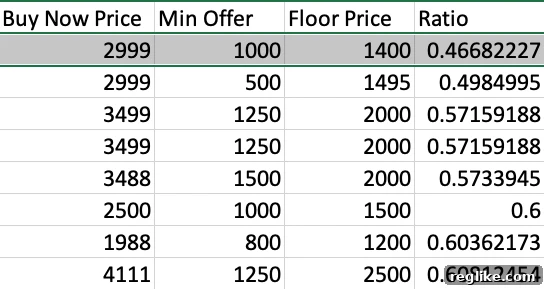
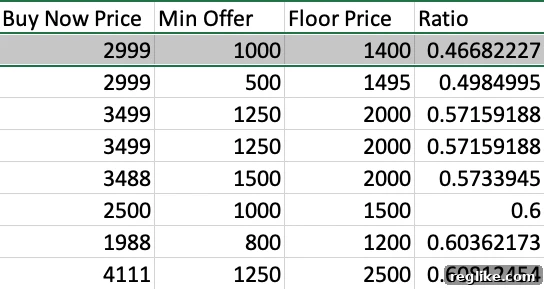
Here’s a visual example of what your spreadsheet might look like after applying the formula:
5. Identifying Discrepancies Through Sorting
With the “Ratio” column populated, the final step in identifying problematic domains is to sort your data. Select all your data (including the new “Ratio” column) and sort it by the “Ratio” column, from “Smallest to Largest.” This sorting action will bring any domains with disproportionately low floor prices to the very top of your spreadsheet. A low ratio indicates that the floor price is a small percentage of the buy now price, potentially signaling an error or an intentional but risky strategy.
Interpreting Your Audit Results and Taking Corrective Action
Once your spreadsheet is sorted, your focus should immediately turn to the domains listed at the top. These are the domains with the lowest ratios, signifying the greatest percentage difference between their floor price and their buy now price. For instance, if a domain has a ratio of 0.47, it means its floor price is only 47% of its buy now price. While some investors might intentionally set aggressive floor prices to facilitate quick sales, a ratio this low often points to an accidental entry or an oversight.
Carefully examine each of these low-ratio domains. Ask yourself: Is this floor price intentional? Does it align with my minimum acceptable sale price for this specific domain? If you find a floor price that is erroneously low, or simply lower than you are comfortable with, it’s crucial to make immediate corrections. You can make these changes directly within your Afternic account’s portfolio management interface. Navigate to the specific domain, edit its floor price, and save your changes. It’s a straightforward process that takes mere seconds but can save you thousands in potential losses.
Alternatively, if you manage a large portfolio or prefer expert assistance, you can always reach out to your Afternic account manager. They can often help you implement changes across multiple domains or even assist in setting a universal floor price strategy, such as setting all floor prices to a certain percentage (e.g., 70-80%) of their respective buy now prices, providing a consistent safety net for your entire portfolio.
Beyond the Audit: Proactive Strategies for Optimal Domain Pricing
While a periodic audit is essential, a proactive approach to domain pricing and portfolio management can significantly reduce the incidence of errors and improve your overall selling success on Afternic. Consider integrating these strategies into your routine:
Regular Review Schedules
Don’t wait for a crisis to audit your portfolio. Establish a regular schedule for reviewing your domain prices and floor prices – perhaps quarterly or semi-annually. The domain market is constantly evolving, with new trends and opportunities emerging. Regular reviews ensure your pricing remains competitive and reflective of current market conditions, preventing stale listings and missed opportunities.
Leveraging Afternic Account Managers
Your Afternic account manager is a valuable resource. Beyond helping with specific floor price adjustments, they can offer insights into market trends, suggest optimal pricing strategies, and help you understand how different floor price settings impact your domain’s visibility and likelihood of sale. Don’t hesitate to utilize their expertise for personalized advice and portfolio optimization.
Understanding Market Value vs. Floor Price
Always distinguish between a domain’s estimated market value and its floor price. While market value helps determine your ideal asking price, the floor price serves as your absolute minimum. A floor price that is too high might deter buyers or slow down automated sales, while one that’s too low puts your investment at risk. Strive for a balance that protects your investment while remaining attractive to potential buyers, considering factors like domain extension, keywords, length, and brandability.
Double-Checking New Entries
The vast majority of floor price errors occur during the initial listing process. Develop a habit of double-checking all pricing entries, especially floor prices, immediately after adding new domains to your Afternic portfolio. A quick review at the point of entry can prevent the need for extensive audits later on.
Continuous Learning in Domain Investing
Stay informed about domain industry news, sales reports, and valuation trends. The more knowledgeable you are about the market, the better equipped you’ll be to price your domains strategically and identify when your prices, including floor prices, might need adjustment. Forums, industry blogs, and conferences are excellent resources for continuous learning.
Safeguarding Your Domain Assets: A Final Word
In the competitive arena of domain investing, protecting your assets is just as important as acquiring them. An incorrect floor price on Afternic represents a preventable vulnerability that can lead to significant financial setbacks. By implementing the simple, step-by-step audit process outlined above, you gain invaluable control over your domain sales, ensuring that every transaction aligns with your investment goals.
Make this audit a regular part of your domain portfolio management routine. Vigilance, combined with proactive strategies for pricing and utilizing the tools and resources available through Afternic, will empower you to navigate the domain market with confidence, maximize your profits, and effectively safeguard your valuable domain investments for years to come.