Outbound domain sales with PipeDrive — Track your
PipeDrive is a great tool for managing outbound sales efforts.
There are lots of tools for managing inbound domain sales leads, such as Uniregistry Market and Efty. But there aren’t any that make it easy to handle outbound sales efforts, and most CRM systems are overkill for something like this.
One CRM-like system I’ve used a lot for sales efforts that will work well for domains is PipeDrive. PipeDrive is an easy-to-use sales tracking system with CRM functionalities.
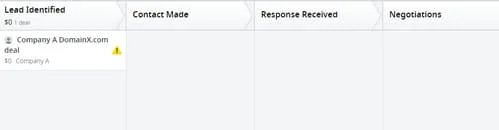
The general workflow of the system is that you move deals through a sales pipeline. You can make the steps in the pipeline whatever you’d like. So here’s a simple pipeline I set up for domain sales with four steps: Lead Identified > Contact Made > Response Received > Negotiations.
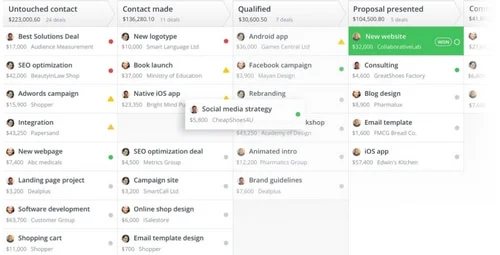
You enter each of your leads in the first column and then move them along as you progress. You can also assign deal values to each deal, add a contact, and pull in emails you send to each lead. At any time you can move the deal to “Won” or “Lost”. You can see your pipeline’s dollar size throughout the process. This sample from PipeDrive shows what it’s like with lots of deals in the pipeline:
A best practice is to create follow up tasks for each lead so you don’t let any of them rot. For example, if someone responds and states they’re interested but then doesn’t reply to your next email, you can set up an alert to remind you to reach out again in two weeks.
Some people demand the robust tools that CRMs like Salesforce offer, but I find it to be overkill for many applications. These tools can also be expensive. PipeDrive is not; following a free trial, the Silver plan (which will be good enough for most people) is $12 per month.