
I’m delighted to welcome Alvin Brown as a contributing author to DNW. Alvin, a fellow Austinite, is a seasoned domain investor and digital marketer. He shares insightful tutorials at KickstartCommerce.com and will be sharing his expertise on DNW to empower domain investors.
The world of domain investing is dynamic and competitive, with opportunities constantly emerging and fading. A significant part of my daily routine involves meticulously reviewing countless expired domain auctions, not only for my personal portfolio but also to share valuable finds with the wider community. While I explore various aftermarket platforms, one platform consistently stands out as a reliable source for high-potential domains: GoDaddy’s Aftermarket Platform.
Week after week, I successfully identify and acquire a growing number of competitively priced expired domains through GoDaddy. This platform, with its robust features and extensive listings, has proven to be an invaluable tool for strategic domain acquisition. If you’re an active participant in GoDaddy’s domain auctions, or even if you’re just starting, you’re in for a treat. This article will unveil three powerful strategies to uncover expired domains available at the standard hand-registration fee – often referred to as the “hand-reg fee.” These hidden gems can offer substantial value and profit potential, making them a cornerstone of smart domain investing.
Before we dive into these specific techniques, let’s ensure everyone is familiar with the GoDaddy Aftermarket. For those new to this ecosystem, understanding its basic functionalities is crucial for maximizing your chances of success.
Navigating the GoDaddy Aftermarket: Your Gateway to Domain Opportunities
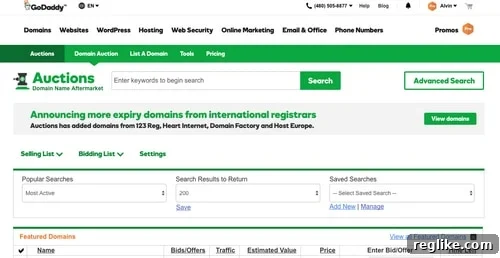
To fully leverage the GoDaddy Aftermarket, the first step is to become a GoDaddy Auctions member. This membership, currently priced at a nominal $4.99 per year, unlocks a treasure trove of domain opportunities. Once you’re a member and logged in, you’ll be greeted by the platform’s default interface, designed to provide comprehensive tools for domain discovery and management. This intuitive dashboard offers a range of capabilities essential for both novice and experienced domain investors:
- Basic or Advanced Search: This feature allows you to conduct precise searches for specific domains or keywords, filtering through millions of listings to find exactly what you’re looking for.
- Announcement Bar: Stay updated with the latest offers, platform news, and important auction announcements, ensuring you don’t miss out on crucial information.
- Secondary Auction Navigation: This crucial section includes your “Selling List,” “Bidding List,” and “Settings” options, enabling efficient management of your active participation on the platform.
- Pre-configured Search Reports: Access quick, categorized views of domains, including “Featured,” “Most Active,” “Expiring,” “Ending Soon,” “Fixed Price,” “Closeouts,” “Bargain Bin,” and “A-Z Listings.” These reports help streamline your search process.
- Custom Search Report Management: The ability to create, save, and manage your own custom search reports is a game-changer, allowing you to tailor your domain discovery process to your specific investment criteria.
- Featured and Most Active Domains: The initial page load often showcases randomly selected “Featured Domains” and “Most Active Domains,” providing a snapshot of current popular listings and potential high-value assets.
These features collectively empower you to efficiently monitor, bid on, and acquire valuable domains. For the specific strategies we’re about to explore – uncovering expired domains at hand-reg fees – our focus will heavily lean on selections within the secondary auction navigation menu, specifically your Selling List and Bidding List. These often-overlooked sections hold the key to discovering domains that once commanded higher prices but have re-entered the market at entry-level costs.
Strategy 1: Bulk Searching “Didn’t Win” Domains for Hand-Reg Opportunities
One of my most frequented hunting grounds for expired domains available at hand-registration fees is a deep dive into previous domain auctions that I “Didn’t Win.” This might seem counterintuitive at first glance – why would you look at domains you failed to acquire? The answer lies in the often unpredictable lifecycle of a domain name.
I’m consistently surprised by the number of expired domains I once bid on and lost, only to find them later available at hand-reg fees. This phenomenon occurs when the victorious bidder, for various reasons, allows the domain to expire after acquiring it at auction. Reasons for this could range from buyer’s remorse, a change in project direction, a failure to develop the domain, or simply forgetting to renew. For a savvy domain investor, these circumstances present an incredible opportunity to acquire a domain that someone else valued enough to bid on, now at a significantly reduced entry cost.
It’s important to manage expectations; not every domain from your “Didn’t Win” list will magically reappear at hand-reg prices. You might only uncover a handful, perhaps 10 or fewer, in any given bulk search. However, even a small number of successful acquisitions from this method can yield substantial returns, making the effort well worth it.
Step-by-Step Guide to Bulk Searching “Didn’t Win” Domains:
- Access Your Bidding List: From the main GoDaddy Aftermarket dashboard, navigate to the secondary auction navigation and click on the “Bidding List” menu selection.
- View “Didn’t Win” Domains: Within the “Bidding List” section, locate and click the “Didn’t Win” text. This action will display a table containing all previous expired domain auctions in which you participated but did not win.
- Download Your List: To export these domains for bulk searching, click the green download icon positioned to the right of the “Didn’t Win” text. This will initiate the export and download of ALL previous expired domain auctions you did not win.
- Prepare Your List: Once the download is complete, open the file using a spreadsheet program like Microsoft Excel (for Windows) or Apple Numbers (for Mac). Copy the entire column containing the domain names, making sure to exclude the header row, to your clipboard. Use keyboard commands like Command+C (Mac) or Ctrl+C (Windows) for efficiency.
- Initiate a Bulk Search: With your list of domains copied, you’re ready to perform a bulk search. Return to the primary menu of GoDaddy’s website, click on the “Domains” link, and then select the “Bulk Domain Search” text link, typically found under the “Find a Domain” section.
- Execute the Bulk Search: Once the bulk search page loads, paste your entire list of “Didn’t Win” domains into the designated input area. Click the “Go” button to initiate the search. Keep in mind that GoDaddy’s bulk search functionality typically has a maximum limit of 500 domains per search. If your list exceeds this number, you’ll need to divide it into smaller segments and execute multiple searches.
- Analyze Results: Upon successful execution, the platform will display the availability status for each domain. You’ll see whether domains are available for hand-registration, already registered and therefore unavailable, or registered but potentially available for premium purchase.
- Proceed to Checkout: For available domains, a “Proceed to Checkout” button will be displayed. You’ll also find options to select/unselect all domains, copy all available domains, and remove selected ones. The subsequent checkout experience is the standard GoDaddy process, making acquisition straightforward.
Strategy 2: Re-evaluating Your Portfolio with “Won” Domains
While it’s less common for me to bulk search expired domains I’ve previously won in auction – given that I typically invest and hold domains for a minimum of five years – this strategy can still yield profitable opportunities under certain circumstances. Domain portfolios evolve, and sometimes domains that were once strategic assets might no longer align with current investment goals, or they might have been inadvertently dropped.
In instances where I’ve intentionally decided to divest from certain domains or, more rarely, accidentally allowed a previously won domain to expire, re-examining this list can reveal what I call “domain diamonds in the rough.” These are domains that were once valuable enough for me to bid on and acquire, and through a twist of fate, have become available again at hand-reg fees. It offers a chance for re-investment, potentially at a much lower cost than the original auction price, or to re-acquire a domain that you know has inherent value.
Step-by-Step Guide to Bulk Searching “Won” Domains:
- Access Your Bidding List: Similar to the “Didn’t Win” method, begin by navigating to the “Bidding List” menu selection from your GoDaddy Aftermarket dashboard.
- View “Won” Domains: Locate and click on the “Won” text within the “Bidding List.” This action will display a table enumerating all expired domain auctions you have successfully won in the past.
- Download Your List: To export this list, click the green download icon adjacent to the “Won” text. This will facilitate the export and download of ALL previous expired domain auctions you have secured.
- Prepare and Search Your List: Once downloaded, open the file in Excel or Numbers. Perform the same actions as explained in the “Didn’t Win” section: copy the domain names to your clipboard, navigate to GoDaddy’s “Bulk Domain Search,” paste the list, and execute the search. Remember the 500-domain limit for bulk searches.
- Analyze and Acquire: Review the bulk search results to identify any domains that are now available at hand-registration fees. The process for proceeding to checkout and acquiring these domains remains identical to the standard GoDaddy checkout experience.
This method allows you to capitalize on domains you’ve already recognized as valuable, offering a second chance to integrate them into your current portfolio if market conditions or your strategy has shifted. It’s a testament to the adage that sometimes, the best opportunities are found by looking back at your own history.
Strategy 3: Unearthing Value from “Sold” Domains
My final strategic fishing ground for domains available at hand-registration fees is the “Sold” section, located within the “Selling List” of the secondary auction navigation. This particular method, while perhaps less intuitive than revisiting your own bids, can be remarkably effective and often overlooked by other investors.
It’s important to clarify that “Sold” domains aren’t necessarily expired domains in the traditional sense; they typically represent public domain auctions or domains you’ve listed for sale and successfully sold through GoDaddy’s platform. However, the true value of this list emerges when a buyer, for whatever reason, subsequently drops a domain they purchased from you. This scenario provides a unique opportunity to re-acquire an asset you previously owned and successfully monetized.
I’ve been genuinely astonished by the number of times I’ve checked this section and identified several domains (often 3-4 per search) that I had previously sold on GoDaddy, only to find that the new buyers allowed them to expire. The profitability potential here is significant. I’ve had success on multiple occasions re-registering such domains, relisting them for sale, and successfully selling them again within 4-6 months of the hand-registration. Imagine the satisfaction and profit of acquiring, selling, and then re-acquiring and re-selling the same valuable domain to two distinct buyers within a two to three-year timeframe – a true testament to intelligent domain management and market timing.
Step-by-Step Guide to Bulk Searching “Sold” Domains:
- Access Your Selling List: From the GoDaddy Aftermarket dashboard, navigate to the secondary auction navigation and click on the “Selling List” menu selection.
- View “Sold” Domains: Within the “Selling List” section, locate and click the “Sold” text. This action will display a table listing all previous domain auctions or sales where you were the seller.
- Download Your List: To export these domains, click the green download icon positioned to the right of the “Sold” text. This will export and download ALL previous domains you have sold through GoDaddy.
- Prepare and Search Your List: Once the download is complete, open the file in Excel or Numbers. As described in the previous sections, copy the column of domain names to your clipboard, navigate to GoDaddy’s “Bulk Domain Search,” paste your list (remembering the 500-domain limit), and execute the search.
- Analyze and Acquire: Carefully review the bulk search results for any domains that have become available at hand-registration fees. The process for selecting, adding to your cart, and purchasing these domains is consistent with the standard GoDaddy checkout procedure.
Maximizing Your Domain Investment Portfolio: Closing Thoughts
Mastering these three strategies for leveraging GoDaddy’s Aftermarket – by systematically checking your “Didn’t Win,” “Won,” and “Sold” domain listings – can significantly enhance your domain investing success. These methods offer a pathway to consistently discover profitable domain investments and secure future sales, all starting from the low cost of a hand-registration fee. The key is persistence, strategic analysis, and a keen eye for opportunities that others might miss.
As an invaluable bonus tip, I highly recommend adopting a proactive approach to tracking the lifecycle of each domain you identify through these methods, especially those from your “Didn’t Win” list. Ask yourself pertinent questions: Was the domain flipped quickly for profit, or was it leased out? If so, at what price point? Websites like NameBio.com can be an excellent resource for uncovering historical sales data and helping you gauge potential valuations. Was the domain eventually developed into a functional website, or was it simply redirected to another online asset? Understanding these outcomes provides crucial insights into market demand, buyer behavior, and potential future investment opportunities.
These reflections and analytical questions are fundamental to how I manage my GoDaddy aftermarket activity and drive the profitable growth of my domain portfolio. By integrating these strategies and continuous learning into your routine, you too can unlock hidden value and achieve significant returns in the exciting world of domain investing. Happy hunting, and may your portfolio flourish!