
Streamline Your Domain Portfolio: Automating Nameserver Setup for DropCatch Acquisitions
The exhilarating rush of successfully acquiring an expired domain name can be one of the most rewarding moments for any domain investor. Whether you’re a seasoned professional building a diverse portfolio or a newcomer just starting your journey, securing valuable digital real estate is a significant accomplishment. However, the initial victory is merely the first step in a multi-faceted process. What comes next – pointing these newly acquired assets to appropriate sales landing pages, listing them on marketplaces, and ensuring they are ready for sale – often involves a series of manual, time-consuming steps that can quickly dampen the excitement.
Many domain investors find themselves caught in a repetitive cycle: win a domain, log into their registrar, navigate to DNS settings, manually update nameservers, then proceed to the chosen parking or sales platform to add and verify the domain. For those managing a handful of domains, this might be a manageable chore. But for individuals or businesses dealing with dozens, hundreds, or even thousands of domains, these individual steps quickly accumulate into a colossal drain on time and resources. This article delves into a remarkably simple yet powerful automation strategy that can eliminate significant manual effort, allowing you to focus on what truly matters: growing your domain portfolio and maximizing your returns.
Fortunately, with a clever adjustment to a single setting within your NameBright account, you can transform this tedious post-acquisition workflow into an almost entirely hands-free operation. This guide will reveal how the seamless integration between the leading drop-catching service, DropCatch.com, and NameBright, your domain registrar, can be leveraged to automatically direct your newly won domains to your preferred parking and sales service, such as Afternic. This automation not only saves invaluable time but also reduces the potential for human error, ensuring your domains are market-ready much faster.
The Domain Investor’s Post-Acquisition Dilemma: Why Manual Steps Slow You Down
Imagine you’ve just won a highly coveted expired domain name through a drop-catching service. Congratulations! Now, what’s next? For many, the standard procedure involves:
- Logging into the registrar account (often NameBright for DropCatch acquisitions).
- Locating the newly acquired domain among potentially many others.
- Navigating to the domain’s DNS or nameserver settings.
- Manually entering the nameservers of your chosen parking or sales platform (e.g., ns1.afternic.com, ns2.afternic.com).
- Saving the changes and waiting for DNS propagation.
- Then, logging into your parking/sales platform (like Afternic, Sedo, or Efty).
- Manually adding the domain to your portfolio on that platform.
- Initiating the ownership verification process, which might involve a final nameserver check or adding a specific third nameserver provided by the platform.
Each of these steps, individually, takes only a minute or two. However, when multiplied across multiple domains acquired weekly or monthly, these minutes quickly add up to hours of repetitive administrative work. This isn’t productive domain investing; it’s operational overhead. Time spent on manual nameserver configuration is time not spent on market research, negotiating sales, or identifying new valuable acquisition targets. It’s a significant bottleneck that can hinder the scalability and profitability of your domain investment strategy.
Unlocking Efficiency: The Synergy Between DropCatch and NameBright
The foundation of this automation strategy lies in understanding the symbiotic relationship between DropCatch.com and NameBright. DropCatch.com is a premier platform designed to intercept valuable domain names the moment they expire and become available for registration. It offers domain investors a crucial edge in securing high-potential assets before anyone else. A key feature of DropCatch.com is its seamless integration with NameBright. When you successfully win a domain through DropCatch, that domain is automatically transferred and registered under your NameBright account. This integration is where the real power of automation begins.
NameBright is more than just a registrar; it’s a robust domain management platform. Beyond basic registration and renewal services, NameBright provides a suite of tools for efficiently organizing and managing your domain portfolio. Among these tools, the “Categories” feature stands out as an unsung hero for automation. While often overlooked, the ability to categorize your domains and apply specific settings to entire groups is precisely what enables us to bypass the tedious manual configuration process.
Deep Dive into NameBright Categories: Your Automation Hub
NameBright’s category system allows you to organize your domains into custom groups. For instance, you might have categories for “Premium Domains,” “Development Domains,” or “For Sale – Afternic.” Critically, when you win domains through DropCatch.com, they are typically assigned to a specific category associated with your DropCatch account within NameBright. This default categorization is the linchpin of our automation strategy.
The genius of NameBright’s categories is that you can define default settings for all domains within a particular category. This means instead of updating nameservers for individual domains one by one, you can configure the desired nameservers once at the category level. Any new domain that falls into that category will automatically inherit these settings. This is precisely what we will leverage for your DropCatch acquisitions. By adjusting the nameserver settings for your DropCatch category, every future domain you win through the service will be pointed to your chosen parking or sales platform automatically, without any further intervention from your side.
Step-by-Step Guide to Automated Nameserver Configuration
Implementing this highly efficient automation is straightforward and requires just a few minutes of your time. Follow these steps to set up your NameBright account for seamless domain management:
-
Log into Your NameBright Account
Your journey to automated domain management begins by accessing your NameBright account. Ensure you have your login credentials ready. This is the central hub where all your DropCatch-acquired domains reside and are managed.
-
Navigate to “My Account” and Click on “Categories”
Once logged in, look for the “My Account” section, typically found in the main navigation or dashboard. Within “My Account,” you will find a link or tab labeled “Categories.” This is where you manage your domain groups and their associated settings. Understanding the importance of this section is crucial, as it controls the default behavior for sets of domains, rather than individual ones.
-
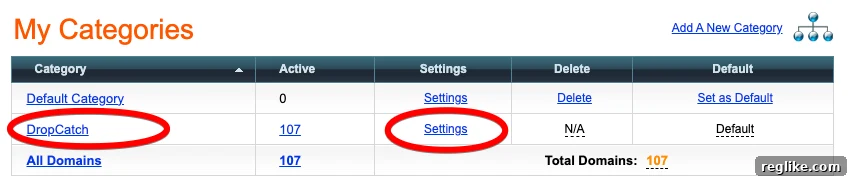
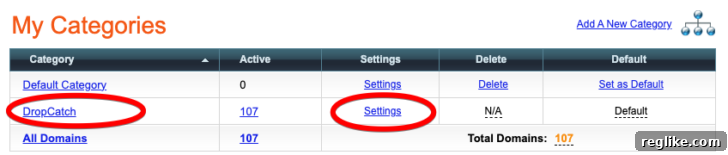
Find Your DropCatch Account Category and Click on “Settings”
In the “Categories” section, you will see a list of categories you may have created or that were automatically generated. Look for the category specifically associated with your DropCatch.com account. NameBright usually creates a default category for domains transferred from DropCatch. Once you’ve identified this category, click on the “Settings” option associated with it. This action will open a configuration panel allowing you to customize the default parameters for all domains within that specific category.
-
Edit the Nameservers to Point to Your Parking Service of Choice
This is the most critical step. Within the category settings, locate the section pertaining to nameservers. Here, you will input the nameserver addresses provided by your preferred domain parking and sales platform. For example, if you are using Afternic, you would typically enter:
ns1.afternic.comns2.afternic.com
Many platforms, including Afternic, now often require a third nameserver for ownership verification purposes. This is an excellent addition to include in your default settings. For Afternic, this might be something like
ns3.afternic.comor a specific verification nameserver they provide. By pre-setting this, you eliminate yet another manual step during the verification process, significantly accelerating your domains’ time to market.Make sure to save your changes after entering the nameservers. This action applies the new default settings to the DropCatch category.
This image illustrates where you would find and adjust these critical settings:
In my personal setup, I have configured my default nameservers to ns1.afternic.com and ns2.afternic.com. Additionally, I’ve included a third nameserver specifically for Afternic’s ownership verification process. This ensures that every domain I successfully acquire through DropCatch.com is not only pointed correctly but also pre-verified for listing on the Afternic marketplace.
The Aftermath: Seamless Integration with Afternic (or Your Chosen Platform)
With these settings in place, the post-acquisition workflow for your DropCatch domains undergoes a dramatic transformation. When you next win a domain through DropCatch.com, you no longer need to perform any manual adjustments within NameBright. The domain will automatically be assigned to its DropCatch category, and crucially, it will automatically inherit the nameservers you configured. This means the domain will begin propagating to Afternic (or your chosen parking service) immediately after acquisition.
The benefits of this seamless integration are profound. Your domains become market-ready much faster, reducing the idle time between acquisition and listing. For platforms like Afternic, which boasts an extensive network of resellers and registrars, faster listing means a quicker path to potential sales. The automated nameserver setup also significantly simplifies Afternic’s ownership verification process. Since the required nameservers are already in place, the verification is often instantaneous, removing yet another hurdle that can delay your sales efforts.
Beyond Afternic: Versatility and Scalability of This Strategy
While Afternic is an excellent choice for many domain investors due to its broad reach and effective sales network, this automation strategy is not limited to a single platform. The core principle remains the same: if your preferred domain parking, selling, or development service provides specific nameservers, you can configure them as the default for your DropCatch category in NameBright. Whether you prefer Sedo, Efty, SquadHelp, or even your own custom development server, the NameBright category settings provide the flexibility to point your domains exactly where you need them, automatically.
This strategy also dramatically enhances the scalability of your domain investing operations. Whether you acquire one domain a week or twenty, the administrative overhead for nameserver management remains virtually zero. This frees up precious time and mental energy, allowing you to scale your acquisition efforts without being bogged down by repetitive manual tasks. Professional domain investors understand that efficiency is key to profitability, and this automation tip is a cornerstone of an efficient operation.
Tangible Benefits of This Automation Strategy
Implementing this simple change yields a multitude of tangible benefits for any domain investor:
- Significant Time Savings: Eliminate minutes per domain spent on manual nameserver updates. Over weeks and months, this translates into hours saved, allowing you to reallocate your efforts to higher-value activities like market research, strategic acquisitions, or direct outreach to potential buyers.
- Reduced Errors: Manual data entry is inherently prone to human error. A misplaced digit in a nameserver entry can lead to incorrect pointing, delays in propagation, and frustration. Automation eliminates these common mistakes, ensuring accuracy every time.
- Faster Time to Market: Domains are pointed to your sales platform immediately upon acquisition. This means they are listed and available for sale much quicker, reducing idle time and accelerating the sales cycle, ultimately leading to faster cash flow.
- Improved Focus and Productivity: By automating mundane administrative tasks, you can concentrate your energy and expertise on strategic decision-making, portfolio growth, and sales generation. This enhances overall productivity and reduces mental fatigue.
- Enhanced Scalability: This automation empowers you to manage a larger volume of domain acquisitions without a proportionate increase in manual workload. It’s a critical enabler for expanding your domain investment business.
- Seamless Ownership Verification: For platforms like Afternic that require ownership verification via nameservers, pre-setting the necessary nameservers in NameBright streamlines this process, making it almost instantaneous.
Conclusion: Optimize Your Domain Investment Workflow
In the competitive world of domain investing, efficiency and automation are not luxuries; they are necessities for sustained success. While winning expired domains is a thrilling achievement, the subsequent manual steps can quickly become a significant drag on your time and resources. By making a single, intelligent adjustment within your NameBright account – leveraging the power of its category settings to automate nameserver configuration for your DropCatch acquisitions – you can dramatically streamline your post-acquisition workflow.
This simple tip transforms a tedious, repetitive process into a hands-free operation, allowing your newly acquired domains to be automatically pointed to your preferred parking and sales platforms. This not only saves you invaluable time and reduces the potential for errors but also ensures your domains are market-ready faster, accelerating your path to profitability. If you’re using DropCatch.com and NameBright, taking a few moments to implement this strategy will undoubtedly become one of the most impactful optimizations you make to your domain investment workflow. Embrace automation, reclaim your time, and elevate your domain portfolio management to new heights.