
Unlock the Full Potential of NamesCon: Seamlessly Navigate Keynotes and Panel Discussions with Sched.org
The highly anticipated NamesCon conference is about to kick off in the vibrant city of Las Vegas, promising an unparalleled experience for professionals across the domain industry. With over 800 expected attendees and a staggering lineup of more than 125 expert speakers and panelists, NamesCon stands as a premier event for networking, learning, and discovering the future trends of the domain world. The sheer volume of concurrent sessions means that meticulous planning is not just recommended, but essential, to ensure you don’t miss out on the most impactful and relevant sessions that align with your interests and professional goals.
This year, NamesCon has partnered with Sched.org, an intuitive and powerful event scheduling platform, to streamline the conference experience for every participant. Attendees have already received a personalized email invitation, guiding them to leverage Sched.org not only to view the comprehensive conference agenda but also to craft and manage their own bespoke schedules. This innovative integration aims to eliminate the stress of juggling multiple sessions and empower attendees to make the most of every minute at NamesCon.
Initially, one might approach a new system like Sched.org with a touch of skepticism, perhaps thinking it’s just another platform requiring an additional login and learning curve. However, this skepticism quickly dissipates upon experiencing its remarkable simplicity and efficiency. The process of building a personalized schedule and seamlessly exporting it to a preferred calendar service, such as Google Calendar, is surprisingly straightforward. This guide will walk you through the simple yet powerful steps to effectively use Sched.org, ensuring you pinpoint every desired session and integrate them directly into your personal digital organizer.
Navigating a large-scale conference like NamesCon can often feel overwhelming. With multiple tracks running simultaneously, it’s easy to feel torn between fascinating keynotes, in-depth panel discussions, and crucial networking opportunities. The strategic use of Sched.org transforms this potential challenge into a distinct advantage, providing a clear roadmap through the conference’s rich content. By planning ahead, you optimize your time, allowing you to absorb critical insights, engage with industry leaders, and connect with peers without the constant worry of missing out. Sched.org acts as your personal conference assistant, ensuring that every curated choice is easily accessible and integrated into your daily flow.
Beyond merely listing sessions, Sched.org provides a dynamic interface that allows for deep engagement with the NamesCon agenda. You can explore speaker profiles, read session descriptions, and even mark sessions as favorites long before the event begins. This pre-conference exploration is invaluable for setting priorities and identifying must-attend events. The platform is designed to be user-friendly, catering to both tech-savvy individuals and those who prefer a more streamlined digital experience. Its mobile-friendly design means your personalized schedule is always at your fingertips, whether you’re navigating the convention center floor or planning your next move during a coffee break. Let’s dive into the practical steps to harness this invaluable tool.
Mastering Your NamesCon Experience: A Step-by-Step Guide to Sched.org
Following these clear instructions will help you effortlessly set up your personalized NamesCon schedule and sync it with your digital calendar, ensuring a smooth and productive conference experience.
1. Accessing Your Sched.org Account and Setting Up Your Profile:
Your journey with Sched.org begins with the personalized invitation email you received from NamesCon. Locate this email in your inbox and click on the embedded link. This action will direct you to the Sched.org platform, where you’ll be prompted to set up a secure password for your account. This initial step is crucial for gaining full access to all the scheduling features and for personalizing your conference journey. Take a moment to ensure your password is robust and memorable.
2. Selecting Your Preferred Schedule View for Optimal Planning:
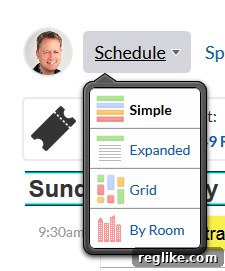
Once logged in, navigate to the “Schedule” dropdown menu. Sched.org offers various viewing options to suit different preferences. For most attendees, the “simple” view proves to be the most efficient for a quick overview. This layout allows you to rapidly scan available sessions for each time slot, making it easy to identify conflicts or pinpoint specific topics of interest without unnecessary visual clutter. Experiment with other views if you wish, but for sheer speed and clarity, “simple” is often the go-to choice for immediate planning.
3. Curating Your Personalized Schedule: Selecting Sessions of Interest:
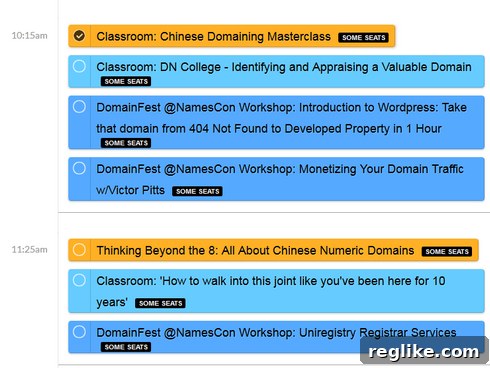
With your preferred view active, scroll down through the day-by-day agenda. As you browse the diverse array of keynotes, panels, and workshops, identify the sessions that resonate most with your professional interests and learning objectives. To add a session to your personal schedule, simply click the radio button located next to its entry. As you select sessions, Sched.org dynamically updates your personalized agenda, helping you visualize your conference path. Don’t worry if you change your mind; you can always deselect sessions if your priorities shift.
4. Initiating the Calendar Integration Process:
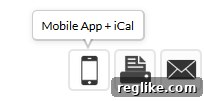
Once you’ve meticulously selected all the sessions you wish to attend, it’s time to integrate your custom schedule with your personal calendar. Look for the distinctive mobile phone icon on the Sched.org interface. This icon serves as your gateway to the export and synchronization options. Clicking this icon will open a new window or section, presenting you with various ways to connect your newly built NamesCon schedule to your preferred digital calendar application.
5. Choosing Your Calendar Synchronization Method: Subscribe vs. Export:
Upon clicking the mobile phone icon, you’ll be presented with a comprehensive list of options for connecting Sched.org to various calendar services. It is crucial at this stage to select the options specifically labeled “your schedule,” rather than “all,” to ensure only your chosen sessions are transferred. You will generally have two primary methods: “Subscribe” or “Export.”
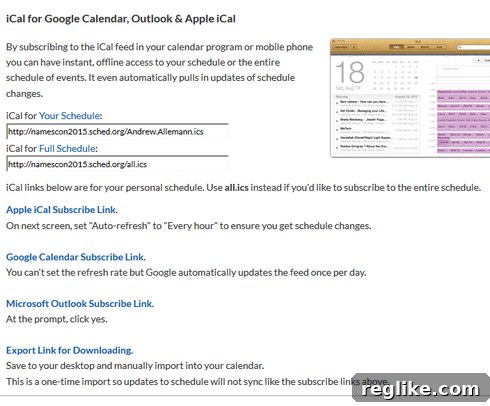
The simplest and most recommended way to keep your calendar updated is to click the appropriate “Subscribe” link. This creates a live connection, meaning any last-minute changes to your selected sessions on Sched.org (e.g., room changes, time adjustments) will automatically reflect in your connected calendar. This ensures you always have the most current information. If, however, you prefer your calendar not to maintain a direct, live connection to Sched.org, or if your calendar service doesn’t fully support live subscriptions, you can opt to “Export” your schedule. This will typically generate an .ics file, a universal calendar format, which you can then manually import into your chosen calendar application.
For those opting to export an .ics file, here are detailed instructions specifically for importing an .ics file into Google Calendar. Most other calendar applications offer a similar import function, usually found within their settings or import/export menus.
Maximizing Your NamesCon Experience Beyond Scheduling
Having your personalized NamesCon schedule seamlessly integrated into your daily calendar offers more than just convenience; it’s a strategic advantage. With your agenda readily accessible on your smartphone or preferred device, you free up valuable mental bandwidth that would otherwise be spent worrying about what’s next or searching for session times. This allows you to fully immerse yourself in the present moment, whether you’re actively participating in a panel discussion, networking with fellow attendees, or simply absorbing the vibrant atmosphere of the conference. You can set reminders, check locations, and even glance at speaker bios right from your familiar calendar interface.
Furthermore, a well-planned schedule facilitates more effective networking. Knowing where you need to be and when, you can confidently engage in conversations, knowing you won’t accidentally miss a crucial keynote. It empowers you to approach the conference with purpose, ensuring you hit all your learning objectives and make meaningful connections. NamesCon is renowned for its unparalleled opportunities to connect with industry leaders, potential partners, and innovators. By having your schedule sorted with Sched.org, you create the space to fully capitalize on these interactions.
In conclusion, NamesCon is an indispensable event for anyone serious about the domain industry, offering a wealth of knowledge, insights, and networking prospects. Sched.org serves as the perfect companion, transforming what could be a complex logistical challenge into a smooth, enjoyable, and highly productive experience. By taking a few moments to set up your personalized schedule, you’re not just organizing your time; you’re investing in a more focused, efficient, and ultimately more rewarding conference journey.
Don’t let the abundance of content at NamesCon overwhelm you. Embrace the power of Sched.org, craft your ideal itinerary, and prepare to make the most of every groundbreaking keynote, insightful panel, and invaluable connection. We look forward to seeing you at NamesCon, equipped and ready to conquer the domain world!