Send your domains to “for sale only” landers at DNS — How to
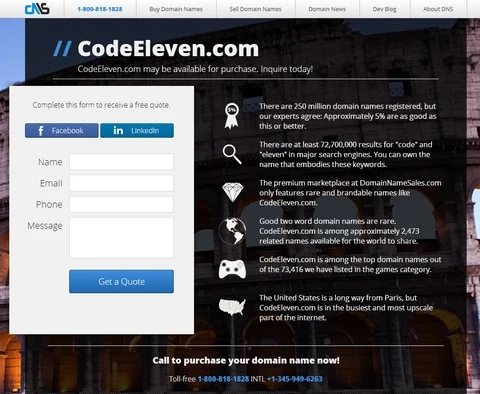
More interested in selling your domains than earning PPC income? Here’s how to send domain names to sales only landers at DNS.
A lot of domainers have asked domain parking firms and marketplaces to offer landing pages dedicated solely to selling domain names — not generating revenue from PPC.
There are a number of reasons you might want to do this for a domain name.
An obvious one is that you think a sales-focused lander will generate more leads for the domain than one that also includes pay-per-click links. Another reason is you may be concerned that the PPC ads will suggest association with a trademark that might land you in hot water. For example, a three or four letter domain might show ads related to a firm who’s acronym matches the domain.
DomainNameSales.com (DNS) offers an option to point your domain names to “for sale only” landers. Here’s how to do it.
Step 1: Set up a portfolio for the domains you want to point to sales landers instead of parked pages.
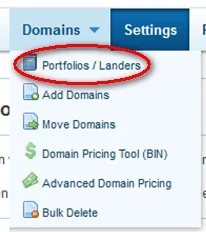
From the “Domains” drop down, select “Portfolios/Landers”:
You’ll now see any of the portfolios you’ve created. Click on the link to “Add Fresh Portfolio” and name it something you’ll remember. In my case, I called it “SalesOnly”.
2. Change the settings on the fresh portfolio.
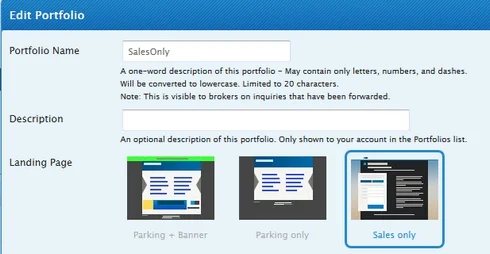
Now you need to change the settings on the fresh portfolio to tell DNS you want the domains to only point to sales landers.
In the portfolio box, select the right most option “Sales only” and click OK. (If you by now closed the dialog box, just click “Edit” next to the portfolio you just created.)
3. Transfer or add domains to the portfolio.
If the domains you want to send to sales landers are not yet at DNS, just click the “Add” button next to the portfolio.
If they are by now at DNS but in a different portfolio, go back to the “Domains” drop down menu at the top of the page and select the third option, “Move Domains”.
From the drop down menu, select the portfolio you just set up to which you need to move the domains.
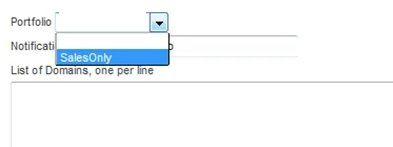
Enter the domain names you want to add to this portfolio and click upload.
That’s it. Now your domains in this portfolio will point to For Sale landers with now PPC ads.
DNS has some pretty slick looking sales landers, but there’s something you ought to be aware of. The landing page includes some data regarding your domain, counting its category and the search results for the domain’s terms. While this is fairly innocuous information, it’s possible that the way your domain is categorized or DNS splits it to show the search results could be used by a trademark owner to suggest the domain was registered to target the trademark. As an example, if you had a sales only lander for IBM.tld and it was categorized in “Technology”, someone might argue that it was registered in bad faith. (Winning that argument is a different matter.)